Geekzone: technology news, blogs, forums
Guest
Welcome Guest.
You haven't logged in yet. If you don't have an account you can register now.


View this topic in a long page with up to 500 replies per page Create new topic
1 | 2 | 3 | 4
DonGould

3892 posts

Uber Geek
+1 received by user: 164


  #1217082 18-Jan-2015 19:51
Send private message

Andib thanks for all the feed back.

Andib: I was using SP3 in my University lectures with 250-300 Students in a room all with smart phones / laptops running causing noise and I've never had any issues with my pen not being responsive. Maybe someone has damaged the pen in store?.
I've never had to re-pair my pen in the life of owning the surface (6 months) with the exception when I clean installed my surface with Windows 10


I suspect that the BT issue I was seeing was that the area had so many wifi APs broadcasting.  You wouldn't typically have 300 devices in a lecture theater set up as APs and all broadcasting their existence.

Folk would typically set the BT on their phone not to announce it self.  I know that's how I run my phone anyway.

The problem in the department store is that they just seem to have truck loads of stuff that's all broadcasting it's existence.  When we attempted to pair, the SP3 found at least 20 devices, this for a technology that's only meant to have a 10m range.

I have to point out, that once we got the pen paired it was faultless and extremely impressive.

Now I'm wondering about Windows 10.  How far way is it?  What will the upgrade be like?  Should I just wait until the Windows 10 SP version hits the shelves?

I confess I'm now thinking about my urgency.

D


Promote New Zealand - Get yourself a .kiwi.nz domain name!!!

Check out mine - i.am.a.can.do.kiwi.nz - don@i.am.a.can.do.kiwi.nz


nathan
5695 posts

Uber Geek
+1 received by user: 1630
Inactive user


  #1217100 18-Jan-2015 20:10
Send private message

DonGould: Andib thanks for all the feed back.

Andib: I was using SP3 in my University lectures with 250-300 Students in a room all with smart phones / laptops running causing noise and I've never had any issues with my pen not being responsive. Maybe someone has damaged the pen in store?.
I've never had to re-pair my pen in the life of owning the surface (6 months) with the exception when I clean installed my surface with Windows 10


I suspect that the BT issue I was seeing was that the area had so many wifi APs broadcasting.  You wouldn't typically have 300 devices in a lecture theater set up as APs and all broadcasting their existence.

Folk would typically set the BT on their phone not to announce it self.  I know that's how I run my phone anyway.

The problem in the department store is that they just seem to have truck loads of stuff that's all broadcasting it's existence.  When we attempted to pair, the SP3 found at least 20 devices, this for a technology that's only meant to have a 10m range.

I have to point out, that once we got the pen paired it was faultless and extremely impressive.

Now I'm wondering about Windows 10.  How far way is it?  What will the upgrade be like?  Should I just wait until the Windows 10 SP version hits the shelves?

I confess I'm now thinking about my urgency.

D


honestly it sounds like the retail person didn't know what was going on, that pen should be configured as part of the Windows OOBE (out of box experience setup)

the pairing of the pen is seamless, we have tested this in all sort of scenarios including lots of radio traffic.  Also BT is only used for the clicknote OneNote feaure, nothing else.

SP3 will run Win10 fine.

You need to think about your need, do you need one now or not.  In tech there is always something new just around the corner. 

We will be making some announcements about Windows 10 on Thursday morning NZ time, but we are talking about mid year for us to RTM the product.   Upgrade from 8.1 -> 10 is seamless, in place, no data loss etc

Next Surface Pro release is not "just around the corner"

SP3 is still a good device, and it will still be a good device in 6 months time I can tell you that.  Nothing else comes close, nothing else is as thin, nothing else has the 2160x1440 screen, 3:2 aspect ratio, Pen / inking quality blah blah.  This is one of, if not, the best laptop/tablet/hybrid product on the market.  Typical MSFT v3 we hit it out of the park.

As someone else pointed out, even the lower cost Intel i3 option is still a great choice.

DonGould

3892 posts

Uber Geek
+1 received by user: 164


  #1217113 18-Jan-2015 20:31
Send private message

DISCLOSURE....

nathan: honestly it sounds like the retail person didn't know what was going on, that pen should be configured as part of the Windows OOBE (out of box experience setup)


the pairing of the pen is seamless, we have tested this in all sort of scenarios including lots of radio traffic.  Also BT is only used for the clicknote OneNote feaure, nothing else.


Yes.  She couldn't find the one that came with the unit I was looking at so had pulled one out of another box.

Having said that, let's not forget that it only to about 5 minutes for us to get it to work just fine.  Let's not get my comments out of perspective here.

As for Windows 10.  My concern is around what it's going to take to do the upgrade.  I have to confess, I just hate upgrades.  No mater how seemless people always say they are, they always seem to bite me.

That's not a reflection of anyone's product quality, it's a reflection of my personal experience with technology.

As for i3 v's i?  I don't doubt you for a second.  I think it's important for other readers (because other people do read comments on forums like this) to remember that I'm a power user.  At the time of writing, I have 25 open applications running on my desktop, that's not counting the 20 tabs I have open in my web browser or the dozen back ground apps such as my back up software, teamviewer, network monitoring client, the list goes on and on and on.

It's also not counting what I have open in the RDP instance I also have running.

I have to confess that I can see this thing being filled up with all those apps to because it's cool and could be.  The person who pointed out that an android tablet won't run half my crap was right....  not being able to run crap means I won't.

The risk to me is this unit being able to run my world, and my wanting it to!

Again Nathan, thanks for some fantastic engagement on this question!

D


Promote New Zealand - Get yourself a .kiwi.nz domain name!!!

Check out mine - i.am.a.can.do.kiwi.nz - don@i.am.a.can.do.kiwi.nz


nathan
5695 posts

Uber Geek
+1 received by user: 1630
Inactive user


  #1217181 18-Jan-2015 22:17
Send private message

the upgrade from Windows 8.1 to Windows 10 is in-place, reliable, and seamless compared to any other Windows upgrade you've seen ever before.

RDP obviously don't use any local resources.

If you're a techo and want to run loads of programs but still save some money and not buy the high-end version, the best bang for buck is the i5/8GB/256GB version :)

Surface also has a mSD slot, so you could put a 128GB chip in there easily.

DonGould

3892 posts

Uber Geek
+1 received by user: 164


  #1217333 19-Jan-2015 09:40
Send private message

nathan: the upgrade from Windows 8.1 to Windows 10 is in-place, reliable, and seamless compared to any other Windows upgrade you've seen ever before.


I look forward to seeing that.  I hate upgrades, and I'm not even really talking about Windows these days.  Don't even get me started on my phone, who's experience seems to keep changing monthly.

nathan: RDP obviously don't use any local resources.


Tell that to the 105Mb of RAM the current open session is using.  I often have two going at once.  I've seen it run to 200Mb per session iirc.


nathan: If you're a techo and want to run loads of programs but still save some money and not buy the high-end version, the best bang for buck is the i5/8GB/256GB version :)


Yip, I think you're right on the mark there.  That defiantly seemed like the best value option.

nathan: Surface also has a mSD slot, so you could put a 128GB chip in there easily.


How long before mSD is bigger than 256GB?!  I'd like to know how they pack all the 1's in to that space?

I remember when we got a 200Mb disk upgrade for the IBM36 at work.  It took the two warehouse guys and the pallet jack to get it inside.  9" disks. 

That seems a life time ago.

D


Promote New Zealand - Get yourself a .kiwi.nz domain name!!!

Check out mine - i.am.a.can.do.kiwi.nz - don@i.am.a.can.do.kiwi.nz


Batman
Mad Scientist
30014 posts

Uber Geek
+1 received by user: 6217

Trusted
Lifetime subscriber

  #1217342 19-Jan-2015 09:53
Send private message

1 TB ssd for me. Minimum 512GB. But that's my workhorse laptop and I don't have a desktop coz I can't sit in one place


Shop on-line at New World now for your groceries (affiliate link).
DonGould

3892 posts

Uber Geek
+1 received by user: 164


  #1221484 24-Jan-2015 17:27
Send private message

Well I just tried to paste a cool pic but fail


Now for driving lessons


Promote New Zealand - Get yourself a .kiwi.nz domain name!!!

Check out mine - i.am.a.can.do.kiwi.nz - don@i.am.a.can.do.kiwi.nz


blackjack17
1713 posts

Uber Geek
+1 received by user: 865


  #1221492 24-Jan-2015 17:52
Send private message

DonGould: DISCLOSURE....

nathan: honestly it sounds like the retail person didn't know what was going on, that pen should be configured as part of the Windows OOBE (out of box experience setup)


the pairing of the pen is seamless, we have tested this in all sort of scenarios including lots of radio traffic.  Also BT is only used for the clicknote OneNote feaure, nothing else.


Yes.  She couldn't find the one that came with the unit I was looking at so had pulled one out of another box.

Having said that, let's not forget that it only to about 5 minutes for us to get it to work just fine.  Let's not get my comments out of perspective here.

As for Windows 10.  My concern is around what it's going to take to do the upgrade.  I have to confess, I just hate upgrades.  No mater how seemless people always say they are, they always seem to bite me.

That's not a reflection of anyone's product quality, it's a reflection of my personal experience with technology.

As for i3 v's i?  I don't doubt you for a second.  I think it's important for other readers (because other people do read comments on forums like this) to remember that I'm a power user.  At the time of writing, I have 25 open applications running on my desktop, that's not counting the 20 tabs I have open in my web browser or the dozen back ground apps such as my back up software, teamviewer, network monitoring client, the list goes on and on and on.

It's also not counting what I have open in the RDP instance I also have running.

I have to confess that I can see this thing being filled up with all those apps to because it's cool and could be.  The person who pointed out that an android tablet won't run half my crap was right....  not being able to run crap means I won't.

The risk to me is this unit being able to run my world, and my wanting it to!

Again Nathan, thanks for some fantastic engagement on this question!

D


I have the i5 version of sp3

In normal usage I have
up to 40 tabs open in chrome(I really should close tabs more often)
up to half a dozen word documents open
up to half a dozen powerpoints open
onenote
outlook 
one remote desktop open
all the normal back ground stuff open

I don't notice any slow downs, I do notice the fan kicking in and the device getting hot when videos are playing.


Off topic
Two things I would like to know is in word is firstly how to get my fingers recognized as a pointer while at the same time as using the pen as a pen.  i.e. writing comments with the pen and scrolling with fingers and secondly how to write comments "off the page" in word, the current ink comments are terrible.  I kind of imagine it as having a larger sheet below the a4 displayed.


DonGould

3892 posts

Uber Geek
+1 received by user: 164


  #1221538 24-Jan-2015 19:34
Send private message

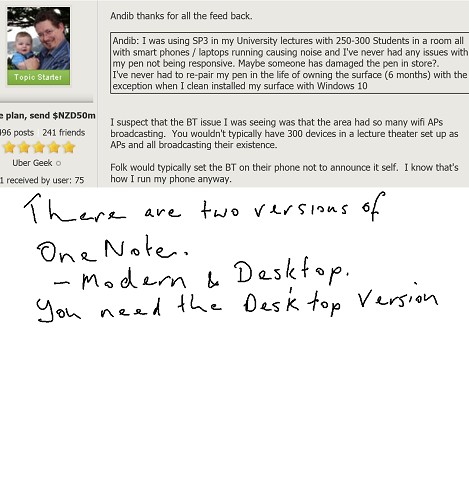
I can't figure out how to get an image out of onenote into something I can do something with, like a jpg


Promote New Zealand - Get yourself a .kiwi.nz domain name!!!

Check out mine - i.am.a.can.do.kiwi.nz - don@i.am.a.can.do.kiwi.nz


Andib
1396 posts

Uber Geek
+1 received by user: 974

ID Verified
Trusted

  #1221545 24-Jan-2015 19:36
Send private message

DonGould: I can't figure out how to get an image out of onenote into something I can do something with, like a jpg


Are you using the Metro App or OneNote as part of office?


<# 
       .DISCLAIMER
       Anything I post is my own and not the views of my past/present/future employer.
#>


Batman
Mad Scientist
30014 posts

Uber Geek
+1 received by user: 6217

Trusted
Lifetime subscriber

  #1221548 24-Jan-2015 19:39
Send private message

He must have an iPhone 5S


Move to New Zealand's best fibre broadband service (affiliate link). Free setup code: R587125ERQ6VE. Note that to use Quic Broadband you must be comfortable with configuring your own router.
DonGould

3892 posts

Uber Geek
+1 received by user: 164


  #1221549 24-Jan-2015 19:41
Send private message


Promote New Zealand - Get yourself a .kiwi.nz domain name!!!

Check out mine - i.am.a.can.do.kiwi.nz - don@i.am.a.can.do.kiwi.nz


DonGould

3892 posts

Uber Geek
+1 received by user: 164


  #1221550 24-Jan-2015 19:43
Send private message

Andib:
DonGould: I can't figure out how to get an image out of onenote into something I can do something with, like a jpg


Are you using the Metro App or OneNote as part of office?


I don't know.

I'm just using what came with the SP3

Per Nathan's comments earlier in this thread, I can double click to screen print, I can write on the image.  I just can't figure out where this export icon is or how to get to the menu.


Promote New Zealand - Get yourself a .kiwi.nz domain name!!!

Check out mine - i.am.a.can.do.kiwi.nz - don@i.am.a.can.do.kiwi.nz


mattwnz
20515 posts

Uber Geek
+1 received by user: 4795


  #1221551 24-Jan-2015 19:43
Send private message

DonGould: 
Looking at the MS product I'm up for twice or 3 times the cost of most of those tablets, but I don't currently understand the benefits.


You are comparing a productivity device (surface tablet) vs consumption device (most android tabs and ipads).

DonGould

3892 posts

Uber Geek
+1 received by user: 164


  #1221588 24-Jan-2015 22:00
Send private message


This time


Promote New Zealand - Get yourself a .kiwi.nz domain name!!!

Check out mine - i.am.a.can.do.kiwi.nz - don@i.am.a.can.do.kiwi.nz


1 | 2 | 3 | 4
View this topic in a long page with up to 500 replies per page Create new topic


Geekzone Live »

Try automatic live updates from Geekzone directly in your browser, without refreshing the page, with Geekzone Live now.


Are you subscribed to our RSS feed? You can download the latest headlines and summaries from our stories directly to your computer or smartphone by using a feed reader.