Geekzone: technology news, blogs, forums
Guest
Welcome Guest.
You haven't logged in yet. If you don't have an account you can register now.


View this topic in a long page with up to 500 replies per page Create new topic
1 | 2 | 3 | 4 
mahdibassam
365 posts

Ultimate Geek
+1 received by user: 70


  #2460205 13-Apr-2020 10:09
Send private message

NikT:

mahdibassam:


Soooooo is there any way to install play store or still nogo?


Yep, still works with the LZplay restore method.


I have set up Google and etc and all working fine with lzplay method thankfully. Loving it so far.

Only issue is that notifications for alot of apps don't come through, e.g news apps like herald or others like trademe and etc. I have disabled battery optimisations for them and manual launch as well. But still the same. Are u experiencing this too?


NikT
1710 posts

Uber Geek
+1 received by user: 730

Trusted

  #2460373 13-Apr-2020 11:15
Send private message

mahdibassam: I have set up Google and etc and all working fine with lzplay method thankfully. Loving it so far.

Only issue is that notifications for alot of apps don't come through, e.g news apps like herald or others like trademe and etc. I have disabled battery optimisations for them and manual launch as well. But still the same. Are u experiencing this too?


I have not had this problem, however I have seen some discussion to this effect and am currently researching it.

Huawei phones have had the occasional hiccup with push notifications (as Mauricio can attest) due to the aggressive battery management. I'm generally fine with this and it fits my workflow, but can understand why others are not.

My suspicion is that Google is not registering the device IDs of handsets with sideloaded GMS against their push servers. This clearly did work before and may be a new development. Many/most Android apps use Google's Firebase Cloud Messaging (FCM) to centralise push notifications through Google Play Services, this is among the reasons some apps may work when sideloaded without GMS but will be missing some functionality.

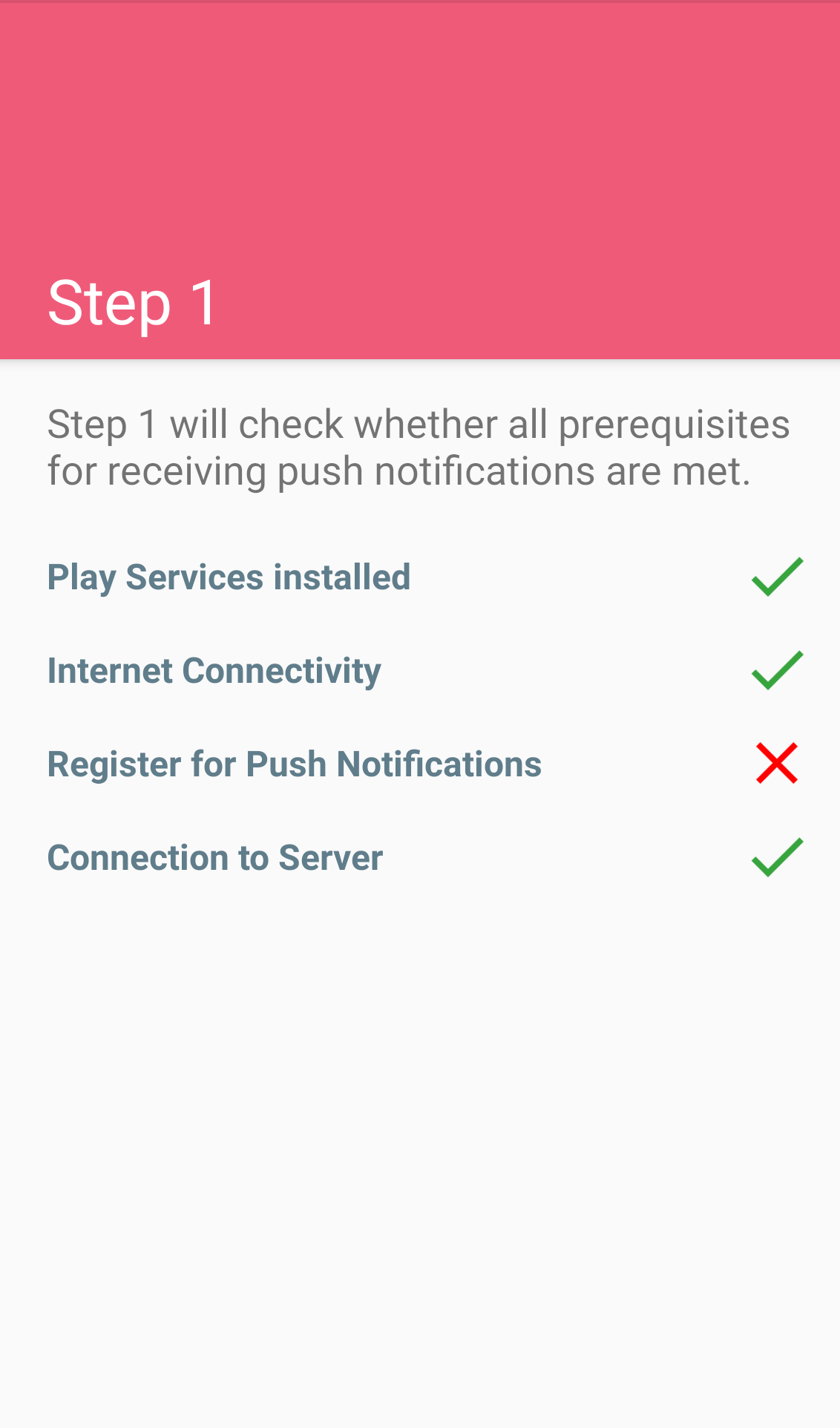
My Mate 30 Pro (4G) is correctly registered for FCM and receives push notifications in line with my P30 Pro (representative of the baseline in Huawei-land). Due to lockdown, I do not currently have another HMS device at hand to freshly load and test GMS and FCM on. You can install one of the numerous apps on the Play Store to check if yours is registered for FCM, Push Notification Tester by Bernd Bindreiter is a good place to start.

Some of the reported issues may be caused by Play Services not getting all the correct permissions or being excluded from battery savings, and I have seen discussions concluding that this was the fix, although you have noted this has been done - hence more research needed.

It may be worth registering your Google Services Framework ID using Google's tool here: https://www.google.com/android/uncertified/

This is a backup option that worked to bypass the endless popups that arose a few weeks back when testing GMS on the Mate Xs. You will need to get the GSF ID from another app,. Device ID by Evozi, from the Play Store to register your device and save taking a crash course in ADB. Note that the GSF ID is reset if you uninstall GMS or factory reset the handset.

Keen to hear how you get on with the above.


Product Manager @ PB Tech

Smartphones @ PB Tech | Headphones @ PB Tech


mahdibassam
365 posts

Ultimate Geek
+1 received by user: 70


  #2460381 13-Apr-2020 11:24
Send private message

NikT:
mahdibassam: I have set up Google and etc and all working fine with lzplay method thankfully. Loving it so far.

Only issue is that notifications for alot of apps don't come through, e.g news apps like herald or others like trademe and etc. I have disabled battery optimisations for them and manual launch as well. But still the same. Are u experiencing this too?


I have not had this problem, however I have seen some discussion to this effect and am currently researching it.

Huawei phones have had the occasional hiccup with push notifications (as Mauricio can attest) due to the aggressive battery management. I'm generally fine with this and it fits my workflow, but can understand why others are not.

My suspicion is that Google is not registering the device IDs of handsets with sideloaded GMS against their push servers. This clearly did work before and may be a new development. Many/most Android apps use Google's Firebase Cloud Messaging (FCM) to centralise push notifications through Google Play Services, this is among the reasons some apps may work when sideloaded without GMS but will be missing some functionality.

My Mate 30 Pro (4G) is correctly registered for FCM and receives push notifications in line with my P30 Pro (representative of the baseline in Huawei-land). Due to lockdown, I do not currently have another HMS device at hand to freshly load and test GMS and FCM on. You can install one of the numerous apps on the Play Store to check if yours is registered for FCM, Push Notification Tester by Bernd Bindreiter is a good place to start.

Some of the reported issues may be caused by Play Services not getting all the correct permissions or being excluded from battery savings, and I have seen discussions concluding that this was the fix, although you have noted this has been done - hence more research needed.

It may be worth registering your Google Services Framework ID using Google's tool here: https://www.google.com/android/uncertified/

This is a backup option that worked to bypass the endless popups that arose a few weeks back when testing GMS on the Mate Xs. You will need to get the GSF ID from another app,. Device ID by Evozi, from the Play Store to register your device and save taking a crash course in ADB. Note that the GSF ID is reset if you uninstall GMS or factory reset the handset.

Keen to hear how you get on with the above.


Thanks for the response my friend!

As you said, I'm not registered for fcm. See photo.


I registered my gsf as well. I'm lost at this stage at how to fix this.


mahdibassam
365 posts

Ultimate Geek
+1 received by user: 70


  #2460389 13-Apr-2020 11:32
Send private message

How do you think i can troubleshoot this? it really makes things difficult as most notifications arent coming through :(  would re-doing the google services setup with LZ Play help?


mahdibassam
365 posts

Ultimate Geek
+1 received by user: 70


  #2460487 13-Apr-2020 12:56
Send private message

I wonder, if you dont set uo GMS at all and use HMS, and install apps from other sources than Play store, would those apps still rely on FCM for notifications? 


mahdibassam
365 posts

Ultimate Geek
+1 received by user: 70


  #2460876 14-Apr-2020 08:45
Send private message

NikT:
mahdibassam: I have set up Google and etc and all working fine with lzplay method thankfully. Loving it so far.

Only issue is that notifications for alot of apps don't come through, e.g news apps like herald or others like trademe and etc. I have disabled battery optimisations for them and manual launch as well. But still the same. Are u experiencing this too?


I have not had this problem, however I have seen some discussion to this effect and am currently researching it.

Huawei phones have had the occasional hiccup with push notifications (as Mauricio can attest) due to the aggressive battery management. I'm generally fine with this and it fits my workflow, but can understand why others are not.

My suspicion is that Google is not registering the device IDs of handsets with sideloaded GMS against their push servers. This clearly did work before and may be a new development. Many/most Android apps use Google's Firebase Cloud Messaging (FCM) to centralise push notifications through Google Play Services, this is among the reasons some apps may work when sideloaded without GMS but will be missing some functionality.

My Mate 30 Pro (4G) is correctly registered for FCM and receives push notifications in line with my P30 Pro (representative of the baseline in Huawei-land). Due to lockdown, I do not currently have another HMS device at hand to freshly load and test GMS and FCM on. You can install one of the numerous apps on the Play Store to check if yours is registered for FCM, Push Notification Tester by Bernd Bindreiter is a good place to start.

Some of the reported issues may be caused by Play Services not getting all the correct permissions or being excluded from battery savings, and I have seen discussions concluding that this was the fix, although you have noted this has been done - hence more research needed.

It may be worth registering your Google Services Framework ID using Google's tool here: https://www.google.com/android/uncertified/

This is a backup option that worked to bypass the endless popups that arose a few weeks back when testing GMS on the Mate Xs. You will need to get the GSF ID from another app,. Device ID by Evozi, from the Play Store to register your device and save taking a crash course in ADB. Note that the GSF ID is reset if you uninstall GMS or factory reset the handset.

Keen to hear how you get on with the above.


Hey nik, would appreciate any help if you can think of anything 😪


Shop now for Lenovo laptops and other devices (affiliate link).
mahdibassam
365 posts

Ultimate Geek
+1 received by user: 70


  #2460877 14-Apr-2020 08:45
Send private message

NikT:
mahdibassam: I have set up Google and etc and all working fine with lzplay method thankfully. Loving it so far.

Only issue is that notifications for alot of apps don't come through, e.g news apps like herald or others like trademe and etc. I have disabled battery optimisations for them and manual launch as well. But still the same. Are u experiencing this too?


I have not had this problem, however I have seen some discussion to this effect and am currently researching it.

Huawei phones have had the occasional hiccup with push notifications (as Mauricio can attest) due to the aggressive battery management. I'm generally fine with this and it fits my workflow, but can understand why others are not.

My suspicion is that Google is not registering the device IDs of handsets with sideloaded GMS against their push servers. This clearly did work before and may be a new development. Many/most Android apps use Google's Firebase Cloud Messaging (FCM) to centralise push notifications through Google Play Services, this is among the reasons some apps may work when sideloaded without GMS but will be missing some functionality.

My Mate 30 Pro (4G) is correctly registered for FCM and receives push notifications in line with my P30 Pro (representative of the baseline in Huawei-land). Due to lockdown, I do not currently have another HMS device at hand to freshly load and test GMS and FCM on. You can install one of the numerous apps on the Play Store to check if yours is registered for FCM, Push Notification Tester by Bernd Bindreiter is a good place to start.

Some of the reported issues may be caused by Play Services not getting all the correct permissions or being excluded from battery savings, and I have seen discussions concluding that this was the fix, although you have noted this has been done - hence more research needed.

It may be worth registering your Google Services Framework ID using Google's tool here: https://www.google.com/android/uncertified/

This is a backup option that worked to bypass the endless popups that arose a few weeks back when testing GMS on the Mate Xs. You will need to get the GSF ID from another app,. Device ID by Evozi, from the Play Store to register your device and save taking a crash course in ADB. Note that the GSF ID is reset if you uninstall GMS or factory reset the handset.

Keen to hear how you get on with the above.


Hey nik, would appreciate any help if you can think of anything 😪

NikT
1710 posts

Uber Geek
+1 received by user: 730

Trusted

  #2460898 14-Apr-2020 09:39
Send private message

mahdibassam:

Hey nik, would appreciate any help if you can think of anything 😪


Looking into it. Won't be overnight without access to test devices etc. I see you're keeping an eye on XDA too - as a widespread issue I'm sure a fix will be forthcoming. This German tutorial using a P40 Pro claims to have push working using a fairly convoluted sequence of steps. I expect there will ultimately be an easier fix than this, but may be worth a look in the meantime.


There is also a system update to v204 with the March security patches available now for the 4G variant.


Product Manager @ PB Tech

Smartphones @ PB Tech | Headphones @ PB Tech


mahdibassam
365 posts

Ultimate Geek
+1 received by user: 70


  #2460961 14-Apr-2020 11:23
Send private message

NikT:


mahdibassam:

Hey nik, would appreciate any help if you can think of anything 😪


Looking into it. Won't be overnight without access to test devices etc. I see you're keeping an eye on XDA too - as a widespread issue I'm sure a fix will be forthcoming. This German tutorial using a P40 Pro claims to have push working using a fairly convoluted sequence of steps. I expect there will ultimately be an easier fix than this, but may be worth a look in the meantime.


There is also a system update to v204 with the March security patches available now for the 4G variant.


Thanks for that :) much appreciated.


Do you think it is widespread though? Everyone is having issues with actually getting Google services installed and running. im good with that part, i just cant get the fcm part to work. i think maybe il just unninstall google services and run through it again to see if that fixes it, what do you think?


Would i need to do anything other than unninstall APKs?


phoebonacci
19 posts

Geek
+1 received by user: 8


  #2460965 14-Apr-2020 11:30
Send private message

Rolling in to say I've seen this issue a little bit lately but it always seems to be to do with power consumption of my apps.


Re your Microsoft suite like Outlook, OneDrive, Authenticator etc., those apps all harmonize so you gotta make sure you have the power settings tweaked for all.


Not sure if that will help as you mentioned some non-MS apps but give it a whirrrrl.


mahdibassam
365 posts

Ultimate Geek
+1 received by user: 70


  #2461131 14-Apr-2020 14:39
Send private message

phoebonacci:


Rolling in to say I've seen this issue a little bit lately but it always seems to be to do with power consumption of my apps.


Re your Microsoft suite like Outlook, OneDrive, Authenticator etc., those apps all harmonize so you gotta make sure you have the power settings tweaked for all.


Not sure if that will help as you mentioned some non-MS apps but give it a whirrrrl.


Can you please install this tool and check if you get a tick for push notifications?


https://play.google.com/store/apps/details?id=com.firstrowria.pushnotificationtester&hl=en 


Move to New Zealand's best fibre broadband service (affiliate link). Free setup code: R587125ERQ6VE. Note that to use Quic Broadband you must be comfortable with configuring your own router.
rayonline
1736 posts

Uber Geek
+1 received by user: 51


  #2465695 19-Apr-2020 20:26
Send private message

I've read all the post on this thread.  I am due for a phone upgrade later this year still using a 32GB Redmi.  Re: the lack of the Play Store.  If one isn't going to do any of the workarounds, so just use it as out of the box.  There are alternative email apps and using the web browser to use YouTube and Google Maps.  What about New Zealand banking apps?  


NikT
1710 posts

Uber Geek
+1 received by user: 730

Trusted

  #2466886 21-Apr-2020 10:29
Send private message

This guide claims to fix FCM on the P40. Curious to hear if it works for those currently affected by this on Mate 30 Pro.


I will be testing this and other elements when I get hands on a new test device.


Product Manager @ PB Tech

Smartphones @ PB Tech | Headphones @ PB Tech


1 | 2 | 3 | 4 
View this topic in a long page with up to 500 replies per page Create new topic


Geekzone Live »

Try automatic live updates from Geekzone directly in your browser, without refreshing the page, with Geekzone Live now.


Are you subscribed to our RSS feed? You can download the latest headlines and summaries from our stories directly to your computer or smartphone by using a feed reader.