Geekzone: technology news, blogs, forums
Guest
Welcome Guest.
You haven't logged in yet. If you don't have an account you can register now.


View this topic in a long page with up to 500 replies per page Create new topic
1 | 2 | 3 | 4 
tieke
687 posts

Ultimate Geek
+1 received by user: 256

ID Verified

  #2810985 11-Nov-2021 09:25
Send private message

I also belatedly realised that Android 12 no longer supports SIP calls natively, so it hasn't been ringing when my home phone does (don't get many landline calls, so hadn't been obvious). Will go with a third-party app instead, although I've previously preferred the native one because I don't trust Android's battery optimisation not to interfere with an always-on app, no matter what I set the battery-saving options to :)


gzt

gzt
18690 posts

Uber Geek
+1 received by user: 7830

Lifetime subscriber

  #2811141 11-Nov-2021 14:59
Send private message

timmmay: I installed Android 12 a couple of weeks ago. This morning my Pixel 4a is offering me the Android 12 upgrade again, a 1.69GB download. Anyone else seeing this?

Are you sure it's not a patch? I recall one of the subsequent 12 updates was large like that.

timmmay

20859 posts

Uber Geek
+1 received by user: 5350

Trusted
Lifetime subscriber

  #2811148 11-Nov-2021 15:08
Send private message

I restarted my phone, checked for updates, and there's none now. I guess it was a glitch in the matrix.


tieke
687 posts

Ultimate Geek
+1 received by user: 256

ID Verified

  #2811420 12-Nov-2021 08:22
Send private message

timmmay:

I restarted my phone, checked for updates, and there's none now. I guess it was a glitch in the matrix.


Looks like it wasn't just you.

timmmay

20859 posts

Uber Geek
+1 received by user: 5350

Trusted
Lifetime subscriber

  #2811425 12-Nov-2021 08:35
Send private message

tieke:
Looks like it wasn't just you.


Interesting, thanks. Looks like the two commands might bring back the Wifi and Mobile Data toggles. Anyone want to try it? I might on the weekend.


adb shell settings put global settings_provider_model false


followed by


adb shell settings put secure sysui_qs_tiles 'wifi,cell,$(settings get secure sysui_qs_tiles)'


timmmay

20859 posts

Uber Geek
+1 received by user: 5350

Trusted
Lifetime subscriber

  #2811819 12-Nov-2021 16:18
Send private message

I can confirm the two commands above allow you to put WiFi / Mobile Data toggles directly into the pull down menu :) There's an article about it here. I'm not sure if the first command is needed or not. You have to install ADB on your computer, connect your phone, enable USB debugging, then authorise the connection on your phone. The command "adb devices" confirms your phone is connected.


adb shell settings put global settings_provider_model false


adb shell settings put secure sysui_qs_tiles 'wifi,cell,$(settings get secure sysui_qs_tiles)'


HP


Shop now for HP laptops and other devices (affiliate link).
lchiu7
6521 posts

Uber Geek
+1 received by user: 543

Trusted

  #2811880 12-Nov-2021 16:59
Send private message

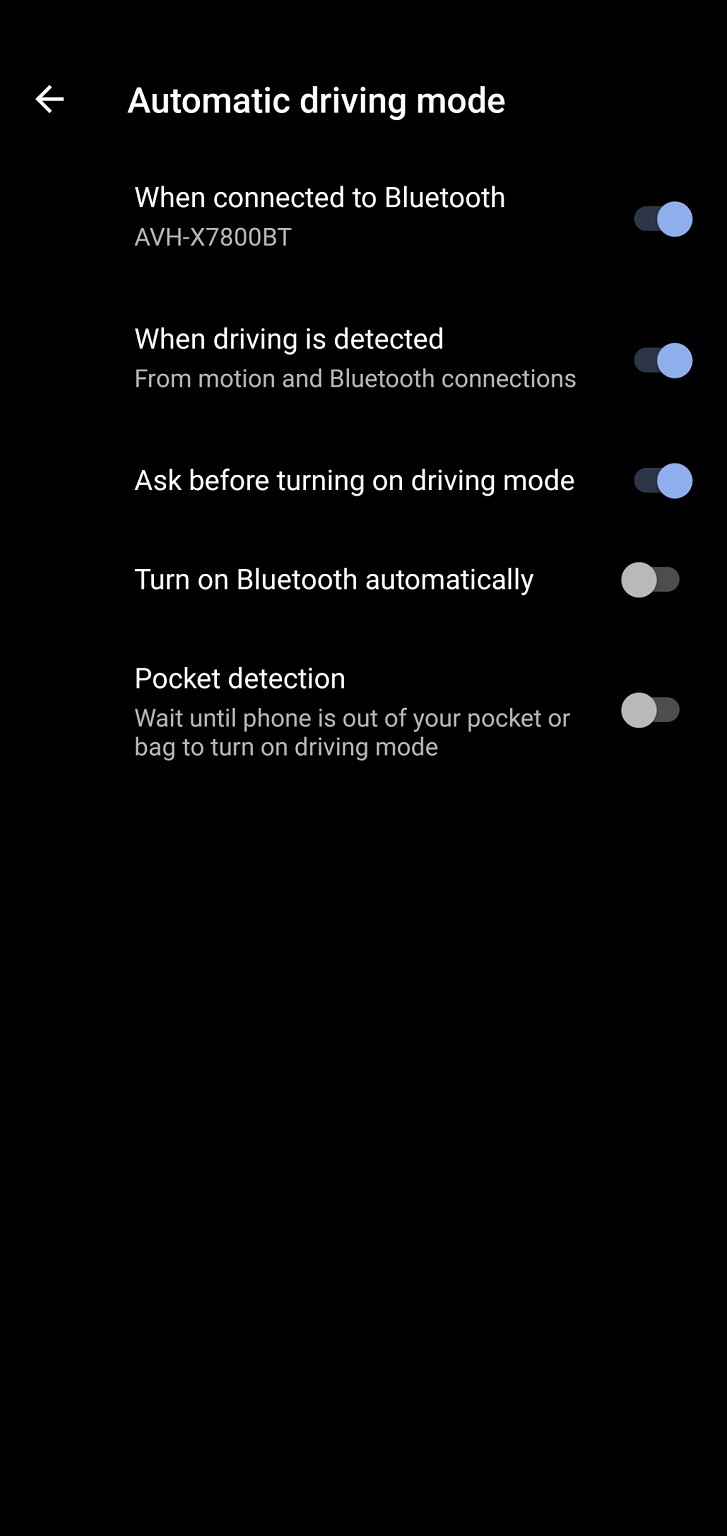
I have the strange problem. I have my Pixel 4xl setup to initiate Android auto when it detects a Bluetooth connection to my car head unit and from motion.  Since I don't have an Android auto head unit it should start up driving mode


This is how I have it setup


Note I have an option set to ask me before turning on driving mode. 


This never works. But I've noticed when I'm riding a bus with my Bluetooth headphones connected,  Android is detecting I'm driving or at least appear to be driving and because there's a BT connection which is not my car but my headset it offers to turn on driving mode !! That must be a bug.


Staying in Wellington. Check out my AirBnB in the Wellington CBD.  https://www.airbnb.co.nz/h/wellycbd  PM me and mention GZ to get a 15% discount and no AirBnB charges.


tieke
687 posts

Ultimate Geek
+1 received by user: 256

ID Verified

  #2812711 14-Nov-2021 18:19
Send private message

I've just realised that Android12 seems to have also removed the "power button to end call" option, which is no longer present either under the Accessibility or the Dialer menu.

Have really found no improvements for my usage with Android 12, and several areas with less or worse functionality.

timmmay

20859 posts

Uber Geek
+1 received by user: 5350

Trusted
Lifetime subscriber

  #2812765 14-Nov-2021 19:00
Send private message

Google seem to have deliberately dumbed it down.

tieke
687 posts

Ultimate Geek
+1 received by user: 256

ID Verified

  #2820574 28-Nov-2021 13:55
Send private message

Just another Android 12 change I hadn't noticed until now - the camera app now records video in HEVC/H265 codec by default. After I transferred some videos off the phone and noticed I could no longer play or edit them on my (older) PC, it took me a while to figure out why, but I have now changed the adanced camera setting to not "Store videos efficiently".


nate
6473 posts

Uber Geek
+1 received by user: 458

Retired Mod
Trusted
Lifetime subscriber

  #2820647 28-Nov-2021 15:57
Send private message

I've found a very annoying Bluetooth bug - if you receive a call, while connected to your car stereo or Bluetooth headphones, then switch Bluetooth off (because you want to just speak on your phone as per normal), when you switch Bluetooth back on, Android will continue to think there is a call, and keep ringing on the Bluetooth device (answering or declining the call does nothing). It's only until you reset the device does it give up.


Yep. Super annoying.


Move to New Zealand's best fibre broadband service (affiliate link). Free setup code: R587125ERQ6VE. Note that to use Quic Broadband you must be comfortable with configuring your own router.
lchiu7
6521 posts

Uber Geek
+1 received by user: 543

Trusted

  #2820767 28-Nov-2021 21:45
Send private message

My biggest issue was in previous version of Android I was using Android Auto connected to my head unit's BT. That worked really well. I could ask Google to read out incoming texts and reply using voice and make calls using voice.


With Android 12 AA has been deprecated (for the handset) in favour of Android Driving Mode. It provides some of the same functions but now when an incoming text (or messages from other selected messaging apps) arrives and you choose to play it, no audio comes out. You see the Assistant icon appear and then the messages has ostensibly played but you have heard nothing.  That renders the entire Driving Mode useless. I have raised it on a Google Support forum and I am not the only one (but it appears I am the only one on GZ!). The response was


This issue has been escalated to the Google product team for further investigation. 


One response said Driving Mode is only supported in the following  countries


This feature is available in English for the following countries:


  • Australia
  • India
  • Ireland
  • Singapore
  • United Kingdom
  • United States

but since Android Auto worked fine and this option of reading out messages is hardly a geographic thing like Android Emergency Mode, it seems to be a bug of some kind.


Staying in Wellington. Check out my AirBnB in the Wellington CBD.  https://www.airbnb.co.nz/h/wellycbd  PM me and mention GZ to get a 15% discount and no AirBnB charges.


gzt

gzt
18690 posts

Uber Geek
+1 received by user: 7830

Lifetime subscriber

  #2828926 8-Dec-2021 19:05
Send private message

The December update made the wifi switch a tiny bit easier to hit. Long list of bugs resolved too. Seems snappier in some areas.

timmmay

20859 posts

Uber Geek
+1 received by user: 5350

Trusted
Lifetime subscriber

  #2828933 8-Dec-2021 19:32
Send private message

I have separate Wifi and mobile data buttons, works fine.


The new update bought a bunch of animations which I found slowish and annoying. You can turn them off in settings by searching for "animations".


1 | 2 | 3 | 4 
View this topic in a long page with up to 500 replies per page Create new topic


Geekzone Live »

Try automatic live updates from Geekzone directly in your browser, without refreshing the page, with Geekzone Live now.


Are you subscribed to our RSS feed? You can download the latest headlines and summaries from our stories directly to your computer or smartphone by using a feed reader.