Geekzone: technology news, blogs, forums
Guest
Welcome Guest.
You haven't logged in yet. If you don't have an account you can register now.


Daegu

8 posts

Wannabe Geek
Inactive user


#179013 22-Aug-2015 19:10
Send private message

After updating my galaxy s6 to 5.1.1 I've got some issues with it.

1st issue is that wallpaper motion effect does not work after updating to 5.1.1. when I was using 5.0.2 version it worked very fine but now it doesn't work anymore. i tapped to use it on settings - wallpaper but it doesn't work.


2nd is that there is no battery power optimisation menu on my phone like the image above. (the image above was taken from the Internet not mine)

3rd issue is that now it lags when im scrolling up or down. something just does not seem right while using apps that require scrolling up or down. EX: Facebook, Twitter, Play Store and especially the browser. it had never happened when my phone was on 5.0.2.

P.S When will samsung pay be available in New Zealand?

Create new topic
johnr
19282 posts

Uber Geek
+1 received by user: 2526
Inactive user


  #1372128 22-Aug-2015 19:13
Send private message

Wall paper motion effect stopped working for me as well


Daegu

8 posts

Wannabe Geek
Inactive user


  #1372135 22-Aug-2015 19:24
Send private message

johnr: Wall paper motion effect stopped working for me as well

I think it happens to people who got their 5.1.1 updates on SM-G920I.
galaxy s6 (SM-G920K) owners in korea do not have this issue

johnr
19282 posts

Uber Geek
+1 received by user: 2526
Inactive user


  #1372136 22-Aug-2015 19:27
Send private message

I have G925i


shrub
790 posts

Ultimate Geek
+1 received by user: 272

ID Verified

  #1372405 23-Aug-2015 12:01
Send private message

I had to get mine factory reset after the update it went into bootloop.... So far i'm liking the battery life. I used o have to charge mid afternoon to get enough for the evenings now its at 30% in the evening without the bump up charge. G920i

haywardb
84 posts

Master Geek
+1 received by user: 12

ID Verified
Subscriber

  #1372792 24-Aug-2015 07:52
Send private message

shrub: I had to get mine factory reset after the update it went into bootloop.... So far i'm liking the battery life. I used o have to charge mid afternoon to get enough for the evenings now its at 30% in the evening without the bump up charge. G920i


Mine done OTA update last week and I also had to factory reset to get out of a bootloop. Have noticed also that my battery life is a little better.

MitchellC
27 posts

Geek


  #1374555 26-Aug-2015 12:33
Send private message

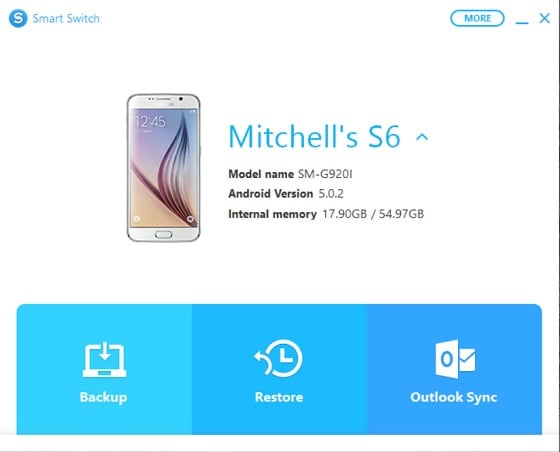
I've recently purchased an S6 (G920i) after owning iPhones for the last 5 years. It's a Spark branded handset purchased from JB Hi-Fi. Currently running 5.0.2, but I see on Sammobile - http://www.sammobile.com/firmwares/download/53160/G920IDVU2COGA_G920ITNZ2COGB_TNZ/ that there is a 5.1.1 update available for it NZ / TNZ. I've checked for updates and there isn't anything available OTA or in Smart Switch. Any advise as to how I can get 5.1.1 or if it is even available for this handset?


Shop now for Dell laptops and other devices (affiliate link).
Dingbatt
6804 posts

Uber Geek
+1 received by user: 3694

Lifetime subscriber

  #1374860 26-Aug-2015 19:34
Send private message

MitchellC: I've recently purchased an S6 (G920i) after owning iPhones for the last 5 years. It's a Spark branded handset purchased from JB Hi-Fi. Currently running 5.0.2, but I see on Sammobile - http://www.sammobile.com/firmwares/download/53160/G920IDVU2COGA_G920ITNZ2COGB_TNZ/ that there is a 5.1.1 update available for it NZ / TNZ. I've checked for updates and there isn't anything available OTA or in Smart Switch. Any advise as to how I can get 5.1.1 or if it is even available for this handset?


Your handset is exactly the same as mine from the same retailer. I received the 5.1.1 update via Smart Switch for PC last week. Needed to use SS because my phone was rooted but on stock firmware. I didn't need the sammobile firmware.


“We’ve arranged a society based on science and technology, in which nobody understands anything about science technology. Carl Sagan 1996


BlackGlove
59 posts

Master Geek
+1 received by user: 34


  #1374865 26-Aug-2015 19:45
Send private message

FWIW I also have the same issue with wallpaper movement. I hadn't even noticed before now. I have also noticed it being a little laggy, which is disappointing from the current flagship phone. Maybe the lack of moving paper is what increased the battery life? tongue-out

MitchellC
27 posts

Geek


  #1374866 26-Aug-2015 19:47
Send private message

Dingbatt:
MitchellC: I've recently purchased an S6 (G920i) after owning iPhones for the last 5 years. It's a Spark branded handset purchased from JB Hi-Fi. Currently running 5.0.2, but I see on Sammobile - http://www.sammobile.com/firmwares/download/53160/G920IDVU2COGA_G920ITNZ2COGB_TNZ/ that there is a 5.1.1 update available for it NZ / TNZ. I've checked for updates and there isn't anything available OTA or in Smart Switch. Any advise as to how I can get 5.1.1 or if it is even available for this handset?


Your handset is exactly the same as mine from the same retailer. I received the 5.1.1 update via Smart Switch for PC last week. Needed to use SS because my phone was rooted but on stock firmware. I didn't need the sammobile firmware.


Interesting. SS doesn't notify me of any updates. I am with Spark and am not rooted. Would that make any difference?


Dingbatt
6804 posts

Uber Geek
+1 received by user: 3694

Lifetime subscriber

  #1374991 27-Aug-2015 07:18
Send private message

All I can think of is that firmware is pushed out on batches so as to not overload their servers. Maybe they haven't got to your handset yet? If you are unrooted and other similar handsets are receiving their updates, I certainly wouldn't be in a hurry to force it. There is nothing so earth shatteringly important in this update that you need to force it.


“We’ve arranged a society based on science and technology, in which nobody understands anything about science technology. Carl Sagan 1996


Create new topic


Geekzone Live »

Try automatic live updates from Geekzone directly in your browser, without refreshing the page, with Geekzone Live now.


Are you subscribed to our RSS feed? You can download the latest headlines and summaries from our stories directly to your computer or smartphone by using a feed reader.