Geekzone: technology news, blogs, forums
Guest
Welcome Guest.
You haven't logged in yet. If you don't have an account you can register now.


Rickles

3107 posts

Uber Geek
+1 received by user: 445

Trusted

#281379 14-Feb-2021 21:25
Send private message

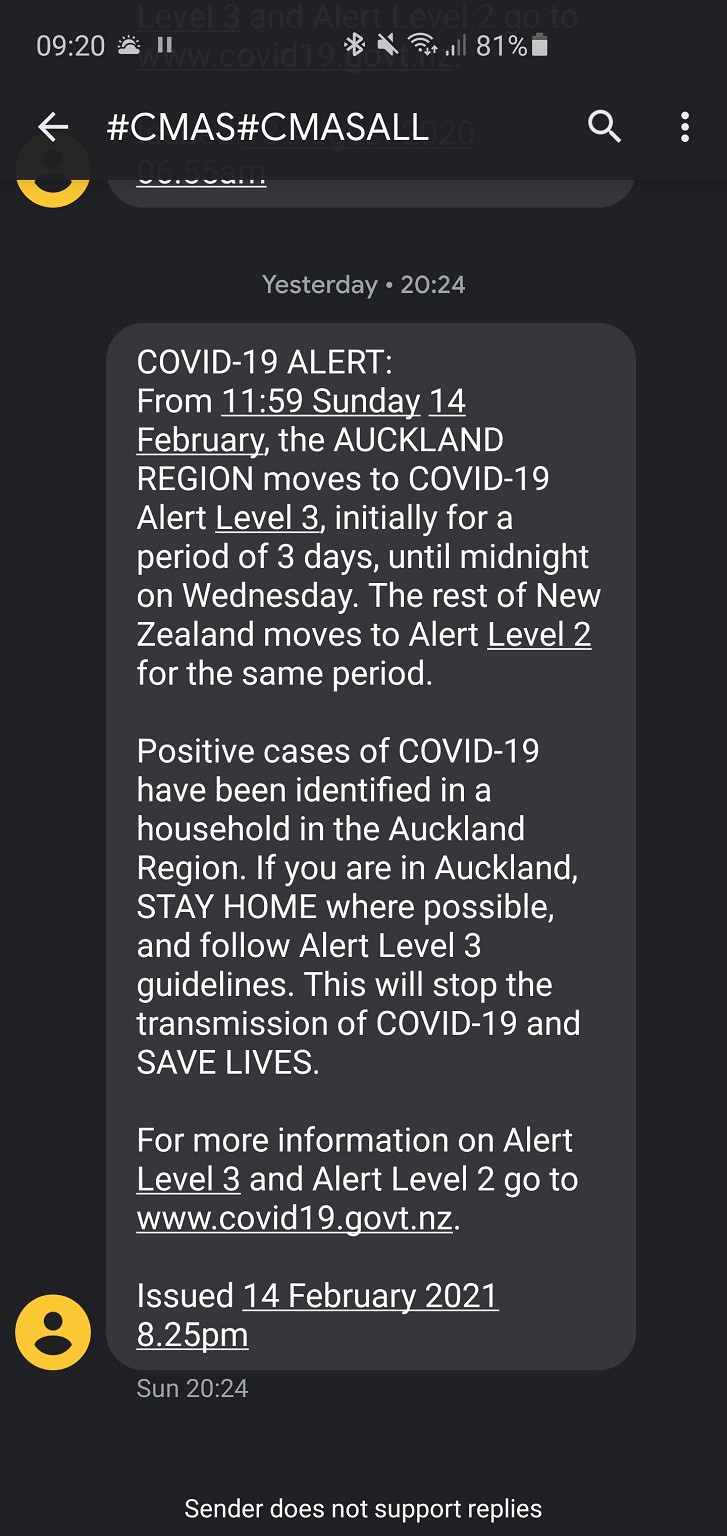
Is there some way to re-read, view or print the Emergency Alerts on Android phone?


Filter this topic showing only the reply marked as answer View this topic in a long page with up to 500 replies per page Create new topic
 1 | 2
TENKAN
314 posts

Ultimate Geek
+1 received by user: 34
Inactive user


  #2656396 14-Feb-2021 21:32
Send private message

Do you mean this?

https://cdn.geekzone.co.nz/imagessubs/bd71b7eba5ebe613426a556c38df1592.jpg


solaybro
630 posts

Ultimate Geek
+1 received by user: 224

Trusted

  #2656398 14-Feb-2021 21:35
Send private message

Settings > Apps and notifications > Emergency alerts > Emergency alert history


Rickles

3107 posts

Uber Geek
+1 received by user: 445

Trusted

  #2656421 14-Feb-2021 23:44
Send private message

Hmmm, I don't seem to have the Alert History option.


Rickles

3107 posts

Uber Geek
+1 received by user: 445

Trusted

  #2656422 14-Feb-2021 23:47
Send private message

OK, thanks all, I've now found mine under Messages/Settings/Advanced/Wireless Emergency Alerts/History.


freitasm
BDFL - Memuneh
80646 posts

Uber Geek
+1 received by user: 41026

Administrator
ID Verified
Trusted
Geekzone
Lifetime subscriber

  #2656423 15-Feb-2021 00:07
Send private message

Easiest way: open settings and search Alerts.


Referral links: Quic Broadband (free setup code: R587125ERQ6VE) | Samsung | AliExpress | Wise | Sharesies 


Support Geekzone by subscribing (browse ads-free), or making a one-off or recurring donation through PressPatron.



psychrn
1610 posts

Uber Geek
+1 received by user: 155

ID Verified
Trusted

  #2656424 15-Feb-2021 01:07
Send private message

freitasm: Easiest way: open settings and search Alerts.


I checked this.


It takes you to settings not actually view the latest alert. Ive noted this before and also wondered how to view the latest message. Its certainly not easy to find again


GZMCC. Lenovo Yoga C640. 8 gb Ram and 256Gb SSD, Cam Am Spyder 2016 F3 LTD.  GoPro 5 Black, Samsung S22 Ultra, Huawei Watch D. Samsung S6 Lite Tablet, Amateur Radio Callsign ZL1CJH


Stream your favourite shows now on Apple TV (affiliate link).
jonathan18
7415 posts

Uber Geek
+1 received by user: 2850

ID Verified
Trusted

  #2656426 15-Feb-2021 05:59
Send private message

I can view the alerts in my messages app - I’m using Google Messages  - but is that not the same for others? If not, it would make sense for other apps to replicate this feature.


mrdrifter
589 posts

Ultimate Geek
+1 received by user: 294

ID Verified
Trusted

  #2656458 15-Feb-2021 08:38
Send private message

jonathan18:


I can view the alerts in my messages app - I’m using Google Messages  - but is that not the same for others? If not, it would make sense for other apps to replicate this feature.


Doesn't work for me and Google Messages is set as my default. Also checked the default system messages app which I never use and it's empty. I need to go into the emergency alerts history via phone settings.


kiwifidget
"Cookie"
3640 posts

Uber Geek
+1 received by user: 1969

Lifetime subscriber

  #2656460 15-Feb-2021 08:49
Send private message

I never saw the alert, and after looking at all the options mentioned here, I can find no trace of one.


Why doesnt it show up in the Tracer App? Isnt that what it is for?


Delete cookies?! Are you insane?!


ripdog
548 posts

Ultimate Geek
+1 received by user: 373
Inactive user


  #2656463 15-Feb-2021 08:57
Send private message

No. The emergency alerts are built into the phone OS and have many purposes other than covid. However they only work if you buy your phone directly from a carrier, as I understand it (iphone's can be bought elsewhere). If you want to get a decent deal on a phone, I guess you're just expected to die when the next emergency happens :)


MaxineN
Max
2049 posts

Uber Geek
+1 received by user: 1662

ID Verified
Trusted
Subscriber

  #2656467 15-Feb-2021 09:10
Send private message

ripdog:


No. The emergency alerts are built into the phone OS and have many purposes other than covid. However they only work if you buy your phone directly from a carrier, as I understand it (iphone's can be bought elsewhere). If you want to get a decent deal on a phone, I guess you're just expected to die when the next emergency happens :)


Not true.


My rooted Oneplus 8 from Europe got the emergency alert last night. It's not carrier specific.


Ramblings from a mysterious lady who's into tech. Warning I may often create zingers.


Want to support Geekzone and browse the site without the ads? Subscribe to Geekzone now (monthly, annual and lifetime options).
ripdog
548 posts

Ultimate Geek
+1 received by user: 373
Inactive user


  #2656468 15-Feb-2021 09:11
Send private message

Well, good to know it's improving. It's still a roll of the dice if you buy off-carrier.


kiwifidget
"Cookie"
3640 posts

Uber Geek
+1 received by user: 1969

Lifetime subscriber

  #2656470 15-Feb-2021 09:14
Send private message

No Xaiomi phone owner, I expect you to die!


Delete cookies?! Are you insane?!


jonathan18
7415 posts

Uber Geek
+1 received by user: 2850

ID Verified
Trusted

  #2656480 15-Feb-2021 09:24
Send private message

mrdrifter:


jonathan18:


I can view the alerts in my messages app - I’m using Google Messages  - but is that not the same for others? If not, it would make sense for other apps to replicate this feature.


Doesn't work for me and Google Messages is set as my default. Also checked the default system messages app which I never use and it's empty. I need to go into the emergency alerts history via phone settings.


Weird... Does anyone else have these alerts showing in their text app? Mine shows as below, and similarly the same alert from Aug last year is there too. In my case it’s Google Messages on a Samsung S10+.


Click to see full size


old3eyes
9158 posts

Uber Geek
+1 received by user: 1364

Subscriber

  #2656481 15-Feb-2021 09:25
Send private message

kiwifidget:


I never saw the alert, and after looking at all the options mentioned here, I can find no trace of one.


Why doesnt it show up in the Tracer App? Isnt that what it is for?


Because the alert system has nothing to do with Covid or the app.  It's used for all types of emergencies that you need to be alerted to.. 


Regards,

Old3eyes


 1 | 2
Filter this topic showing only the reply marked as answer View this topic in a long page with up to 500 replies per page Create new topic


Geekzone Live »

Try automatic live updates from Geekzone directly in your browser, without refreshing the page, with Geekzone Live now.


Are you subscribed to our RSS feed? You can download the latest headlines and summaries from our stories directly to your computer or smartphone by using a feed reader.