Geekzone: technology news, blogs, forums
Guest
Welcome Guest.
You haven't logged in yet. If you don't have an account you can register now.


graham007

225 posts

Master Geek
+1 received by user: 38


#285999 30-May-2021 10:26
Send private message

Hi , 


My Note 20 ultra used to connect all ok to all windows computers, but something happened , and now its not able to connect to windows machine. I have tried with 2 windows computers , desktop n laptop , and now the car android unit also wont recognize it.


I have tried to uninstall re-install usb drivers on the desktop windows pc it didnt help and when the same issue happened with other computer and car unit, i am suspecting its to with the phone side and not the windows side ? 
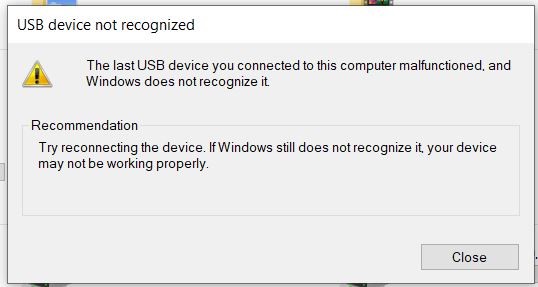


This is the error : https://ibb.co/Sy8TdFn


can you pls help fix this , appreciate your kind help ,  thanks a lot .


Filter this topic showing only the reply marked as answer Create new topic
phantomdb
585 posts

Ultimate Geek
+1 received by user: 103

Lifetime subscriber

  #2715407 30-May-2021 10:29
Send private message

https://thecellguide.com/usb-connection-not-working-on-a-samsung-galaxy-smartphone-377 maybe try the solution here? it is for an older phone but sounds like the same issue


[ SIGNATURE HERE ]


graham007

225 posts

Master Geek
+1 received by user: 38


  #2715410 30-May-2021 10:37
Send private message

thanks, 


the last one worked ! I will leave it here in case someone else gets stuck in future. 


  • If the issue persists, try enabling USB Debugging in your settings:


    • Go to Settings > About Phone.
    • Tap on Build number repeatedly until it says “You are now a developer”.
    • You will now be able to access Settings > Developer options.
    • Enable USB debugging.
    • Once USB debugging is enabled, restart your phone and try to connect it again.
  • If none of the options above worked, make sure the USB cable you have is able to transfer files and a different cable if necessary
  • If the issue persists after trying all the options above, you might want to consider trying a factory reset of your device. Click here for a step-by-step guide on how to backup and reset your Galaxy smartphone.

Filter this topic showing only the reply marked as answer Create new topic


Geekzone Live »

Try automatic live updates from Geekzone directly in your browser, without refreshing the page, with Geekzone Live now.


Are you subscribed to our RSS feed? You can download the latest headlines and summaries from our stories directly to your computer or smartphone by using a feed reader.
