Geekzone: technology news, blogs, forums
Guest
Welcome Guest.
You haven't logged in yet. If you don't have an account you can register now.


Niber

43 posts

Geek
+1 received by user: 3


#321524 25-Aug-2025 09:31
Send private message

Seems Pixel is the only Android phone that can do it, but Pixel seems to really hate NZ so still no pixel 10 in NZ.


For example the following Youtube Shorts video is clearly HDR when I view it through my PC Chrome: https://www.youtube.com/shorts/4o3xlXSbCcs


But if I view it through my S22 Ultra or a friends Xiaomi 15 then it's in SDR.


What's the point in even having a phone at all if it can't view HDR video.


Some reports says that if I get the very newest Samsung then it can support it, but there's just no way I'm getting another Samsung. and there's no excuse for them to not support it on the S22 Ultra I have already


Create new topic
mrgsm021
1538 posts

Uber Geek
+1 received by user: 310

ID Verified
Trusted

  #3407170 25-Aug-2025 09:53
Send private message

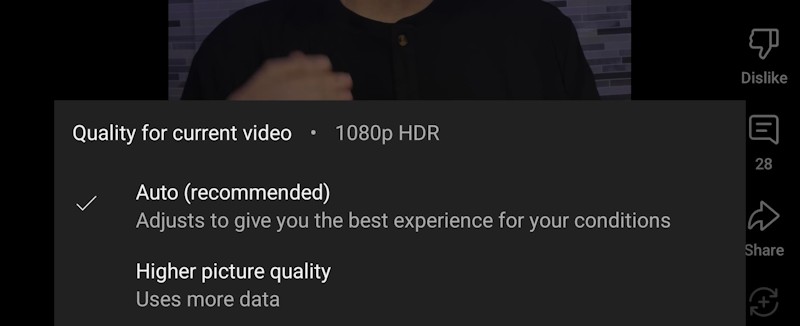
My OnePlus 13 appears to play your YT link in 1080p HDR, according to the resolutions setting in the apps.


Niber

43 posts

Geek
+1 received by user: 3


  #3407180 25-Aug-2025 10:17
Send private message

mrgsm021:


My OnePlus 13 appears to play your YT link in 1080p HDR, according to the resolutions setting in the apps.


Interesting! that def puts that phone on my radar. is there any chance you could dim the brightness of ur screen to doublecheck that the video is brighter than the UI? (that video isn't the ideal showcase of HDR, but basically the blue background should feel like it "pops")


Niber

43 posts

Geek
+1 received by user: 3


  #3407187 25-Aug-2025 10:39
Send private message

mrgsm021:


My OnePlus 13 appears to play your YT link in 1080p HDR, according to the resolutions setting in the apps.


Aaaaw no, I just checked and my phone res settings also says HDR, but the monitor isn't displaying it as HDR, so unfortunately it seems the res settings isn't an indicator if the phone works with HDR or not


freitasm
BDFL - Memuneh
80646 posts

Uber Geek
+1 received by user: 41024

Administrator
ID Verified
Trusted
Geekzone
Lifetime subscriber

  #3407208 25-Aug-2025 11:41
Send private message

Niber:


Seems Pixel is the only Android phone that can do it, but Pixel seems to really hate NZ so still no pixel 10 in NZ.


For example the following Youtube Shorts video is clearly HDR when I view it through my PC Chrome: https://www.youtube.com/shorts/4o3xlXSbCcs


But if I view it through my S22 Ultra or a friends Xiaomi 15 then it's in SDR.


Am I missing something? It seems to be 1080p HDR on my Fold6.


Niber:


Aaaaw no, I just checked and my phone res settings also says HDR, but the monitor isn't displaying it as HDR, so unfortunately it seems the res settings isn't an indicator if the phone works with HDR or not


This is something new, not posted in the OP, so obviously all replies so far are related to the opening topic post.


Do you mean you want to watch HDR on an external monitor? Or do you mean you watch it on the phone display itself and it doesn't look HDR?


Referral links: Quic Broadband (free setup code: R587125ERQ6VE) | Samsung | AliExpress | Wise | Sharesies 


Support Geekzone by subscribing (browse ads-free), or making a one-off or recurring donation through PressPatron.


muppet
2642 posts

Uber Geek
+1 received by user: 1660

Trusted

  #3407211 25-Aug-2025 11:42
Send private message

I have a Pixel and these HDR images etc are so annoying in a feed, they pop out SUPER BRIGHT and try to burn your retinas.


You're not missing much IMHO.


lxsw20
3689 posts

Uber Geek
+1 received by user: 2174

Subscriber

  #3407212 25-Aug-2025 11:44
Send private message

muppet:


I have a Pixel and these HDR images etc are so annoying in a feed, they pop out SUPER BRIGHT and try to burn your retinas.


You're not missing much IMHO.


Yeap I have my MacBookPro screen turned right down then the sun comes out all of a sudden when I click on an HDR video. 


Move to New Zealand's best fibre broadband service (affiliate link). Free setup code: R587125ERQ6VE. Note that to use Quic Broadband you must be comfortable with configuring your own router.
Niber

43 posts

Geek
+1 received by user: 3


  #3407213 25-Aug-2025 11:44
Send private message

freitasm:


I just want to view HDR video in HDR on my phone screen (not external monitor).


Just because it says HDR doesn't unfortunately mean that it is HDR. For example, you can force Youtube to send you a 4k stream even if your screen is 1080p max, and in similar manner you can tell Youtube to send you the HDR stream even if your screen/app doesn't support viewing it as HDR.


freitasm
BDFL - Memuneh
80646 posts

Uber Geek
+1 received by user: 41024

Administrator
ID Verified
Trusted
Geekzone
Lifetime subscriber

  #3407214 25-Aug-2025 11:47
Send private message

Niber:


freitasm:


I just want to view HDR video in HDR on my phone screen (not external monitor).


Just because it says HDR doesn't unfortunately mean that it is HDR. For example, you can force Youtube to send you a 4k stream even if your screen is 1080p max, and in similar manner you can tell Youtube to send you the HDR stream even if your screen/app doesn't support viewing it as HDR.


Ok... Using the word "monitor" on your reply was a red herring. you meant display.


Referral links: Quic Broadband (free setup code: R587125ERQ6VE) | Samsung | AliExpress | Wise | Sharesies 


Support Geekzone by subscribing (browse ads-free), or making a one-off or recurring donation through PressPatron.


Niber

43 posts

Geek
+1 received by user: 3


  #3407216 25-Aug-2025 11:48
Send private message

muppet:


I have a Pixel and these HDR images etc are so annoying in a feed, they pop out SUPER BRIGHT and try to burn your retinas.


You're not missing much IMHO.


That's just because the content creators are abusing HDR (putting EVERYTHING in the high dynamic range, instead of just the spec highlights / sunsets etc), I predict in the future there will be some sort of check that forces content-creators to only put few things in the HDR range.


In my case I don't want to view others content (because it's almost always bad), I just want to view my own content to make sure that it displays correctly in HDR


Niber

43 posts

Geek
+1 received by user: 3


  #3407219 25-Aug-2025 11:50
Send private message

freitasm:


Ok... Using the word "monitor" on your reply was a red herring. you meant display.


Oh, sorry English isn't my first language. Yeah screen/display I meant


Niber

43 posts

Geek
+1 received by user: 3


  #3407220 25-Aug-2025 11:52
Send private message

muppet:


I have a Pixel and these HDR images etc are so annoying in a feed, they pop out SUPER BRIGHT and try to burn your retinas.


You're not missing much IMHO.


i would be curious if you could confirm if videos are working HDR for you as well? (and what model of pixel u have)


I've heard that Pixel is the main device that they added that support for, but I've never actually heard from first hand experience it working (as you were talking about images, not video shorts)


Shop now for Lego sets and other gifts (affiliate link).
muppet
2642 posts

Uber Geek
+1 received by user: 1660

Trusted

  #3407222 25-Aug-2025 12:01
Send private message

Niber:


i would be curious if you could confirm if videos are working HDR for you as well? (and what model of pixel u have)


I've heard that Pixel is the main device that they added that support for, but I've never actually heard from first hand experience it working (as you were talking about images, not video shorts)


I've got a Pixel 7 Pro. When I view that video in your first post my screen cranks up the brightness to "burn retinas" level in a way it doesn't with other Youtube videos. It also says "1080p HDR" in the quality menu.


Create new topic


Geekzone Live »

Try automatic live updates from Geekzone directly in your browser, without refreshing the page, with Geekzone Live now.


Are you subscribed to our RSS feed? You can download the latest headlines and summaries from our stories directly to your computer or smartphone by using a feed reader.