Geekzone: technology news, blogs, forums
Guest
Welcome Guest.
You haven't logged in yet. If you don't have an account you can register now.


kiwifidget

"Cookie"
3640 posts

Uber Geek
+1 received by user: 1969

Lifetime subscriber

#321555 28-Aug-2025 20:59
Send private message

I have horrible cell reception where I live, so I rely on wifi calling since Sure Signal went obsolete.


I noticed today though, when I went to make a call, that the phone symbol had no wifi symbol on it.


Wifi calling is on in settings.


I restarted my phone but thats made no difference.


Turned wifi calling off then on, no difference.


Last update was April 7 according to the system settings.


So somehow, wifi calling is there but also not there.


What should I do next?


Delete cookies?! Are you insane?!


Filter this topic showing only the reply marked as answer View this topic in a long page with up to 500 replies per page Create new topic
 1 | 2
freitasm
BDFL - Memuneh
80646 posts

Uber Geek
+1 received by user: 41030

Administrator
ID Verified
Trusted
Geekzone
Lifetime subscriber

  #3408291 28-Aug-2025 21:07
Send private message

What operator?


Referral links: Quic Broadband (free setup code: R587125ERQ6VE) | Samsung | AliExpress | Wise | Sharesies 


Support Geekzone by subscribing (browse ads-free), or making a one-off or recurring donation through PressPatron.


kiwifidget

"Cookie"
3640 posts

Uber Geek
+1 received by user: 1969

Lifetime subscriber

  #3408292 28-Aug-2025 21:14
Send private message

freitasm:


What operator?


2degrees


Delete cookies?! Are you insane?!


Linux
12173 posts

Uber Geek
+1 received by user: 8469

Trusted
Lifetime subscriber

  #3408293 28-Aug-2025 21:14
Send private message

What handset make / model?


Linux
12173 posts

Uber Geek
+1 received by user: 8469

Trusted
Lifetime subscriber

  #3408294 28-Aug-2025 21:15
Send private message

@kiwifidget Just checked my handset and same thing Wi-Fi calling is not connected as well


Looks to be something on the 2degrees side


Edit: ignore post it is connected


kiwifidget

"Cookie"
3640 posts

Uber Geek
+1 received by user: 1969

Lifetime subscriber

  #3408295 28-Aug-2025 21:16
Send private message

Linux:


What handset make / model?


The one you sold me 🤣


Yeah, I still have it.


So thats a Samsung S20+ 5G. SM-G986B/DS.


Delete cookies?! Are you insane?!


Linux
12173 posts

Uber Geek
+1 received by user: 8469

Trusted
Lifetime subscriber

  #3408296 28-Aug-2025 21:18
Send private message

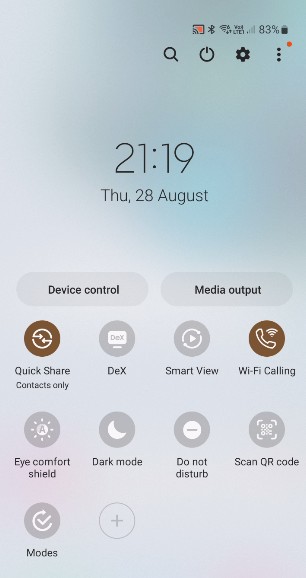
Don't look for the Wi-Fi calling icon on the main screen - Drag down from the top of the screen and then look at the Wi-Fi signal and see if you can see the Wi-Fi calling connected icon


Shop now for Dell laptops and other devices (affiliate link).
kiwifidget

"Cookie"
3640 posts

Uber Geek
+1 received by user: 1969

Lifetime subscriber

  #3408297 28-Aug-2025 21:21
Send private message


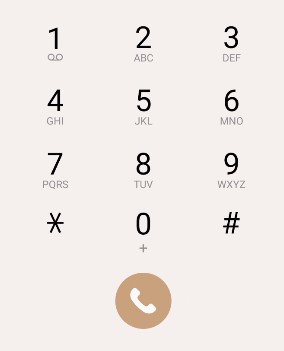
And when I go to make a call....


No wifi-ness.


I have tried toggling wifi calling off and on, no success.


Delete cookies?! Are you insane?!


Linux
12173 posts

Uber Geek
+1 received by user: 8469

Trusted
Lifetime subscriber

  #3408299 28-Aug-2025 21:24
Send private message

Have you manually checked for updates to the handsets?


kiwifidget

"Cookie"
3640 posts

Uber Geek
+1 received by user: 1969

Lifetime subscriber

  #3408300 28-Aug-2025 21:26
Send private message

Linux:


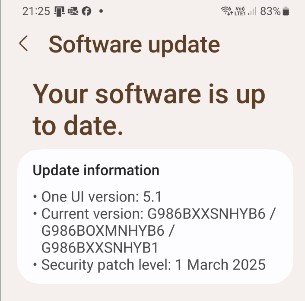
Have you manually checked for updates to the handsets?


Yes, there are no updates.


Proof...


Delete cookies?! Are you insane?!


kiwifidget

"Cookie"
3640 posts

Uber Geek
+1 received by user: 1969

Lifetime subscriber

  #3408301 28-Aug-2025 21:40
Send private message

I think I'll leave it over night, let it have a good think about its recent behaviour, how it has let me down.


Hopefully come morning, it will have reconsidered and start working properly.


Delete cookies?! Are you insane?!


Linux
12173 posts

Uber Geek
+1 received by user: 8469

Trusted
Lifetime subscriber

  #3408303 28-Aug-2025 21:42
Send private message

Very odd for sure!


Support Geekzone with one-off or recurring donations Donate via PressPatron.
AKLWestie
650 posts

Ultimate Geek
+1 received by user: 115

Trusted
Lifetime subscriber

  #3408356 28-Aug-2025 22:28
Send private message

I had the same problem few days ago.  So, wifi calling was working for a while but then stopped working.


I fixed it by:


  • first, make sure the wifi calling button is on, wifi is on, mobile data is on (but wifi calling may not working at this stage, but the button was on), and airplane mode is off (so your phone is on the mobile network)
  • then turn off wifi calling, wait few seconds
  • turn off wifi, wait few seconds
  • turn air plane mode on, note, your phone is off grid at this stage
  • wait five minutes or more (yes five minutes)
  • turn off airplane mode, wait for your phone is registered on the mobile network again (e.g. the "2degrees" carrier name is showing up), wait a few seconds
  • turn on wifi, wait few seconds
  • turn on wifi calling

it worked for me, I am on 2degrees as well.  But your mileage may vary.


One thing I miss being on Skinny was that wifi calling worked well.  2degrees' wifi calling could be a hit and miss sometimes


alinz
77 posts

Master Geek
+1 received by user: 16


  #3408362 29-Aug-2025 02:03
Send private message

There's a weird setting buried in the calling app which by default is set to 'prefer cell network' regardless of vowifi being on. Try changing it to prefer wifi.


Linux
12173 posts

Uber Geek
+1 received by user: 8469

Trusted
Lifetime subscriber

  #3408363 29-Aug-2025 05:16
Send private message

alinz:


There's a weird setting buried in the calling app which by default is set to 'prefer cell network' regardless of vowifi being on. Try changing it to prefer wifi.


@alinz not for 2degrees WiFi calling it is either on or off


SparkNZ have the setting you have described and it is not really buried


kiwifidget

"Cookie"
3640 posts

Uber Geek
+1 received by user: 1969

Lifetime subscriber

  #3408373 29-Aug-2025 08:21
Send private message

OK, so the leaving it overnight to magically fix itself has not worked.


Trying AKLWesties method.


Wifi calling ON, Airplane mode OFF, Data roaming NATIONAL ONLY (is that the mobile data setting you meant?)


Wifi calling OFF for 5sec or thereabouts.


Wifi OFF, wait a few secs.


Airplane mode ON.


Wait 5 minutes. 


Woops, got distracted, thats 9 minutes.


Airplane mode off. Dont know how I will tell if its back on the network, I dont ever see 2d show up.


I see Volte1, and 4G, and my microscopic bar of signal. so I'll go with that.


Wifi ON. Wait 5 secs.


Wifi Calling ON. Cross fingers, hold breath, and close eyes.


Open one eye..... it's BACK!! Breathe out.


Thanks @aklwestie


Man, what a palava, rigmarole.


Now I did notice when I was poking around settings, that I have Network Provider set to Auto rather than specifically selecting 2d, is that advised?


Delete cookies?! Are you insane?!


 1 | 2
Filter this topic showing only the reply marked as answer View this topic in a long page with up to 500 replies per page Create new topic


Geekzone Live »

Try automatic live updates from Geekzone directly in your browser, without refreshing the page, with Geekzone Live now.


Are you subscribed to our RSS feed? You can download the latest headlines and summaries from our stories directly to your computer or smartphone by using a feed reader.