Geekzone: technology news, blogs, forums
Guest
Welcome Guest.
You haven't logged in yet. If you don't have an account you can register now.


CycleTourer

32 posts

Geek
+1 received by user: 14


#324095 26-Feb-2026 11:31
Send private message quote this post

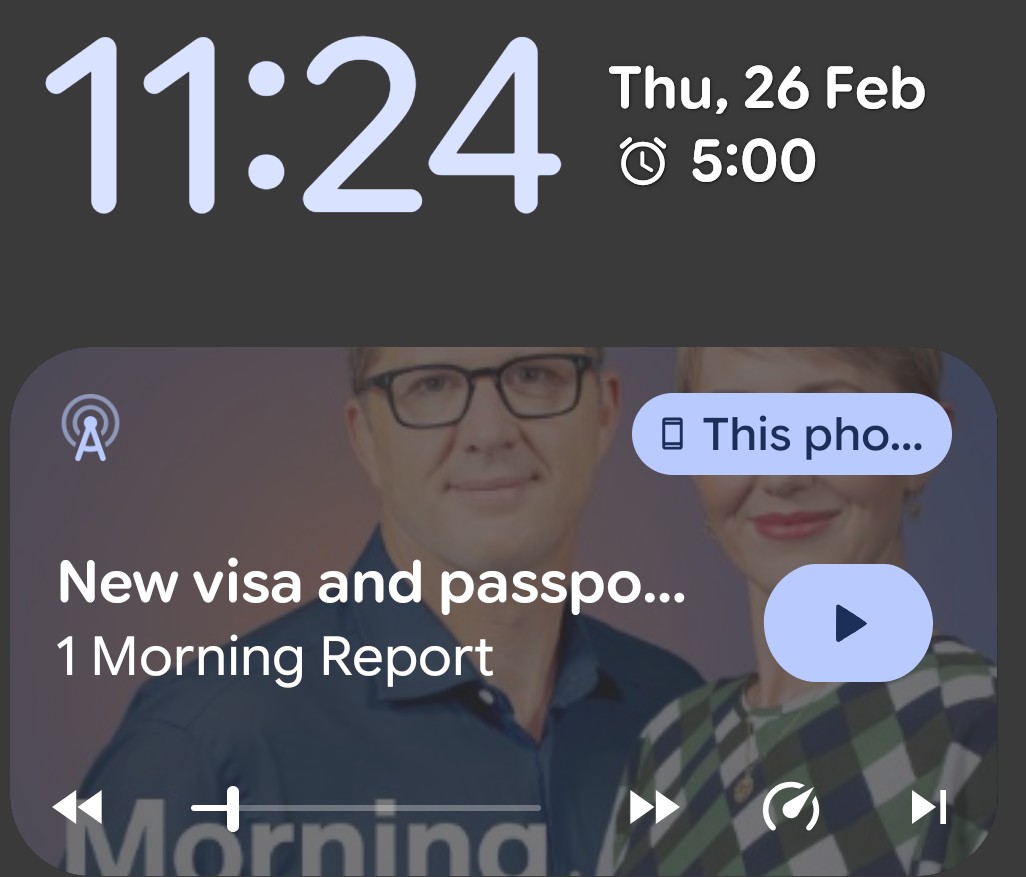
I recently moved from a Pixel 3 to a Pixel 6 and thus made a serious leap in android versions.  I'm now running A16.   And tearing my hair out with what I think is called the media player on my lock screen. (see screenshot below)  I'm hoping against hope that there is either a way to muscle it into behaving much more like the one I was used to on A12, or replacing it altogether with something that is much closer to it.


Since the same thing appears on my lock screen whether I'm using my podcaster or my music app, I'm assuming that this is a system-wide widget and it shows regardless of which specific app is producing the audio.  Apologies if I have that wrong.  I'm a retired computer programmer so comfortable with technology, but a bit of a luddite when it comes to phones.


My gripes:


  • It's very unreliable.  Often when I'm playing a podcast (my most common use case, but it's no better with my music app) and want to pause it, I find that no way no how can I get it to respond to taps on the pause button.  I can't even get it to respond to taps in the empty area of the widget to try to quickly get to my podcaster!  I'm forced to unlock the phone and go to my podcaster in order to actually get it to pause.  Given that I often listen to podcasts while driving this is a huge leap backwards in safety.
  • It goes away incredibly quickly.  I haven't timed it, but if I pause and then only a few minutes later want to restart playing I find that it has already disappeared from the lockscreen, once again forcing me to unlock the phone and go to my podcaster.
  • It doesn't even work properly.  This morning (the final straw) I had a podcast playing which I wanted to pause; I turned the screen on and found that the pause/play button was actually in play mode!!  Once again I was forced to unlock the phone yaddayaddayadda.....

I would have searched here because I cannot be the only person who viscerally hates this piece of #$%&* but I can't figure out how to do a subforum-specific search and, well, searching for "media player" is not exactly going to be a quick way of locating anything useful 🙃


All I want is a simple, reliable thing on my lock screen that allows me to play/pause/rewind/fast forward audio, and that will still show on my lock screen for some reasonable length of pause time.  The A12 one does it for literally hours; I would be happy with one that lasted say an hour, if multiple hours isn't possible.


Is there any way to achieve this?


Create new topic
fe31nz
1294 posts

Uber Geek
+1 received by user: 423


  #3465295 27-Feb-2026 00:14
Send private message quote this post

I have not actually tried using a music player on my Flip 7 yet, so I just tried the one I normally use, USB Audio Player PRO, for which I have a paid license.  I normally use this on my S8 tablet, which has an older Android version.  On the Flip 7, when I tried the lock screen and front screen controls, hitting the pause/play button only worked every so often - it took quite a number of tries before it would work.  But if I clicked the power button to wake the screen, but did not log in, the pause/play button worked as it should.  That would be very annoying if I was wanting to use it like that - unusable really.  But with a little more experimenting I found a workaround for my front screen.  It can be woken by a double tap, and I found that while the front screen was asleep (in Always On Display mode), a double tap of the play/pause button worked reliably, and did not seem to wake the front display.


CycleTourer

32 posts

Geek
+1 received by user: 14


  #3465325 27-Feb-2026 08:48
Send private message quote this post

Thanks for this; unfortunately, a double tap seems to do nothing at all (with Always On Display turned on).  The podcast shows as playing, but I've tried double-tapping both in the region of the podcast info, and elsewhere on the screen, and nothing ever changes 😒


mudguard
2327 posts

Uber Geek
+1 received by user: 1250


  #3465348 27-Feb-2026 09:59
Send private message quote this post

I'll ask the obvious question, can you not pause from the car controls? Or is it just bluetooth pairing?


I know that's not the answer and I've had a similar issue with my phone waking in my pocket whilst on my pushbike. The widget is open on the lock screen and the movements will do things like increase the podcast narration speed. I actually got fed up with it and went diving into the settings so that lock screen was wake only by the button press, not the double tap like I'd always used. To be fair mine is also a slight niche case, I no longer fold my flip phone in half, so it's like a normal phone in my pocket. 


Edit. So further playing on mine. If it mine goes to the lock screen, IE I've locked with the button, the widget buttons still show, but are unresponsive. But if I double tap anywhere on the screen it will awake but not unlock but the widget controls are useable. 


NB 99% of the time I'm using the car controls, or headphone controls. 


CycleTourer

32 posts

Geek
+1 received by user: 14


  #3465368 27-Feb-2026 10:48
Send private message quote this post

mudguard:


I'll ask the obvious question, can you not pause from the car controls? Or is it just bluetooth pairing?


Fair question.  "Car" in my case (the one I'm worried about the most) is a 7.5m motorhome towing a Jimny -- the controls aren't visible because I have the monitor showing the rear view camera so I can keep an eye on the car.  But when playing in the car, whilst bluetooth pairs impeccably well, unfortunately I've never managed to find which buttons on the stereo actually communicate with the phone 😒 (I'm not sure there are any -- I did RTFM) so I have the problem there too.


mudguard:


I know that's not the answer and I've had a similar issue with my phone waking in my pocket whilst on my pushbike. The widget is open on the lock screen and the movements will do things like increase the podcast narration speed. I actually got fed up with it and went diving into the settings so that lock screen was wake only by the button press, not the double tap like I'd always used. To be fair mine is also a slight niche case, I no longer fold my flip phone in half, so it's like a normal phone in my pocket. 


Edit. So further playing on mine. If it mine goes to the lock screen, IE I've locked with the button, the widget buttons still show, but are unresponsive. But if I double tap anywhere on the screen it will awake but not unlock but the widget controls are useable. 


I've always had Always On Display turned off, but turned it on this morning to test the previous poster's idea.  While in Settings I searched for "double" and found nothing.  For battery usage I don't really want to use Always On Display, but would definitely try it to see whether your workaround works for me.  Any idea where the double-tap thing is??


EDIT. Also, my podcaster didn't show any (useful) widget on the lock screen when "off".  It only displayed the name of the podcast that was currently playing.


Also: I have my display set to turn off after 30 seconds (again, for battery usage), so I almost never use the power button to lock the screen.


Create new topic


Geekzone Live »

Try automatic live updates from Geekzone directly in your browser, without refreshing the page, with Geekzone Live now.


Are you subscribed to our RSS feed? You can download the latest headlines and summaries from our stories directly to your computer or smartphone by using a feed reader.
