Geekzone: technology news, blogs, forums
Guest
Welcome Guest.
You haven't logged in yet. If you don't have an account you can register now.


lyonrouge

1993 posts

Uber Geek
+1 received by user: 20

Trusted
Lifetime subscriber

#92558 1-Nov-2011 19:28
Send private message

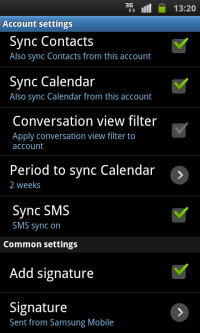
Can anyone report what Android phones support SMSsync? So far I've confirmed Galaxy S. I initially thought it was in 2.3, but upgraded my LG-P500h to 2.3.3 but it does not support it.

Create new topic
Linuxluver
5833 posts

Uber Geek
+1 received by user: 1639

Trusted
Subscriber

  #540090 1-Nov-2011 21:51
Send private message

lyonrouge: Can anyone report what Android phones support SMSsync? So far I've confirmed Galaxy S. I initially thought it was in 2.3, but upgraded my LG-P500h to 2.3.3 but it does not support it.


I sync all my SMS to my Gmail account with the "Backup to Gmail" app. I have every SMS sent or received from 7 or 8 phones over the past 2 years all stored in the my Gmail.  


_____________________________________________________________________

I've been on Geekzone over 16 years..... Time flies.... 


Kiwi1971
696 posts

Ultimate Geek
+1 received by user: 9


  #540183 2-Nov-2011 08:35
Send private message

Linuxluver:
lyonrouge: Can anyone report what Android phones support SMSsync? So far I've confirmed Galaxy S. I initially thought it was in 2.3, but upgraded my LG-P500h to 2.3.3 but it does not support it.


I sync all my SMS to my Gmail account with the "Backup to Gmail" app. I have every SMS sent or received from 7 or 8 phones over the past 2 years all stored in the my Gmail.  


GoSMS has an option to back up to SD and Email but I recently used an app called Desk SMS [I think] on my Desire that synced every SMS to email so that everytime I was texted, I also received an email with it. Uninstalled it as I was a bit tired of all the emails.  I might re-install it and just filter the email alerts to archive.

DLS

lyonrouge

1993 posts

Uber Geek
+1 received by user: 20

Trusted
Lifetime subscriber

  #540202 2-Nov-2011 09:14
Send private message

thanks for the offerings of alternative functions. Are you using these because your handsets do not support SMSsync or is it because you don't have an Exchange Server 2010 backend?


lyonrouge

1993 posts

Uber Geek
+1 received by user: 20

Trusted
Lifetime subscriber

  #540203 2-Nov-2011 09:15
Send private message

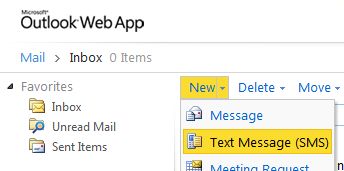
ps. It is not the retention of the SMS I'm interested in, it is the unified messaging solution that does not require an SMS gateway that is of interest.

Linuxluver
5833 posts

Uber Geek
+1 received by user: 1639

Trusted
Subscriber

  #540355 2-Nov-2011 14:37
Send private message

lyonrouge: thanks for the offerings of alternative functions. Are you using these because your handsets do not support SMSsync or is it because you don't have an Exchange Server 2010 backend?


I'd never heard of the option you describe. I try to avoid MS solutions where possible. They are too expensive for me to use at home without pirating them.  


_____________________________________________________________________

I've been on Geekzone over 16 years..... Time flies.... 


lyonrouge

1993 posts

Uber Geek
+1 received by user: 20

Trusted
Lifetime subscriber

  #540360 2-Nov-2011 14:50
Send private message

Note, this feature is an action within ActiveSync which only displays if both Exchange 2010 and the handset support it.

Galaxy Example


Shop now for Dell laptops and other devices (affiliate link).
lyonrouge

1993 posts

Uber Geek
+1 received by user: 20

Trusted
Lifetime subscriber

  #540793 3-Nov-2011 16:11
Send private message

To use this on a LG Optimus One (P500h) you have to buy TouchDown which is $23.70 [not sure if that is NZ or USD], but it does work. Once enabled on phone and outlook restarted, I tested sending and recieving SMS from both OWA and Outlook 2010.


note: you have to synchonise the sent folder on the phone for SMS sending to work.

lyonrouge

1993 posts

Uber Geek
+1 received by user: 20

Trusted
Lifetime subscriber

  #542041 7-Nov-2011 14:27
Send private message

Additional note: by default, remote wipe on Touchdown does not wipe the phone, only the account in Touchdown (at least on my LG Optimus One)

Create new topic


Geekzone Live »

Try automatic live updates from Geekzone directly in your browser, without refreshing the page, with Geekzone Live now.


Are you subscribed to our RSS feed? You can download the latest headlines and summaries from our stories directly to your computer or smartphone by using a feed reader.