|
|
|
adamj: We have had many comments from friends and family visiting that all channels looks better on our HDi than theirs does on smaller screens with standard decoders.
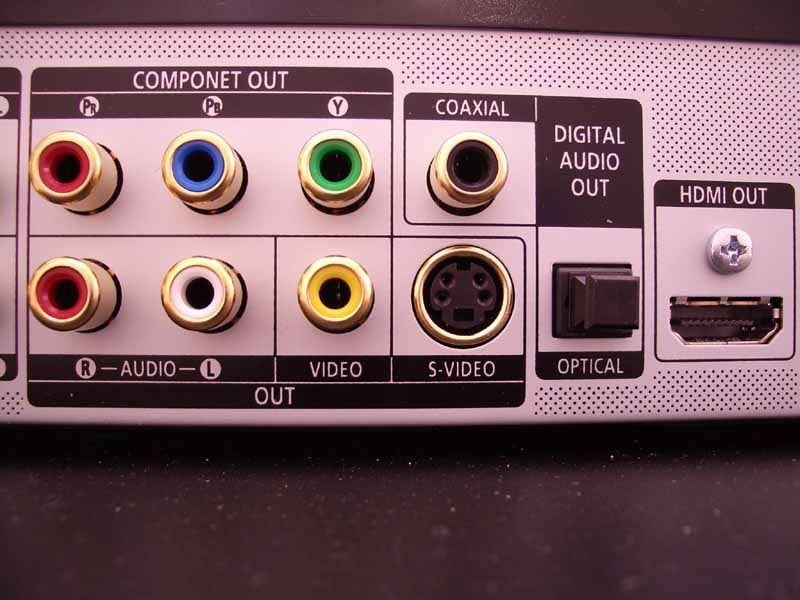
tkr001: Those things you refer to with lots of pins are the scart outputs. They may or may not support component. Check as I advised previously. The quality is better than composite (the yellow plug, red and white are for audio) but the major limiting factor is the compressed picture transmitted by sky. I'm afraid you are stuck with it as the channels you are interested in are not HD and probably won't be in the forseeable future. Moving to HDi will do nothing for you.im beginning understand all this stuff, so if i want slightly better picture quailty from sky, i will need a sky box with red green blue (RGB) and yellow white red plugins like this picture? that can connect/support my tv? my sky box right now only has the yellow, red and white no RGB, so do i take my sky box to sky and get one thats "component output" supported? also, my sky box has two slots of those pins, sorry if this is too much but im looking over the network also for help, thank you
tkr001: scart (the 2 outlets with lots of pins on your sky decoder) is capable of outputting component and you can get a cable with a scart connector on one end and red, green, and blue rca plugs on the other end. Some of the cables even have the red and white audio leads too so with those you would have a scart plug to plug into the sky decoder and 5 rca plugs to plug into your TV. The only problem is not ALL sky decoders will output component video. That is why you need to check you have a model that will. If you don't Sky will replace it with one that will and supply the appropriate cable. They will charge you a call out fee though.this is the back of my sky box, im guessing it can support "SCART connecter on one end and red green blue plgins on the other" (sorry dont know the name of the cable) also thank u tkr001 your very helpful
tkr001: Yes those are the scart outputs on the back of the box. You have to use the bottom one (tv) for scart to component. Go into the setup menus and check to see if component is an option for the tv scart. If so all you need to do is buy and connect the cable and select component in the setup.Hi, i have purchased the SCART/Component cable, I've pluged the SCART head to the Sky box 2nd slot (TV) and the component end (5 plugs) to the TV like this:


cyril7: OT I know as this is not HDi related, but snowman, I suspect the Sky box you have does not support Component, regardless you need to set it in the advanced menu under SCART settings, but maybe post a picture of the front of you box so we can see what model you have.could u please advise me on how i can recover my pin code so i could go to advance settings? here are pictures of the box:
Cyril


cyril7: Hi, the Pace DSR600 series is TP2/3 based (processor) it does not support Component, only composite, S-Video and RGB.
Cheers
Cyril
|
|
|