Geekzone: technology news, blogs, forums
Guest
Welcome Guest.
You haven't logged in yet. If you don't have an account you can register now.


View this topic in a long page with up to 500 replies per page Create new topic
1 | 2 | 3 | 4 | 5 | 6 | 7 | 8 | 9 | 10
suthland
64 posts

Master Geek
+1 received by user: 15


  #3364231 15-Apr-2025 11:06
Send private message

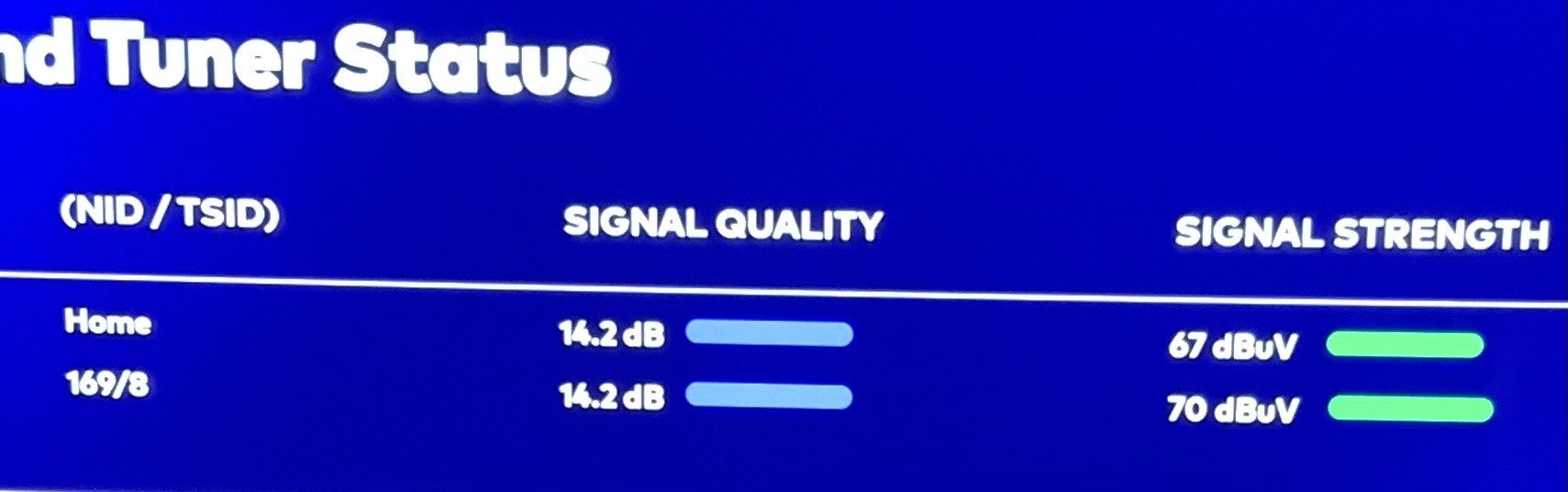
Turned LNB this morning from 7 o’clock to 6 o’clock - this is the result. 


Spyware
3818 posts

Uber Geek
+1 received by user: 1366

Lifetime subscriber

  #3364287 15-Apr-2025 13:08
Send private message

openmedia:


Sadly no actual technical changes other than a switch to DVB-S2. I was really hoping we'd see the Freeview Channels update to H264 from MPEG2.


Freeview NZ technical specs do not specify using H.264 on satellite. Upgrade to HD will be using H.265, page 61, 6.11.3.


https://freeviewnz.tv/Media/o4pp5qwe/freeview-specification-2022-v15.pdf


Spark Max Fibre using Mikrotik CCR1009-8G-1S-1S+, CRS125-24G-1S, Unifi UAP, U6-Pro, UAP-AC-M-Pro, Apple TV 4K (2022), Apple TV 4K (2017), iPad Air 1st gen, iPad Air 4th gen, iPhone 13, SkyNZ3151 (the white box). If it doesn't move then it's data cabled.


openmedia
3449 posts

Uber Geek
+1 received by user: 878

Trusted

  #3364298 15-Apr-2025 13:46
Send private message

Spyware:


Freeview NZ technical specs do not specify using H.264 on satellite. Upgrade to HD will be using H.265, page 61, 6.11.3.


https://freeviewnz.tv/Media/o4pp5qwe/freeview-specification-2022-v15.pdf


A lot of the existing older Satellite decoders can't support H265, but pretty much any DVB-S2 device will support H264. It would be great to see a switch to HEVC.


Generally known online as OpenMedia, now working for Red Hat APAC as a Technology Evangelist and Portfolio Architect. Still playing with MythTV and digital media on the side.


CYaBro
4708 posts

Uber Geek
+1 received by user: 1182

ID Verified
Trusted

  #3364309 15-Apr-2025 14:11
Send private message

I'm not getting any channels on 12546000, is that needed?


Opinions are my own and not the views of my employer.


openmedia
3449 posts

Uber Geek
+1 received by user: 878

Trusted

  #3364312 15-Apr-2025 14:42
Send private message

CYaBro:


I'm not getting any channels on 12546000, is that needed?


Transponder appears to be active but has no channels.


Generally known online as OpenMedia, now working for Red Hat APAC as a Technology Evangelist and Portfolio Architect. Still playing with MythTV and digital media on the side.


Eitsop
584 posts

Ultimate Geek
+1 received by user: 153

ID Verified

  #3364329 15-Apr-2025 15:22
Send private message

openmedia:


CYaBro:


I'm not getting any channels on 12546000, is that needed?


Transponder appears to be active but has no channels.


is EPG still going through old satellite for now?


maybe that transponder will host EPG in future 


Shop now at Mighty Ape (affiliate link).
rlevis
355 posts

Ultimate Geek
+1 received by user: 33


  #3364338 15-Apr-2025 16:18
Send private message

I use EPG Collector and had to change it to 12530000 which works.


kiwirock
694 posts

Ultimate Geek
+1 received by user: 141


  #3364350 15-Apr-2025 17:19
Send private message

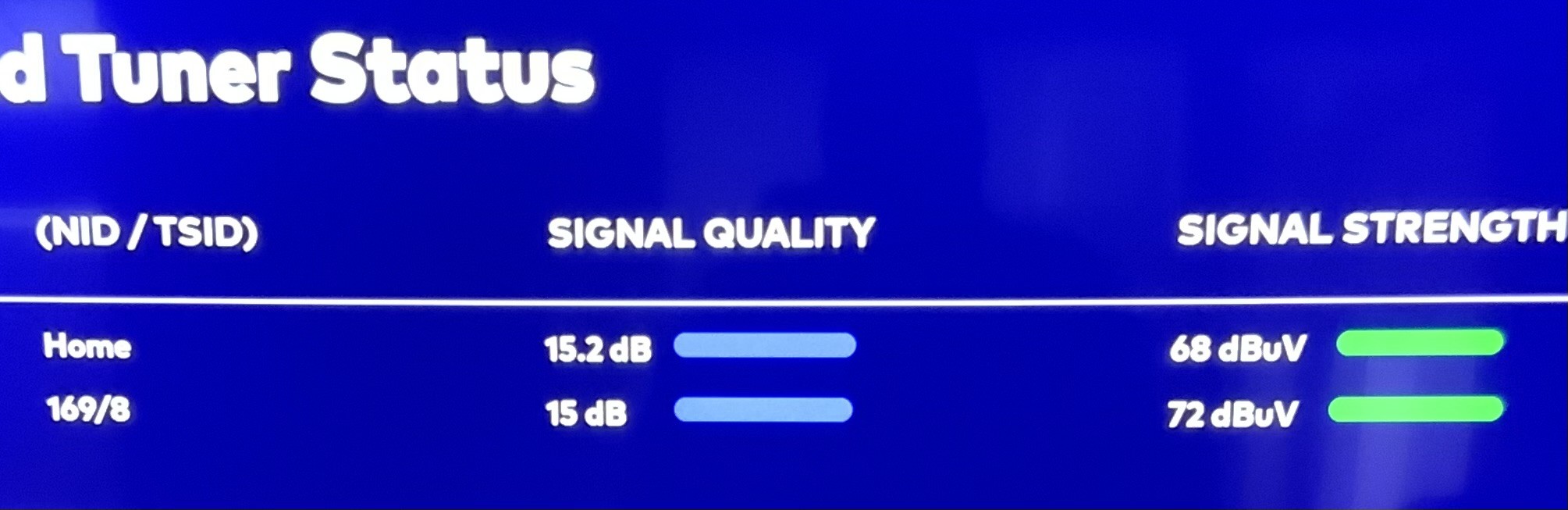
After peaking the LNB skew, I squeezed 1.1 dB more out of it. 


I think it might go higher, but the dual throat LNB can't be rotated any further, it's up against the holder.


Signal quality on the decoders is at 72% after adjusting the skew, used to be 83%.


Location: Inver's.


Buckchoi
119 posts

Master Geek
+1 received by user: 43


  #3364364 15-Apr-2025 18:02
Send private message

Apsattv:


skewt:


If anyone has any issues with a decoder not working today, try


Push: setup - 1111 - select


should goto a blank screen and hopefully force an update 


Are you sure about that? does nothing on my Kaon black box?


I can confirm that it does indeed work as described on a Kaon black box, the offshore call centre told me to do it. It solved a T100 no signal issue (absolutely nothing, 0.0dB with no satellite name listed) when powering off and reboots did not solve it. The box was left on standby overnight and had the required software version, so something did not work during the changeover process. I suspect the way our multiroom was installed is to blame (1 cable feed from a dual LNB into a 2 output splitter). Back when we had to do the 888 test, that only succeeded when I did it on both Kaon black boxes at the same time, otherwise individually I got T100 no signal.


Buckchoi
119 posts

Master Geek
+1 received by user: 43


  #3364384 15-Apr-2025 19:27
Send private message

I forgot to mention that I had to do the 1111 thing on the other Kaon black box too, so both boxes needed that fix.


Apsattv

2453 posts

Uber Geek
+1 received by user: 725


  #3364386 15-Apr-2025 19:45
Send private message

Yes tried again after dinner can confirm the 1111 process does work. Not that was having any issues!! just was curious to try it


Shop now for Dyson appliances (affiliate link).
Buckchoi
119 posts

Master Geek
+1 received by user: 43


  #3364452 15-Apr-2025 21:16
Send private message

What does performing the 1111 process actually do? How did that resolve my problem when multiple poweroffs, unplugs and reboots made no difference?


garryk
45 posts

Geek
+1 received by user: 1


  #3364515 15-Apr-2025 22:18
Send private message

I'm running a VuSolo2+ decoder using an abandoned Sky dish and LNB to put Freeview etc FTA content up on an oldish 42" Vierra Panasonic screen (HDMI) (Yeah, I probably should invest in a new smart TV and ditch the satellite decoder. Streaming content also comes in separately over an Apple TV - HDMI)


Knowing the cutover was looming up, last night I checked what services I still had available (some channels having previously dropped off), so I knew things were still at least partly working.


But today I found I have NO channels at all working over the satellite decoder, and no signal showing in Signal Finder (0.0 dB SNR, 0% AGC, 0 BER.)


I updated the satellites.xml file, and did a couple of restarts from cold, but nothing changed.


Looks like I am heading up onto the roof to re-align the dish in the morning? (In Hamilton, so wouldnt have thought I'd be fringe? Maybe my original installation has been sub-optimal albeit working, but now is no longer well enough aligned?)


Or is there something simple I've missed about what has to be done to move from the Optus-hosted services to the Korea6- based services?


RunningMan
9189 posts

Uber Geek
+1 received by user: 4842


  #3364516 15-Apr-2025 22:25
Send private message

@garryk go to settings->tuners&scanning then scan the transponders in this post https://www.geekzone.co.nz/forums.asp?forumid=83&topicid=318137&page_no=4#3364387 


You will need to change to 8PSK and auto for the other settings.


Eitsop
584 posts

Ultimate Geek
+1 received by user: 153

ID Verified

  #3364518 15-Apr-2025 22:27
Send private message

The satellite file. If you don’t format right it can fail


Do a blind scan. May need to add plugin


1 | 2 | 3 | 4 | 5 | 6 | 7 | 8 | 9 | 10
View this topic in a long page with up to 500 replies per page Create new topic


Geekzone Live »

Try automatic live updates from Geekzone directly in your browser, without refreshing the page, with Geekzone Live now.


Are you subscribed to our RSS feed? You can download the latest headlines and summaries from our stories directly to your computer or smartphone by using a feed reader.