Geekzone: technology news, blogs, forums
Guest
Welcome Guest.
You haven't logged in yet. If you don't have an account you can register now.


rogercruse

644 posts

Ultimate Geek
+1 received by user: 211

ID Verified
Lifetime subscriber

#301933 16-Oct-2022 23:36
Send private message


Nighttime crap


Filter this topic showing only the reply marked as answer View this topic in a long page with up to 500 replies per page Create new topic
 1 | 2
rogercruse

644 posts

Ultimate Geek
+1 received by user: 211

ID Verified
Lifetime subscriber

  #2983582 16-Oct-2022 23:41
Send private message

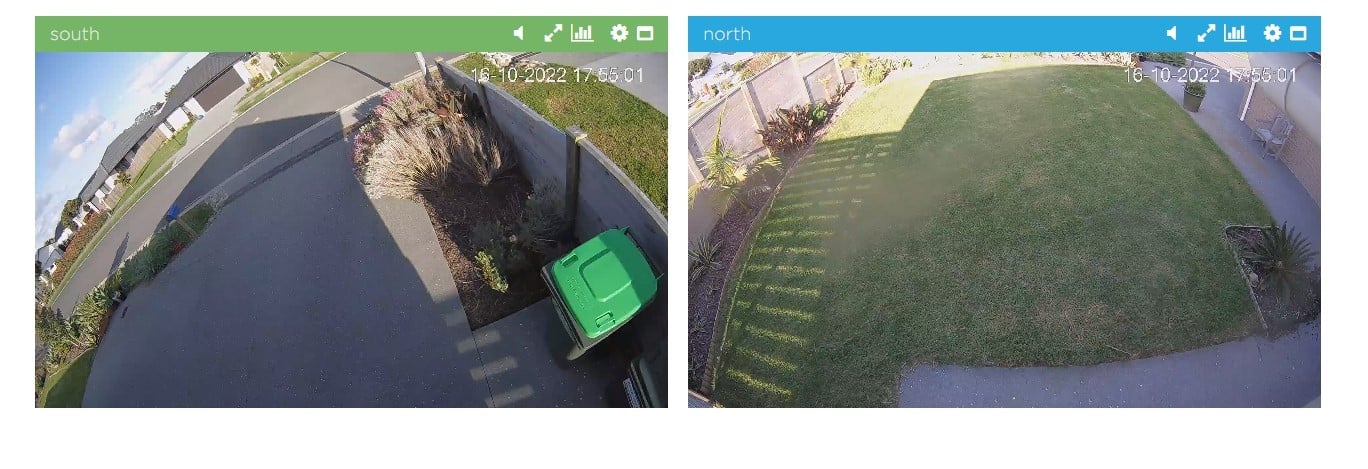
These images were taken by my security cameras. These are the same cameras during the day... what do I need to do to improve the nighttime images.


I've tried cleaning the lens, etc.


rogercruse

644 posts

Ultimate Geek
+1 received by user: 211

ID Verified
Lifetime subscriber

  #2983583 16-Oct-2022 23:46
Send private message

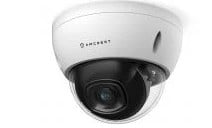
Cameras are Amcrest and are only three years old. They look like this


Spyware
3818 posts

Uber Geek
+1 received by user: 1366

Lifetime subscriber

  #2983584 17-Oct-2022 00:17
Send private message

Problem is the dome not the lens.


Spark Max Fibre using Mikrotik CCR1009-8G-1S-1S+, CRS125-24G-1S, Unifi UAP, U6-Pro, UAP-AC-M-Pro, Apple TV 4K (2022), Apple TV 4K (2017), iPad Air 1st gen, iPad Air 4th gen, iPhone 13, SkyNZ3151 (the white box). If it doesn't move then it's data cabled.


yann
138 posts

Master Geek
+1 received by user: 37


  #2983585 17-Oct-2022 00:21
Send private message

It isn't insects or spiders leaving trails on the dome is it?  Or would there be micro cracks/fissures in the dome itself which is leading to the highlighted areas during the night vision modes?


Sorry, I don't have these cameras, but is it possible to reseat the dome so the back is now at the front etc?  A bit light a tear off strip on goggles or sports cars windscreens etc. (or if it is the dome, can they be replaced?)  Is it possible to test it without the dome?


On my cameras I've had, I've had spiders building webs around or near the lens, sometimes on cases or mounts I have had, but I've not had a camera with a dome, so unsure whether this might cause issues during a NV type mode.


On the North camera, it looks like it is blurred in the same place as it is during the evening - just thinking again whether it is the dome thing if you've cleaned the lens etc.


Yann


insane
3324 posts

Uber Geek
+1 received by user: 1006

ID Verified
Trusted
2degrees
Subscriber

  #2983592 17-Oct-2022 01:05
Send private message

My guess is that it's condensation building up in there at night. Nothing you can do about that, other than getting a better quality camera that has been sealed with an inert gas.

Could try an external IR light and disable the internal ones, incase it's the IR LEDs that are heating the plastic and causing a large temp difference at night that could be causing additional condensation.

A quick google of that Brand had a few people complaining of just this. Affects some other brands too. Annoying!

For what it's worth, my unify G3 bullets seem okay, but have heard the G4 has this issue too.

Jase2985
13730 posts

Uber Geek
+1 received by user: 6202

ID Verified
Lifetime subscriber

  #2983594 17-Oct-2022 05:30
Send private message

its the IR light hitting dust/condensation on the dome and lighting it up. either need an external IR light source or different cameras.


that is why i would never by a dome camera for outside.


HP


Shop now for HP laptops and other devices (affiliate link).
RogerMellie
350 posts

Ultimate Geek
+1 received by user: 198


  #2983628 17-Oct-2022 10:11
Send private message

^ this.


robjg63
4161 posts

Uber Geek
+1 received by user: 1425

Subscriber

  #2983668 17-Oct-2022 12:41
Send private message


Nothing is impossible for the man who doesn't have to do it himself - A. H. Weiler


robjg63
4161 posts

Uber Geek
+1 received by user: 1425

Subscriber

  #2983669 17-Oct-2022 12:44
Send private message


Nothing is impossible for the man who doesn't have to do it himself - A. H. Weiler


jonathan18
7415 posts

Uber Geek
+1 received by user: 2850

ID Verified
Trusted

  #2983731 17-Oct-2022 13:12
Send private message

I have exactly the same issue with my two Amcrest dome cameras - in fact, I’m sure I had posted seeking advice here on GZ, but can’t find the thread…

Agree it’s related to the dome - I think it’s condensation, and is definitely related to the IR lights; I’ve tried various things to solve it, including cleaning the dome, using windscreen defogging solution, adding in extra packs of silica gel… The only ‘solution’ that works is turning off the IR lights, but of course then their effectiveness in the dark is significantly curtailed.

I did take a look for external IR lights but can’t recall if I managed to find anything suitable, as ideally they’d be powered by the same Ethernet cable (I only ran one to each camera).

When I feel I can justify the expense I think I’ll replace them with bullet cameras; I have a WiFi bullet camera (due to inability to get Ethernet there) and its nighttime image is absolutely fine. I think I’ll stick with Amcrest as, otherwise, they’ve been reliable; also, they have a decently wide FoV, something my other camera brand (Reolink) doesn’t have.

magnetonz
23 posts

Geek
+1 received by user: 2
Inactive user


  #2983912 17-Oct-2022 15:15
Send private message

I had the same problem in another brand of dome camera.  Ended up being condensation.
I purchased a few of those little condensation absorbing sachets and managed to squeeze them in around the circuit board.

Problem then went away for a few months, until I needed to replace them.


Shop now for Lego sets and other gifts (affiliate link).
jonathan18
7415 posts

Uber Geek
+1 received by user: 2850

ID Verified
Trusted

  #2983917 17-Oct-2022 15:28
Send private message

magnetonz:

I had the same problem in another brand of dome camera.  Ended up being condensation.
I purchased a few of those little condensation absorbing sachets and managed to squeeze them in around the circuit board.

Problem then went away for a few months, until I needed to replace them.


Yep, that’s one of the fixes I attempted, as mentioned above - made no difference to my problem, even in the short-term!

I’m now looking at potentials replacements - are there any particular downsides to a non-dome turret camera, specially this one? https://amcrest.com/prohd-5mp-outdoor-security-ip-turret-poe-camera-2-8mm-lens-103-fov-ip67-weatherproof-white-ip5m-t1179ew-28mm.html

Around NZ $300 for two incl shipping. Do these require mounting boxes like the dome versions?

MarkM536
321 posts

Ultimate Geek
+1 received by user: 146


  #2983989 17-Oct-2022 19:50
Send private message

rogercruse:


Please also adjust that driveway camera!


The bin isn't worth it!


shanes
270 posts

Ultimate Geek
+1 received by user: 84

Lifetime subscriber

  #2984000 17-Oct-2022 20:35
Send private message

rogercruse:


These images were taken by my security cameras. These are the same cameras during the day... what do I need to do to improve the nighttime images.


I've tried cleaning the lens, etc.


Those examples are almost identical to issues I was having, I'd tried cleaning them etc. and thought they were clean, but in the end I really had to take to the dome with a rag to polish it up.


If you get up close can you see what the blemish on the North daytime picture is? It looks bad enough that you might be able to see discolouration or condensation? In my case I think it was baked on spiders web.


MadEngineer
4591 posts

Uber Geek
+1 received by user: 2570

Trusted

  #2984831 19-Oct-2022 18:36
Send private message

100% dust and dirt on the outside of the dome, assuming it’s properly sealed.

Last time I had this on my camera at home I used the same microfibre cloth I’d just used for detailing my car to give the dome a quick clean.


You're not on Atlantis anymore, Duncan Idaho.

 1 | 2
Filter this topic showing only the reply marked as answer View this topic in a long page with up to 500 replies per page Create new topic


Geekzone Live »

Try automatic live updates from Geekzone directly in your browser, without refreshing the page, with Geekzone Live now.


Are you subscribed to our RSS feed? You can download the latest headlines and summaries from our stories directly to your computer or smartphone by using a feed reader.