Geekzone: technology news, blogs, forums
Guest
Welcome Guest.
You haven't logged in yet. If you don't have an account you can register now.


View this topic in a long page with up to 500 replies per page Create new topic
1 | 2 | 3 | 4 | 5 | 6 | 7 | 8 | 9 | 10 | ... | 19
Journeyman
1224 posts

Uber Geek
+1 received by user: 1264


  #3482627 20-Apr-2026 19:41
Send private message quote this post

RunningMan:


What platform are you using @Journeyman ?


Pixel 8 for the phone, Chrome browser on the PC. I'll usually Chromecast it to the tv from my phone but I haven't tried that yet.


RunningMan
9326 posts

Uber Geek
+1 received by user: 4968


  #3482628 20-Apr-2026 19:59
Send private message quote this post

Just for reference, bitrate watching on AppleTV is about 1.2Mb/s with pretty blurry picture. ATV App doesn't specify the resolution.


ATV is running tvOS 26.4, but note conflicting info in the minimum requirements:


https://helptvnz.zendesk.com/hc/en-us/articles/360019571112-Which-devices-can-I-watch-TVNZ-on 


Apple TV - 4th Gen & 4K, tvOS 15+ supported


https://helptvnz.zendesk.com/hc/en-us/categories/360001260171-Smart-TV


TVNZ+ supports tvOS 13


Starlith
211 posts

Master Geek
+1 received by user: 83

Trusted

  #3482640 20-Apr-2026 21:32
Send private message quote this post

Put some tv on for toddler and noticed adverts, my toddler had a go at me for subjecting her highness to watching ads even though I plead my innocence. Then I looked at Tvnz’s own preschooler advertising guidelines - bloody rude alright. So in the end my toddler won and I decided to ditch the app for a return to kodi and the 3rd party addin


RedactedRetracted
103 posts

Master Geek
+1 received by user: 48


  #3482645 20-Apr-2026 22:37
Send private message quote this post

Had a look at the TVNZ 1/2/DUKE livestreams on the website, it appears that in the backend they are now 1080p50 with 5.1 audio - however they explicitly filter these options from being returned to the web client at least. They are also DRM'd now (with Widevine/Playready/Fairplay depending on your client).


Here's the ffprobe output of the livestream for those interested in the exact codecs etc:


  Duration: N/A, start: 1776680932.010667, bitrate: 19523 kb/s
  Program 0
  Stream #0:0: Video: h264 (Main) (avc1 / 0x31637661), yuv420p, 416x234 [SAR 1:1 DAR 16:9], 180 kb/s, 25 fps, 25 tbr, 50k tbn, start 1776680932.080000 (default)
    Metadata:
      variant_bitrate : 299968
      id              : video-234p25-300
    Side data:
      Encryption initialization data: (102 bytes)
  Stream #0:1: Video: h264 (Main) (avc1 / 0x31637661), yuv420p, 640x360 [SAR 1:1 DAR 16:9], 412 kb/s, 50 tbr, 50k tbn, start 1776680938.080000 (default)
    Metadata:
      variant_bitrate : 699968
      id              : video-360p25-700
    Side data:
      Encryption initialization data: (102 bytes)
  Stream #0:2: Video: h264 (High) (avc1 / 0x31637661), yuv420p, 768x432 [SAR 1:1 DAR 16:9], 762 kb/s, 50 tbr, 50k tbn, start 1776680938.080000 (default)
    Metadata:
      variant_bitrate : 1200000
      id              : video-432p25-1200
    Side data:
      Encryption initialization data: (102 bytes)
  Stream #0:3: Video: h264 (High) (avc1 / 0x31637661), yuv420p, 1024x576 [SAR 1:1 DAR 16:9], 1206 kb/s, 50 tbr, 50k tbn, start 1776680938.080000 (default)
    Metadata:
      variant_bitrate : 1800000
      id              : video-576p25-1800
    Side data:
      Encryption initialization data: (102 bytes)
  Stream #0:4: Video: h264 (High) (avc1 / 0x31637661), yuv420p, 1280x720 [SAR 1:1 DAR 16:9], 2213 kb/s, 50 tbr, 50k tbn, start 1776680938.080000 (default)
    Metadata:
      variant_bitrate : 2400000
      id              : video-720p25-2400
    Side data:
      Encryption initialization data: (102 bytes)
  Stream #0:5: Video: h264 (High) (avc1 / 0x31637661), yuv420p, 1280x720 [SAR 1:1 DAR 16:9], 3764 kb/s, 100 tbr, 50k tbn, start 1776680938.040000 (default)
    Metadata:
      variant_bitrate : 4800000
      id              : video-720p50-4800
    Side data:
      Encryption initialization data: (102 bytes)
  Stream #0:6: Video: h264 (High) (avc1 / 0x31637661), yuv420p, 1920x1080 [SAR 1:1 DAR 16:9], 4506 kb/s, 50 tbr, 50k tbn, start 1776680938.080000 (default)
    Metadata:
      variant_bitrate : 4200000
      id              : video-1080p25-4200
    Side data:
      Encryption initialization data: (102 bytes)
  Stream #0:7: Video: h264 (High) (avc1 / 0x31637661), yuv420p, 1920x1080 [SAR 1:1 DAR 16:9], 6066 kb/s, 100 tbr, 50k tbn, start 1776680938.040000 (default)
    Metadata:
      variant_bitrate : 6000000
      id              : video-1080p50-6000
    Side data:
      Encryption initialization data: (102 bytes)
  Stream #0:8(eng): Audio: aac (LC) (mp4a / 0x6134706D), 48000 Hz, stereo, fltp, 93 kb/s, start 1776680932.010667 (default)
    Metadata:
      variant_bitrate : 96000
      id              : aac-96k
    Side data:
      Encryption initialization data: (102 bytes)
  Stream #0:9(eng): Audio: aac (LC) (mp4a / 0x6134706D), 48000 Hz, stereo, fltp, 125 kb/s, start 1776680932.010667 (default)
    Metadata:
      variant_bitrate : 128000
      id              : aac-128k
    Side data:
      Encryption initialization data: (102 bytes)
  Stream #0:10(eng): Audio: eac3 (ec-3 / 0x332D6365), 48000 Hz, 5.1(side), fltp, 192 kb/s, start 1776680938.016000 (default)
    Metadata:
      variant_bitrate : 192000
      id              : eac3-192k
    Side data:
      Audio Service Type: main
      Encryption initialization data: (102 bytes)


nova
262 posts

Ultimate Geek
+1 received by user: 146

Trusted

  #3482648 20-Apr-2026 23:10
Send private message quote this post

I tried to watch the news yesterday on my Samsung TV, part way through the news hour. The "Watch from start" option didn't work, I got an error message about "Invalid end time". "Watch live" did work, and I could rewind to the start, but fast forward and rewind were barely usable. And when I fast forwarded a bit too far, it started showing me "Ad 1 of 7" at which point I gave up. It used to be that if you watched live content, within a few hours of broadcast, that you would just get the live ads as part of the stream which you could fast forward through. I can see why they might want to have fixed that, but I don't see myself using TVNZ+ much anymore. The old app was a little buggy, but this one is so buggy I can't believe they released it in the current state.


jamesrt
1679 posts

Uber Geek
+1 received by user: 961

ID Verified
Trusted
Lifetime subscriber

  #3482681 21-Apr-2026 08:30
Send private message quote this post

Re the comments about unable to pause etc; noticed myself last night that I now need to use the "OK" button on my Panasonic TV remote to pause/resume, and not the "pause/play" buttons - which I'm quite certain used to work last week!


Move to New Zealand's best fibre broadband service (affiliate link). Free setup code: R587125ERQ6VE. Note that to use Quic Broadband you must be comfortable with configuring your own router.
dafman
4091 posts

Uber Geek
+1 received by user: 2695

Trusted
Subscriber

  #3482684 21-Apr-2026 09:06
Send private message quote this post

jamesrt:


Re the comments about unable to pause etc; noticed myself last night that I now need to use the "OK" button on my Panasonic TV remote to pause/resume, and not the "pause/play" buttons - which I'm quite certain used to work last week!


Two days ago, Grand Designs wouldn't load at all on Panasonic TVNZ app. Yesterday, it did load after approx 1 min of buffering circle. Used load perfectly ok before upgrade.


TVNZ app on iPhone no longer finds any Chromecast options despite having two on home network. Old app was fine in locating these.


Am beginning to think the developers that worked on the Sonos app refresh offered TVNZ a deal they couldn't turn down.


mailmarshall
364 posts

Ultimate Geek
+1 received by user: 60


  #3482694 21-Apr-2026 10:23
Send private message quote this post

dafman:


jamesrt:


Re the comments about unable to pause etc; noticed myself last night that I now need to use the "OK" button on my Panasonic TV remote to pause/resume, and not the "pause/play" buttons - which I'm quite certain used to work last week!


Two days ago, Grand Designs wouldn't load at all on Panasonic TVNZ app. Yesterday, it did load after approx 1 min of buffering circle. Used load perfectly ok before upgrade.


TVNZ app on iPhone no longer finds any Chromecast options despite having two on home network. Old app was fine in locating these.


Am beginning to think the developers that worked on the Sonos app refresh offered TVNZ a deal they couldn't turn down.


I had the same issue on my phone, so deleted TVNZ app and reinstalled. This forced it to search home network again for casting devices. Working now


openmedia
3497 posts

Uber Geek
+1 received by user: 902

Trusted

  #3482760 21-Apr-2026 12:52
Send private message quote this post

dafman:


jamesrt:


Re the comments about unable to pause etc; noticed myself last night that I now need to use the "OK" button on my Panasonic TV remote to pause/resume, and not the "pause/play" buttons - which I'm quite certain used to work last week!


Two days ago, Grand Designs wouldn't load at all on Panasonic TVNZ app. Yesterday, it did load after approx 1 min of buffering circle. Used load perfectly ok before upgrade.


Which Panasonic Smart TV Platform? My OLED is their "My Home Screen" platform and the TVNZ+ App worked perfectly.


Generally known online as OpenMedia, now working for Red Hat APAC as a Technology Evangelist and Portfolio Architect. Still playing with MythTV and digital media on the side.


dafman
4091 posts

Uber Geek
+1 received by user: 2695

Trusted
Subscriber

  #3482784 21-Apr-2026 14:43
Send private message quote this post

openmedia:


dafman:


jamesrt:


Re the comments about unable to pause etc; noticed myself last night that I now need to use the "OK" button on my Panasonic TV remote to pause/resume, and not the "pause/play" buttons - which I'm quite certain used to work last week!


Two days ago, Grand Designs wouldn't load at all on Panasonic TVNZ app. Yesterday, it did load after approx 1 min of buffering circle. Used load perfectly ok before upgrade.


Which Panasonic Smart TV Platform? My OLED is their "My Home Screen" platform and the TVNZ+ App worked perfectly.


It's a 2018 TH-65FZ95OU - it looks like it it is running My Home Screen 3.0. Two days ago, Grand designs just returned a light blue screen, yesterday it took around a minute to load, then a long time to come up to full resolution (but was good res when it finally arrived). Navigating around the app is definitely more laggy than historic. It could be the TV age is struggling with the update maybe.


enserf
enserf
42 posts

Geek
+1 received by user: 12

ID Verified
Subscriber

  #3482806 21-Apr-2026 15:57
Send private message quote this post

Just tried the iPhone app- it was fine except for the old list and nothing recent.


If only they would sort out the Apple TV disaster- that's what I use daily.


Shop now for Lego sets and other gifts (affiliate link).
tanivula
1007 posts

Uber Geek
+1 received by user: 160

Lifetime subscriber

  #3482811 21-Apr-2026 16:04
Send private message quote this post

the new app looks ok.  Feedback on Android TV device:


  • alphabetical keyboard for (login email entry) sucks
  • not using the device keyboard is worse - meaning not being able to use the phone remote for keyboard entry is painful
  • the programmes on "my list" have changed order putting newest at the start (having the ability to change order would be fab)
  • would be great if you could use a code to enter via a mobile device to link rather than the email / passcode ordeal

Android App feedback:


  • playback interface is better
  • seek slider doesn't work
  • tapping on the side of the screen to ff a segment (not the icon) is great and in line with other players

old3eyes
9170 posts

Uber Geek
+1 received by user: 1369

Subscriber

  #3482814 21-Apr-2026 16:24
Send private message quote this post

I haven't tested it yet but after the update all my watch  list  was gone  and so  were the programs  even though one of them is still on TVNZ. 


Regards,

Old3eyes


freitasm
BDFL - Memuneh
80944 posts

Uber Geek
+1 received by user: 41698

Administrator
ID Verified
Trusted
Geekzone
Lifetime subscriber

  #3482820 21-Apr-2026 16:36
Send private message quote this post

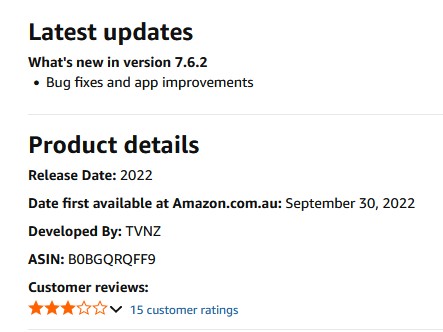
Checking to see if the TVNZ app was updated in the Amazon Appstore for the Fire TV... Who creates an app store with a field for the date when the app was first released, but doesn't have a field for the last update?


And, no... It's not updated yet. Still no TVNZ on Fire TV.


Referral links: Quic Broadband (free setup code: R587125ERQ6VE) | Samsung | AliExpress | Wise | Sharesies 


Support Geekzone by subscribing (browse ads-free), or making a one-off or recurring donation through PressPatron.



RunningMan
9326 posts

Uber Geek
+1 received by user: 4968


  #3482827 21-Apr-2026 16:57
Send private message quote this post

RedactedRetracted:


Had a look at the TVNZ 1/2/DUKE livestreams on the website, it appears that in the backend they are now 1080p50 with 5.1 audio - however they explicitly filter these options from being returned to the web client at least. They are also DRM'd now (with Widevine/Playready/Fairplay depending on your client).


Now that's a tangible useful upgrade. Pity we can't get it yet, but having 5.1 audio is (will be?) a real improvement.


RedactedRetracted:


Here's the ffprobe output of the livestream for those interested in the exact codecs etc:


  Stream #0:2: Video: h264 (High) (avc1 / 0x31637661), yuv420p, 768x432 [SAR 1:1 DAR 16:9], 762 kb/s, 50 tbr, 50k tbn, start 1776680938.080000 (default)
    Metadata:
      variant_bitrate : 1200000
      id              : video-432p25-1200
    Side data:
      Encryption initialization data: (102 bytes)


This must have been what I was getting on the Apple TV yesterday. 432p 1.2Mb/s which is garbage to watch.


1 | 2 | 3 | 4 | 5 | 6 | 7 | 8 | 9 | 10 | ... | 19
View this topic in a long page with up to 500 replies per page Create new topic


Geekzone Live »

Try automatic live updates from Geekzone directly in your browser, without refreshing the page, with Geekzone Live now.


Are you subscribed to our RSS feed? You can download the latest headlines and summaries from our stories directly to your computer or smartphone by using a feed reader.