Geekzone: technology news, blogs, forums
Guest
Welcome Guest.
You haven't logged in yet. If you don't have an account you can register now.


Frosty78

5 posts

Wannabe Geek
+1 received by user: 1


#319391 21-Apr-2025 08:48
Send private message

Hi


I've just been setting up a Panasonic TV at the parents house. 65Z85AGZ. I've logged in with mums Amazon account and mostly smooth sailing except the 3 NOW app is coming up as 'Unavailable'. I've had no other issue setting up TVNZ OD & Neon. The Amazon account 'Country & Regin Settings' are set to New Zealand however linked to the Amazon.com.au (as there is no NZ Amazon).


Any ideas on the roadblock is?


View this topic in a long page with up to 500 replies per page Create new topic
 1 | 2
DjShadow
4222 posts

Uber Geek
+1 received by user: 1322

ID Verified
Trusted
Subscriber

  #3366106 21-Apr-2025 09:16
Send private message

I know on my Panasonic TV, the ThreeNow app didn’t appear until I did a firmware update. Mine however predates the Amazon Firmware so you may get a diff result


robjg63
4160 posts

Uber Geek
+1 received by user: 1425

Subscriber

  #3366109 21-Apr-2025 09:39
Send private message

Not directly what you want to know - but the 3Now app certainly is available for the Amazon Fire TV stick generally.


So the TV wont let you find the app and install it.


If you log into amazon.com.au on a browser and go to 'Your apps and devices' can you search for 3Now and push it to the TV?


Nothing is impossible for the man who doesn't have to do it himself - A. H. Weiler


freitasm
BDFL - Memuneh
80646 posts

Uber Geek
+1 received by user: 41025

Administrator
ID Verified
Trusted
Geekzone
Lifetime subscriber

  #3366137 21-Apr-2025 12:12
Send private message

I had an Amazon Fire TV Panasonic and the ThreeNow app was certainly available. Update everything, restart the TV and make sure the account is set to AU/NZ.


You might have to go to Amazon.com and check under Digital content on your account to ensure the region is correct. 


Referral links: Quic Broadband (free setup code: R587125ERQ6VE) | Samsung | AliExpress | Wise | Sharesies 


Support Geekzone by subscribing (browse ads-free), or making a one-off or recurring donation through PressPatron.


Frosty78

5 posts

Wannabe Geek
+1 received by user: 1


  #3366479 22-Apr-2025 11:54
Send private message

Thanks for all the replies. So I've gone through the suggestions - making sure region is NZ, 'purchasing' 3NOW app on Amazon web and trying to push through to the device. I even did a factory reset on the tv and set up using my account (not Mums account) with NZ as region. 3NOW still is unavailable. As noted, no issues with any other apps incl SKY, TVNZ OD. So I'll keep digging. Perhaps some setting with the TV...dunno.


mattwnz
20515 posts

Uber Geek
+1 received by user: 4795


  #3366520 22-Apr-2025 15:18
Send private message

Try contacting panasonic about it, or TV3. I think some apps can be restricted, because I recall the Freeview app wasn't available on some tvs, and don't think you can download it on a chromecast, but you can on a sony tv for example.


openmedia
3449 posts

Uber Geek
+1 received by user: 877

Trusted

  #3366553 22-Apr-2025 17:10
Send private message

Great to see some FireTV based TVs appearing. I suggest the issues is with the tagging on the ThreeNow app as it won't work on a number of older FireTV devices.


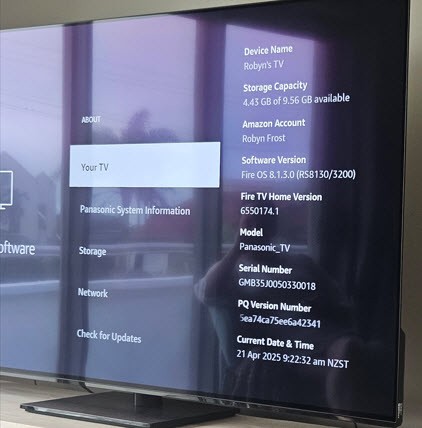
Are you able to confirm the versions of FireOS on the device?


  • Settings > Device > Fire TV and looking at the "Software Version" details.
  • https://developer.amazon.com/docs/fire-tv/fire-os-overview.html


Generally known online as OpenMedia, now working for Red Hat APAC as a Technology Evangelist and Portfolio Architect. Still playing with MythTV and digital media on the side.


Shop now for Lenovo laptops and other devices (affiliate link).
openmedia
3449 posts

Uber Geek
+1 received by user: 877

Trusted

  #3366554 22-Apr-2025 17:13
Send private message

Ok so based on the URL below 3Now should be present


https://www.panasonic.com/nz/consumer/television-audio/televisions-learn/concept/fire-tv.html


Generally known online as OpenMedia, now working for Red Hat APAC as a Technology Evangelist and Portfolio Architect. Still playing with MythTV and digital media on the side.


freitasm
BDFL - Memuneh
80646 posts

Uber Geek
+1 received by user: 41025

Administrator
ID Verified
Trusted
Geekzone
Lifetime subscriber

  #3366585 22-Apr-2025 18:51
Send private message

It should be. I had a Panasonic Fire TV here for months and ThreeNow was present.


Referral links: Quic Broadband (free setup code: R587125ERQ6VE) | Samsung | AliExpress | Wise | Sharesies 


Support Geekzone by subscribing (browse ads-free), or making a one-off or recurring donation through PressPatron.


Frosty78

5 posts

Wannabe Geek
+1 received by user: 1


  #3366650 23-Apr-2025 08:27
Send private message

openmedia:


Great to see some FireTV based TVs appearing. I suggest the issues is with the tagging on the ThreeNow app as it won't work on a number of older FireTV devices.


Are you able to confirm the versions of FireOS on the device?


  • Settings > Device > Fire TV and looking at the "Software Version" details.
  • https://developer.amazon.com/docs/fire-tv/fire-os-overview.html


openmedia
3449 posts

Uber Geek
+1 received by user: 877

Trusted

  #3366665 23-Apr-2025 09:23
Send private message

Frosty78:


So FireOS8 so it does support ThreeNow


Can you access the app and see your TV as an option when you're logged into amazon.com.au


https://www.amazon.com.au/Warner-Bros-Discovery-NZ-ThreeNow/dp/B0BFF99HRS


Generally known online as OpenMedia, now working for Red Hat APAC as a Technology Evangelist and Portfolio Architect. Still playing with MythTV and digital media on the side.


BillieBob
4 posts

Wannabe Geek
+1 received by user: 1


  #3367211 24-Apr-2025 16:28
Send private message

Hi, I have just got a New Panasonic Fire TV and I also can't get the 3Now App going. I have updated the TV and booted it but no luck.  I hope someone finds a solution.  I have emailed TV3 and hope to get a reply soon.


It's a bit annoying in 2025.  


Thanks


Want to support Geekzone and browse the site without the ads? Subscribe to Geekzone now (monthly, annual and lifetime options).
Spyware
3817 posts

Uber Geek
+1 received by user: 1366

Lifetime subscriber

  #3367224 24-Apr-2025 17:09
Send private message

Search for "threenow" rather than "3now".


Spark Max Fibre using Mikrotik CCR1009-8G-1S-1S+, CRS125-24G-1S, Unifi UAP, U6-Pro, UAP-AC-M-Pro, Apple TV 4K (2022), Apple TV 4K (2017), iPad Air 1st gen, iPad Air 4th gen, iPhone 13, SkyNZ3151 (the white box). If it doesn't move then it's data cabled.


Yabanize
2351 posts

Uber Geek
+1 received by user: 583


  #3368932 29-Apr-2025 19:38
Send private message

Same issue here on a new Panasonic Z85. It is possible to sideload.


freitasm
BDFL - Memuneh
80646 posts

Uber Geek
+1 received by user: 41025

Administrator
ID Verified
Trusted
Geekzone
Lifetime subscriber

  #3368934 29-Apr-2025 19:40
Send private message

Interesting. I will ask a contact at Panasonic tomorrow. 


Referral links: Quic Broadband (free setup code: R587125ERQ6VE) | Samsung | AliExpress | Wise | Sharesies 


Support Geekzone by subscribing (browse ads-free), or making a one-off or recurring donation through PressPatron.


BillieBob
4 posts

Wannabe Geek
+1 received by user: 1


  #3368945 29-Apr-2025 20:29
Send private message

Hi, I have just received an email from Panasonic, and they said that I should delete my USA Amazon account on the TV and register an AU / NZ Amazon account, so I will try this.  Thanks


 1 | 2
View this topic in a long page with up to 500 replies per page Create new topic


Geekzone Live »

Try automatic live updates from Geekzone directly in your browser, without refreshing the page, with Geekzone Live now.


Are you subscribed to our RSS feed? You can download the latest headlines and summaries from our stories directly to your computer or smartphone by using a feed reader.