Geekzone: technology news, blogs, forums
Guest
Welcome Guest.
You haven't logged in yet. If you don't have an account you can register now.


Filter this topic showing only the reply marked as answer View this topic in a long page with up to 500 replies per page Create new topic
1 | ... | 3 | 4 | 5 | 6 | 7 | 8 | 9 | 10 | 11 | 12 | 13 | ... | 42
Nate001
677 posts

Ultimate Geek
+1 received by user: 465


  #2814280 17-Nov-2021 09:34
Send private message

Added to iPhone, easy and quick. Shows up on apple watch too with QR which is handy. 


trig42
5889 posts

Uber Geek
+1 received by user: 2094

ID Verified

  #2814281 17-Nov-2021 09:35
Send private message

I've just added mine to my wallet.


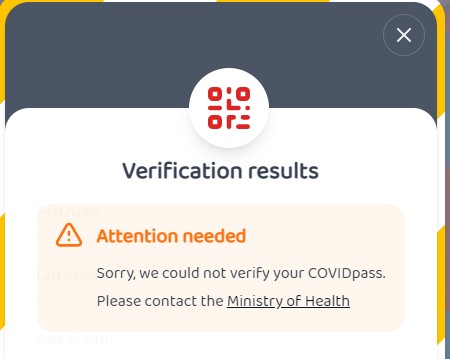
It doesn't work with that https://vaxxed.as site though - Just says sorry we could not verify your COVIDpass, please contact the Ministry of Health.


Klathman
302 posts

Ultimate Geek
+1 received by user: 78


  #2814283 17-Nov-2021 09:37
Send private message

I did have some issues adding the cert to google pay as I have my mail app in a work profile but google pay is in the main personal work container and wouldn't run in the work container.


I didn't realise that Google Pay wasn't even installed on my phone to begin with so that was the first issue. Then it was getting the link from the email to open in the personal part of the phone. Finally got that sorted and then could add the QR code to the home screen. I imagine that I'm a fringe and painful use-case but can definitely see that causing pain for some people.


BarTender
3629 posts

Uber Geek
+1 received by user: 2572

ID Verified
Trusted
Lifetime subscriber

  #2814284 17-Nov-2021 09:38
Send private message

trig42:


I've just added mine to my wallet.


It doesn't work with that https://vaxxed.as site though - Just says sorry we could not verify your COVIDpass, please contact the Ministry of Health.


I had given feedback saying their site was broken, and they were waiting until the legit pass was created today, so I suspect they will have it fixed today or tomorrow.


tanivula
998 posts

Ultimate Geek
+1 received by user: 158

Lifetime subscriber

  #2814285 17-Nov-2021 09:42
Send private message

tdgeek:


tanivula:


Whats the best way of adding this QR code to GPay? 


Loyalty / Gift / Public Transport? I feel like there was an easier way to add random things in here with older versions. 


I'm Apple but I accessed my email they sent on my phone, clicked the Apple one, you can click the Google one, and it added it to the app


Haha, damn, another case of RTFI!


wonderferret
141 posts

Master Geek
+1 received by user: 17

Lifetime subscriber

  #2814286 17-Nov-2021 09:43
Send private message

Who do I log a bug with ?
I have a surname with 3 parts and my NHI record is correct but the cert issuer page concatenates the last 2 parts of my name and says I'm not vaccinated


HP


Shop now for HP laptops and other devices (affiliate link).
Beccara
1473 posts

Uber Geek
+1 received by user: 517

ID Verified

  #2814288 17-Nov-2021 09:45
Send private message

Got mine just now, it works on https://nz-covid-pass.github.io/ but  https://vaxxed.as/ comes up with


Most problems are the result of previous solutions...

All comment's I make are my own personal opinion and do not in any way, shape or form reflect the views of current or former employers unless specifically stated 

Jase2985
13732 posts

Uber Geek
+1 received by user: 6206

ID Verified
Lifetime subscriber

  #2814289 17-Nov-2021 09:46
Send private message

wonderferret: Who do I log a bug with ?
I have a surname with 3 parts and my NHI record is correct but the cert issuer page concatenates the last 2 parts of my name and says I'm not vaccinated


best to call the 0800 number


freitasm
BDFL - Memuneh
80655 posts

Uber Geek
+1 received by user: 41052

Administrator
ID Verified
Trusted
Geekzone
Lifetime subscriber

  #2814291 17-Nov-2021 09:47
Send private message

tanivula:


Whats the best way of adding this QR code to GPay? 


Loyalty / Gift / Public Transport? I feel like there was an easier way to add random things in here with older versions. 


What you mean? Just click the link from the email and it's automatically added after you accept T&Cs and use fingerprint (if enabled on your phone). Nothing else.


Referral links: Quic Broadband (free setup code: R587125ERQ6VE) | Samsung | AliExpress | Wise | Sharesies 


Support Geekzone by subscribing (browse ads-free), or making a one-off or recurring donation through PressPatron.



wonderferret
141 posts

Master Geek
+1 received by user: 17

Lifetime subscriber

  #2814292 17-Nov-2021 09:48
Send private message

Jase2985:

wonderferret: Who do I log a bug with ?
I have a surname with 3 parts and my NHI record is correct but the cert issuer page concatenates the last 2 parts of my name and says I'm not vaccinated


best to call the 0800 number


Sigh, The 0800 number is busy

freitasm
BDFL - Memuneh
80655 posts

Uber Geek
+1 received by user: 41052

Administrator
ID Verified
Trusted
Geekzone
Lifetime subscriber

  #2814293 17-Nov-2021 09:49
Send private message

Beccara:


Got mine just now, it works on https://nz-covid-pass.github.io/ but  https://vaxxed.as/ comes up with


Contact vaxxed.as and ask them to fix their page then.


Referral links: Quic Broadband (free setup code: R587125ERQ6VE) | Samsung | AliExpress | Wise | Sharesies 


Support Geekzone by subscribing (browse ads-free), or making a one-off or recurring donation through PressPatron.


Shop now at Mighty Ape (affiliate link).
geocom
597 posts

Ultimate Geek
+1 received by user: 143

Subscriber

  #2814294 17-Nov-2021 09:49
Send private message

Not exactly sure why they need to send it via email rather than just having a button on the web page as even then it still takes you to the heath website to finish that process. Also would consider it more secure to do it via the website than via a email.


Also have to wonder why apple wallets qr code is so small compared to google's seems like it will be a pain to scan compared to google pay.


MaxineN:


Double tap power button and you can select cards from there.


Anyone have any suggestions on why this wont work when you only have a Vaccination Certificate stored in it. Have had a look in the settings and the double click option is enabled. However it wont work


Geoff E


tanivula
998 posts

Ultimate Geek
+1 received by user: 158

Lifetime subscriber

  #2814295 17-Nov-2021 09:50
Send private message

freitasm:


What you mean? Just click the link from the email and it's automatically added after you accept T&Cs and use fingerprint (if enabled on your phone). Nothing else.


I realise that now. Admittedly I didn't read the email/instructions properly, downloaded the PDF and went hmmm ok, what do I do with it now. My bad! 


jonathan18
7415 posts

Uber Geek
+1 received by user: 2850

ID Verified
Trusted

  #2814296 17-Nov-2021 09:50
Send private message

Clicking on the Google Pay link in the email didn’t work for me - came up with a help page which did contain useful info. I had to copy the link (which wasn’t possible from within Gmail on my phone for some reason; had to do it in the Gmail app on my iPad and email it back to myself); then opened that link in a browser window, which then opened through into Google Pay and that loaded perfectly. Even the shortcut on the home screen needs a fingerprint to open, but once set up it’ll be easy to use.


richms
29100 posts

Uber Geek
+1 received by user: 10216

Trusted
Lifetime subscriber

  #2814297 17-Nov-2021 09:51
Send private message

I had to log out and back in before it showed on the my health thing.

Emailed quickly and added to Google pay with no hassle at all. Not sure if it will automatically show on all phones or if I have to re do the link yet as the going out phone is at home.


Richard rich.ms

1 | ... | 3 | 4 | 5 | 6 | 7 | 8 | 9 | 10 | 11 | 12 | 13 | ... | 42
Filter this topic showing only the reply marked as answer View this topic in a long page with up to 500 replies per page Create new topic


Geekzone Live »

Try automatic live updates from Geekzone directly in your browser, without refreshing the page, with Geekzone Live now.


Are you subscribed to our RSS feed? You can download the latest headlines and summaries from our stories directly to your computer or smartphone by using a feed reader.