Geekzone: technology news, blogs, forums
Guest
Welcome Guest.
You haven't logged in yet. If you don't have an account you can register now.
To post in this sub-forum you must have made 30 posts or have Trust status or have completed our ID Verification


Filter this topic showing only the reply marked as answer View this topic in a long page with up to 500 replies per page Create new topic
1 | 2 | 3 | 4 | 5 | 6 | 7 | 8 | 9 | 10 | 11 | ... | 15
UnoTellyService
62 posts

Master Geek
+1 received by user: 40

Trusted
Unotelly

  #1052020 24-May-2014 00:54
Send private message

KrazyKid: Hi

Finding your service really good and about to sign up.
Is there any chance that you get fix the issue with SkyGo for NZ Sky.
It would be nice to not gave to change the DNS back every time I want to watch the rugby :)

(Also help on the all important WAF)

Thanks


Try setting Channel Option 1 to "Turn Off" when using Sky Go NZ. It seems Sky Go NZ uses links common to the rest of the channels available under Channel Option 1. 


Glassboy
851 posts

Ultimate Geek
+1 received by user: 251

ID Verified
Trusted

  #1052024 24-May-2014 02:02
Send private message

Just hijacking this thread a bit.  There's been a few other people mentioning Netflix buffering issues.  If you are a UnoTelly user can you try changing your Unotelly setting for Netflix to the UK and then testing how well it works.  This seems to have resolved all my issues (of course I can't watch ST:TOS but that's a separate issue).

dclegg
2806 posts

Uber Geek
+1 received by user: 810

Trusted

  #1052049 24-May-2014 08:46
Send private message

Glassboy: Just hijacking this thread a bit.  There's been a few other people mentioning Netflix buffering issues.  If you are a UnoTelly user can you try changing your Unotelly setting for Netflix to the UK and then testing how well it works.  This seems to have resolved all my issues (of course I can't watch ST:TOS but that's a separate issue).


That is only an acceptable "workaround" if the content you want to watch is available in both locations. Sadly we seem to be addicted to shows that are only available in the US version.


freitasm

BDFL - Memuneh
80662 posts

Uber Geek
+1 received by user: 41088

Administrator
ID Verified
Trusted
Geekzone
Lifetime subscriber

  #1052051 24-May-2014 08:47
Send private message

Not exactly related but bringing this thread to the attention of UnoTelly folks around here. It seems Netflix is not working quite right for a few users (not only UnoTelly but other providers as well). Perhaps Netflix has blocked access as Hulu tried doing before?

Note that Netflix on browser with UnoTelly works fine, it seems it's devices (Amazon FireTV, Apple TV) that are failing.


Referral links: Quic Broadband (free setup code: R587125ERQ6VE) | Samsung | AliExpress | Wise | Sharesies 


Support Geekzone by subscribing (browse ads-free), or making a one-off or recurring donation through PressPatron.


dclegg
2806 posts

Uber Geek
+1 received by user: 810

Trusted

  #1052061 24-May-2014 09:29
Send private message

freitasm: 
Note that Netflix on browser with UnoTelly works fine, it seems it's devices (Amazon FireTV, Apple TV) that are failing.


Thats not quite true. Initial testing seems to indicate that it may be content related. We're in the process of watching season 4 of The West Wing, and I can't get that to work in the browser at all (Chrome v34.0.1847.137 on OSX Mavericks). But I tried another show (The Office; not sure which season or ep queued up), and that started streaming with no issue.

This may have been a red herring, and perhaps it was down to dumb luck rather than the chosen content. But the point I'm trying to make is that its not just devices that are failing, but the browser interface is also struggling.

UnoTellyNick
52 posts

Master Geek
+1 received by user: 30

Trusted
Unotelly

  #1052066 24-May-2014 09:33
Send private message

dclegg:
freitasm: 
Note that Netflix on browser with UnoTelly works fine, it seems it's devices (Amazon FireTV, Apple TV) that are failing.


Thats not quite true. Initial testing seems to indicate that it may be content related. We're in the process of watching season 4 of The West Wing, and I can't get that to work in the browser at all (Chrome v34.0.1847.137 on OSX Mavericks). But I tried another show (The Office; not sure which season or ep queued up), and that started streaming with no issue.

This may have been a red herring, and perhaps it was down to dumb luck rather than the chosen content. But the point I'm trying to make is that its not just devices that are failing, but the browser interface is also struggling.


Hi dclegg,

It appears that Netflix is not loading the correct streaming catalogue correctly.

To test if this is the case, go into search in the Netflix app, search for any random title, click play. See if it plays.

Regards,
Nick


http://www.unotelly.com


Unlock Netflix, BBC iPlayer, Hulu, and more in New Zealand!


Shop now for Dyson appliances (affiliate link).
freitasm

BDFL - Memuneh
80662 posts

Uber Geek
+1 received by user: 41088

Administrator
ID Verified
Trusted
Geekzone
Lifetime subscriber

  #1052067 24-May-2014 09:34
Send private message

I have just received some information from UnoTelly support. It seems Netflix has changed something and we may need to null route some DNS servers. More information in this article.


Referral links: Quic Broadband (free setup code: R587125ERQ6VE) | Samsung | AliExpress | Wise | Sharesies 


Support Geekzone by subscribing (browse ads-free), or making a one-off or recurring donation through PressPatron.


dclegg
2806 posts

Uber Geek
+1 received by user: 810

Trusted

  #1052071 24-May-2014 09:37
Send private message

UnoTellyNick:
dclegg:
freitasm: 
Note that Netflix on browser with UnoTelly works fine, it seems it's devices (Amazon FireTV, Apple TV) that are failing.


Thats not quite true. Initial testing seems to indicate that it may be content related. We're in the process of watching season 4 of The West Wing, and I can't get that to work in the browser at all (Chrome v34.0.1847.137 on OSX Mavericks). But I tried another show (The Office; not sure which season or ep queued up), and that started streaming with no issue.

This may have been a red herring, and perhaps it was down to dumb luck rather than the chosen content. But the point I'm trying to make is that its not just devices that are failing, but the browser interface is also struggling.


Hi dclegg,

It appears that Netflix is not loading the correct streaming catalogue correctly.

To test if this is the case, go into search in the Netflix app, search for any random title, click play. See if it plays.

Regards,
Nick


Nope, getting the same error when doing that. 

I've just seen Mauricio's post, and am currently digesting this. A little concerned that the article he links to singles out the Airport Extreme as a router that doesn't support the necessary configuration.

freitasm

BDFL - Memuneh
80662 posts

Uber Geek
+1 received by user: 41088

Administrator
ID Verified
Trusted
Geekzone
Lifetime subscriber

  #1052072 24-May-2014 09:38
Send private message

Sorry, I've update the link in my post to the correct one, try again.


Referral links: Quic Broadband (free setup code: R587125ERQ6VE) | Samsung | AliExpress | Wise | Sharesies 


Support Geekzone by subscribing (browse ads-free), or making a one-off or recurring donation through PressPatron.


UnoTellyNick
52 posts

Master Geek
+1 received by user: 30

Trusted
Unotelly

  #1052077 24-May-2014 09:42
Send private message

dclegg:
UnoTellyNick:
dclegg:
freitasm: 
Note that Netflix on browser with UnoTelly works fine, it seems it's devices (Amazon FireTV, Apple TV) that are failing.


Thats not quite true. Initial testing seems to indicate that it may be content related. We're in the process of watching season 4 of The West Wing, and I can't get that to work in the browser at all (Chrome v34.0.1847.137 on OSX Mavericks). But I tried another show (The Office; not sure which season or ep queued up), and that started streaming with no issue.

This may have been a red herring, and perhaps it was down to dumb luck rather than the chosen content. But the point I'm trying to make is that its not just devices that are failing, but the browser interface is also struggling.


Hi dclegg,

It appears that Netflix is not loading the correct streaming catalogue correctly.

To test if this is the case, go into search in the Netflix app, search for any random title, click play. See if it plays.

Regards,
Nick


Nope, getting the same error when doing that. 

I've just seen Mauricio's post, and am currently digesting this. A little concerned that the article he links to singles out the Airport Extreme as a router that doesn't support the necessary configuration.


Can you take a screenshot of the error on Chrome?


http://www.unotelly.com


Unlock Netflix, BBC iPlayer, Hulu, and more in New Zealand!

freitasm

BDFL - Memuneh
80662 posts

Uber Geek
+1 received by user: 41088

Administrator
ID Verified
Trusted
Geekzone
Lifetime subscriber

  #1052097 24-May-2014 10:04
Send private message

Ok, it now seems that both device (Amazon FireTV) and PCs (laptop and HTPC) can't access Netflix. This is not UnoTelly only, it affects other DNS services as well.


Hulu and Amazon FireTV continue to work fine.

I have null routed the DNS as suggested in the support article but no change.


Referral links: Quic Broadband (free setup code: R587125ERQ6VE) | Samsung | AliExpress | Wise | Sharesies 


Support Geekzone by subscribing (browse ads-free), or making a one-off or recurring donation through PressPatron.


HP


Shop now for HP laptops and other devices (affiliate link).
freitasm

BDFL - Memuneh
80662 posts

Uber Geek
+1 received by user: 41088

Administrator
ID Verified
Trusted
Geekzone
Lifetime subscriber

  #1052112 24-May-2014 10:20
Send private message

Working with Nick now via join.me/Skype to see if we can get to the bottom of this. Hold on.


Referral links: Quic Broadband (free setup code: R587125ERQ6VE) | Samsung | AliExpress | Wise | Sharesies 


Support Geekzone by subscribing (browse ads-free), or making a one-off or recurring donation through PressPatron.


dclegg
2806 posts

Uber Geek
+1 received by user: 810

Trusted

  #1052123 24-May-2014 10:35
Send private message

UnoTellyNick:
dclegg:
UnoTellyNick:
dclegg:
freitasm: 
Note that Netflix on browser with UnoTelly works fine, it seems it's devices (Amazon FireTV, Apple TV) that are failing.


Thats not quite true. Initial testing seems to indicate that it may be content related. We're in the process of watching season 4 of The West Wing, and I can't get that to work in the browser at all (Chrome v34.0.1847.137 on OSX Mavericks). But I tried another show (The Office; not sure which season or ep queued up), and that started streaming with no issue.

This may have been a red herring, and perhaps it was down to dumb luck rather than the chosen content. But the point I'm trying to make is that its not just devices that are failing, but the browser interface is also struggling.


Hi dclegg,

It appears that Netflix is not loading the correct streaming catalogue correctly.

To test if this is the case, go into search in the Netflix app, search for any random title, click play. See if it plays.

Regards,
Nick


Nope, getting the same error when doing that. 

I've just seen Mauricio's post, and am currently digesting this. A little concerned that the article he links to singles out the Airport Extreme as a router that doesn't support the necessary configuration.


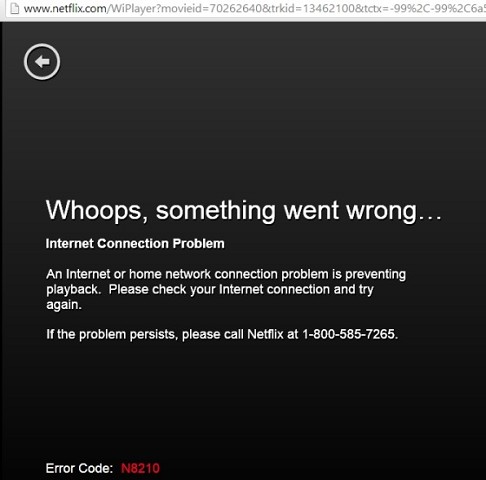
Can you take a screenshot of the error on Chrome?


It's the same error that Mauricio posted.

Glassboy
851 posts

Ultimate Geek
+1 received by user: 251

ID Verified
Trusted

  #1052124 24-May-2014 10:35
Send private message

freitasm: Working with Nick now via join.me/Skype to see if we can get to the bottom of this. Hold on.


Excellent.  I was a little bit downhearted last night when I received my Asus DSL-N66U and my Netflix on Roku problem seemed to be far worse then with the HG659.  It wasn't until about 1:30am that I got to the point that it was obviously a problem with Netflix US access only.

If anyone is looking at replacing their HG659, the DSL-N66U is a very slick router, and the setup wizard makes it very easy to connect to VDSL.  WiFi strength is much better than the HG659.  If it allowed a separate network\DHCP settings on the guest networks it would be almost perfect :-)

steve2222
507 posts

Ultimate Geek
+1 received by user: 45


  #1052133 24-May-2014 11:10
Send private message

So USA Netflix via Hola on Chrome still works - or is that expected ie not affected by this recent Netflix back end change?

1 | 2 | 3 | 4 | 5 | 6 | 7 | 8 | 9 | 10 | 11 | ... | 15
Filter this topic showing only the reply marked as answer View this topic in a long page with up to 500 replies per page Create new topic


Geekzone Live »

Try automatic live updates from Geekzone directly in your browser, without refreshing the page, with Geekzone Live now.


Are you subscribed to our RSS feed? You can download the latest headlines and summaries from our stories directly to your computer or smartphone by using a feed reader.