Geekzone: technology news, blogs, forums
Guest
Welcome Guest.
You haven't logged in yet. If you don't have an account you can register now.


View this topic in a long page with up to 500 replies per page Create new topic
1 | 2 | 3
chriscal
26 posts

Geek
+1 received by user: 11


  #3249140 14-Jun-2024 19:36
Send private message

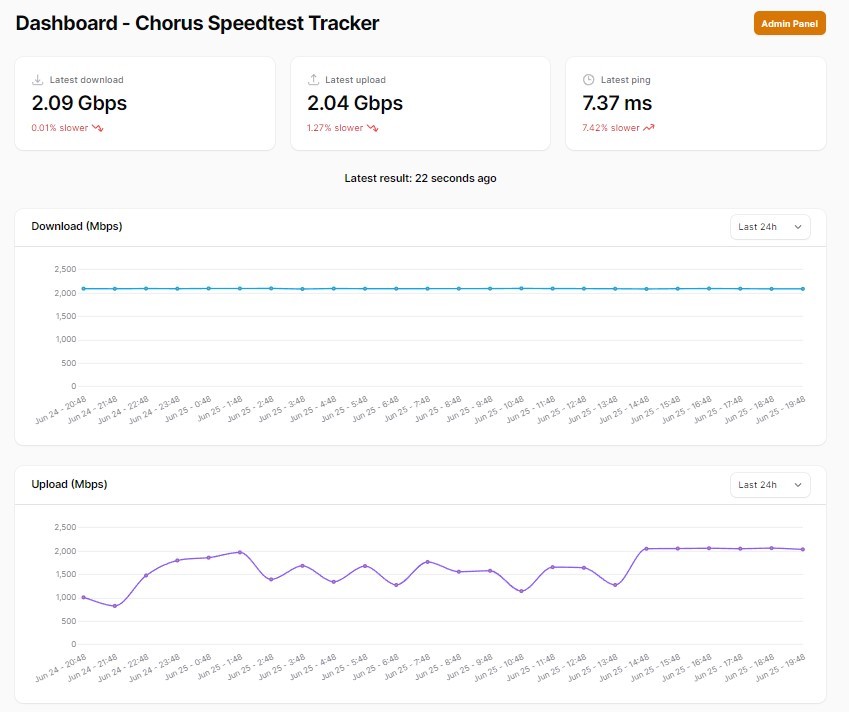
Looks like from between my last post and this last week, my download speeds have seen better days, but my upload looks like a very bad EKG chart. UDM-SE matches what I see on Speedtest Tracker


michaelmurfy
meow
13579 posts

Uber Geek
+1 received by user: 10910

Moderator
ID Verified
Trusted
Lifetime subscriber

  #3249149 14-Jun-2024 19:56
Send private message

@chriscal No issues here in Wellington (Hyperfibre) and getting pretty stable results.


I believe there are some network upgrades coming soon that should help but I've also noticed an update to speedtest-tracker will require reconfiguration by feeding environmental variables into it. See here: https://docs.speedtest-tracker.dev/getting-started/environment-variables 


For some odd reason mine is back to randomly selecting servers.


Michael Murphy | https://murfy.nz
Referral Links: Quic Broadband (use R122101E7CV7Q for free setup)

Are you happy with what you get from Geekzone? Please consider supporting us by subscribing.
Opinions are my own and not the views of my employer.


godber
75 posts

Master Geek
+1 received by user: 46

ID Verified
Trusted
Lifetime subscriber

  #3249235 14-Jun-2024 22:03
Send private message

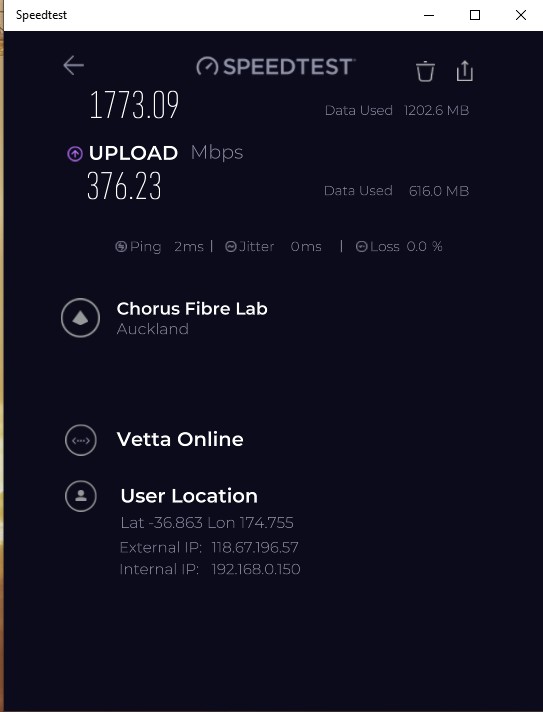
@chriscal My upload has always been sub par.  Download is very steady though.  See below to Chorus Speedtest.  A Speedtest to Quic/Vetta's Auckland Speedtest server is even worse.


Godfrey
Auckland/Coroglen, New Zealand
Quic Broadband - 4G Hyperfibre


Referral Link:
Quic (use R71004E9PVBJ on checkout for free setup)


gabesmith
46 posts

Geek
+1 received by user: 6

Trusted

  #3249465 15-Jun-2024 21:07
Send private message

I concur with observations of sub-par upload speeds with Quic. I just switched today from Orcon 2G Hyperfibre to Quic 2G Hyperfibre. Same router (Mikrotik CCR2004-16G-2S+), same home network etc, using DHCP Auth.


I would summarise the change as slightly faster download speeds but significantly slower upload speeds. Not shown on graph is latency has increased under Quic from sub 10ms to 15ms to 20ms.


I sure do hope Quic are able to iron out these issues as I was really hoping for different results than this.


Mikek
112 posts

Master Geek
+1 received by user: 42


  #3249683 16-Jun-2024 16:40
Send private message

This is pretty much exactly inline with the results I was getting using them. What i found using ipv4 only upload would be around 300-700mbps max while download was all over the show at as low as 700 to as high as 1800, 


When using IPv6 the results for Upload would improve they would go from 300mbps to 1200mbps but again that was pretty much the max with Quic,


To say the least it was super disappointing, You shouldn't have to use Linux and speedtest to one server only to maybe reach hyper fibre speeds its just not right, something is broken on their end. That was BNG 2 AKL 


gabesmith
46 posts

Geek
+1 received by user: 6

Trusted

  #3251846 22-Jun-2024 11:27
Send private message

Just an update. Using Chorus Fibre Lab seems to be the most reliable speedtest server to use with Quic from my testing. My download speeds are consistently around 1.9-2.0 Gbps. Uploads are variable. I have seen upload speeds start at 1.7 Gbps but then slows down to 0.8 to 1.0 Gbps.


Under Orcon my previous ISP, I had a different speed constraint where downloads were around 1.2-1.5 Gbps but uploads were consistently 2.0 Gbps. Same router, home network etc.


@quic and others, any ideas what is going on with my upload speed and how can this be diagnosed further?


Thanks, Gabe


Shop now for Lenovo laptops and other devices (affiliate link).
ssamjh
358 posts

Ultimate Geek
+1 received by user: 174

ID Verified
Trusted

  #3252025 23-Jun-2024 00:49
Send private message

gabesmith:


Just an update. Using Chorus Fibre Lab seems to be the most reliable speedtest server to use with Quic from my testing. My download speeds are consistently around 1.9-2.0 Gbps. Uploads are variable. I have seen upload speeds start at 1.7 Gbps but then slows down to 0.8 to 1.0 Gbps.


I've noticed some inconsistency between bng1-akl1 and bng2-akl2.

bng1-akl1 seems to be around 2000Mb/s download but between 900-1300Mb/s upload.
bng2-akl2 seems to be around 1700Mb/s download and upload.


I did mention this to the Quic team so they are aware. Will test again after the upcoming maintenance window.


Whitianga, Coromandel - Quic Rocket1G - Ref (free setup): R893192EGADLZ


Smokeping: Quic / Voyager / Starlink


Coromandel Webcam Network


michaelmurfy
meow
13579 posts

Uber Geek
+1 received by user: 10910

Moderator
ID Verified
Trusted
Lifetime subscriber

  #3252026 23-Jun-2024 01:08
Send private message

@gabesmith Also there is a Discord server for Quic customers now. See here: https://www.geekzone.co.nz/forums.asp?forumid=194&topicid=315195 


Michael Murphy | https://murfy.nz
Referral Links: Quic Broadband (use R122101E7CV7Q for free setup)

Are you happy with what you get from Geekzone? Please consider supporting us by subscribing.
Opinions are my own and not the views of my employer.


Mikek
112 posts

Master Geek
+1 received by user: 42


  #3252088 23-Jun-2024 13:24
Send private message

ssamjh:


gabesmith:


Just an update. Using Chorus Fibre Lab seems to be the most reliable speedtest server to use with Quic from my testing. My download speeds are consistently around 1.9-2.0 Gbps. Uploads are variable. I have seen upload speeds start at 1.7 Gbps but then slows down to 0.8 to 1.0 Gbps.


I've noticed some inconsistency between bng1-akl1 and bng2-akl2.

bng1-akl1 seems to be around 2000Mb/s download but between 900-1300Mb/s upload.
bng2-akl2 seems to be around 1700Mb/s download and upload.


I did mention this to the Quic team so they are aware. Will test again after the upcoming maintenance window.


@gabesmith


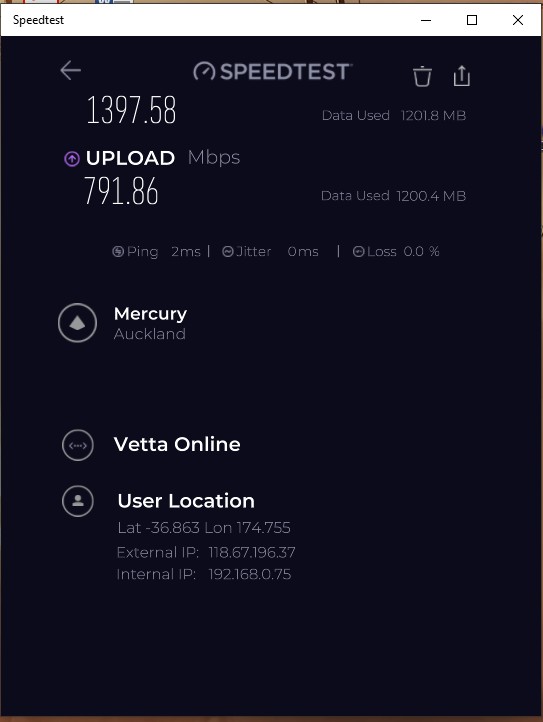
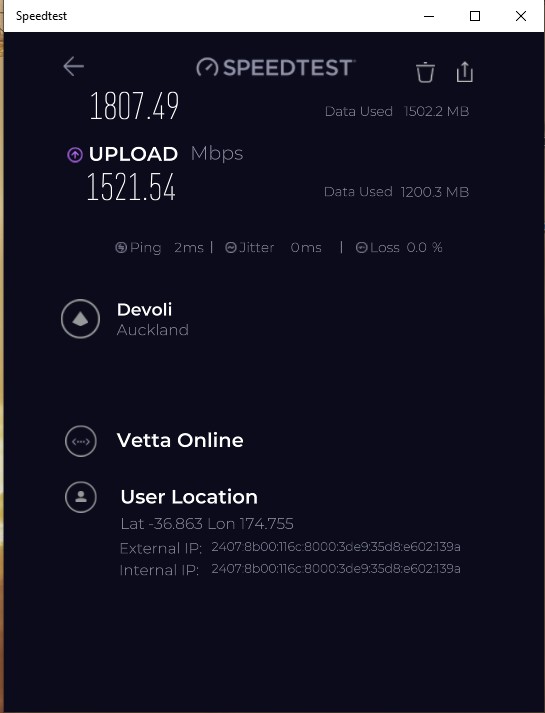
I found inline with ssamjh, apart from I could link it down to ipv4 and ipv6 being the major difference, I was on BNG 2 see results below and see same test on different ISP but exactly same gear and same PC, 


This is all carried out on windows 10, Speed test App from windows store,


No linux speed testing, My conclusion was that they either have congestion or incorrect setup. It would be good to see if you can recreate this result from selecting just IPv4 because some speed test servers only allow ipv4 testing then using ipv6 and selecting the chorus server and see what upload looks like?


3l3m3nt
120 posts

Master Geek
+1 received by user: 152

ID Verified
Trusted
Lifetime subscriber

  #3252906 25-Jun-2024 10:34
Send private message

Hey - on your linux host, try some sysctl tweaks. I found this helped heaps..


net.core.default_qdisc = fq_codel
net.core.rmem_max = 82501632
net.core.wmem_max = 82501632
net.core.rmem_default = 1048576
net.core.wmem_default = 1048576
net.core.netdev_max_backlog = 250000
net.ipv4.ip_local_port_range = 1024 64999
net.ipv4.tcp_congestion_control = bbr
net.ipv4.tcp_rmem = 4096 131072 82501632
net.ipv4.tcp_wmem = 4096 16384 82501632
net.ipv4.tcp_moderate_rcvbuf = 1


Dunedin, NZ
Quic Broadband  | Rocket 1G/1G Hyperfibre (Yes, you read that right!)
Dunedin Live Webcam (4K) | Quic Smokepings


Referral Links:
Quic (use R282731EPGJMG on checkout for free setup, and to help me pay for my fast internet addiction)
Contact Energy (use FRTDD2R for $100 credit)


godber
75 posts

Master Geek
+1 received by user: 46

ID Verified
Trusted
Lifetime subscriber

  #3253159 25-Jun-2024 20:12
Send private message

3l3m3nt:


Hey - on your linux host, try some sysctl tweaks. I found this helped heaps..


net.core.default_qdisc = fq_codel
net.core.rmem_max = 82501632
net.core.wmem_max = 82501632
net.core.rmem_default = 1048576
net.core.wmem_default = 1048576
net.core.netdev_max_backlog = 250000
net.ipv4.ip_local_port_range = 1024 64999
net.ipv4.tcp_congestion_control = bbr
net.ipv4.tcp_rmem = 4096 131072 82501632
net.ipv4.tcp_wmem = 4096 16384 82501632
net.ipv4.tcp_moderate_rcvbuf = 1


Seems to have made a difference.  I changed around 14:00 on 25 June 2024 and upload now seems to be a around 2000Mbps.


Will see how it goes over the next few days.


Godfrey
Auckland/Coroglen, New Zealand
Quic Broadband - 4G Hyperfibre


Referral Link:
Quic (use R71004E9PVBJ on checkout for free setup)


Shop now on AliExpress (affiliate link).
3l3m3nt
120 posts

Master Geek
+1 received by user: 152

ID Verified
Trusted
Lifetime subscriber

  #3253160 25-Jun-2024 20:15
Send private message

Good to hear mate. Yeah, the defaults on Linux aren't quite there yet for those speeds ☺️


Dunedin, NZ
Quic Broadband  | Rocket 1G/1G Hyperfibre (Yes, you read that right!)
Dunedin Live Webcam (4K) | Quic Smokepings


Referral Links:
Quic (use R282731EPGJMG on checkout for free setup, and to help me pay for my fast internet addiction)
Contact Energy (use FRTDD2R for $100 credit)


michaelmurfy
meow
13579 posts

Uber Geek
+1 received by user: 10910

Moderator
ID Verified
Trusted
Lifetime subscriber

  #3253331 26-Jun-2024 09:04
Send private message

@godber Woah... I would have not thought on a Linux host this would have been an issue. Great catch @3l3m3nt!


Michael Murphy | https://murfy.nz
Referral Links: Quic Broadband (use R122101E7CV7Q for free setup)

Are you happy with what you get from Geekzone? Please consider supporting us by subscribing.
Opinions are my own and not the views of my employer.


3l3m3nt
120 posts

Master Geek
+1 received by user: 152

ID Verified
Trusted
Lifetime subscriber

  #3253332 26-Jun-2024 09:21
Send private message

Thanks mate 😁


Dunedin, NZ
Quic Broadband  | Rocket 1G/1G Hyperfibre (Yes, you read that right!)
Dunedin Live Webcam (4K) | Quic Smokepings


Referral Links:
Quic (use R282731EPGJMG on checkout for free setup, and to help me pay for my fast internet addiction)
Contact Energy (use FRTDD2R for $100 credit)


chriscal
26 posts

Geek
+1 received by user: 11


  #3253341 26-Jun-2024 09:49
Send private message

Would you look at that, you can see where I made the change last night. Will see how it goes over the next few days. Nice one @3l3m3nt!


1 | 2 | 3
View this topic in a long page with up to 500 replies per page Create new topic


Geekzone Live »

Try automatic live updates from Geekzone directly in your browser, without refreshing the page, with Geekzone Live now.


Are you subscribed to our RSS feed? You can download the latest headlines and summaries from our stories directly to your computer or smartphone by using a feed reader.