Geekzone: technology news, blogs, forums
Guest
Welcome Guest.
You haven't logged in yet. If you don't have an account you can register now.


FruitJuice

11 posts

Geek
+1 received by user: 2


#312850 23-May-2024 13:46
Send private message

Just switched over to Quic HyperFibre and not getting the expected speeds, especially upload.


My setup: New Nokia ONT 10G port > UDM-Pro SPF+ WAN (Mikrotik S-RJ10 Module) > USW-24-Enteprise SPF+ via Ubiquiti 10G DAC


PC Connected to Port 13/2.5G on USW-24-Enterprise


UDM has nothing enabled that could potentially impact speed.


I'm using DHCP Auth.


Just wondering if anyone else is running a UDM-Pro and getting good speeds, what is your settings. Am I missing something?


I seem to average 1700/780 - tested from 2 different PC's both 2.5G NIC's.


and from a linux host running speedtest cli


View this topic in a long page with up to 500 replies per page Create new topic
 1 | 2 | 3
michaelmurfy
meow
13579 posts

Uber Geek
+1 received by user: 10910

Moderator
ID Verified
Trusted
Lifetime subscriber

  #3233793 23-May-2024 13:50
Send private message

Booted into Linux and tested under there?


Some NIC's, especially Realtek ones are terrible under Windows.


The dream machine pro is totally fine for Hyperfibre: https://www.geekzone.co.nz/forums.asp?forumid=194&topicid=311756 and also many people here are using them.


Edit: Forgot to mention you got the security features turned off on the dream machine?


Michael Murphy | https://murfy.nz
Referral Links: Quic Broadband (use R122101E7CV7Q for free setup)

Are you happy with what you get from Geekzone? Please consider supporting us by subscribing.
Opinions are my own and not the views of my employer.


FruitJuice

11 posts

Geek
+1 received by user: 2


  #3233811 23-May-2024 15:09
Send private message

Might be on to something there. I updated my LAN drivers with the latest Realtek drivers, now I'm averaging a 2000/990. Still not ideal but a slight improvement. Linux host matches windows now, but still Realtek.


Might be time for a PCIE non-realtek card.


My UDM-Pro certainly seems a lot happier with the results.


Chills
175 posts

Master Geek
+1 received by user: 99

Subscriber

  #3233849 23-May-2024 16:57
Send private message

Unironically, TP-Link NICs aren't bad for windows and use Intel drivers. Can get a 2.5Gb NIC from them for about $50.


FruitJuice

11 posts

Geek
+1 received by user: 2


  #3233952 23-May-2024 20:47
Send private message

Managed to pickup an Asus XG-C100C that apparently uses the Marvell driver. Best I can get is 2000/900. Time to brush up on my networking/troubleshooting skills.


nztim
4012 posts

Uber Geek
+1 received by user: 2710

ID Verified
Trusted
TEAMnetwork
Subscriber

  #3233953 23-May-2024 21:01
Send private message

Try iperf between two devices get networking sorted then let us know


Any views expressed on these forums are my own and don't necessarily reflect those of my employer. 


FruitJuice

11 posts

Geek
+1 received by user: 2


  #3234089 24-May-2024 10:05
Send private message

Well, I've done some iperf with the limited knowledge I do have of using it. Looking at the results I seem to be getting the right results, but I'll leave it for the smart network people to decide.


iperf between PC (.124) and UMDP (.254)


PC


UDMP


I also run Speedtest Tracker, can't say how reliable this is running in docker, but in this image you can clearly see when it changed from 2Degrees giga to quic hyper.


Support Geekzone with one-off or recurring donations Donate via PressPatron.
michaelmurfy
meow
13579 posts

Uber Geek
+1 received by user: 10910

Moderator
ID Verified
Trusted
Lifetime subscriber

  #3234090 24-May-2024 10:08
Send private message

You’re using the old version of speedtest tracker that’s based off an old version of speedtest-cli. Ensure you also limit to 1 test per hour. Test against a single server like chorus fibre lab or one of the Vetta speedtest servers. 


Michael Murphy | https://murfy.nz
Referral Links: Quic Broadband (use R122101E7CV7Q for free setup)

Are you happy with what you get from Geekzone? Please consider supporting us by subscribing.
Opinions are my own and not the views of my employer.


FruitJuice

11 posts

Geek
+1 received by user: 2


  #3234106 24-May-2024 10:39
Send private message

Speedtest is set to run once every hour, and was set to a single server, I've updated it to the Chorus Fibre Lab server now and ran a manual test. The DL is good, its just that UL.


And this is from my PC to the same about 25 minutes between runs.


michaelmurfy
meow
13579 posts

Uber Geek
+1 received by user: 10910

Moderator
ID Verified
Trusted
Lifetime subscriber

  #3234234 24-May-2024 12:22
Send private message

Again, that Speedtest Tracker app is the old version reliant on an old version of Speedtest-CLI. Use this one instead: https://github.com/alexjustesen/speedtest-tracker


But given from your router directly it is showing above 1Gbit I'm inclined to believe you've got a feature enabled on your Dream Machine slowing things down after that like IDS/IPS as this is limited at around 850Mbit on the Dream Machine Pro.


Michael Murphy | https://murfy.nz
Referral Links: Quic Broadband (use R122101E7CV7Q for free setup)

Are you happy with what you get from Geekzone? Please consider supporting us by subscribing.
Opinions are my own and not the views of my employer.


FruitJuice

11 posts

Geek
+1 received by user: 2


  #3234697 25-May-2024 21:08
Send private message

I am officially out of ideas, networking is not really my thing, and it feel like I'm missing something and its going to be something real dumb, am I expecting too much :) 


I managed to get my hands on a UDM-SE and tested some more as this allowed me to use the 2.5GB WAN port and not use a SPF+ module.


  • I have replaced network cables
  • connected 15m cable direct from network cabinet to PC
  • replaced DAC between switch and UDM-SE
  • ensured Flow Control is on (and tested with it off)
  • ensured all security features is turned off (Device Identification, Traffic Identification, Internet Security)
  • made sure I have no weird traffic or firewall rules, just the defaults.

Tested with various versions of Unifi OS and Network Applications, both official releases and early access.


Connected Nokia ONT > 2.5GB WAN UDM-SE > USW-24 > PC on port 24/2.5GB. Result: 2000/750(avg)


This below test was first done with factory default UDM-SE, then restored backup.


Eliminated switch and connected PC to UDM-SE LAN SPF+ via S-RJ10, confirmed avg 8000/8000 via PCIe 10GB NIC (Marvell), also confirmed 2300/2300 via onboard 2.5GB NIC (Realtek) via iperf3 from PC to UDM. Speedtest has a solid 2000/750(avg)


I've also updated my Speedtest Tracker. The tests from 1pm - 4pm is UDM-Pro and the tests from 6pm - 8pm is UMD-SE.


aj6828
177 posts

Master Geek
+1 received by user: 47

ID Verified
Trusted

  #3234699 25-May-2024 21:11
Send private message

What happens when you plug in your pc via lan directly to the ont and run a speed test?


Exclusive for Geekzone Members!
Dynamic IP & Bring Your Own Device Hyperfibre & Fibre plans & NO Contracts with Hyperline.co.nz powered by ASN 9790 Network


Chrous areas only HYPERLINE.co.nz  


Move to New Zealand's best fibre broadband service (affiliate link). Free setup code: R587125ERQ6VE. Note that to use Quic Broadband you must be comfortable with configuring your own router.
FruitJuice

11 posts

Geek
+1 received by user: 2


  #3234703 25-May-2024 21:31
Send private message

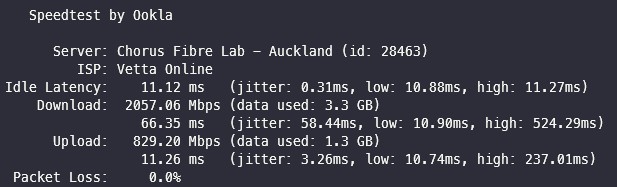
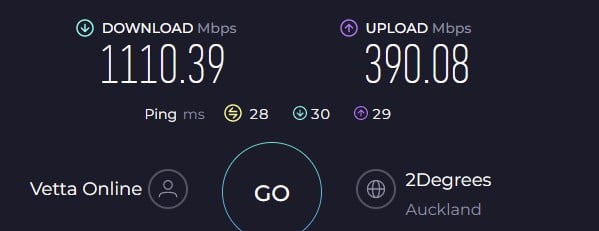
PC connected to ONT


Chorus Fibre Lab via web

and CLI


and when I let it choose a server


michaelmurfy
meow
13579 posts

Uber Geek
+1 received by user: 10910

Moderator
ID Verified
Trusted
Lifetime subscriber

  #3234725 26-May-2024 00:47
Send private message

FruitJuice:


My UDM-Pro certainly seems a lot happier with the results.


As your upstream here is 1.9Gbit on your UDM (which just conducts a Speedtest) the problem is 100% either on your network or with the UDM.


To be honest I would be inclined to factory reset the UDM and set it up again from scratch - if that is easy for you to do. Take a backup first.


With basically the stock configuration other people on here have gotten 2Gbit up and down via the UDM. I'm actually a bit confused myself with what this could be! But going by the upload always being around 850Mbit I think you're hitting a bug where traffic is not being offloaded as 850Mbit is basically the software processing limit of the UDM.


Michael Murphy | https://murfy.nz
Referral Links: Quic Broadband (use R122101E7CV7Q for free setup)

Are you happy with what you get from Geekzone? Please consider supporting us by subscribing.
Opinions are my own and not the views of my employer.


FruitJuice

11 posts

Geek
+1 received by user: 2


  #3235072 26-May-2024 21:14
Send private message

I am inclined to agree that there is something on my network re. speeds. Going through the process of elimination at the moment.


A weird thing that I've noticed, and I'm not sure if it is just me, but in the last 24 hours, I have noticed whenever I put a bit of load on the internet then it drops my connection and I have to restart the connection / restart the unifi network app. For example I kicked a Kali update which usual pulls a lot of data and about 5 minutes in my internet connection dropped. I had something similar last night when I kicked of a large download and about 30% in internet dropped. Maybe its just a coincidence or I'm going crazy.


Edit: Adding to the above, the logs show this and I'm not sure where the issue is coming from.


Edit2: A quick google search and the above seem to be related to https://community.ui.com/questions/UDM-SE---Internet-Heath---Packet-loss-detected/bda82f16-de39-40a0-ac43-0fc2e60676bf?page=4


FruitJuice

11 posts

Geek
+1 received by user: 2


  #3243319 31-May-2024 15:01
Send private message

Just wanted to post an update. It seems like all my suspected internal network issues have been resolved. I get stable throughput between clients and devices. I've factory reset devices, change UDM-Pro to UDM-SE, changed cables, DAC's and transceivers and gave it a week to see how things go. At least I can now break the 1GB upload going out of my network.


Speedtest to Chorus Fiber Labs is still a bit over the place, maybe I have the wrong expectation but I expected that upload/download lines to be a bit more straight than what they are showing on Speedtest Tracker. My UDM-SE speedtest (once a day at 3am) also reports random speeds, even as low as 400/200 this morning.

Out of ideas as to whats next, so guess I'll leave it as is.


FWIW, I'm in Wellington connected to bng2-akl2.


Graph "Last Week"


Graph "Last 24 Hours"


 1 | 2 | 3
View this topic in a long page with up to 500 replies per page Create new topic


Geekzone Live »

Try automatic live updates from Geekzone directly in your browser, without refreshing the page, with Geekzone Live now.


Are you subscribed to our RSS feed? You can download the latest headlines and summaries from our stories directly to your computer or smartphone by using a feed reader.