Geekzone: technology news, blogs, forums
Guest
Welcome Guest.
You haven't logged in yet. If you don't have an account you can register now.


Filter this topic showing only the reply marked as answer View this topic in a long page with up to 500 replies per page Create new topic
1 | ... | 27 | 28 | 29 | 30 | 31 | 32 | 33 | 34 | 35
Fuzzi9986
52 posts

Master Geek
+1 received by user: 26

ID Verified
Trusted

  #3104844 16-Jul-2023 19:25

Delorean:
michaelmurfy: @alpay456 as I said this happens with every single provider. A provider can’t directly control their routes once the traffic leaves their network and also ICMP is deprioritised on routers out on the internet so may not be entirely accurate. Unless if you’re noticing actual performance issues with the game just enjoy it…

There is nothing wrong here. It’s just the internet working as expected. No provider states you’re going to ever get the lowest possible latency to any service and this is always best effort no matter what provider you’re with.


Unless they are MyRepublic - didn’t they keep saying they were the best for gaming and speeds? 😂


Well they're leaving NZ at the end of the month and sold all their customers to 2° and having been on them before they're really not


GARBAGE
48 posts

Geek
+1 received by user: 13

ID Verified

  #3104864 16-Jul-2023 20:50
Send private message

While I agree no ISP will guarantee any form of latency, especially on a residential connection, it's always been the case for me for a very long time (other ISP's) that ping to west coast NA would be ~150-170ms. This was usually through a direct link from Auckland -> LA via the southern cross cable. 


It appears Quic are going to Sydney first for whatever reason, so it adds a bit of time to the ping. That's a little disappointing, but having said that I only noticed due to this thread, so it doesn't really affect me. 


It's not optimal routing, but there's nothing you can do about it :)


dasimpsonsrule
148 posts

Master Geek
+1 received by user: 37


  #3104874 16-Jul-2023 22:19
Send private message

lloydw:
alpay456:


@michaelmurfy A friend of mine with 2Degrees gets about 160 ping.


Furthermore, My ping a couple days ago was about 150 without mudfish.
Seems to be the same route when i captured the discrepancy.


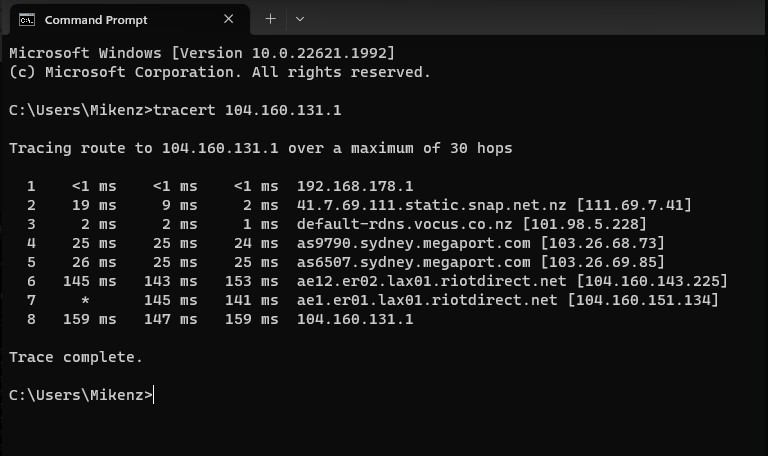
This doesn’t look like a quic issue as the extra latency appears to be inside the riot network between hop 6-7. I’m guessing mudfish is going around this latency issue.

But as others have stated routes change regularly but overall I’ve found quic taking better routes than my old ISP Voyager and noticing faster response times to the west coast.


I agree. I have just run some tests myself, and get about 150ms latency to a bunch of US IP addresses I tested, but that one that alpay456 used which goes through the riot network has an extra 50ms.


alpay456
4 posts

Wannabe Geek


  #3105514 18-Jul-2023 13:29
Send private message

@dasimpsonsrule


Here is a tracert from my friend to the riot NA servers.
Seems like there is another hop in comparison to mine.


Although I am genuinely curious why at a random day the ping decided to be 150 then decided to jump to 200.


GARBAGE
48 posts

Geek
+1 received by user: 13

ID Verified

  #3105515 18-Jul-2023 13:31
Send private message

The extra hop is inside the Riot network for whatever reason. Only Riot can help you with that :) 


yitz
2239 posts

Uber Geek
+1 received by user: 594


  #3105523 18-Jul-2023 13:46
Send private message

GARBAGE:It appears Quic are going to Sydney first for whatever reason, so it adds a bit of time to the ping. That's a little disappointing, but having said that I only noticed due to this thread, so it doesn't really affect me. 


I would take a guess and say it goes to Sydney because that's where Riot's anti-DDoS scrubbing / clean pipe infrastructure is.


But that's not the reason why those on Quic are getting 200 ms vs 150 ms on other ISPs that'll have to do with the return path, most likely with their upstream provider Anycast Networks/Swoop potentially routing back via Hong Kong or Singapore on the return path (going by the amount of extra delay). That's something between Quic/Vetta and Anycast/Swoop.


Support Geekzone with one-off or recurring donations Donate via PressPatron.
Regiiko
27 posts

Geek
+1 received by user: 1


  #3107841 25-Jul-2023 12:10
Send private message

I've just switched to Quic from My Republic, and got the go-ahead from them to switchover.


I use an ex-lease Dell R210II as a router/firewall, have set the PPPoE configuration but seem to be unable to connect, pppd's logs only show this (repeats itself):


pppd[6112]: Timeout waiting for PADO packets
pppd[6112]: Unable to complete PPPoE Discovery


EDIT: I use VyOS as my OS of choice for this device.


michaelmurfy
meow
13581 posts

Uber Geek
+1 received by user: 10914

Moderator
ID Verified
Trusted
Lifetime subscriber

  #3107846 25-Jul-2023 12:24
Send private message

@Regiiko No VLAN, both username / password need to be populated and not blank. You're also coming from a MyRepublic IP so perhaps it has not swapped over or the service is on the 2nd ONT port?


Michael Murphy | https://murfy.nz
Referral Links: Quic Broadband (use R122101E7CV7Q for free setup)

Are you happy with what you get from Geekzone? Please consider supporting us by subscribing.
Opinions are my own and not the views of my employer.


Regiiko
27 posts

Geek
+1 received by user: 1


  #3107857 25-Jul-2023 13:03
Send private message

I've followed the instructions from the email / setup page (pppoe auth, untagged vlan) and switched the ethernet cable over to the second ONT port. Really not sure where to begin debugging.


EDIT: If I input incorrect credentials, I would expect to see a CHAP failure in the logs, but there's nothing there.


CYaBro
4708 posts

Uber Geek
+1 received by user: 1182

ID Verified
Trusted

  #3107859 25-Jul-2023 13:04
Send private message

Regiiko:

I've followed the instructions (pppoe auth details in email, untagged vlan) and switched the ethernet cable over to the second ONT port. Really not sure where to begin debugging.


Can you see your ONT and connection details in your Quic account?


Opinions are my own and not the views of my employer.


Regiiko
27 posts

Geek
+1 received by user: 1


  #3107862 25-Jul-2023 13:07
Send private message

CYaBro:
Regiiko:


I've followed the instructions (pppoe auth details in email, untagged vlan) and switched the ethernet cable over to the second ONT port. Really not sure where to begin debugging.


Can you see your ONT and connection details in your Quic account?


Yup, here's the diagnostics/data info:


ONT Port Status


Ethernet Port: eth 2
CPE: Detected
Downstream Traffic During Test: 0
Port Negotiation Speed: AUTO, Duplex: AUTO
MACs Learned:

ONT Tests


Network Provisioning: Yes
ONT Online: good
Option 82 Correct: Yes
CPE Connected: No
Speed Correct Yes
Optical Range Within Allowed Range
Last ONT Event Event Dying-gasp
Alert Timestamp 2023-07-25 13:06:49
Resolution Timestamp 2023-07-25 13:06:49


Shop now for Lenovo laptops and other devices (affiliate link).
hsvhel
1273 posts

Uber Geek
+1 received by user: 596

ID Verified

  #3107869 25-Jul-2023 13:36
Send private message

might be an outlier, but try adding VLAN10


My connection required it until it was cleared up with Chorus


Referral Link Quic


Free Setup use R502152EQH6OK on check out


RunningMan
9189 posts

Uber Geek
+1 received by user: 4842


  #3107870 25-Jul-2023 13:39
Send private message

Regiiko:


ONT Port Status


Ethernet Port: eth 2
CPE: Detected
Downstream Traffic During Test: 0
Port Negotiation Speed: AUTO, Duplex: AUTO
MACs Learned:


Use port 2.


Regiiko
27 posts

Geek
+1 received by user: 1


  #3107872 25-Jul-2023 13:44
Send private message

RunningMan:

Regiiko:


ONT Port Status


Ethernet Port: eth 2
CPE: Detected
Downstream Traffic During Test: 0
Port Negotiation Speed: AUTO, Duplex: AUTO
MACs Learned:


Use port 2.


It is connected to port 2, the ONT status light for port 2 is blinking green.

CYaBro
4708 posts

Uber Geek
+1 received by user: 1182

ID Verified
Trusted

  #3107884 25-Jul-2023 14:14
Send private message

Regiiko: 

It is connected to port 2, the ONT status light for port 2 is blinking green.


Have you got another router you can test with?


Or connect a computer directly to port 2 on the ONT and setup a PPPoE connection to see if it works.


Opinions are my own and not the views of my employer.


1 | ... | 27 | 28 | 29 | 30 | 31 | 32 | 33 | 34 | 35
Filter this topic showing only the reply marked as answer View this topic in a long page with up to 500 replies per page Create new topic


Geekzone Live »

Try automatic live updates from Geekzone directly in your browser, without refreshing the page, with Geekzone Live now.


Are you subscribed to our RSS feed? You can download the latest headlines and summaries from our stories directly to your computer or smartphone by using a feed reader.