Geekzone: technology news, blogs, forums
Guest
Welcome Guest.
You haven't logged in yet. If you don't have an account you can register now.


danepak

1124 posts

Uber Geek
+1 received by user: 85


#195785 3-May-2016 20:11
Send private message

I want to get my mother in law some WiFi speakers, as I've got a Spotify Premium account (free through my Spark mobile subscription).


Nothing expensive (under $100) as she's certainly no audio geek.


Would something like the Kaiser Baas Sound Shift be an OK buy?
http://www.trademe.co.nz/electronics-photography/home-audio/other/auction-1079731220.htm


She's got an old stereo (probably 20 years old or more). I assume Kaiser Baas Sound Shift would work with this.


Or would the Pioneer XW-BTS1 be a better choice?
http://pricespy.co.nz/product.php?p=1599166


Or finally, the LG Music Flow H3?
https://shop.jbhifi.co.nz/ipod-mp3-portables/wireless-audio/lg-music-flow-h3-wi-fi-multi-room-speaker/91287


She would control the music through her Samsung Galaxy tablet and I don't want to buy her a speaker, which only can run on batteries. It has to be plugged into a power socket.


She basically has to be able to stream music from Spotify and also TuneIn radio (or similar).


One more thing: The router is downstairs, but we would like the speaker to be upstairs.
We've got a Sonos Play 5 ourselves and it's worked fine with having a Sonos Bridge next to the router and then the Sonos speaker elsewhere in the house.
Can something similar be achieved with a cheap WiFi speaker?


View this topic in a long page with up to 500 replies per page Create new topic
 1 | 2
JoshWright
404 posts

Ultimate Geek
+1 received by user: 113

ID Verified
Trusted

  #1546300 3-May-2016 21:00
Send private message

What about a Chromecast Audio for an existing set of speakers?


danepak

1124 posts

Uber Geek
+1 received by user: 85


  #1546303 3-May-2016 21:06
Send private message

JoshWright:


What about a Chromecast Audio for an existing set of speakers?


Not a bad idea.
However, I'm not sure about the kind of speakers that she has.
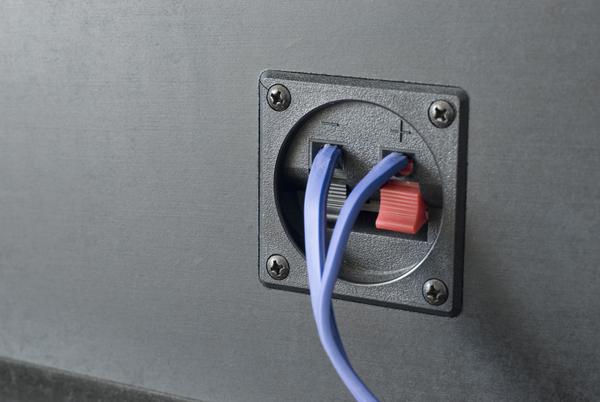
If it's something like this, then it obviously wouldn't work, right?
http://stockarch.com/files/imagecache/Preview/files/10/02/speaker_connections1.jpg


Or would it work, if I connected the Chromecast Audio to the actual stereo's AUX?
Or would the stereo need a Line In?


Sorry about all the questions, but this is unknown territory to me.


JoshWright
404 posts

Ultimate Geek
+1 received by user: 113

ID Verified
Trusted

  #1546306 3-May-2016 21:10
Send private message

danepak:


JoshWright:


What about a Chromecast Audio for an existing set of speakers?


Not a bad idea.
However, I'm not sure about the kind of speakers that she has.
If it's something like this, then it obviously wouldn't work, right?
http://stockarch.com/files/imagecache/Preview/files/10/02/speaker_connections1.jpg


Or would it work, if I connected the Chromecast Audio to the actual stereo's AUX?
Or would the stereo need a Line In?


Sorry about all the questions, but this is unknown territory to me.


That's alright! It's powered by Micro USB, and connects with a 3.5mm Aux in plug to the stereo.


danepak

1124 posts

Uber Geek
+1 received by user: 85


  #1546311 3-May-2016 21:19
Send private message

JoshWright:


danepak:


JoshWright:


What about a Chromecast Audio for an existing set of speakers?


Not a bad idea.
However, I'm not sure about the kind of speakers that she has.
If it's something like this, then it obviously wouldn't work, right?
http://stockarch.com/files/imagecache/Preview/files/10/02/speaker_connections1.jpg


Or would it work, if I connected the Chromecast Audio to the actual stereo's AUX?
Or would the stereo need a Line In?


Sorry about all the questions, but this is unknown territory to me.


That's alright! It's powered by Micro USB, and connects with a 3.5mm Aux in plug to the stereo.


OK, I just need to ensure that the stereo has an input.
I remember that I back in the days had a stereo (back in the late 80s) and I seem to remember that it didn't have a Line In or AUX In, only Line Out or Aux Out.
A stereo like that would obviously not work with the Chromecast Audio, right?


I guess I just have to find out, next time we visit her.


JoshWright
404 posts

Ultimate Geek
+1 received by user: 113

ID Verified
Trusted

  #1546325 3-May-2016 21:27
Send private message

danepak:


JoshWright:


danepak:


JoshWright:


What about a Chromecast Audio for an existing set of speakers?


Not a bad idea.
However, I'm not sure about the kind of speakers that she has.
If it's something like this, then it obviously wouldn't work, right?
http://stockarch.com/files/imagecache/Preview/files/10/02/speaker_connections1.jpg


Or would it work, if I connected the Chromecast Audio to the actual stereo's AUX?
Or would the stereo need a Line In?


Sorry about all the questions, but this is unknown territory to me.


That's alright! It's powered by Micro USB, and connects with a 3.5mm Aux in plug to the stereo.


OK, I just need to ensure that the stereo has an input.
I remember that I back in the days had a stereo (back in the late 80s) and I seem to remember that it didn't have a Line In or AUX In, only Line Out or Aux Out.
A stereo like that would obviously not work with the Chromecast Audio, right?


I guess I just have to find out, next time we visit her.


Correct needs to be Aux/Line in, not out.


danepak

1124 posts

Uber Geek
+1 received by user: 85


  #1546346 3-May-2016 22:06
Send private message

This is the stereo.
Good or bad news?


Haven't found out what speakers she's got yet.


Click to see full size


Move to New Zealand's best fibre broadband service (affiliate link). Free setup code: R587125ERQ6VE. Note that to use Quic Broadband you must be comfortable with configuring your own router.
JoshWright
404 posts

Ultimate Geek
+1 received by user: 113

ID Verified
Trusted

  #1546375 3-May-2016 22:25
Send private message

From a quick Google search this model appears to have a Phono/RCA input on the rear, so a Chromecast Audio could possibly be used with a 3.5mm to RCA cable.


danepak

1124 posts

Uber Geek
+1 received by user: 85


  #1546383 3-May-2016 22:34
Send private message

Thanks mate.
I'll give it a go!


richms
29097 posts

Uber Geek
+1 received by user: 10206

Trusted
Lifetime subscriber

  #1546391 3-May-2016 22:55
Send private message

JoshWright:


From a quick Google search this model appears to have a Phono/RCA input on the rear, so a Chromecast Audio could possibly be used with a 3.5mm to RCA cable.


Cant use the phono input, as in that era of stereos it was always at turntable level as there was no preamp in turntables.


Putting line level stuff into that will just overload the amp and have nothing but distortion.


If they dont use any of the other crap on the vintage stereo then perhaps just buy a small cheap amplifier like a lepai or another class D amp and use the existing speakers and free up the space that giant antique takes?


Richard rich.ms

danepak

1124 posts

Uber Geek
+1 received by user: 85


  #1546393 3-May-2016 22:58
Send private message

richms:


JoshWright:


From a quick Google search this model appears to have a Phono/RCA input on the rear, so a Chromecast Audio could possibly be used with a 3.5mm to RCA cable.


Cant use the phono input, as in that era of stereos it was always at turntable level as there was no preamp in turntables.


Putting line level stuff into that will just overload the amp and have nothing but distortion.


If they dont use any of the other crap on the vintage stereo then perhaps just buy a small cheap amplifier like a lepai or another class D amp and use the existing speakers and free up the space that giant antique takes?


OK, interesting. Thanks for the info. Might have to look for a cheap amplifier then.


richms
29097 posts

Uber Geek
+1 received by user: 10206

Trusted
Lifetime subscriber

  #1546394 3-May-2016 23:00
Send private message

Friend got one of these - his feedback is that its loud enough for background but not enough for a party - http://www.aliexpress.com/item/2015-New-Recommended-F900-hot-sales-DIY-30W-2-Mini-Bluetooth-amplifier-Wireless-receiver-for-phone/32302404979.html


Has bluetooth and also an aux in so thats both bases covered.


Richard rich.ms


Shop now for Dell laptops and other devices (affiliate link).
richms
29097 posts

Uber Geek
+1 received by user: 10206

Trusted
Lifetime subscriber

  #1546396 3-May-2016 23:03
Send private message

actually not sure if that listing comes with a power brick or not. Its not english. Find that amp from an english listing with a power adapter and it should be ok.


Richard rich.ms

danepak

1124 posts

Uber Geek
+1 received by user: 85


  #1546402 3-May-2016 23:15
Send private message

A car amplifier?

richms
29097 posts

Uber Geek
+1 received by user: 10206

Trusted
Lifetime subscriber

  #1546405 3-May-2016 23:18
Send private message

danepak: A car amplifier?


Need too much current at 12v to be viable. Since you have wall power, then you can just grab a 24 or 32v power adapter to get more power from a class D amp, heaps of them on aliexpress branded with various made up names. I got a couple of nice "breeze audio" branded ones to replace my underpowered and horrible volume control lepai amps for the other speakers off the home theater amp.


Richard rich.ms

danepak

1124 posts

Uber Geek
+1 received by user: 85


  #1546466 4-May-2016 09:11
Send private message

http://www.trademe.co.nz/computers/peripherals/speakers/21-2-speakers-sub/auction-1080438794.htm


Would this otherwise work as a solution?
Apparently my mum in law wants to continue to use the turntable from the old stereo.


 1 | 2
View this topic in a long page with up to 500 replies per page Create new topic


Geekzone Live »

Try automatic live updates from Geekzone directly in your browser, without refreshing the page, with Geekzone Live now.


Are you subscribed to our RSS feed? You can download the latest headlines and summaries from our stories directly to your computer or smartphone by using a feed reader.