Geekzone: technology news, blogs, forums
Guest
Welcome Guest.
You haven't logged in yet. If you don't have an account you can register now.


sheldonlendrum

Sheldon
120 posts

Master Geek
+1 received by user: 28

Lifetime subscriber

#270073 22-Apr-2020 08:03
Send private message

Hi, right before the lockdown I upgraded my internet connection to Trustpower's max/max plan, and signed a contract - which meant that we received a 65" Samsung TV. 
This was perfect timing as our previous 55" Samsung had developed two 70mm white spots in the middle of the screen. It always looked light headlights on the screen :/ 


On Monday the TV turned up so I replaced the 55 with the 65 on the wall - straight swap. 


However, this TV turns off after 15 minutes if you don't press any buttons on the remote - which is really fustrating. 
I have been through all the settings, double-checked, used the Samsung live chat (all they're currently offering) and tried all of the tricks two CSR's could think of, including factory resets etc..


It is (I think but not confirmed by their support) because I am feeding the source from HDMI.
If I run the TV using the smart app's - it does not turn off. 


My setup is: 


                                                                                   -> Speakers
TV -> HDMI (tried port 1, 2 and 3 (arc) <- DENON AMP   -> Sky
                                                                                   -> APPLE TV
                                                                                   -> Harmony Hub/Remote


So the TV is only acting as the. display, the AMP is doing the sound and input switching from sky/atv/netflix/lghtbox/prime etc..
Control is all doing using a harmony hub/remote. 


If I plug the 55" back in, it doesn't turn off.


Sheldon Lendrum
@SheldonLendrum
http://www.inboxdesign.co.nz/

UFF Speedtest


View this topic in a long page with up to 500 replies per page Create new topic
 1 | 2
Dingbatt
6804 posts

Uber Geek
+1 received by user: 3694

Lifetime subscriber

  #2467596 22-Apr-2020 09:00
Send private message

I assume the CSRs got you to check that “Auto Power Off” was deselected under “Eco Solutions” in General settings?


(Note, I’m looking at my Samsung Smart TV and assuming settings will be the same)


Have you got HDMI CEC turned on?


“We’ve arranged a society based on science and technology, in which nobody understands anything about science technology. Carl Sagan 1996


sheldonlendrum

Sheldon
120 posts

Master Geek
+1 received by user: 28

Lifetime subscriber

  #2467598 22-Apr-2020 09:03
Send private message

Dingbatt:


I assume the CSRs got you to check that “Auto Power Off” was deselected under “Eco Solutions” in General settings?


(Note, I’m looking at my Samsung Smart TV and assuming settings will be the same)


Yes - checked that, and the lowered value for that is 4 hours - I've even enabled that to see.


Also - that prompts a warning on the screen saying it is going to power off, this is just going off. 


I think the TV is not detecting any signal back from the HDMI source and turning off?


Sheldon Lendrum
@SheldonLendrum
http://www.inboxdesign.co.nz/

UFF Speedtest


snnet
1413 posts

Uber Geek
+1 received by user: 556


  #2467613 22-Apr-2020 09:21
Send private message

Try plugging a source other than your receiver into the HDMI port and using it that way - it may be the receiver sending CEC to turn the TV off (some power setting on the receiver) - have seen this before with pass-thru options enabled on av receivers.


Dingbatt
6804 posts

Uber Geek
+1 received by user: 3694

Lifetime subscriber

  #2467614 22-Apr-2020 09:24
Send private message

I’m sure you did an internet search, but was just reading some people had success using a different power cable, although if it’s not happening on TV (just on HDMI) I don’t think that is the problem. Another was that the batteries in the remote were flat, but you using the Harmony should negate that. Out of interest, what happens if you use the OEM remote? Is it a Bluetooth one?


Is the interval always 15 minutes? What happens if you operate a control any time in that 15 minutes?


Couldn't tell if you had tried cutting the Denon Amp out of the equation and just connecting a source direct to the TV?


I have had success in the past by turning CEC off on all components to try and isolate problems.


Edit: I have a Marantz Receiver which I believe uses the same firmware as Denon. There is a power saving option in the hdmi control menu. Worth a look? Although I would have thought it would have affected the old tellie as well.


“We’ve arranged a society based on science and technology, in which nobody understands anything about science technology. Carl Sagan 1996


Jase2985
13730 posts

Uber Geek
+1 received by user: 6202

ID Verified
Lifetime subscriber

  #2467622 22-Apr-2020 09:48
Send private message

try unplugging all sources from the tv and see if it still does it, it will either show you its the TV or its one of the sources doing it.


if it doesnt turn off you need to start looking at which of your sources is on at the time and seeing if there is any correlation there


sheldonlendrum

Sheldon
120 posts

Master Geek
+1 received by user: 28

Lifetime subscriber

  #2467819 22-Apr-2020 13:52
Send private message

Thanks Guys. 


I have tried unplugging all sources, and just use the built in Netflix, and this did NOT cause the issue (TV remained on). 
I have googled - yes.
Next step is plugging in ONLY an apple TV directly and running off that. I'll to that tonight.


The TV is wall mounted in the lounge, and all of the other gear is 10m's away in the Garage. 


Thanks for your help.


Sheldon Lendrum
@SheldonLendrum
http://www.inboxdesign.co.nz/

UFF Speedtest


Want to support Geekzone and browse the site without the ads? Subscribe to Geekzone now (monthly, annual and lifetime options).
Dingbatt
6804 posts

Uber Geek
+1 received by user: 3694

Lifetime subscriber

  #2472811 28-Apr-2020 14:24
Send private message

Sorry wrong thread.


deleted by edit


“We’ve arranged a society based on science and technology, in which nobody understands anything about science technology. Carl Sagan 1996


esawers
559 posts

Ultimate Geek
+1 received by user: 94


  #2472825 28-Apr-2020 15:01
Send private message

Our Samsung tv turns off when the Xbox goes to sleep

sheldonlendrum

Sheldon
120 posts

Master Geek
+1 received by user: 28

Lifetime subscriber

  #2475176 2-May-2020 11:21
Send private message

Okay. Thanks all
For a couple of days I bypassed the app and fed the sky box directly to the tv. And used the tv speakers.
No issues!
Which makes me think it’s the amp.

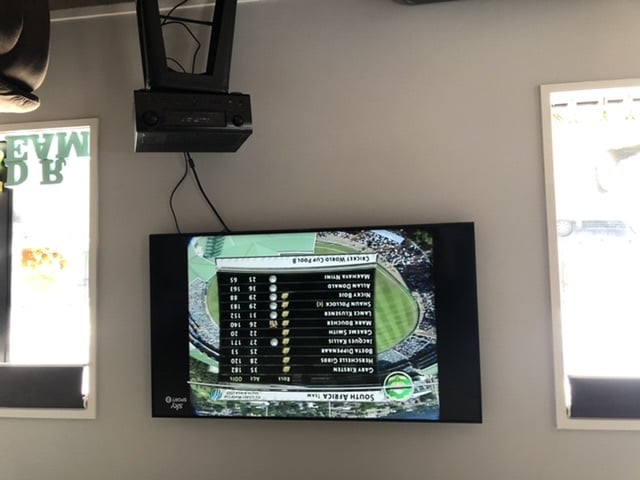
So this morning I’ve unplugged the amp and brought it into the lounge. Plugged the long cable from the sky into the normal input for the sky and plugged a short hdmi into the tv.normal setup but the amp right at the tv not at the other end of the long cable.

We’ve been watching cricket hightlights (without sound) for just over an hour with no picture cutout.

Click to see full size


Sheldon Lendrum
@SheldonLendrum
http://www.inboxdesign.co.nz/

UFF Speedtest


Dunnersfella
4100 posts

Uber Geek
+1 received by user: 887


  #2475359 2-May-2020 14:34
Send private message

That picture confused me initially... I thought it was a projector hanging from the ceiling near your TV!


Then I realised it was upside down.


Ooops.


So more than likely it's the long cable to blame, meaning you're probably getting enough loss on the cable run (HDMI needs to maintain close to 5 volts) so that the TV / amp turns off. You will either need to inject 5 volts back into the system or look at a different cable.


Well, that's my hunch.


sheldonlendrum

Sheldon
120 posts

Master Geek
+1 received by user: 28

Lifetime subscriber

  #2475413 2-May-2020 17:28
Send private message

Thanks!
Yes. Oops about the photo.

Do you mean something like this?

Do you know anywhere in NZ to buy from?
Would it go at the amp or tv end of the cable?

https://www.amazon.com/MyCableMart-HDMI-HDMI-Female-Power-Injector/dp/B0767NKNQ3

Click to see full size


Sheldon Lendrum
@SheldonLendrum
http://www.inboxdesign.co.nz/

UFF Speedtest


Shop now at Mighty Ape (affiliate link).
Yoban
453 posts

Ultimate Geek
+1 received by user: 86


  #2475510 2-May-2020 19:46
Send private message

possibly look at the fibre hdmi cables, if you can easily replace the existing. would save the hassles of injecting 5v. Something like https://www.amazon.com/RUIPRO-4K60HZ-HDMI2-0b-Supports-HDCP2-2/dp/B07287LTRZ


Discussed here: https://www.geekzone.co.nz/forums.asp?forumid=34&topicid=239925


Dunnersfella
4100 posts

Uber Geek
+1 received by user: 887


  #2475550 3-May-2020 01:18
Send private message

Good fibre cables have 5 volt injectors built into the display end (USB to micro USB typically) that can be powered off a wall-wart or at a pinch, off the TV's USB port.


I'm not so sure it's a bandwidth issue, so fibre may not be the solution, but a cable with a voltage injector may be.


Dingbatt
6804 posts

Uber Geek
+1 received by user: 3694

Lifetime subscriber

  #2475576 3-May-2020 07:09
Send private message

I couldn’t tell from your OP whether both your old TV and new TV are both 4K?


You tried your Sky decoder direct, but what about the AppleTV using the long cable? My AppleTV tells me if the cable isn’t good enough.


The reason I ask is to do with the resolution that you are trying to pass down your long cable. Sky does up to 1080i at best I think. The rest is handled by either the Amp or the TV to do the required upscaling. Depending on which ATV you have, it will be 1080p or 4K.


If your Amp is set to “Auto” in the resolution settings, it may be negotiating with the TV, seeing a 4K capability, and trying to poke 4K down the cable, which might be borderline for the cable to cope with.


So a couple of things I thought you might like to check before laying down any hard cash on more hardware.


What is the resolution the TV is reporting it’s receiving in the various connection configurations you have tried?


What happens in your original configuration (ie source->Amp———————>TV) if you lower the video output resolution of the Amp?


“We’ve arranged a society based on science and technology, in which nobody understands anything about science technology. Carl Sagan 1996


sheldonlendrum

Sheldon
120 posts

Master Geek
+1 received by user: 28

Lifetime subscriber

  #2475580 3-May-2020 07:57
Send private message

Thanks guys.
I’ll try the Apple TV direct shortly. (It is the current 4K model)

The old tv is/was 4K.

It’s not that easy to replace the cable, in walls through rtght roof space down walls etc. but possible.

I’ll play around a bit more today.
I’m not even sure how to tell that on the AMP. I’ll research and come back to you


Sheldon Lendrum
@SheldonLendrum
http://www.inboxdesign.co.nz/

UFF Speedtest


 1 | 2
View this topic in a long page with up to 500 replies per page Create new topic


Geekzone Live »

Try automatic live updates from Geekzone directly in your browser, without refreshing the page, with Geekzone Live now.


Are you subscribed to our RSS feed? You can download the latest headlines and summaries from our stories directly to your computer or smartphone by using a feed reader.