Geekzone: technology news, blogs, forums
Guest
Welcome Guest.
You haven't logged in yet. If you don't have an account you can register now.


View this topic in a long page with up to 500 replies per page Create new topic
1 | 2 | 3 | 4 | 5 | 6 | 7 | 8
Finch

2862 posts

Uber Geek
+1 received by user: 195


  #1665985 8-Nov-2016 19:31
Send private message

gzt:
Finch: @Gzt Argh! The technical jargon is burning my eyes!!

How about I reset to Windows 8/8.1 for a day or two, and install nothing else, and see what happens then? I don't mind spending a day or two on each step that's fine.

Best to take your cues only from jpwise from here forwards. The manufacturer service technician is the best person to take you all the way through to resolution by following the mandated process.

There is some time lost so far on your own initiative, but now you are in the right hands to take it forward to resolution.


Alright. He suggested I reset to windows 8, so I will do that, and wait a couple of days.


Finch

2862 posts

Uber Geek
+1 received by user: 195


  #1665986 8-Nov-2016 19:32
Send private message

By the way, would like to say thanks to everybody for the help, especially JPwise, I'm sure he could of easily said take it back to JB and I'll have a look at it, but seems to be going out of his way to help out.


Thanks everyone :)


Finch

2862 posts

Uber Geek
+1 received by user: 195


  #1666003 8-Nov-2016 19:59
Send private message

Well, looks like I pressed the wrong buttons...

Click to see full size

Something about deleting the entire hard drive, now it Boots up to a black screen!


jpwise
jpwise
591 posts

Ultimate Geek
+1 received by user: 13

Lifetime subscriber

  #1666047 8-Nov-2016 21:14
Send private message

@Finch - did you create a set of Recovery Re-install discs (DVD/USB) before doing the Win10 upgrade originally? They're created using the Recovery Media Creator.


http://www.mytoshiba.co.nz/support/items/faq/69


If not, it's a case of whether the recovery partition is still present on your machine or not. Easiest option to check would be to press F12 immediately after poweron and then <HDD RECOVERY>. 


So power it off by holding down the power button for 15-20 seconds to force a full power off. Then power on, and immediately start tapping F12, then try the recovery option to see if it loads.   If it doesn't and you get the no bootable device message again, it sounds like the drive was erased, and you'll need to either obtain recovery media (you can make a set using another identical model), purchase a set, or bring it in for service and we can re-image it. Although the re-image would be billable if it was brought in.


Working for Service Plus - serviceplus.co.nz

Authorised Service Provider for Apple, Asus, BenQ, Dynabook, Lenovo, and others - refer serviceplus.co.nz/brands


Finch

2862 posts

Uber Geek
+1 received by user: 195


  #1666059 8-Nov-2016 21:41
Send private message

Sadly, no I didn't create any recovery discs, nothing like that.

Looks like I messed up big time, what an idiot.

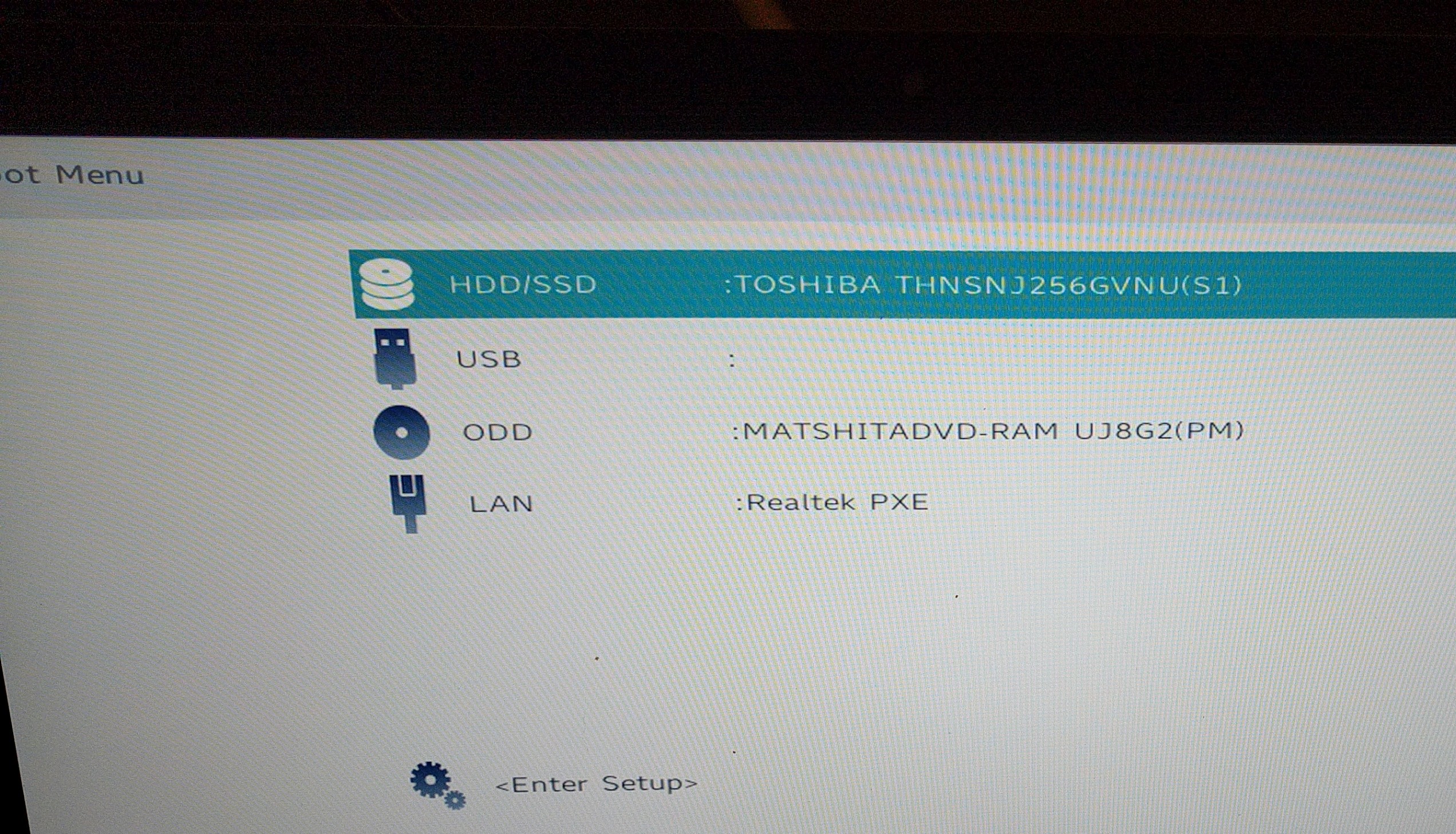
When I press F12 this pops up...

imgthumb]https://cdn.geekzone.co.nz/imagessubs/982ed57c93545728af278dc42ebf7dff.jpg[/imgthumb]

And then when I press enter (Guessing that's what I do?) I get the no bootable device message.


Finch

2862 posts

Uber Geek
+1 received by user: 195


  #1666063 8-Nov-2016 21:46
Send private message

Click to see full size


Shop now for Lenovo laptops and other devices (affiliate link).
jpwise
jpwise
591 posts

Ultimate Geek
+1 received by user: 13

Lifetime subscriber

  #1666069 8-Nov-2016 21:54
Send private message

It varies from model to model. User manual seems to indicate yours is the old '0' method (pg 35)


http://www.mytoshiba.co.nz/file/download/resource/file/28625/sc50%20sl50%20sp50.pdf


For a number of the Toshibas you normally have an <HDD RECOVERY> option in that menu above/below the Enter Setup option.  If you just press enter it's trying to boot to the selected device, being the HDD/SSD which has not bootable OS.


I'm working off the top of my head here since I'm at home, but your unit was a P50-C - PSPTSA series. If you can obtain a recovery set for the same series, it's enough to re-install the unit, although some drivers can vary which may complicate things given your current issues.


Your other option lacking recovery media would be to install a Windows 10 install from scratch.  Using another machine you can make a Windows 10 Install USB, and re-install.  As you've already upgraded the machine to 10 in the past the license upgrade is already recorded for activation.


http://www.microsoft.com/en-us/software-download/windows10


Once it's re-installed you would need to install the drivers manually, but it would get the unit up and running - may also resolve your issues given they were looking to be software related anyway.


Working for Service Plus - serviceplus.co.nz

Authorised Service Provider for Apple, Asus, BenQ, Dynabook, Lenovo, and others - refer serviceplus.co.nz/brands


Finch

2862 posts

Uber Geek
+1 received by user: 195


  #1666071 8-Nov-2016 22:02
Send private message

I just watched this video...

https://m.youtube.com/watch?v=2cB3VKbSfzY

Thought it was going to do the trick, sadly not. I get the below message.

Click to see full size

Finch

2862 posts

Uber Geek
+1 received by user: 195


  #1666073 8-Nov-2016 22:04
Send private message

I'm on mobile so it's harder to post links, sorry about that. I do have access to another laptop, plus uSB devices. Do you think I should DL Windows 10 from the site you linked, put into USB, then plug into my Laptop?

I can do that no worries.

jpwise
jpwise
591 posts

Ultimate Geek
+1 received by user: 13

Lifetime subscriber

  #1666081 8-Nov-2016 22:17
Send private message

If you've got access to another machine to create the Win10 install USB - it's something you can definitely give a go. After the re-install it won't have the Toshiba bundled apps or drivers, but it will get the machine running without having to hunt around for a recovery set, or pay to buy a set, or have to re-imaged for you.


Also for anyone else watching the thread, who owns a machine with an onboard recovery partition - please take the time to create a recovery set. HP, Sony, Toshiba, take your pick. If you don't create a recovery set, and the HDD dies, you're going to be in much the same boat.  It can save a lot of hassle, and if anything goes catastrophically wrong software wise, you can re-instate it to the original factory state to get it running again.


Working for Service Plus - serviceplus.co.nz

Authorised Service Provider for Apple, Asus, BenQ, Dynabook, Lenovo, and others - refer serviceplus.co.nz/brands


Finch

2862 posts

Uber Geek
+1 received by user: 195


  #1666108 8-Nov-2016 22:24
Send private message

Click to see full size

I had Windows 10 home. Should I choose regular Windows 10 or the home version with a single language?


Want to support Geekzone and browse the site without the ads? Subscribe to Geekzone now (monthly, annual and lifetime options).
jpwise
jpwise
591 posts

Ultimate Geek
+1 received by user: 13

Lifetime subscriber

  #1666113 8-Nov-2016 22:31
Send private message

I'd just recommend Win 10, although you can go single language if you want. Also get the x64 (64bit version). There's not normally much reason you'd want to install 32bit otherwise.


Working for Service Plus - serviceplus.co.nz

Authorised Service Provider for Apple, Asus, BenQ, Dynabook, Lenovo, and others - refer serviceplus.co.nz/brands


Batman
Mad Scientist
30014 posts

Uber Geek
+1 received by user: 6217

Trusted
Lifetime subscriber

  #1666114 8-Nov-2016 22:33
Send private message

Finch: 

Looks like I messed up big time, what an idiot.


I don't think so, you did everything you were asked to do, and this happens as a result. The Toshiba patch that Toshiba gave you didn't work, so just give the thing back and let Toshiba fix it themselves.


Finch

2862 posts

Uber Geek
+1 received by user: 195


  #1666116 8-Nov-2016 22:35
Send private message

Ok thanks. Well it's downloading now, looks like it will take 30 mins give or take.

Finch

2862 posts

Uber Geek
+1 received by user: 195


  #1666117 8-Nov-2016 22:36
Send private message

@Joker

No I think it was my fault. I was exploring all the options and think I did the wrong one.

1 | 2 | 3 | 4 | 5 | 6 | 7 | 8
View this topic in a long page with up to 500 replies per page Create new topic


Geekzone Live »

Try automatic live updates from Geekzone directly in your browser, without refreshing the page, with Geekzone Live now.


Are you subscribed to our RSS feed? You can download the latest headlines and summaries from our stories directly to your computer or smartphone by using a feed reader.