|
|
|
#include <std_disclaimer>
Any comments made are personal opinion and do not reflect directly on the position my current or past employers may have.
Yes just after I posted it was all working I had to restart everything and the little yellow circle with what appears to be a penguin in the center that you clicked on in my pc has disappeared now and have not been able to get it back.
But I can honestly say I did have access to my storage device photos music videos etc, it could not be used as a back up device which was my main reason for connecting even though I had enabled permissions to write, perhaps next update.
@hio77 Got mine and it is up and running.
Some initial feedback:
1/ I can't see where it shows you the up time for the Fibre connection, although I can see the menu option for DSL up time.
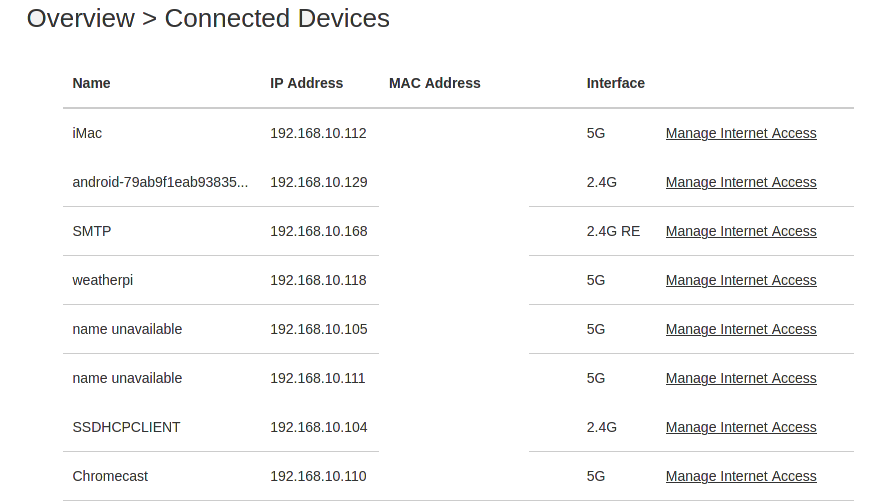
2/ Pitty it doesn't seem to allow you to label 'unknown' devices (using the unique MAC address). See attached screen grab. All the 'unknown' devices are named in the actual device so not sure why it is not passed back to the modem, but I seem to recall the HG659b allowed you to edit and name them. Makes it easy trying to trace which device is which.

3/ Have not factory reset yet so I still have FON, but I am on v13.
I've plugged a 2.5" USB drive into the USB port on this new modem. Anyone know how I can browse or map the drive?
In the modem admin app, there's a page for USB related stuff. It's recognizing the Seagate Expansion, so I'm pretty sure the drive is powered & working fine.
Been using the new smart spark modem,setting it up was easy,just plug it in ,in place of the huawei one.Would have been nice to have WPS feature on at default,plus having the two frequencies,2.4 and 5mhz with same SSID name a bit awkward setting wifi extenders up.Had to enable the 2.4 in guest mode
budgie14:
Been using the new smart spark modem,setting it up was easy,just plug it in ,in place of the huawei one.Would have been nice to have WPS feature on at default,plus having the two frequencies,2.4 and 5mhz with same SSID name a bit awkward setting wifi extenders up.Had to enable the 2.4 in guest mode
There is a toggle for bandsteering, that will do what you want.
as discussed in DM though there are better alternatives :)
#include <std_disclaimer>
Any comments made are personal opinion and do not reflect directly on the position my current or past employers may have.
#include <std_disclaimer>
Any comments made are personal opinion and do not reflect directly on the position my current or past employers may have.
hio77: Looks like it's just showing it as 2.4ghz.but that does seem confusing. Can you provide a screenshot?
Odd, it's gone now. I'll shot it if I see it again.
Got it..

nickbrooker:
Got it..
Thanks,
That's rather weird looking. I'll have it flicked off to the manufacturer to make sense of it.
haven't seen it in any of our testing. i however also haven't connected a PI2 to any of the test units...
#include <std_disclaimer>
Any comments made are personal opinion and do not reflect directly on the position my current or past employers may have.
I have just (finally!) upgraded to Spark Fibre and got one of these VRV9517 modems. Seems fast, nice user interface. The WiFi gives good coverage but a nuisance having the guest SSID's appear (can't seem to turn them off). The problem I'm having is that Port Forwarding doesn't seem to work. I need ports 5000-5001 forwarded to my Synology NAS. The wizard in the NAS attempts to use UPnP to configure the router, and reports it has worked, but the rules never appear in the Port mapping. I've added them manually, but I still can't connect via the internet - always get connection refused. Tried a number of things for several hours and haven't got it to work - is anyone successfully using Port Forwarding with this router? I have firmware 6.00.13build01.
ledzep01:
I have just (finally!) upgraded to Spark Fibre and got one of these VRV9517 modems. Seems fast, nice user interface. The WiFi gives good coverage but a nuisance having the guest SSID's appear (can't seem to turn them off). The problem I'm having is that Port Forwarding doesn't seem to work. I need ports 5000-5001 forwarded to my Synology NAS. The wizard in the NAS attempts to use UPnP to configure the router, and reports it has worked, but the rules never appear in the Port mapping. I've added them manually, but I still can't connect via the internet - always get connection refused. Tried a number of things for several hours and haven't got it to work - is anyone successfully using Port Forwarding with this router? I have firmware 6.00.13build01.
Give it a factory reset and see if it doesnt come right. 6.00.13 fixed a few UPNP issues. 6.00.07 fixed the guest issue your explaining.
No issues with port forwarding have been identified though, can you double check the nas is actually listening on those ports?
#include <std_disclaimer>
Any comments made are personal opinion and do not reflect directly on the position my current or past employers may have.
Thanks 'That VDSL Cat'. Couple of things here. First, I am seeing an unsecured SPARK_FON SSID with exactly the same strength and channel as my valid, secured SSID. I can't connect to it. This is different from the router Guest SSID which is disabled.
NAS is definitely using ports 5000/5001 as I connect through those ports on local LAN to DSM. Has to be specified in the URL. The port forwarding worked fine on my old Thomson TG585! Shame because the user interface on the VRV9517 is quite nice.
Your suggestion of a factory reset may work but I have a few reservations. Firstly, it is brand new as supplied a few days old from Spark. Shouldn't need to do a factory reset yet! I haven't fiddled with anything other than trying to get port forwarding going. It didn't come with a manual, I can't find one on the internet, and Spark doesn't yet have any information on the router on its support site. I see there is a reset button and I can do a factory settings restore from the admin screen. I could save current config and restore it later, but I don't have any info on default userid/password and default IP address after a factory reset. If I can't get it going again quickly and we are without Internet my wife will kill me! The router is definitely fast (I get full speed 920 - 930 Mbps on the speed test) but I'm looking at getting something better. The problems I've experienced and lack of information anywhere on the brand doesn't fill me with confidence. It only cost me $14.95 delivery charge.
I have reset mine and spark Fon stills show but concur that you cannot connect to it hopefully, my hard drive is being picked up but only by 1 pc out of 4 that is connected and yes this does show a penquin sitting down with yellow beak.
I cannot stream anything from the external or write anything to it but I could copy pictures from it to another hdd that worked fine...
|
|
|