Geekzone: technology news, blogs, forums
Guest
Welcome Guest.
You haven't logged in yet. If you don't have an account you can register now.


View this topic in a long page with up to 500 replies per page Create new topic
1 | ... | 35 | 36 | 37 | 38 | 39 | 40 | 41 | 42 | 43 | 44 | 45 | ... | 78
hio77

'That VDSL Cat'
13036 posts

Uber Geek
+1 received by user: 3896

ID Verified
Trusted
Lizard Networks
Subscriber

  #2505647 16-Jun-2020 10:37
Send private message

grolschie: Regarding the SSDP/UPnP Search issue with the mesh unit, frustratingly it sometimes allows the packets through. Will the fix be rolled out soon, or are they waiting to solve the disconnects issue first?


I can confirm for you that in all the software versions i've ran past what's public right now, this issue does not happen.


We suspect a updated libary has resolved it.


#include <std_disclaimer>


Any comments made are personal opinion and do not reflect directly on the position my current or past employers may have. 


grolschie
911 posts

Ultimate Geek
+1 received by user: 159


  #2505648 16-Jun-2020 10:39

hio77:

grolschie: Regarding the SSDP/UPnP Search issue with the mesh unit, frustratingly it sometimes allows the packets through. Will the fix be rolled out soon, or are they waiting to solve the disconnects issue first?


I can confirm for you that in all the software versions i've ran past what's public right now, this issue does not happen.


We suspect a updated libary has resolved it.


Thanks. Can we get our hands on this in the near future please? Or are they rolling out a bunch of fixes together later?

DanAsh
7 posts

Wannabe Geek
+1 received by user: 1


  #2506566 17-Jun-2020 13:11
Send private message

Just had fibre installed with BigPipe today and going through the process of setting this modem up.


Are firmware updates pushed out automatically with BigPipe the same as with Spark?


Mine has been plugged in for a few hours and is still on v6.10.12 build07.


grolschie
911 posts

Ultimate Geek
+1 received by user: 159


  #2506569 17-Jun-2020 13:14

DanAsh:


Mine has been plugged in for a few hours and is still on v6.10.12 build07.


That's newer than the Spark ones, which are running: v6.00.15 build05.


DanAsh
7 posts

Wannabe Geek
+1 received by user: 1


  #2506759 17-Jun-2020 15:36
Send private message

grolschie:


DanAsh:


Mine has been plugged in for a few hours and is still on v6.10.12 build07.


That's newer than the Spark ones, which are running: v6.00.15 build05.


Good point! I was only looking at the minor version (xx.12 vs xx.15).


I've noticed that the "connected devices" page doesn't line up with the "DHCP Leases" page ("DHCP Leases" page is correct). I have set up a bunch of DHCP Reservations but the "Host Name" as set in each reservation doesn't appear to be updating on other pages. 


hio77

'That VDSL Cat'
13036 posts

Uber Geek
+1 received by user: 3896

ID Verified
Trusted
Lizard Networks
Subscriber

  #2506771 17-Jun-2020 15:49
Send private message

DanAsh:


Just had fibre installed with BigPipe today and going through the process of setting this modem up.


Are firmware updates pushed out automatically with BigPipe the same as with Spark?


Mine has been plugged in for a few hours and is still on v6.10.12 build07.


Bigpipe ones are 6.10.x rather than 6.00.x the SKinny, Spark and BP firmwares at a baseline are all the same.


but there are minor differances in how they are configured.


Bigpipe and Skinny use a different method to push update out than the spark model - on skinny you can go into the webui and update it.


VRV9517_v6.10.14_build02 is current build for Bigpipe. between 6.x.14 and 6.x.15 there aren't any functional changes apart from enabling some more complex capability.


#include <std_disclaimer>


Any comments made are personal opinion and do not reflect directly on the position my current or past employers may have. 


Stream your favourite shows now on Apple TV (affiliate link).
DanAsh
7 posts

Wannabe Geek
+1 received by user: 1


  #2506790 17-Jun-2020 16:07
Send private message

hio77:


Bigpipe ones are 6.10.x rather than 6.00.x the SKinny, Spark and BP firmwares at a baseline are all the same.


but there are minor differances in how they are configured.


Bigpipe and Skinny use a different method to push update out than the spark model - on skinny you can go into the webui and update it.


VRV9517_v6.10.14_build02 is current build for Bigpipe. between 6.x.14 and 6.x.15 there aren't any functional changes apart from enabling some more complex capability.


Thanks. In that case it looks like I need to get the latest firmware file form BigPipe and upload it manually. The firmware file on the BigPipe website is for the HG659 modem.


DanAsh
7 posts

Wannabe Geek
+1 received by user: 1


  #2506803 17-Jun-2020 16:36
Send private message

DanAsh:


Thanks. In that case it looks like I need to get the latest firmware file form BigPipe and upload it manually. The firmware file on the BigPipe website is for the HG659 modem.


Turns out Bigpipe do push out automatic updates however the "check daily" option wasn't selected on the autofw.htm page (not even sure if you can navigate to this page via the web interface).


hio77

'That VDSL Cat'
13036 posts

Uber Geek
+1 received by user: 3896

ID Verified
Trusted
Lizard Networks
Subscriber

  #2506862 17-Jun-2020 17:13
Send private message

DanAsh:

DanAsh:


Thanks. In that case it looks like I need to get the latest firmware file form BigPipe and upload it manually. The firmware file on the BigPipe website is for the HG659 modem.


Turns out Bigpipe do push out automatic updates however the "check daily" option wasn't selected on the autofw.htm page (not even sure if you can navigate to this page via the web interface).


That's a good catch.

I don't really know how the functionality past the basic background so didn't know there was a tick. That answers a question I was asked elsewhere :)


#include <std_disclaimer>


Any comments made are personal opinion and do not reflect directly on the position my current or past employers may have. 


timbosan
2199 posts

Uber Geek
+1 received by user: 294

Subscriber

  #2506871 17-Jun-2020 17:29
Send private message

Hi, anyone know if using the Spark Smart Modem as a Access Point (WAP) if it receives updates? Or do I have to do something special to get them?

Also, for the record, I have been using my Smart Modem as a WAP for over a month, and never experience the WiFi problems noted in this thread.  However my DHCP leases are handled by my router (Untangle) so the Smart Modem doesn't do anything except act as WAP.


hio77

'That VDSL Cat'
13036 posts

Uber Geek
+1 received by user: 3896

ID Verified
Trusted
Lizard Networks
Subscriber

  #2506904 17-Jun-2020 18:57
Send private message

timbosan:

Hi, anyone know if using the Spark Smart Modem as a Access Point (WAP) if it receives updates? Or do I have to do something special to get them?

Also, for the record, I have been using my Smart Modem as a WAP for over a month, and never experience the WiFi problems noted in this thread.  However my DHCP leases are handled by my router (Untangle) so the Smart Modem doesn't do anything except act as WAP.


The spark model will not.
The skinny and bigpipe versions will use their own method, which isn't reliant on being able to reach back.

I'd love to know what version, if bandsteering is on and if you have any mesh nodes.


Really do appreciate the feedback. Your correct in that the vast majority of the units out there are without any complaint.

Something I always do when I'm too caught up in these issues is take a step back and do a deep dive on customers that have not raised issue to validate if they simply aren't phased enough to complain or if its only in certain situations.


#include <std_disclaimer>


Any comments made are personal opinion and do not reflect directly on the position my current or past employers may have. 


Want to support Geekzone and browse the site without the ads? Subscribe to Geekzone now (monthly, annual and lifetime options).
PJ48
302 posts

Ultimate Geek
+1 received by user: 106

Lifetime subscriber

  #2506937 17-Jun-2020 20:12
Send private message

hio77:
PJ48:


I can confirm that the apparent dropping of DHCP leases may be a red herring. My iPhone X has been losing Wifi periodically whilst staying next to the Smart Mesh, and the system log confirms that it is repeatedly gaining and losing DHCP lease. When I substitute the ER-X as the router and disable the DHCP and NAT on the Smart system it continues to drop off and reconnect to the wifi. 


Thanks.

That aligns with our supsisons and findings to date, really appreciate you going to effor of taking the dhcp daemon out of the equation..

Can you confirm if you have bandsteering on or off?


Don't know if this is helpful or not, but in addition to band steering being on, it mainly seems to happen in the same room as the Smart Mesh (connected on ethernet backhaul) and the culprit is an iPhone X.


hio77

'That VDSL Cat'
13036 posts

Uber Geek
+1 received by user: 3896

ID Verified
Trusted
Lizard Networks
Subscriber

  #2506941 17-Jun-2020 20:27
Send private message

PJ48:


Don't know if this is helpful or not, but in addition to band steering being on, it mainly seems to happen in the same room as the Smart Mesh (connected on ethernet backhaul) and the culprit is an iPhone X.


Sortof.


what that tells me is the apple device is the one that shows the problem for you.


Apple are experts at not really following standards, and so often they perform roaming and powersaving incorrectly....


#include <std_disclaimer>


Any comments made are personal opinion and do not reflect directly on the position my current or past employers may have. 


timbosan
2199 posts

Uber Geek
+1 received by user: 294

Subscriber

  #2506989 17-Jun-2020 22:09
Send private message

hio77: [The spark model will not.
The skinny and bigpipe versions will use their own method, which isn't reliant on being able to reach back.

I'd love to know what version, if bandsteering is on and if you have any mesh nodes.

Really do appreciate the feedback. Your correct in that the vast majority of the units out there are without any complaint.

Something I always do when I'm too caught up in these issues is take a step back and do a deep dive on customers that have not raised issue to validate if they simply aren't phased enough to complain or if its only in certain situations.


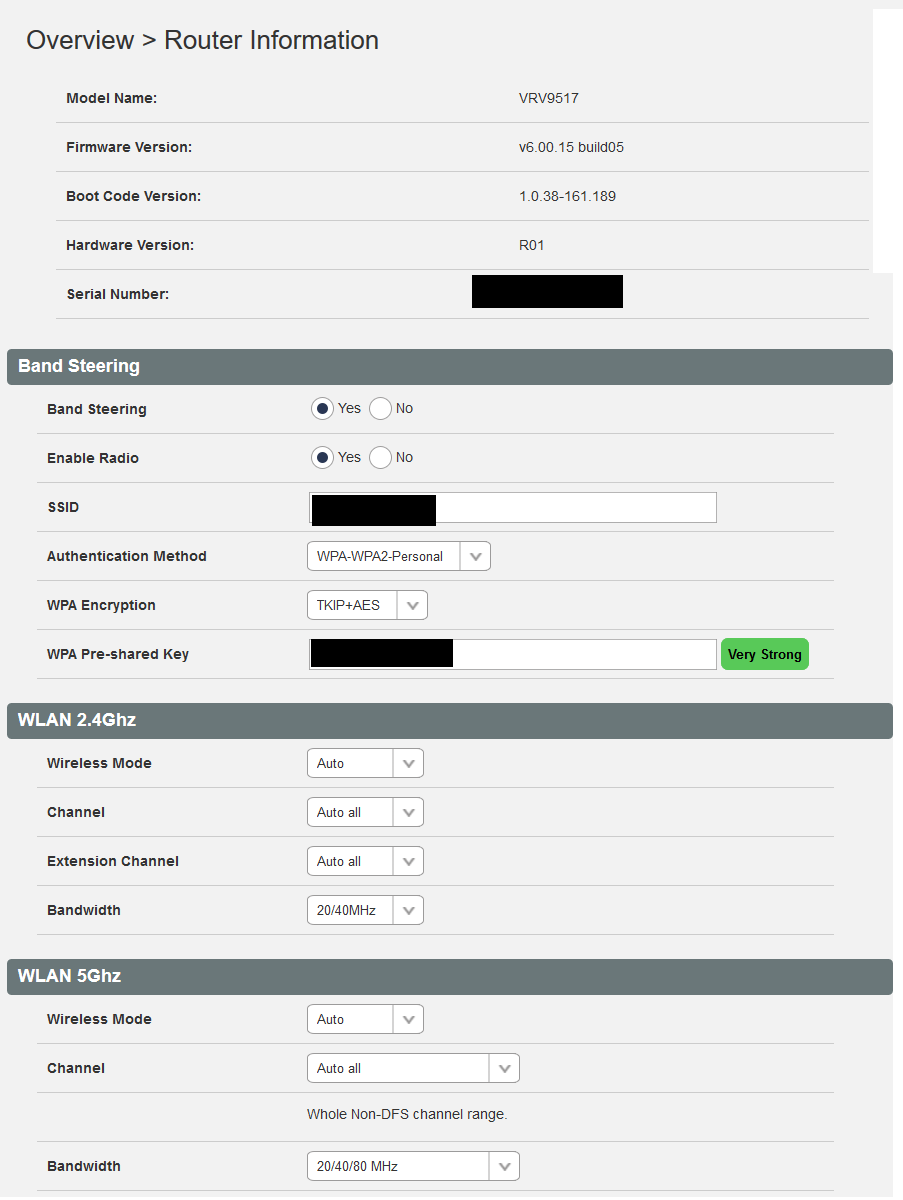
Happy to help!  Bandsteering is on (and always has been).  No mesh nodes - but I do have a second Smart Modem I was thinking of setting up with the current one, which would replace 2 (old) x Unifi APs.  But I cannot figure out the Smart Modem's support 802.11k / v / r.

If you want any other information, let me know. I also happy to change configuration if required as there is only 1 device running off this. 

And, how do I update it? Plug it into the ONT and wait?

Here's the modem info:


smelck
61 posts

Master Geek
+1 received by user: 5


  #2507121 18-Jun-2020 10:48
Send private message

Hi all,


Relative novice and seeking some advice.


Just upgraded to Smart Modem from old faithful 659b - nice and easy, firmware upgraded great and noticeable improvement in wifi signal and speed.


I have a relatively small house / section (110 sqr mtre / 840 sgr mtr) - and coverage inside is fine - but have always had issues with signal outside.


I previously used an extender (linksys) which I placed in the shed (about 15 mtrs from modem / router through a couple of windowed walls) but signal was spotty as it was on the very edge of its range. I also had issues with some devices switching between inside and ext signals.


Having a wired option is also work in progress :)


Looking at using nodes now - how many might i need? I'm getting a good 2/3 bars mid garden from the smart modem. If I need 2 is piggy backing nodes ok ? (appreciate it will impact speed / strength)


On fibre max and get expected speeds wired at modem. I understand without seeing the layout its just advice. 


Cheers


1 | ... | 35 | 36 | 37 | 38 | 39 | 40 | 41 | 42 | 43 | 44 | 45 | ... | 78
View this topic in a long page with up to 500 replies per page Create new topic


Geekzone Live »

Try automatic live updates from Geekzone directly in your browser, without refreshing the page, with Geekzone Live now.


Are you subscribed to our RSS feed? You can download the latest headlines and summaries from our stories directly to your computer or smartphone by using a feed reader.