Geekzone: technology news, blogs, forums
Guest
Welcome Guest.
You haven't logged in yet. If you don't have an account you can register now.


Monza

299 posts

Ultimate Geek
+1 received by user: 30


#185379 20-Nov-2015 13:37
Send private message

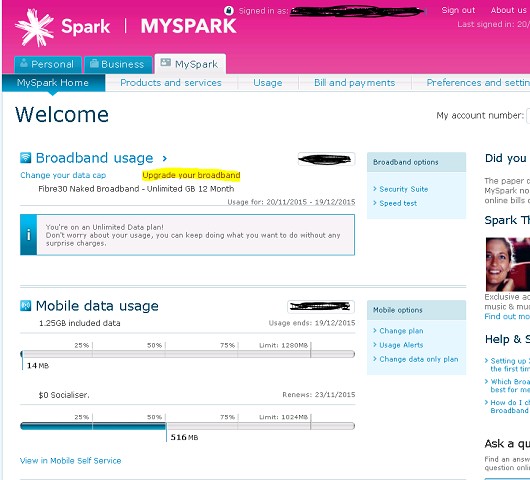
Currently on fibre 30 and want to upgrade to fibre 100. Tried to do this online through the MySpark portal but the only option I could see was "upgrade your broadband" but it is trying to lock me for 12 months or pay $300 install cost. It doesn't seem to understand I already have fibre. Note I use my own router so don't need one sent out.

After this initial fustration I rang 123, advised of at least 90 min wait so requested call back. When called back the person advised I can do all this online and to try again. I was out for lunch at the time so not able to try with Spark still on the phone. Now back at my desk I tried again but still the same result. 

Rang 123 back again, this time not even advising a wait time, just saying will call back later this afternoon.

Why so difficult to complete a simple speed change?

Create new topic
PeterReader
6028 posts

Uber Geek
+1 received by user: 461

Trusted
Geekzone
Lifetime subscriber

  #1431692 20-Nov-2015 13:37
Send private message

Hello... Our robot found some keywords in your post, so here is an automated reply with some important things to note regarding broadband speeds.


If you are posting regarding DSL speeds please check that


- you have reset your modem and router


- your PC (or other PCs in your LAN) is not downloading large files when you are testing


- you are not being throttled by your ISP due to going over the monthly cap


- your tests are always done on an ethernet connection to the router - do not use wireless for testing


- you read this topic and follow the instructions there.


Make sure you provide information for other users to help you. If you have not already done it, please EDIT your post and add this now:


- Your ISP and plan


- Type of connection (ADSL, ADSL2, VDSL)


- Your modem DSL stats (do not worry about posting Speedtest, we need sync rate, attenuation and noise margin)


- Your general location (or street)


- If you are rural or urban


- If you know your connection is to an exchange, cabinet or conklin


- If your connection is to a ULL or wholesale service


- If you have done an isolation test as per the link above


Most of the problems with speed are likely to be related to internal wiring issues. Read this discussion to find out more about this. Your ISP is not intentionally slowing you down today (unless you are on a managed plan). Also if this is the school holidays it's likely you will notice slower than usual speed due to more users online.


A master splitter is required for VDSL2 and in most cases will improve speeds on DSL connections. Regular disconnections can be a monitored alarm or a set top box trying to connect. If there's an alarm connected to your line even if you don't have an alarm contract it may still try to connect so it's worth checking.


I recommend you read these two blog posts:


- Is your premises phone wiring impacting your broadband performance? (very technical)


- Are you receiving a substandard ULL ADSL2+ connection from your ISP?


I am the Geekzone Robot and I am here to help. I am from the Internet. I do not interact. Do not expect other replies from me.


Referral links: Quic Broadband (free setup code: R587125ERQ6VE) | Samsung | AliExpress | Wise | Sharesies 


Support Geekzone by subscribing (browse ads-free), or making a one-off or recurring donation through PressPatron.


Inphinity
2780 posts

Uber Geek
+1 received by user: 1184


  #1431706 20-Nov-2015 13:48
Send private message

You want the "Change Plan" option rather than upgrade broadband, I believe

Monza

299 posts

Ultimate Geek
+1 received by user: 30


  #1431722 20-Nov-2015 14:08
Send private message

I could only see that option under my mobile usage, see below with highlighted option that tried to use;


Wheelbarrow01
1784 posts

Uber Geek
+1 received by user: 2638

Trusted
Chorus

  #1431739 20-Nov-2015 14:39
Send private message

Hi Monza,

Can you please PM me with your account number and contact phone number and I'll get your speed change underway.

Thanks,
Simon


The views expressed by me are not necessarily those of my employer Chorus NZ Ltd


Monza

299 posts

Ultimate Geek
+1 received by user: 30


  #1433163 23-Nov-2015 11:03
Send private message

Wheelbarrow01: Hi Monza,

Can you please PM me with your account number and contact phone number and I'll get your speed change underway.

Thanks,
Simon


Thanks for you help Simon, looks Spark really need to sort out their webpage to make this a bit easier and avoid lengthy phone calls.

firefuze
510 posts

Ultimate Geek
+1 received by user: 85


  #1433172 23-Nov-2015 11:27
Send private message

I had the same problem. Already have fibre and have my own capable modem and just wanted to change the speed. (from 100 to 200) 'Upgrade Broadband' option wants a new 12 month term, send out a modem I don't need plus $14.95 postage. 

Used online chat, sorted in 10mins


Support Geekzone with one-off or recurring donations Donate via PressPatron.
Monza

299 posts

Ultimate Geek
+1 received by user: 30


  #1433205 23-Nov-2015 12:02
Send private message

Thanks, did not know Spark had online chat option.

I can't find it on their homepage but googling "Spark online chat" I found this, ">http://www.spark.co.nz/help/chat/reactive-chat[/url] Is that it?

Batman
Mad Scientist
30014 posts

Uber Geek
+1 received by user: 6217

Trusted
Lifetime subscriber

  #1433232 23-Nov-2015 12:33
Send private message

Sometimes mobile and desktop pages are different. Sometimes a page just will not work on a particular browser! Always have a full desktop version of multiple browsers!

Jase2985
13735 posts

Uber Geek
+1 received by user: 6216

ID Verified
Lifetime subscriber

  #1433233 23-Nov-2015 12:36
Send private message

its on their contact us page
https://www.spark.co.nz/contactus/

eibmoZi
1 post

Wannabe Geek


  #1433240 23-Nov-2015 12:41

Good luck! 3 months trying to go from UF30 to UF100, including multiple chat and 123 calls, as well as multiple forms online.

Batman
Mad Scientist
30014 posts

Uber Geek
+1 received by user: 6217

Trusted
Lifetime subscriber

  #1433264 23-Nov-2015 13:15
Send private message

eibmoZi: Good luck! 3 months trying to go from UF30 to UF100, including multiple chat and 123 calls, as well as multiple forms online.


Why is it so difficult i wonder?

HP


Shop now for HP laptops and other devices (affiliate link).
Monza

299 posts

Ultimate Geek
+1 received by user: 30


  #1434877 25-Nov-2015 22:20
Send private message

joker97:
eibmoZi: Good luck! 3 months trying to go from UF30 to UF100, including multiple chat and 123 calls, as well as multiple forms online.


Why is it so difficult i wonder?


Difficult AND slow... over 3 working days and still my speed hasn't changed.

Wheelbarrow01
1784 posts

Uber Geek
+1 received by user: 2638

Trusted
Chorus

  #1434923 26-Nov-2015 07:39
Send private message

I just gave it a nudge for you. Can you please test your speed now? (May require router restart).


The views expressed by me are not necessarily those of my employer Chorus NZ Ltd


Monza

299 posts

Ultimate Geek
+1 received by user: 30


  #1434943 26-Nov-2015 08:33
Send private message

Wheelbarrow01: I just gave it a nudge for you. Can you please test your speed now? (May require router restart).


Thanks, got my email at 7:32 this morning and sure enough 100/20 on speedtest (without router speedtest).


Create new topic


Geekzone Live »

Try automatic live updates from Geekzone directly in your browser, without refreshing the page, with Geekzone Live now.


Are you subscribed to our RSS feed? You can download the latest headlines and summaries from our stories directly to your computer or smartphone by using a feed reader.