Geekzone: technology news, blogs, forums
Guest
Welcome Guest.
You haven't logged in yet. If you don't have an account you can register now.


Jarsky

142 posts

Master Geek
+1 received by user: 39


#215582 3-Jul-2017 19:30
Send private message

Anyone else getting this issue with slow speeds in the evenings lately? 


Since Wednesday/Thurdsay last week I noticed that Twitch to Hong Kong was skipping and stuttering. 
I tested both on my Spark VDSL as well as a Vodafone VDSL connection, and it was only apparent on the Spark one.


I tested the same stream on both, and actually ended up on the same CDN for both e.g video-edge-8555f4.syd01.hls.ttvnw.net which an NSLookup and a whois tells me its Twitch HK 103.53.48.22 


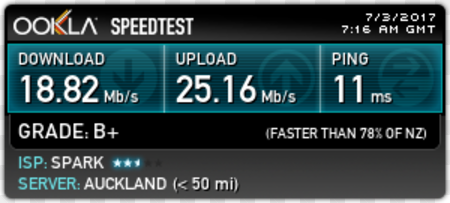
When running a speedtest, I can see the connection is slowing down as far as 6-10Mbit down to even Sparks own speedtest.net server, while upload shows a normal speed. 


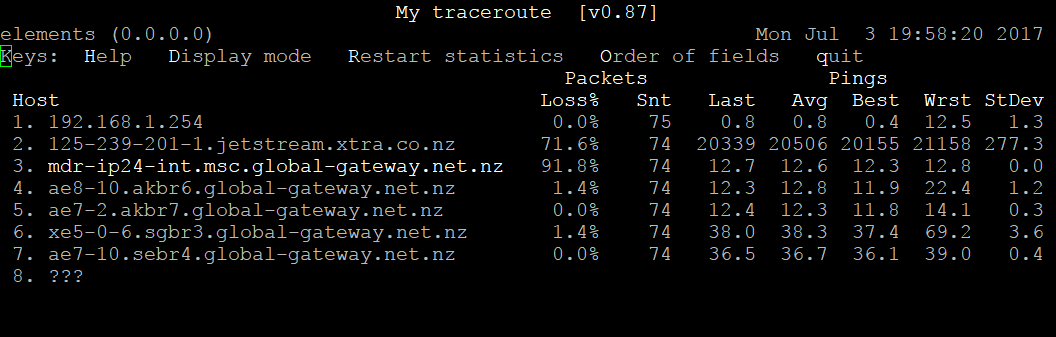
Right now again im getting this:


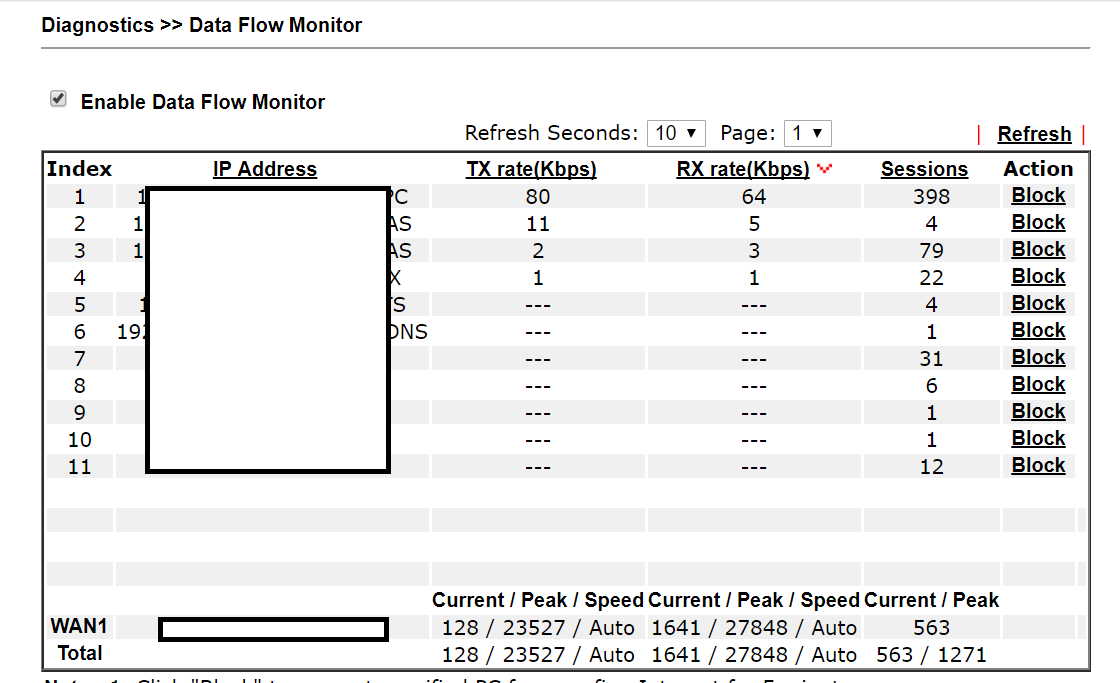
While my network is idle:


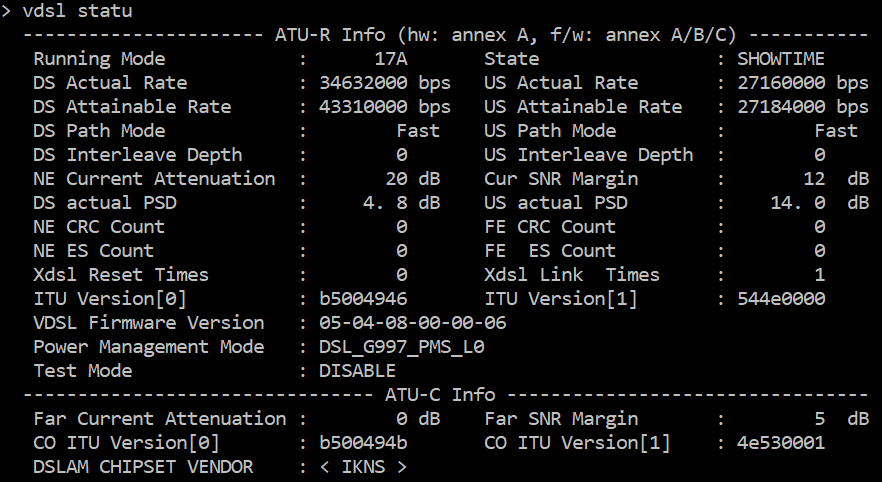
Add to that that over the weekend I lost PPP connection (DSL Sync remained) about 10x on Saturday which dropped my line from 70Mbit down to 49Mbit - losing over 20Mbit in sync...
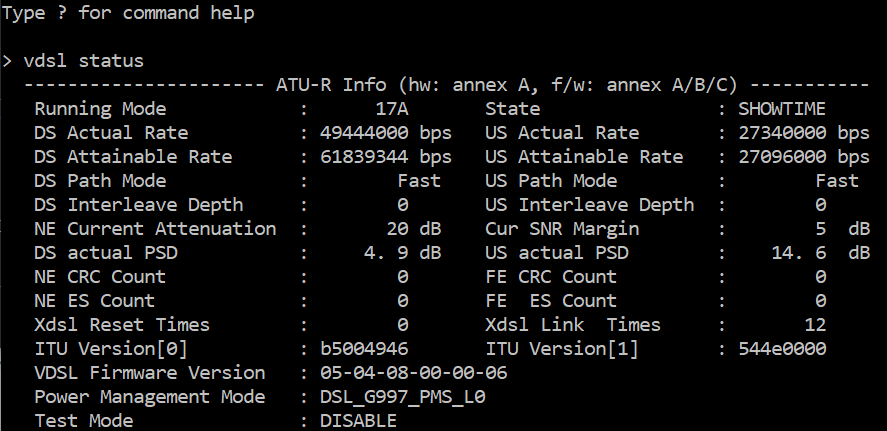


I would normally not be too phased, except that this week is the annual GamesDoneQuick speed running event on Twitch!


It's taking forever to buffer any videos that arent coming off local CDN's with Spark either. e.g non YouTube videos


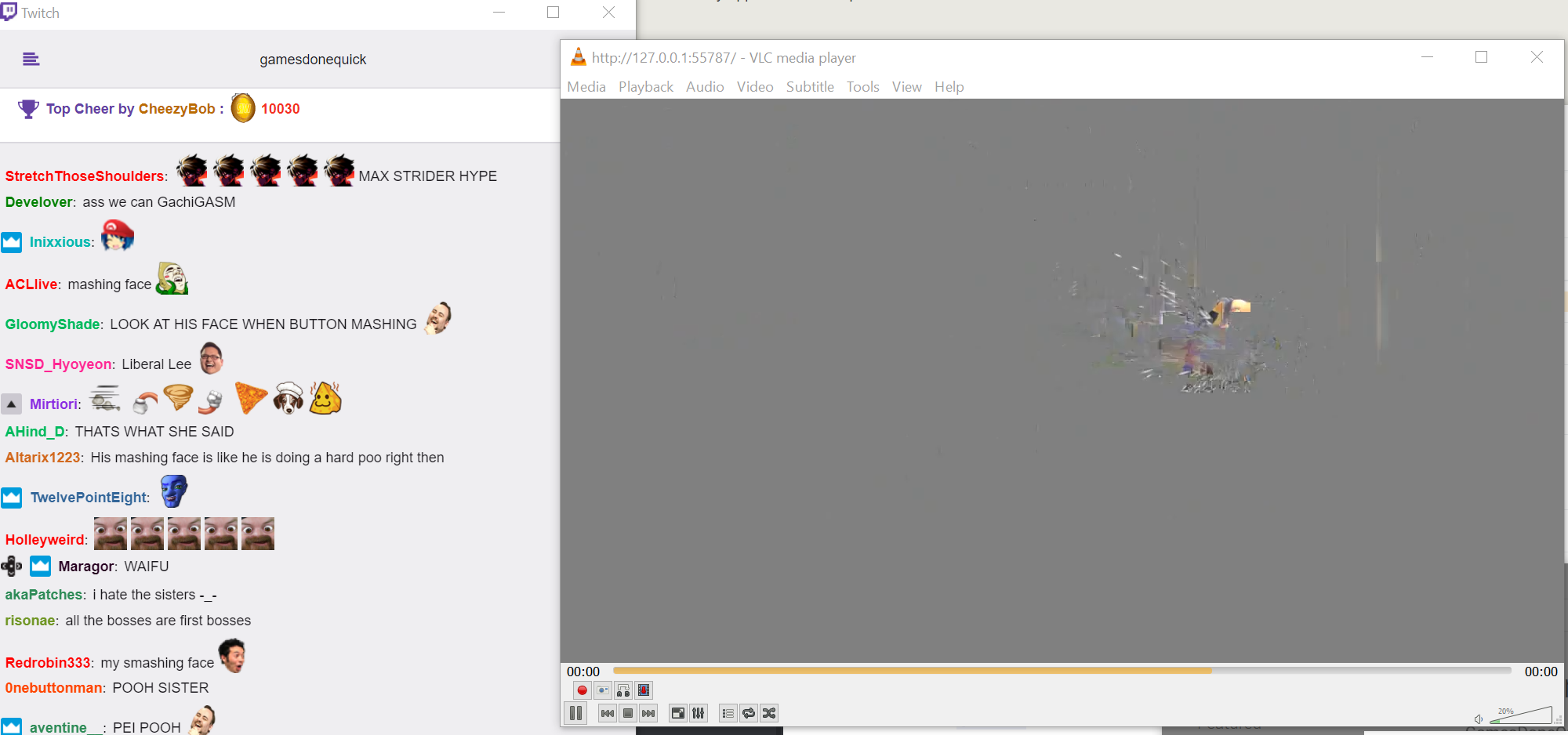
e.g right now Twitch is just doing this every couple of seconds right now, making it unwatchable. 


Create new topic
Jase2985
13730 posts

Uber Geek
+1 received by user: 6202

ID Verified
Lifetime subscriber

  #1812243 3-Jul-2017 20:47
Send private message

what is the link to the twitch stream ie on the website? im spark and VDSL in Auckland.


i doubt its congestion but more of a routing issue/issue with a upstream provider


Jarsky

142 posts

Master Geek
+1 received by user: 39


  #1812264 3-Jul-2017 21:36
Send private message

But it appears to be my overall speed thats congested, the speedtests are too the internal Spark speedtest.net server which shows overall slow speed. 
Everything is *slow*, just feeling it the most with Twitch right now. 


The stream im watching in particular is http://twitch.tv/GamesDoneQuick


Noticing it on any stream though from that site. Same issue on Smashcast (Hitbox). 


Local FPS games like BF1 are showing connection stability errors - though its able to compensate so no real performance hit there. 


Jase2985
13730 posts

Uber Geek
+1 received by user: 6202

ID Verified
Lifetime subscriber

  #1812266 3-Jul-2017 21:40
Send private message

line fault and DLM playing havoc because of it?


maybe @hio77 could have a look at it?


Jarsky

142 posts

Master Geek
+1 received by user: 39


  #1812279 3-Jul-2017 22:20
Send private message

Jase2985:


line fault and DLM playing havoc because of it?


maybe @hio77 could have a look at it?


Sorry I should have mentioned, this has really only been noticeable in the evenings. It has been fine during the day. 


Interesting thing, just reloaded the WAN. 


The IP address changed from 115.188.173.X to 115.188.175.X


The connection is now fine again. Speedtest is full speed again and Twitch and all videos are streaming fine. 


(still waiting for DLM to negotiate my sync back to 70Mbit but that's a separate issue)


Really at a loss what's been going on for the last week....


cbrpilot
964 posts

Ultimate Geek
+1 received by user: 555

Trusted
Spark NZ

  #1812369 4-Jul-2017 09:37
Send private message

Hi Jarsky,


None of the images you're posted are showing up for me, but from your description you were experiencing slow speeds no matter what the destination.  Nothing amiss on the Spark network. We have not made any changes. 


I've reverse engineered from your IP where you connect to our network, and I can't see any traffic drops last week which would indicate a congestion issue on the Chorus network either (unless it was only impacting a very small number of customers). 


Given your change of sync speed and the disconnections you've experienced, this very much sounds like a line issue.  If this continues, we'd encourage you to get in touch with us via the normal channels to get it looked into.


Dave.


My views are my own, and may not necessarily represent those of my employer.


Jarsky

142 posts

Master Geek
+1 received by user: 39


  #1812427 4-Jul-2017 11:22
Send private message

Thanks Dave, it still seems to be ok right now - i'll do some more testing this afternoon and this evening and see what happens as thats when the speed dips have been occuring. 


Shop now on AliExpress (affiliate link).
hio77
'That VDSL Cat'
13036 posts

Uber Geek
+1 received by user: 3896

ID Verified
Trusted
Lizard Networks
Subscriber

  #1812428 4-Jul-2017 11:24
Send private message

cbrpilot:


Hi Jarsky,


None of the images you're posted are showing up for me, but from your description you were experiencing slow speeds no matter what the destination.  Nothing amiss on the Spark network. We have not made any changes. 


I've reverse engineered from your IP where you connect to our network, and I can't see any traffic drops last week which would indicate a congestion issue on the Chorus network either (unless it was only impacting a very small number of customers). 


Given your change of sync speed and the disconnections you've experienced, this very much sounds like a line issue.  If this continues, we'd encourage you to get in touch with us via the normal channels to get it looked into.


Dave.


i can only echo as above.


I flew back into the country Yesterday, and back in the office this morning.


Looking at graphs all is fine, Looking at my personal connections at home (Vodafone and Spark lines) performance as as par normal. - I monitor both locally and also can't see anything amiss in the office which i'm sure Dave already checked!


Drop of speed is definitely ddDLM related and not alot we can do, i'm more than happy to double check this is the case on your line for you though.


#include <std_disclaimer>


Any comments made are personal opinion and do not reflect directly on the position my current or past employers may have. 


Jarsky

142 posts

Master Geek
+1 received by user: 39


  #1813482 5-Jul-2017 21:55
Send private message

Seems that the low throughput on downstream has stopped - so no more stutters which is great. 


Definately got DLM wrecking some havoc on my line though. Last week my connection was 69/29...then it dropped to 49/27, and just now its dropped to 34/27. 


So im now down to half the speed I was on a week ago. Rather disappointing when my line started out with 108/38M "attainable" (restricted to 70/30 because of the Ikanos VDSL card in the cabinet)


I'll log the connection issue with the Spark broadband team. 


michaelmurfy
meow
13579 posts

Uber Geek
+1 received by user: 10910

Moderator
ID Verified
Trusted
Lifetime subscriber

  #1813484 5-Jul-2017 21:59
Send private message

Just making sure - you have got a Master Filter installed right?


Michael Murphy | https://murfy.nz
Referral Links: Quic Broadband (use R122101E7CV7Q for free setup)

Are you happy with what you get from Geekzone? Please consider supporting us by subscribing.
Opinions are my own and not the views of my employer.


hio77
'That VDSL Cat'
13036 posts

Uber Geek
+1 received by user: 3896

ID Verified
Trusted
Lizard Networks
Subscriber

  #1813486 5-Jul-2017 22:03
Send private message

Jarsky, DM me details i'll have a good look at your line for ya..


#include <std_disclaimer>


Any comments made are personal opinion and do not reflect directly on the position my current or past employers may have. 


BarTender
3629 posts

Uber Geek
+1 received by user: 2572

ID Verified
Trusted
Lifetime subscriber

  #1813533 6-Jul-2017 07:26
Send private message

Did you also know that Chorus are busy doing software upgrades their DSLAMs. It could have caused the bouncing on the line and the slower line speed for the moment. Let ddDLM do it's thing over the next week and see if it returns to normal.


I personally noticed my line was rather unstable straight after the upgrade, then it settled down 2 weeks later.


The ddDLM will cause your like to disconnect and resync around 2-4am.


Want to support Geekzone and browse the site without the ads? Subscribe to Geekzone now (monthly, annual and lifetime options).
Jarsky

142 posts

Master Geek
+1 received by user: 39


  #1813547 6-Jul-2017 08:31
Send private message

michaelmurfy:


Just making sure - you have got a Master Filter installed right?


Haha yes, I most certainly do have a splitter. Had it installed when i moved in - and then replaced with a new one by the Chorus tech when I had VDSL installed.


BarTender:


Did you also know that Chorus are busy doing software upgrades their DSLAMs.


Wasn't aware of this as I don't work in broadband, and didnt receive any notifications other than 'there was a fault in my area' a few weeks ago, so i'll give it some time and see what happens with the stability with ddDLM. Thanks for the assist - and @cbrpilot / @hio77


Jarsky

142 posts

Master Geek
+1 received by user: 39


  #1834447 31-Jul-2017 16:42
Send private message

Just thought I would update this post that after 2 techs closing my cases as No Fault Found - I tested the line myself with NTS and found a 25v loop on my line.


I made a post on Chorus' FB wall, and their social team had me log another case with Spark. After a frustrating time with 1 rep that refused to log me a fault without doing 'Troubleshooting' i finally got a fault logged and Chorus' social team managed the fault from there.


The tech cleared the loop which instantly fixed my speed issue.


There's still some ddDLM tuning to occur, but much improved over the 35Mbit I was down to before.


Before:


DSL State: Up

Actual rate(D/U): 36,928/19,208kbps
Attainable rate(D/U): 46,144/19,416kbps
Attenuation(D/U): 21/25.1dB
Noise margin (D/U): 12/11.7dB

DC (V) AC (V) RES IMP CAP
------------------------------------------------
A-B | 23.40 * >10.0M 1.69M *
B-A | * * >10.0M * *
A-E | -3.00 0.65 2.11M 831.4K 0.159uF
B-E | -26.50 0.42 639.7K 693.3K 0.146uF
------------------------------------------------
LNG BAL: 49.2dB GRND NSE: 44.0dBRNP


After:


DC (V) AC (V) RES IMP CAP
------------------------------------------------
A-B | 3.00 * 490.2K 37.2K *
B-A | * * 376.5K * *
A-E | -18.30 0.35 1.52M 4.09M 0.152uF
B-E | -21.30 0.34 766.0K 825.3K 0.154uF
------------------------------------------------
LNG BAL: 61.3dB GRND NSE: 42.0dBRNP
Actual rate(D/U): 55,944/25,968kbps
Attainable rate(D/U): 93,184/26,496kbps
Attenuation(D/U): 11.5/15.3dB
Noise margin (D/U): 15/12.2dB


So if you have sync issues, just be persistant :)


hio77
'That VDSL Cat'
13036 posts

Uber Geek
+1 received by user: 3896

ID Verified
Trusted
Lizard Networks
Subscriber

  #1834450 31-Jul-2017 16:49
Send private message

@Jarsky:


Just thought I would update this post that after 2 techs closing my cases as No Fault Found - I tested the line myself with NTS and found a 25v loop on my line.


I made a post on Chorus' FB wall, and their social team had me log another case with Spark. After a frustrating time with 1 rep that refused to log me a fault without doing 'Troubleshooting' i finally got a fault logged and Chorus' social team managed the fault from there.


The tech cleared the loop which instantly fixed my speed issue.


There's still some ddDLM tuning to occur, but much improved over the 35Mbit I was down to before. 


So if you have sync issues, just be persistant :)


this is exactly why i offered to follow this up for ya, DM me on Skype next time now that i've actually made the connection....


#include <std_disclaimer>


Any comments made are personal opinion and do not reflect directly on the position my current or past employers may have. 


Create new topic


Geekzone Live »

Try automatic live updates from Geekzone directly in your browser, without refreshing the page, with Geekzone Live now.


Are you subscribed to our RSS feed? You can download the latest headlines and summaries from our stories directly to your computer or smartphone by using a feed reader.