Geekzone: technology news, blogs, forums
Guest
Welcome Guest.
You haven't logged in yet. If you don't have an account you can register now.


MikeB4

MikeB4
18775 posts

Uber Geek
+1 received by user: 12765

ID Verified
Trusted
Subscriber

#240155 23-Aug-2018 13:26
Send private message

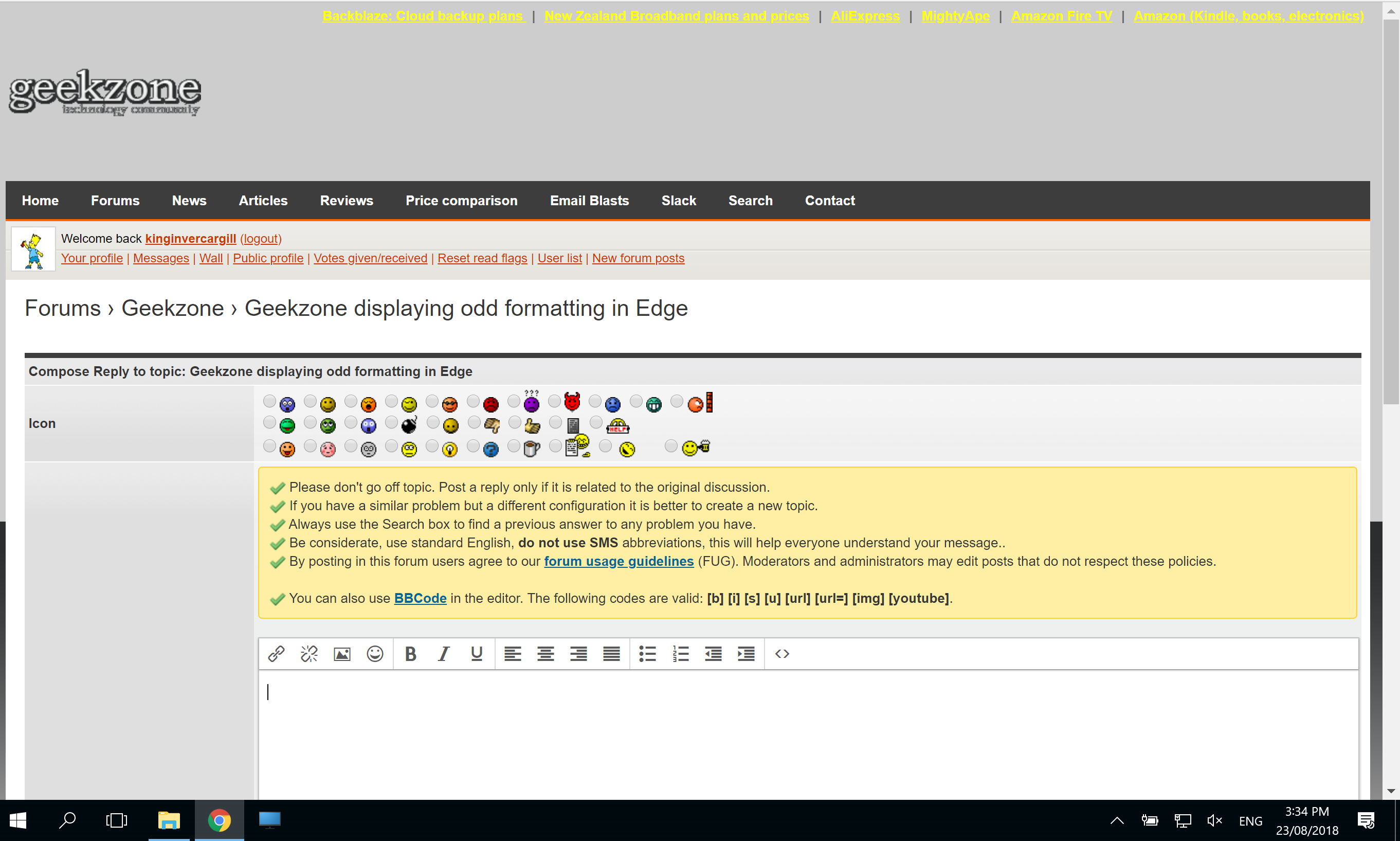
Today I am getting odd formatting of Geekzone. The banner is displaying as light gray and extends down behind the body of the web page, this is especially evident on the left side. The right side is also inconsistent and "jaggered. In forum list I am getting usernames appearing the post body of the post above.


I am using Edge version 42.17134.1.0.


I have done all the usuals like clear cache history forms etc etc. The web page displays correctly in MacOS using Chrome and in Windows 10 using Chrome.   


Here is a crazy notion, lets give peace a chance.


View this topic in a long page with up to 500 replies per page Create new topic
 1 | 2
freitasm
BDFL - Memuneh
80646 posts

Uber Geek
+1 received by user: 41024

Administrator
ID Verified
Trusted
Geekzone
Lifetime subscriber

  #2077927 23-Aug-2018 13:27
Send private message

One specific page or all of them?


Referral links: Quic Broadband (free setup code: R587125ERQ6VE) | Samsung | AliExpress | Wise | Sharesies 


Support Geekzone by subscribing (browse ads-free), or making a one-off or recurring donation through PressPatron.


djtOtago
1181 posts

Uber Geek
+1 received by user: 605


  #2077930 23-Aug-2018 13:31
Send private message

Screen shot from edge


Click to see full size


Top banner odd colour :)


djtOtago
1181 posts

Uber Geek
+1 received by user: 605


  #2077931 23-Aug-2018 13:35
Send private message

Looks like edge dosn't like the body background-image.


So is falling back to background-color: #cecece;


MikeB4

MikeB4
18775 posts

Uber Geek
+1 received by user: 12765

ID Verified
Trusted
Subscriber

  #2077936 23-Aug-2018 13:41
Send private message

Its appearing on all pages, Front page, News, Forums. including drill downs


Here is a crazy notion, lets give peace a chance.


djtOtago
1181 posts

Uber Geek
+1 received by user: 605


  #2077937 23-Aug-2018 13:41
Send private message

Actually the image is there. It is just half way down the page.


Remove body css style background-position-y: center fixes it in Edge. Haven't checked other browsers.


Sideface
9649 posts

Uber Geek
+1 received by user: 15595

Trusted
DR
Lifetime subscriber

  #2077941 23-Aug-2018 13:47
Send private message

I had the same problem this afternoon, on all forums, using Firefox (latest).


Format was OK on Chrome (which I rarely use).


Self-corrected after about an hour.


Never before or since.


EDIT  I spoke too soon - problem is back on Firefox.


Here is a screenshot:


Click to see full size


click to view


Sideface


Want to support Geekzone and browse the site without the ads? Subscribe to Geekzone now (monthly, annual and lifetime options).
djtOtago
1181 posts

Uber Geek
+1 received by user: 605


  #2077948 23-Aug-2018 13:55
Send private message

In the sites css the body tag style has background-position:top;
Changing this to background-position: center top; ie (give values to both x and y positions)
Should stop browsers defaulting the background-position-y to center;


Edit: May need to add background-position: center top; to the .forumBox style to fix problem @Sideface is seeing.


Benjip
977 posts

Ultimate Geek
+1 received by user: 524

ID Verified

  #2077956 23-Aug-2018 14:14
Send private message

Happening to me too in Safari (macOS).


MikeB4

MikeB4
18775 posts

Uber Geek
+1 received by user: 12765

ID Verified
Trusted
Subscriber

  #2077962 23-Aug-2018 14:31
Send private message

I can also confirm that it is occuring in MacOS with Safari Version 12.0 (14606.1.36.1.6)


Here is a crazy notion, lets give peace a chance.


michaelmurfy
meow
13579 posts

Uber Geek
+1 received by user: 10910

Moderator
ID Verified
Trusted
Lifetime subscriber

  #2077972 23-Aug-2018 14:39
Send private message

Can confirm the same on Chrome + Linux.


Michael Murphy | https://murfy.nz
Referral Links: Quic Broadband (use R122101E7CV7Q for free setup)

Are you happy with what you get from Geekzone? Please consider supporting us by subscribing.
Opinions are my own and not the views of my employer.


freitasm
BDFL - Memuneh
80646 posts

Uber Geek
+1 received by user: 41024

Administrator
ID Verified
Trusted
Geekzone
Lifetime subscriber

  #2077981 23-Aug-2018 14:54
Send private message

Nothing changed in our CSS or templates in months. I wonder if it is CF cache. Will reset all when at hotel - currently at an all day meeting.


Referral links: Quic Broadband (free setup code: R587125ERQ6VE) | Samsung | AliExpress | Wise | Sharesies 


Support Geekzone by subscribing (browse ads-free), or making a one-off or recurring donation through PressPatron.


Shop now for Dell laptops and other devices (affiliate link).
dacraka
771 posts

Ultimate Geek
+1 received by user: 165

ID Verified
Trusted

  #2077999 23-Aug-2018 15:14
Send private message

Yes, happens on Chrome 68.0.3440.106 (64-bit) too


kinginvercargill
126 posts

Master Geek
+1 received by user: 33

ID Verified
Lifetime subscriber

  #2078013 23-Aug-2018 15:38
Send private message

Can also confirm that its appearing messy as well, on Chrome 68.0.3440.106 (64bit) and Firefox 64bit (Haven't tried any other Browsers)


MadEngineer
4591 posts

Uber Geek
+1 received by user: 2570

Trusted

  #2078016 23-Aug-2018 15:43
Send private message

That's ... weird - this occurs when I connect via a vpn.  Toggling the VPN on/off then forcing a refresh makes the issue appear/clear respectively in Chrome


You're not on Atlantis anymore, Duncan Idaho.

MadEngineer
4591 posts

Uber Geek
+1 received by user: 2570

Trusted

  #2078021 23-Aug-2018 15:57
Send private message

Hmm, well now I can't clear that ... is it related to the IPv6 logo?


You're not on Atlantis anymore, Duncan Idaho.

 1 | 2
View this topic in a long page with up to 500 replies per page Create new topic


Geekzone Live »

Try automatic live updates from Geekzone directly in your browser, without refreshing the page, with Geekzone Live now.


Are you subscribed to our RSS feed? You can download the latest headlines and summaries from our stories directly to your computer or smartphone by using a feed reader.