|
|
|
>why not? should be able to start it where you like be it .2 or .72<
Sure, but knowing why may assist us helping this chap.
As wratterus says, perhaps a device on the network has already been assigned 192.168.1.2?
Rickles:Because I want to use it as a Wireless AP? and I don't want it's default IP (192.168.1.1) to conflict with my other router.
>s vodafone aware of the issue changing the IP of the modem to 192.168.1.2 gives an error?<
Are you sure you mean the modem ... they usually have a (WAN) IP address that is static or dynamic as assigned by the ISP.
If you mean the router, then as first in line (LAN) they normally are 192.168.1.1 so that when subsequently assigning IP addresses to attached devices, it does so in ascending numbers.
Question is, why do you want to start the routers' IP address at 192.168.1.2 ?
wratterus:I had DHCP disabled
Starscream122:
It gives a error when trying to apply the change I have tried upgrading to the latest FW and also factory resetting it still gives the error (no error details) It's only when trying to change it to 192.168.1.2 1.3 works fine.
Definitely sure you didn't have anything on your LAN already on that IP, or in the DHCP lease table in the modem? That could stop it working at a guess.
so all your devices have static addresses? have you checked the IP allocation table in the router and made sure nothing has that IP address?
Yes. Nothing else has that address. So it's a bug in the firmware. I even tried connecting to the ultra hub with no other devices connected to it and it simply will not let me change it's IP address to 192.168.1.2
Colleague's suggestion: Try enabling DHCP, then assigning 192.168.1.2 to the router, then Accept. Now go back in and turn off DHCP.
Answer is that that IP address is in use
Starscream122:
Yes. Nothing else has that address. So it's a bug in the firmware. I even tried connecting to the ultra hub with no other devices connected to it and it simply will not let me change it's IP address to 192.168.1.2
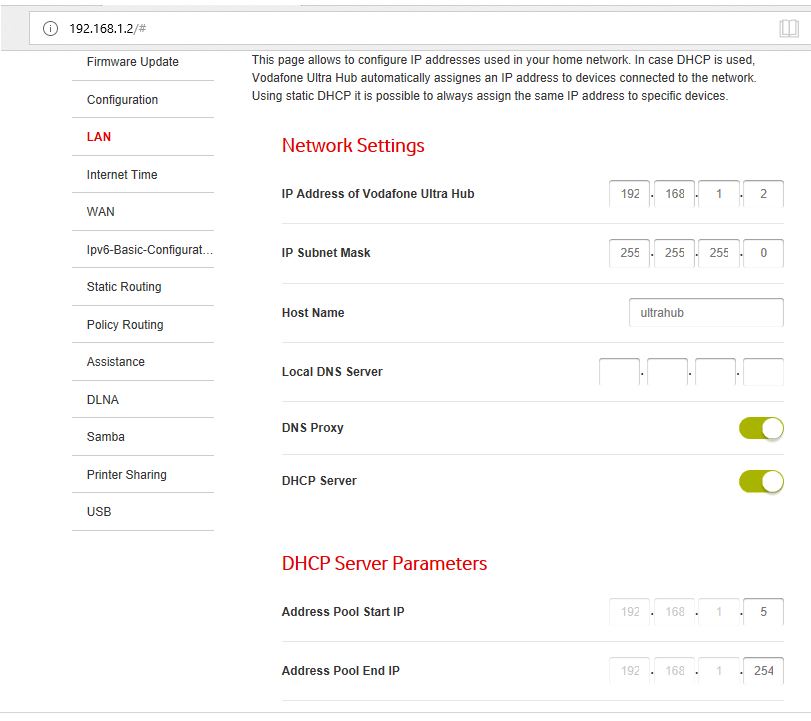
You need to change the DHCP Start IP address.
I can run the router as 192.168.1.2, but to do so you need to change the DHCP start address off 192.168.1.2

MikeHales:By what device? the ultra hub is using 192.168.1.1 is it using 192.168.1.2 also?
Answer is that that IP address is in use
Starscream122:
MikeHales:By what device? the ultra hub is using 192.168.1.1 is it using 192.168.1.2 also?
Answer is that that IP address is in use
see the above reply, it seems as though its part the DHCP allocation
Morm:
Starscream122:
Yes. Nothing else has that address. So it's a bug in the firmware. I even tried connecting to the ultra hub with no other devices connected to it and it simply will not let me change it's IP address to 192.168.1.2
You need to change the DHCP Start IP address.
I can run the router as 192.168.1.2, but to do so you need to change the DHCP start address off 192.168.1.2
I Disabled DHCP which takes away that allocation... still think it's a bug?
@Starscream122 explain your setup again
device 1 (router that connects to internet) = what device
device 2 (AP) = what device and how its connected to device 1
Then list what IP address device 1 has and what its DHCP pool range is
then list what IP address you have tried to allocate device 2
Jase2985:
@Starscream122 explain your setup again
device 1 (router that connects to internet) = what device
device 2 (AP) = what device and how its connected to device 1
Then list what IP address device 1 has and what its DHCP pool range is
then list what IP address you have tried to allocate device 2
RT-AC86U (Main Router) On 192.168.1.1
and a ultra hub on 192.168.1.3 (Second Router used as a AP)
no other routers/modems.
I also had the RT-AC86U turned off when I tried to change the ultra hubs IP to 192.168.1.2
1.3 works. Checked RT-AC86U Router and it's IP Pool Starting Address is 192.168.1.2
|
|
|