Geekzone: technology news, blogs, forums
Guest
Welcome Guest.
You haven't logged in yet. If you don't have an account you can register now.


KillerHulk

348 posts

Ultimate Geek
+1 received by user: 24


#208571 17-Feb-2017 12:26
Send private message

Hi,


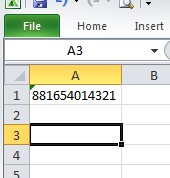
When u punch in long numbers into excel cell, it changes it to zero or a formula thing.


For Example:


my original number is 881654014321, but excel changes it to either "8.81654E+11" or "881654000000" when i save it.


Also when i change back the cell format for "8.81654E+11" to "number", it changes to "881654000000" (which is not even my original number)


The problem is , i have to do CVS uploads and they show as error because "part number no found".


Any permanent fix for this ?


Thanks in advance..


I Eat Dumbbells for Breakfast


Filter this topic showing only the reply marked as answer View this topic in a long page with up to 500 replies per page Create new topic
 1 | 2
dolsen
1483 posts

Uber Geek
+1 received by user: 319

Trusted
Lifetime subscriber

  #1721773 17-Feb-2017 12:29
Send private message

Format cell as text.


RunningMan
9210 posts

Uber Geek
+1 received by user: 4854


  #1721774 17-Feb-2017 12:29
Send private message

Change the format of the cell to "number" with 0 decimal places


KillerHulk

348 posts

Ultimate Geek
+1 received by user: 24


  #1721777 17-Feb-2017 12:34
Send private message

dolsen:


Format cell as text.


If i change to text, it does the same thing and changes to all zeroes at the end.


I Eat Dumbbells for Breakfast


KillerHulk

348 posts

Ultimate Geek
+1 received by user: 24


  #1721778 17-Feb-2017 12:34
Send private message

RunningMan:


Change the format of the cell to "number" with 0 decimal places


Already done that.


But number appears with all zeroes and not what i really entered.


I Eat Dumbbells for Breakfast


dolsen
1483 posts

Uber Geek
+1 received by user: 319

Trusted
Lifetime subscriber

  #1721781 17-Feb-2017 12:37
Send private message

Sulco:


dolsen:


Format cell as text.


If i change to text, it does the same thing and changes to all zeroes at the end.


Are you sure you have changed it correctly? From excel, "Text format cells are treated as text even when a number is in the cell. The cell is displayed exactly as entered."


Putting your number into excel here, the number is exactly as entered.


KillerHulk

348 posts

Ultimate Geek
+1 received by user: 24


  #1721789 17-Feb-2017 12:43
Send private message

It does not change for me .!!!!!


what am i doing wrong ??


I Eat Dumbbells for Breakfast


Support Geekzone with one-off or recurring donations Donate via PressPatron.
dolsen
1483 posts

Uber Geek
+1 received by user: 319

Trusted
Lifetime subscriber

  #1721803 17-Feb-2017 12:54
Send private message

Sulco:


It does not change for me .!!!!!


what am i doing wrong ??


So, right click on the cell(s).


Select format cells


Select text under the category option on the number tab.


Edit - I chose text as they way I think you are using this is basically taking a part number from an external source and using it basically as a string. If you are doing calculations on it, using the number with 0 decimal places would be the better approach. Some people may say it the is better approach regardless - I wouldn't necessarily argue against that.


Brumfondl
1199 posts

Uber Geek
+1 received by user: 524

Trusted
Subscriber

  #1721804 17-Feb-2017 12:55
Send private message

I just tried formatting the cell as a number with 0 decimal places and it worked perfectly. Using Excel 2016 on a PC through Office 365.


ggsten
4 posts

Wannabe Geek


  #1721810 17-Feb-2017 13:02
Send private message

Try a single quote before, i.e.  '881654014321


RunningMan
9210 posts

Uber Geek
+1 received by user: 4854


  #1721814 17-Feb-2017 13:07
Send private message

Using the number you provided, it is displaying correctly for me when the cell is formatted as number, with 0 decimal places.


Inphinity
2780 posts

Uber Geek
+1 received by user: 1184


  #1721822 17-Feb-2017 13:18
Send private message

Microsoft knowledge base article about Excel truncating number values to 15 significant figures, leading remaining places as 0. From your example, though, it looks like your number is only 12 digits to begin with. What version of Excel are you using? Both the prior suggestions here - Number with 0 decimal places, or Text with a leading ' - display your example value correctly for me in both Excel 2013 and Excel 2016, as does setting it to Custom with a Type of 0.


Shop now at Mighty Ape (affiliate link).
dolsen
1483 posts

Uber Geek
+1 received by user: 319

Trusted
Lifetime subscriber

  #1721824 17-Feb-2017 13:23
Send private message

Inphinity:


Both the prior suggestions here - Number with 0 decimal places, or Text with a leading ' - display your example value correctly for me in both Excel 2013 and Excel 2016, as does setting it to Custom with a Type of 0.


Just to clarify, a text field does not need the leading '. A general field does.


Having as text field may help protect the value from being automagically corrected / updated by Excel for an inexperienced user.


Jedsdad
120 posts

Master Geek
+1 received by user: 24


  #1721827 17-Feb-2017 13:31
Send private message

When you are trying to import the CSV file how are you doing it?


Are you going to Date/From Text in a blank Excel spreadsheet


Select what row you want to import from


Click "My Data has Headers" if csv has headers


Select Next


Select whether the CSV file is delimited by Tabs or by comma etc.


Select Next


Select the column that is showing the value you are having issues with?


Change it from General to Text


Click Finish


Jedsdad

KillerHulk

348 posts

Ultimate Geek
+1 received by user: 24


  #1721837 17-Feb-2017 13:56
Send private message

Inphinity:


Microsoft knowledge base article about Excel truncating number values to 15 significant figures, leading remaining places as 0. From your example, though, it looks like your number is only 12 digits to begin with. What version of Excel are you using? Both the prior suggestions here - Number with 0 decimal places, or Text with a leading ' - display your example value correctly for me in both Excel 2013 and Excel 2016, as does setting it to Custom with a Type of 0.


i am using Microsoft excel for MAC 2011 and it says its up to date.


I Eat Dumbbells for Breakfast


KillerHulk

348 posts

Ultimate Geek
+1 received by user: 24


  #1721839 17-Feb-2017 14:02
Send private message

i did format the cell to number by right clicking and format.


Then save the file as .csv


When i reopen the file, it has again changed back to 8.81654E.11


I Eat Dumbbells for Breakfast


 1 | 2
Filter this topic showing only the reply marked as answer View this topic in a long page with up to 500 replies per page Create new topic


Geekzone Live »

Try automatic live updates from Geekzone directly in your browser, without refreshing the page, with Geekzone Live now.


Are you subscribed to our RSS feed? You can download the latest headlines and summaries from our stories directly to your computer or smartphone by using a feed reader.