Geekzone: technology news, blogs, forums
Guest
Welcome Guest.
You haven't logged in yet. If you don't have an account you can register now.


FieldMouse

128 posts

Master Geek
+1 received by user: 17

Subscriber

#325632 26-Sep-2026 12:08
Send private message quote this post

I previously asked a question about dual booting because I wanted to have a standalone copy of MS Publisher and I am running Office 365

I solved the problem by buying a cube computer running Win 11 and then connected the two on an ethernet unmanaged switch and controlled both computers using a KVM 2 port box
All this works well

For simplicity purposes, the Office 365 computer is called Main-PC and this is where all the files are. The cube computer is called Small-PC. The passwords are the same on both P's

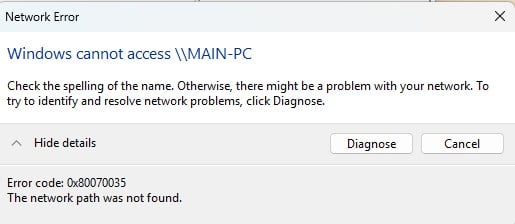
From the Small-PC I can see Main-PC on the network but I cannot open it. I get this message.

All the drives on the Main PC are set for sharing


Thoughts please


Create new topic
robjg63
4209 posts

Uber Geek
+1 received by user: 1476

Subscriber

  #3530924 26-Sep-2026 12:34
Send private message quote this post


Nothing is impossible for the man who doesn't have to do it himself - A. H. Weiler


zaptor
762 posts

Ultimate Geek
+1 received by user: 50


  #3530945 26-Sep-2026 16:24
Send private message quote this post

If you can ping MAIN-PC from Small-PC then that at least proves name resolution is working.


If not, you can just enter the IP address into the File Explorer address bar directly instead of the hostname. I prefer statically allocated IP addresses myself, as it means the IP lease doesn't changed underneath you for whatever reason.


Also, are both the Small-PC and Main-PC ethernet Networks set to Private? (as opposed to Public)


xpd

xpd
Geek of Coastguard
14327 posts

Uber Geek
+1 received by user: 4852

Retired Mod
ID Verified
Trusted
Lifetime subscriber

  #3530948 26-Sep-2026 16:45
Send private message quote this post

I find Windows Firewall can be a nightmare when sharing local LAN, so I turn it off. 


XPD / Gavin


LinkTree


XMusic Module Player


FieldMouse

128 posts

Master Geek
+1 received by user: 17

Subscriber

  #3531058 26-Sep-2026 19:15
Send private message quote this post

zaptor:


If you can ping MAIN-PC from Small-PC then that at least proves name resolution is working.


If not, you can just enter the IP address into the File Explorer address bar directly instead of the hostname. I prefer statically allocated IP addresses myself, as it means the IP lease doesn't changed underneath you for whatever reason.


Also, are both the Small-PC and Main-PC ethernet Networks set to Private? (as opposed to Public)


Both are set to private and I used the IP address

On Main-PC, I can see Main-PC and Small-PC on the network and I can see all the Main-PC drives (8 of them) on the network
When I click on Small-PC on the network, it asks for a password but won't accept it even though it is correct

On Small-PC I can see Main-PC, but not Small-PC
When I click on Mai-PC I get the message I previously posted


FieldMouse

128 posts

Master Geek
+1 received by user: 17

Subscriber

  #3531059 26-Sep-2026 19:23
Send private message quote this post

xpd:


I find Windows Firewall can be a nightmare when sharing local LAN, so I turn it off. 


On Main-PC the firewall is managed by Bitdefender

I haven't yet set Bitdefender on Small-PC, so I turned off Windows firewall. However it didn't make any difference


gzt

gzt
19726 posts

Uber Geek
+1 received by user: 8825

Lifetime subscriber

  #3531061 26-Sep-2026 19:31
Send private message quote this post

FieldMouse: When I click on Small-PC on the network, it asks for a password but won't accept it even though it is correct

On Small-PC I can see Main-PC, but not Small-PC
When I click on Mai-PC I get the message I previously posted

Username domain may need to be specific for the remote machine network even though you have the same username.


Move to New Zealand's best fibre broadband service (affiliate link). Free setup code: R587125ERQ6VE. Note that to use Quic Broadband you must be comfortable with configuring your own router.
zaptor
762 posts

Ultimate Geek
+1 received by user: 50


  #3531066 26-Sep-2026 22:41
Send private message quote this post

gzt: 
Username domain may need to be specific for the remote machine network even though you have the same username.


Good point. Domain qualification is also one of the gotchas.


It does sound like a credential authentication issue somewhere.


I wonder if FieldMouse has tried enabling full access to the Everyone group?


Failing that, perhaps check the Event Viewer-->Windows Logs-->Security entries for access requests on MAIN-PC?
There should be an entry detailing New Logon account details (including the qualified Security ID, which just looks to be a combination of {Account Domain}\{Account Name}) as well as the source hostname and IP address.


On my Windows 10 PC I get Event ID's of 4624 for a successful login, not sure what the ID is for a failed attempt.


Create new topic


Geekzone Live »

Try automatic live updates from Geekzone directly in your browser, without refreshing the page, with Geekzone Live now.


Are you subscribed to our RSS feed? You can download the latest headlines and summaries from our stories directly to your computer or smartphone by using a feed reader.