Geekzone: technology news, blogs, forums
Guest
Welcome Guest.
You haven't logged in yet. If you don't have an account you can register now.


View this topic in a long page with up to 500 replies per page Create new topic
1 | 2 | 3
Finch

2862 posts

Uber Geek
+1 received by user: 195


  #2981838 12-Oct-2022 09:41
Send private message

Gordy7:

You could get a copy of Windows 10 installation media on a USB stick and try re-installing Windows keeping your settings - or  even a complete fresh install.


See if your laptop behaves better.


https://www.microsoft.com/en-us/software-download/windows10


Thanks. Not sure on the technical part of it all, but wouldn’t it be easier to find the potential rogue update and then remove it? Or is just getting a fresh version of Windows10 easier?

Thanks


Gordy7
gordy7
2001 posts

Uber Geek
+1 received by user: 505

ID Verified
Lifetime subscriber

  #2981863 12-Oct-2022 10:22
Send private message

You can spend hours chasing problems with computers - and just when you think you have ironed out the problem - more hours fixing other mystery issues that develop.
You could try a roll back if you had that configured.
It reads like you have your stuff backed up otherwise I would take an image of your SSD disk with something like Macrium Reflect then try re-installing Windows.
You could also try a factory restore but you would lose you personal stuff.
I tend to go down the image and re-install path these days for family and friends.


Gordy


My first ever AM radio network connection was with a 1MHz AM crystal(OA91) radio receiver.


Finch

2862 posts

Uber Geek
+1 received by user: 195


  #2981976 12-Oct-2022 14:45
Send private message

Gordy7: You can spend hours chasing problems with computers - and just when you think you have ironed out the problem - more hours fixing other mystery issues that develop.
You could try a roll back if you had that configured.
It reads like you have your stuff backed up otherwise I would take an image of your SSD disk with something like Macrium Reflect then try re-installing Windows.
You could also try a factory restore but you would lose you personal stuff.
I tend to go down the image and re-install path these days for family and friends.


I went to the link you provided and just downloaded MediacreationTool.exe . Do I open it up on the current laptop I'm working on and get something from that (Not my current laptop, just temporary use), or put the exe on a flash drive and put it in my broken laptop? I'm assuming the 2nd option?


Gordy7
gordy7
2001 posts

Uber Geek
+1 received by user: 505

ID Verified
Lifetime subscriber

  #2981981 12-Oct-2022 15:11
Send private message

Finch:


I went to the link you provided and just downloaded MediacreationTool.exe . Do I open it up on the current laptop I'm working on and get something from that (Not my current laptop, just temporary use), or put the exe on a flash drive and put it in my broken laptop? I'm assuming the 2nd option?


Before I get back to the Win10 USB stick -


Have you tried booting your laptop into safe mode? If you can get to Windows desktop briefly - Hold down the shift key and select Restart. On powerup there may also be an option to get to a usable mode using the F8 or F9 key. If you can get to safemode in some way you may be able to rollback or remove the app that has caused a problem and also see if your SSD is ok.


Yes - use Media Creation tool - Probably be best to use to use a temp computer since your faulty laptop is running extremely slow by the sound of it.


If the temp computer is running Win10 then all should be ok. There may be an option to create a USB stick (>8GB) for another computer.


When USB stick has been loaded, plug it into the faulty laptop, may have to open BIOS using DEL or F2 or similar key on power up and make laptop to boot off USB stick.


Hope you can make some progress with my rough notes.


Gordy


My first ever AM radio network connection was with a 1MHz AM crystal(OA91) radio receiver.


Finch

2862 posts

Uber Geek
+1 received by user: 195


  #2981986 12-Oct-2022 15:19
Send private message

Gordy7:


Finch:


I went to the link you provided and just downloaded MediacreationTool.exe . Do I open it up on the current laptop I'm working on and get something from that (Not my current laptop, just temporary use), or put the exe on a flash drive and put it in my broken laptop? I'm assuming the 2nd option?


Before I get back to the Win10 USB stick -


Have you tried booting your laptop into safe mode? If you can get to Windows desktop briefly - Hold down the shift key and select Restart. On powerup there may also be an option to get to a usable mode using the F8 or F9 key. If you can get to safemode in some way you may be able to rollback or remove the app that has caused a problem and also see if your SSD is ok.


Yes - use Media Creation tool - Probably be best to use to use a temp computer since your faulty laptop is running extremely slow by the sound of it.


If the temp computer is running Win10 then all should be ok. There may be an option to create a USB stick (>8GB) for another computer.


When USB stick has been loaded, plug it into the faulty laptop, may have to open BIOS using DEL or F2 or similar key on power up and make laptop to boot off USB stick.


Hope you can make some progress with my rough notes.


Cheers mate. Haven't tried safe mode yet, will look into that first. Was also looking at doing a system restore, if that's still a thing?


Ok so I use my temporary laptop? I thought I just plugged in the USB into the broken laptop straight off the bat, thanks for clarifying. Will try everything :D 


Finch

2862 posts

Uber Geek
+1 received by user: 195


  #2982087 12-Oct-2022 19:27
Send private message

I did a system restore to 2nd October, all seems somewhat okay. I noticed before, and the problem is still there, where I can’t change the brightness. There’s no option to change it, can’t even do it on the keyboard.


Shop now for Dyson appliances (affiliate link).
Gordy7
gordy7
2001 posts

Uber Geek
+1 received by user: 505

ID Verified
Lifetime subscriber

  #2982094 12-Oct-2022 20:20
Send private message

Finch: I did a system restore to 2nd October, all seems somewhat okay. I noticed before, and the problem is still there, where I can’t change the brightness. There’s no option to change it, can’t even do it on the keyboard.


If you are generally happy with the roll back, then you can tidy up Windows with the following:


Open administrative command prompt and type or copy and paste (line by Line):


sfc /scannow
dism /online /cleanup-image /restorehealth
chkdsk /scan


Gordy


My first ever AM radio network connection was with a 1MHz AM crystal(OA91) radio receiver.


Finch

2862 posts

Uber Geek
+1 received by user: 195


  #2982098 12-Oct-2022 20:33
Send private message

Gordy7:


Finch: I did a system restore to 2nd October, all seems somewhat okay. I noticed before, and the problem is still there, where I can’t change the brightness. There’s no option to change it, can’t even do it on the keyboard.


If you are generally happy with the roll back, then you can tidy up Windows with the following:


Open administrative command prompt and type or copy and paste (line by Line):


sfc /scannow
dism /online /cleanup-image /restorehealth
chkdsk /scan


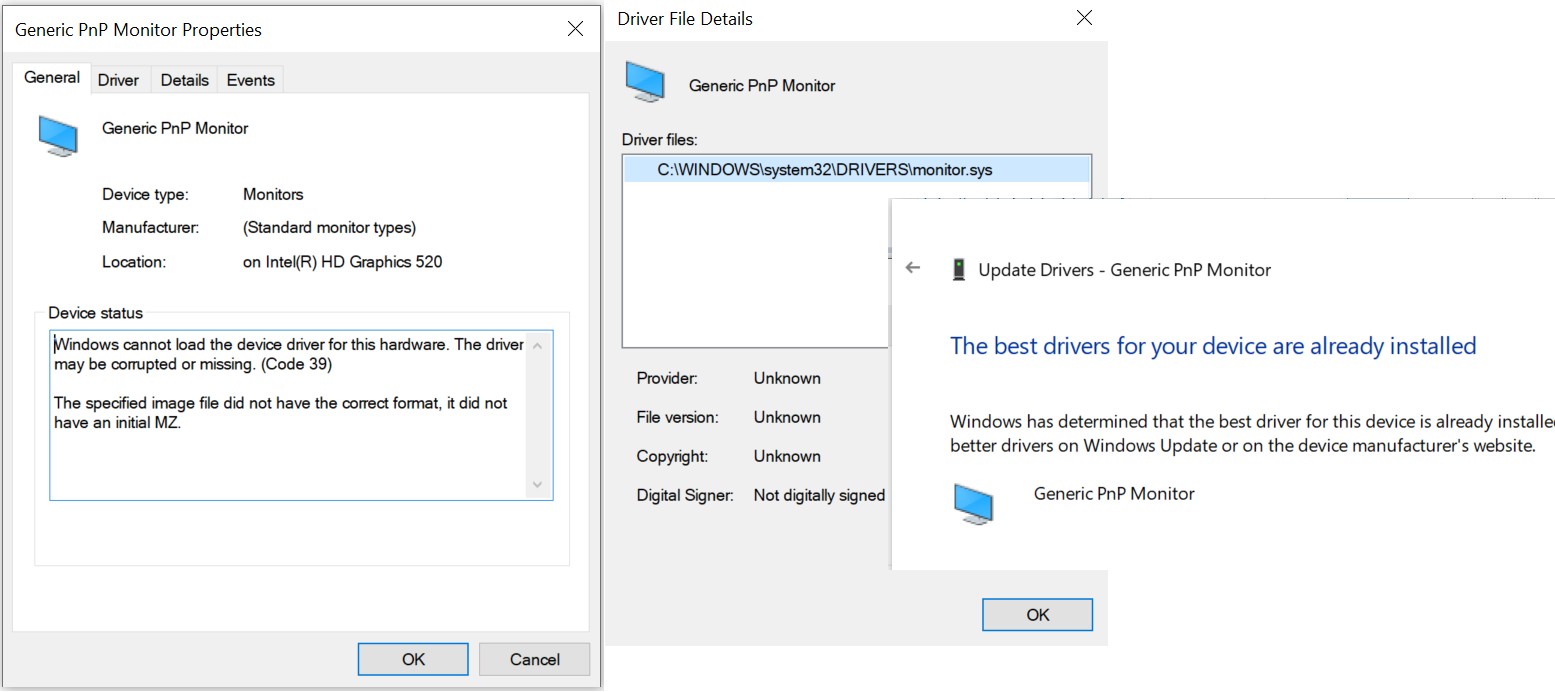
Cheers mate. Almost done. I need to upgrade my monitor driver I think. It says it has an error (Probably the reason I can't change brightness) and it's from 2006?. I just downloaded DriverFX, looks like it's downloading the update...


Finch

2862 posts

Uber Geek
+1 received by user: 195


  #2982101 12-Oct-2022 20:52
Send private message

Why is updating drivers so hard? Device manager is telling me I'm up to date, but it says it's from 2006? Surely that's not right?


DriverFX has downloaded something with about 100 files, not entirely sure if it's legit or not. Heading into Device Manager and selecting this file, it still tells me it's up to date (nd theres nothing in the download from DriverFX)


Finch

2862 posts

Uber Geek
+1 received by user: 195


  #2982104 12-Oct-2022 21:00
Send private message


Gordy7
gordy7
2001 posts

Uber Geek
+1 received by user: 505

ID Verified
Lifetime subscriber

  #2982105 12-Oct-2022 21:08
Send private message

Finch:


Why is updating drivers so hard? Device manager is telling me I'm up to date, but it says it's from 2006? Surely that's not right?


DriverFX has downloaded something with about 100 files, not entirely sure if it's legit or not. Heading into Device Manager and selecting this file, it still tells me it's up to date (nd theres nothing in the download from DriverFX)


Driverfx or Driverfix?


I am always skeptical with using 3rd party driver solutions.... more so when they charge heaps.


Use free Windows updates and sometimes free drivers direct from the manufacturer of your laptop or manufacturer of an interface card.


Gordy


My first ever AM radio network connection was with a 1MHz AM crystal(OA91) radio receiver.


Shop now for Dell laptops and other devices (affiliate link).
Gordy7
gordy7
2001 posts

Uber Geek
+1 received by user: 505

ID Verified
Lifetime subscriber

  #2982107 12-Oct-2022 21:20
Send private message

re Monitor driver corruption - run the file checks and windows image cleanup commands I listed earlier.


Gordy


My first ever AM radio network connection was with a 1MHz AM crystal(OA91) radio receiver.


Finch

2862 posts

Uber Geek
+1 received by user: 195


  #2982109 12-Oct-2022 21:24
Send private message

Gordy7:


Finch:


Why is updating drivers so hard? Device manager is telling me I'm up to date, but it says it's from 2006? Surely that's not right?


DriverFX has downloaded something with about 100 files, not entirely sure if it's legit or not. Heading into Device Manager and selecting this file, it still tells me it's up to date (nd theres nothing in the download from DriverFX)


Driverfx or Driverfix?


I am always skeptical with using 3rd party driver solutions.... more so when they charge heaps.


Use free Windows updates and sometimes free drivers direct from the manufacturer of your laptop or manufacturer of an interface card.


DriverFX. I've uninstalled it now anyway.


Am running the command prompts now you mentioned above


Finch

2862 posts

Uber Geek
+1 received by user: 195


  #2982111 12-Oct-2022 21:41
Send private message

First line went through fine, got a text document.

Looks like the second line has paused at 62.3%

Gordy7
gordy7
2001 posts

Uber Geek
+1 received by user: 505

ID Verified
Lifetime subscriber

  #2982114 12-Oct-2022 21:53
Send private message

Finch: First line went through fine, got a text document.

Looks like the second line has paused at 62.3%


If you run your Task Manager - Performance window do you see any CPU, Disk and Network activity suggesting that there is ongoing operations in progress? 


Gordy


My first ever AM radio network connection was with a 1MHz AM crystal(OA91) radio receiver.


1 | 2 | 3
View this topic in a long page with up to 500 replies per page Create new topic


Geekzone Live »

Try automatic live updates from Geekzone directly in your browser, without refreshing the page, with Geekzone Live now.


Are you subscribed to our RSS feed? You can download the latest headlines and summaries from our stories directly to your computer or smartphone by using a feed reader.