Geekzone: technology news, blogs, forums
Guest
Welcome Guest.
You haven't logged in yet. If you don't have an account you can register now.


View this topic in a long page with up to 500 replies per page Create new topic
1 | 2 | 3 | 4 | 5 | 6 | 7 | 8 | 9
MikeB4
MikeB4
18775 posts

Uber Geek
+1 received by user: 12766

ID Verified
Trusted
Subscriber

  #2101945 5-Oct-2018 09:29
Send private message

JimmyH:


It's really starting to annoy me.


While I mostly like Windows 10 and think it's better than Windows 7 for most of the things I do, this stupid update thing has me on the verge of reformatting my machine and moving it back to Windows 7. 


I'm tired of updates installing without my agreement, disrupting what may be happening at the time, and breaking stuff.


Several times I have had queued up video encoding processes that take 5-7 hours to run (compresssing a week or mores worth of recorded HD video from .ts to .mp4 for transfer to my server). I start the process running and go to bed. In the morning I discover it has neither completed nor quit elegantly, because an update installed itself and the machine rebooted half way through.


As well as having to re-do the job, I have to roll-back the machine to remove the update and get it working properly first.


Any advice on how to disable updates would be *really* appreciated.


Otherwise, I think I will rebuild my main machine as a Windows 7 box over Christmas - doing this and finding and reinstalling all the applications will be tedious, but I think worth it if I can't stop these!


Add to that , advertisements in my OS, uninvited Apps installing and reinstalling. I have reached a point I use my iMac almost exclusively and I am close to the point of selling or givivng away my remaining Windows machines and buying a MacBook Pro to compliment my iMac


Here is a crazy notion, lets give peace a chance.


freitasm

BDFL - Memuneh
80653 posts

Uber Geek
+1 received by user: 41045

Administrator
ID Verified
Trusted
Geekzone
Lifetime subscriber

  #2102007 5-Oct-2018 09:58
Send private message

I found an edge case on Edge (no pun intended) with a page on Synology router not working on Edge but working on Chrome. Not a big deal as it's not a page that I use much since it's a router configuration setting that is pretty much set and forget. I only had to use it because the router firmwared was updated and I wanted to enable a new feature.


Anyway, still using Edge as default after Day One, so that's better than before. Will continue using it.


As for the comments about time, I had the updated install in the background while working and it took about 20 minutes, then a reboot that took about 10 minutes - so really only about 10 minutes that I walked away to have a coffee (Intel Xeon, SSD, 46 GB RAM). The laptop (Intel Core M) took a bit longer but since I was using the desktop I didn't even measure the time it took but wasn't too bad IIRC.


Referral links: Quic Broadband (free setup code: R587125ERQ6VE) | Samsung | AliExpress | Wise | Sharesies 


Support Geekzone by subscribing (browse ads-free), or making a one-off or recurring donation through PressPatron.


Zepanda66
533 posts

Ultimate Geek
+1 received by user: 212


  #2102012 5-Oct-2018 10:05
Send private message

is this the 1803 update? cause im installing it now. 


http://www.speedtest.net/result/7315955530.png


freitasm

BDFL - Memuneh
80653 posts

Uber Geek
+1 received by user: 41045

Administrator
ID Verified
Trusted
Geekzone
Lifetime subscriber

  #2102025 5-Oct-2018 10:16
Send private message

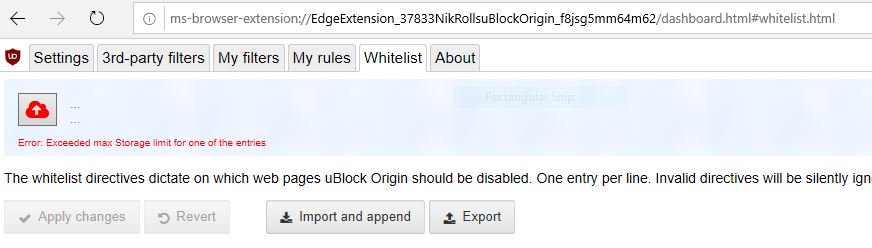
Noticed one thing with Edge: it seems sync storage is a smaller than Chrome. Case in point: uBlock Origin Cloud Sync feature uses sync storage and if I copy my list from Chrome to Edge I get an error when I try to create a backup:


/cc @nathan


Referral links: Quic Broadband (free setup code: R587125ERQ6VE) | Samsung | AliExpress | Wise | Sharesies 


Support Geekzone by subscribing (browse ads-free), or making a one-off or recurring donation through PressPatron.


Behodar
11099 posts

Uber Geek
+1 received by user: 6082

Trusted
Lifetime subscriber

  #2102028 5-Oct-2018 10:19
Send private message

Zepanda66:


is this the 1803 update? cause im installing it now. 


1809.


1101
3141 posts

Uber Geek
+1 received by user: 1143


  #2102060 5-Oct-2018 11:07
Send private message

JimmyH:


Any advice on how to disable updates would be *really* appreciated.


Most of the old methods no longer work on 1803, thank MS for that.


There are some HACKS that may work.
Delete softwaredistrubution folder and make that folder a link instead . I havnt tried, but should work .

https://www.tenforums.com/tutorials/8013-enable-disable-windows-update-automatic-updates-windows-10-a-50.html#post1236513


taskkill /im TiWorker.exe /f
net stop wuauserv /y
rd "%WINDIR%\SoftwareDistribution" /s /q
mklink /d "%WINDIR%\SoftwareDistribution" "X:\SoftwareDistribution"


HP


Shop now for HP laptops and other devices (affiliate link).
Zepanda66
533 posts

Ultimate Geek
+1 received by user: 212


  #2102065 5-Oct-2018 11:16
Send private message

Had to manually install in 1809 as it wasn't coming down through windows updates just yet. But it must have taken about half an hour? Went pretty smoothly on my ryzen/nvidia build. 


http://www.speedtest.net/result/7315955530.png


Gilco2
1556 posts

Uber Geek
+1 received by user: 134


  #2102066 5-Oct-2018 11:18
Send private message

overall my updates went well.    With Edge though on Amazon when I select My recommendations they dont show up.  I downloaded opera and chrome and still works as it should but not in Chrome.  Something in the new Edge isnt compatible with Amazon


MaxLV
656 posts

Ultimate Geek
+1 received by user: 161


  #2102280 5-Oct-2018 18:47
Send private message

nathan:


mentalinc:


Nope, didn't work (well it didn't a few hours into notification). may work now, but we;re many days into the release now.


the update isn't being pushed to anyones PCs yet.  Everyone that's installing it have manually seeked it out, but choosing to install from Windows Update, or the Update Assistant.


Once it starts being pushed from WU, we use machine learning and intelligently selecting devices that our data and feedback predict will have a smooth update experience.


Ummm...

I updated two computers on Wednesday.

One with the media creation tool, the other via WU. 

I was going to use the Media Creation tool to update both computers, but when I checked WU again on the second computer, it told me that 1809 was ready to install, and was initialising the download. 
I had previously clicked the WU check for updates button (two hours before) and it said no updates were available.


Both updates went smoothly, and I haven't had any problems since.


aschteev
80 posts

Master Geek
+1 received by user: 6


  #2102289 5-Oct-2018 19:47
Send private message

Anyone having issues with Edge and Adobe Flash with the new 1809 update? I can no longer get SkyGO playing since updating, no matter what combination of disabling and enabling the 'Allow Adobe Flash' setting under advanced settings does.


The option is no longer available under 'Manage Website Permissions' either.


EDIT: Discovered that you have to click the jigsaw piece icon in the address bar and enable Adobe Flash each time!!


chchmjr
66 posts

Master Geek
+1 received by user: 2

ID Verified
Lifetime subscriber

  #2102336 5-Oct-2018 21:19
Send private message

I now have to enable Flash every time to watch Neon on Chrome.


Shop now on Samsung phones, tablets, TVs and more (affiliate link).
Brumfondl
1198 posts

Uber Geek
+1 received by user: 524

Trusted
Subscriber

  #2102349 5-Oct-2018 22:00
Send private message

chchmjr:


I now have to enable Flash every time to watch Neon on Chrome.


This is a Chrome 69 thing, not an 1809 thing...


Rikkitic
Awrrr
19065 posts

Uber Geek
+1 received by user: 16305

Lifetime subscriber

  #2102355 6-Oct-2018 00:24
Send private message

As far as I can tell, I have managed to completely kill Windows 10 updates. I found the following tip and it has worked well for me: First, disable the Windows Update Facilitation Service. This appears to be something MS came up with to block everyone who was trying to disable updates. Although you can disable this service, you can't turn it off so you have to add another step. After disabling, use Task Manager to kill the system process osrss. This will immediately cause a reboot so be prepared. Since doing this, the Facilitation Service has remained disabled on my machine and I have seen no sign of further updates. I also have seen no sign of other problems caused by this, but if you do this, you do it at your own risk. I make no guarantees. You have been warned.


Plesse igmore amd axxept applogies in adbance fir anu typos


amiga500
1484 posts

Uber Geek
+1 received by user: 422
Inactive user


  #2102359 6-Oct-2018 05:31
Send private message

Another 'milestone' the 1809 64 bit iso is now 4.8 gb in other words too big to fit on a normal 4.7 gb DVD.  This means a person will have to use a flash drive, not a problem if you are using Windows but not so easy when using Linux. I have not done this but the recommended method is to install a ppa for a piece of software called Woe.


Burning a Windows DVD iso in Linux *was* super easy and reliable.


DamageInc
555 posts

Ultimate Geek
+1 received by user: 73

Lifetime subscriber

  #2102373 6-Oct-2018 07:46
Send private message

Update seem to go ok.


Rebooted and helllooo one of the dual monitors turns on but doesn't show the desktop automatically, i have to turn it off then on again.


Anyone have this issue?


Pop! OS


1 | 2 | 3 | 4 | 5 | 6 | 7 | 8 | 9
View this topic in a long page with up to 500 replies per page Create new topic


Geekzone Live »

Try automatic live updates from Geekzone directly in your browser, without refreshing the page, with Geekzone Live now.


Are you subscribed to our RSS feed? You can download the latest headlines and summaries from our stories directly to your computer or smartphone by using a feed reader.