|
|
|
For anyone else having problems with the mobile HD4000 graphics in the Oct update, the "trick" to getting them working is to go into "Core Isolation" setting and turn off Memory Integrity.
I guess I'm sacrificing security, but at least I can use my laptop again properly.
Hopefully Intel release updated drivers with this issue fixed.
It's not clear to me whether it's advisable to rollback from 1809 to 1803.
Some sources say you should roll back, but other sources say the deletions happen during the upgrade (so what would be the point in rolling back?).
Don't roll back
nathan:
Don't roll back
Thanks @nathan It's good to get confirmation from someone who knows what he's talking about.
EDIT: I didn't experience any data loss anyway (that I've noticed).
I rolled back after the sudden loss of One Drive files but also I lost faith in a build that seem to be seriously lacking quality control. Missing a whole step in the and release management process seem a very ppor discision by MSFT and need open and honest explanation.
Here is a crazy notion, lets give peace a chance.
Batman: When i shut down the pc just restarts. Weird. Buy one it boots up if i shut down it will then shut down.
When i booted up today it started disk checking. What the? [It had a proper shut down last night]
MikeB4:
with no one on any of my Windows PCs I recieved an email from One Drive advising that a large number of files had been deleted. I logged on and checked One drive and found at least 30GB if files in the One drive recycling bin. I have restored these. I am currently rolling back my PCs etc to 1803
So, was this not even during the upgrade that this happened?
MikeB4:
I rolled back after the sudden loss of One Drive files but also I lost faith in a build that seem to be seriously lacking quality control. Missing a whole step in the and release management process seem a very ppor discision by MSFT and need open and honest explanation.
Thanks for that info. It is a positive for OneDrive that you could see what was deleted and restore the files. I've been reluctant to totally trust any cloud drive so I always synchronise my OneDrive files in a separate local copy. This meant that I could easily check if any files were deleted during the update to 1809. None were lost but it is possible that is because I avoided the problem because I don't use default folders.
Paul1977:
MikeB4:
with no one on any of my Windows PCs I recieved an email from One Drive advising that a large number of files had been deleted. I logged on and checked One drive and found at least 30GB if files in the One drive recycling bin. I have restored these. I am currently rolling back my PCs etc to 1803
So, was this not even during the upgrade that this happened?
I did not notice anything immediately after running the updgrade but I was not really looking. I had set it to update on each machine and left them to it, I rebooted as they completed and went and had breakfast. While I was relaxing in town I recieved the email regarding the to large deletion of file from One Drive. When I got home I restored the files from the One drive bin. I then Rolled back the machines to 1803.
I use One Drive as one of my Offsite back ups, I also have files backed up onsite and to another offsite so nothing was actually lost.
Here is a crazy notion, lets give peace a chance.
MikeB4:
I did not notice anything immediately after running the updgrade but I was not really looking. I had set it to update on each machine and left them to it, I rebooted as they completed and went and had breakfast. While I was relaxing in town I recieved the email regarding the to large deletion of file from One Drive. When I got home I restored the files from the One drive bin. I then Rolled back the machines to 1803.
I use One Drive as one of my Offsite back ups, I also have files backed up onsite and to another offsite so nothing was actually lost.
I see, that makes sense.
Out of interest, did delete full folders or just random files?
Paul1977:
MikeB4:
I did not notice anything immediately after running the updgrade but I was not really looking. I had set it to update on each machine and left them to it, I rebooted as they completed and went and had breakfast. While I was relaxing in town I recieved the email regarding the to large deletion of file from One Drive. When I got home I restored the files from the One drive bin. I then Rolled back the machines to 1803.
I use One Drive as one of my Offsite back ups, I also have files backed up onsite and to another offsite so nothing was actually lost.
I see, that makes sense.
Out of interest, did delete full folders or just random files?
A combination of folders and files. It seemed random and I could see no pattern, I looked at type, date saved and date last altered etc and could see no real trend. I mus confess I was more concerned with damage mitigation.
Here is a crazy notion, lets give peace a chance.
MikeB4: I rolled back after the sudden loss of One Drive files ...
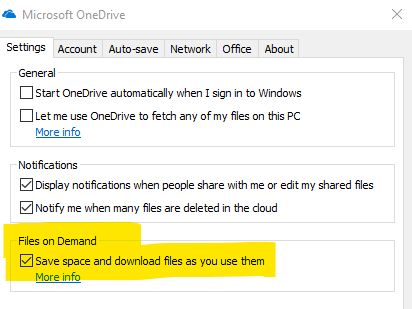
This is not related to the newish 'OneDrive Files On-Demand' feature?
Please keep this GZ community vibrant by contributing in a constructive & respectful manner.
I think microsoft probably overreacted pulling the update. They should have surveyed how big the problem was. It seems they pulled it because of the noise the apparent issue was making on social media which by all accounts shouldn't really be taken seriously unless they did receive actual complaints about files being deleted.
http://www.speedtest.net/result/7315955530.png
|
|
|