Geekzone: technology news, blogs, forums
Guest
Welcome Guest.
You haven't logged in yet. If you don't have an account you can register now.


sigod

39 posts

Geek
+1 received by user: 5


#324632 6-May-2026 12:52
Send private message quote this post

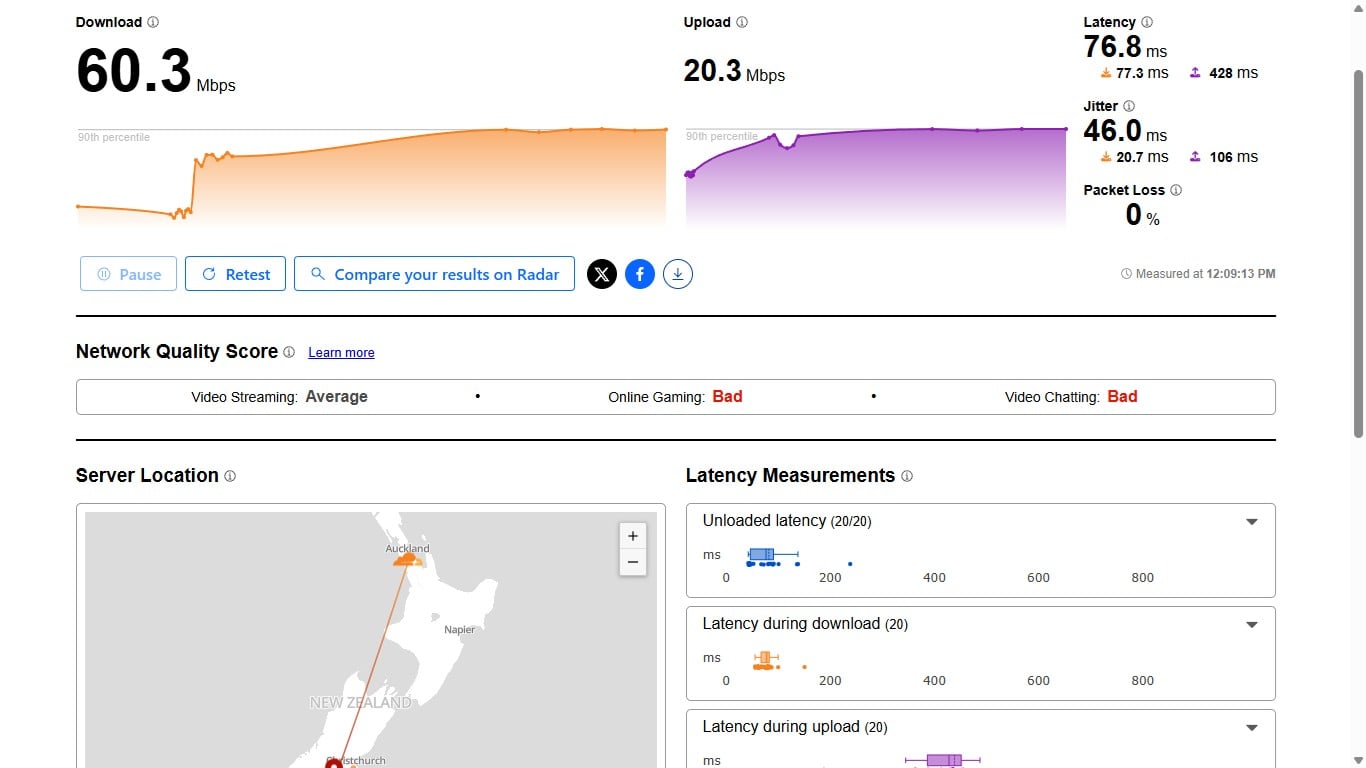
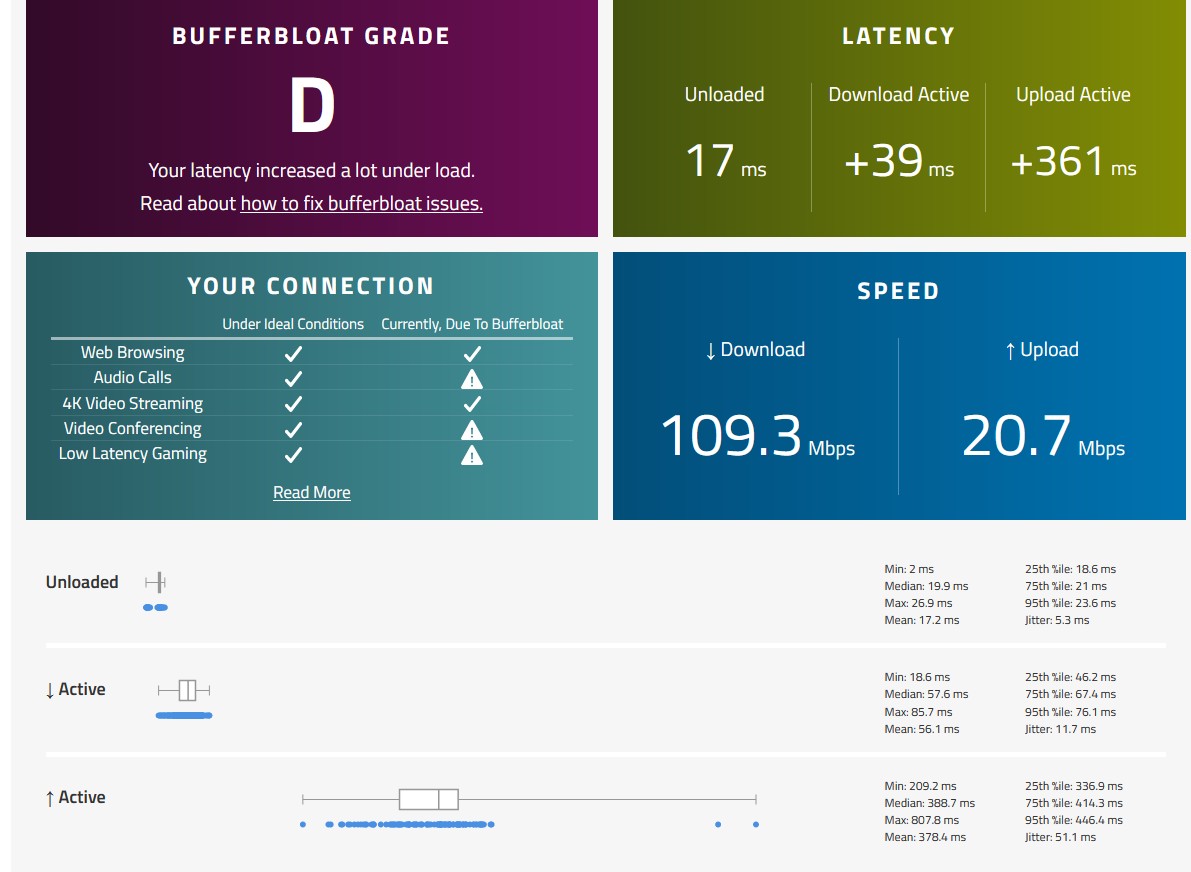
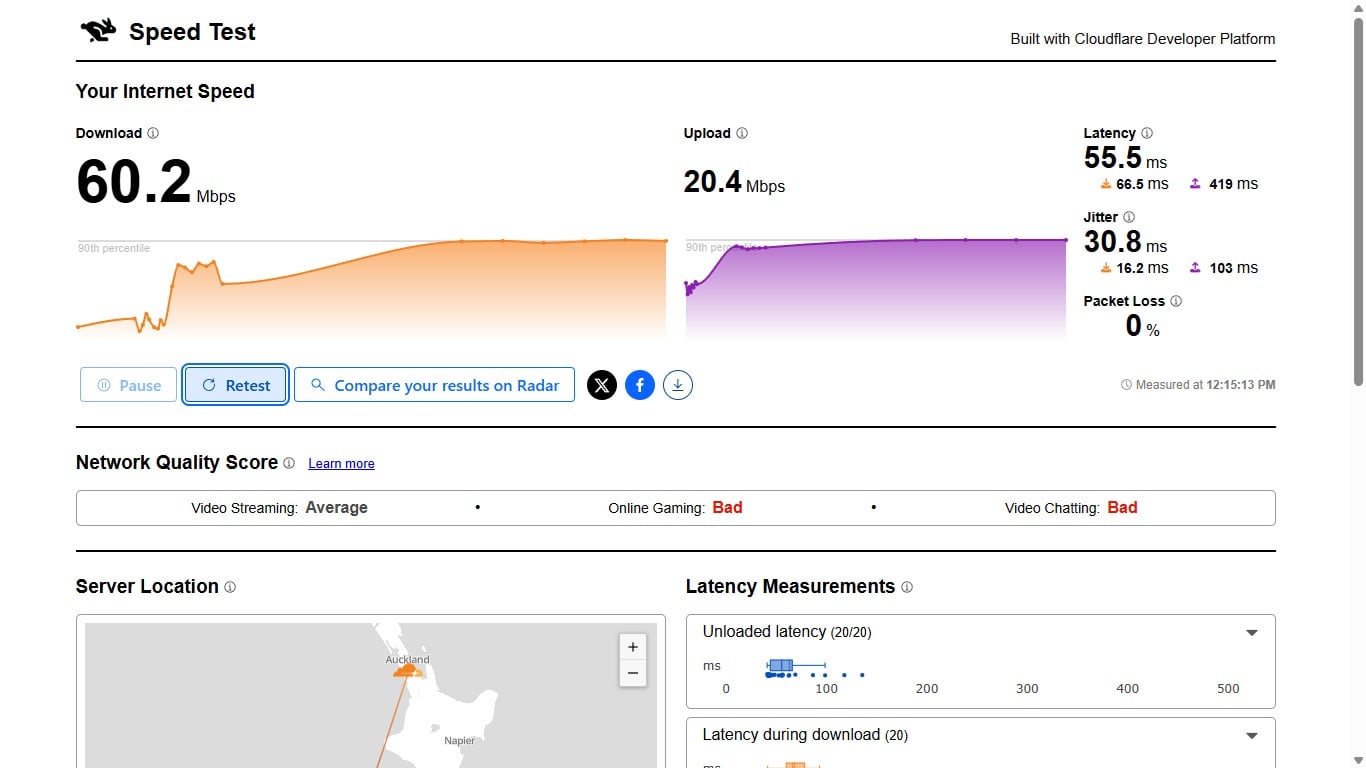
Hi, I just got a new Sky Fibre starter connection 105/26 Mbps in Christchurch and I did some tests over ethernet (not wifi) using the Sky provided AR2410 router and I seem to be getting buffer bloat and was wondering if a router with Smart Queue Management (SQM) is needed to fix this.


Router info:


Build Timestamp


22-12-05 20:50


Model Name


AR2140


Software Version


1.3.13


Hardwware Version


AR2140X-1.0


And these are the results:


Create new topic
SpartanVXL
1540 posts

Uber Geek
+1 received by user: 679


  #3488085 6-May-2026 14:41
Send private message quote this post

It seems like you’re not getting the speed you’re paying for. Check some other speedtest servers, if your plan is 105 down then you should be getting 105 or a little bit over on fibre.


Then you can check for bufferbloat if you want, but unless something is going to be maxing your connection 24/7 then theres usually no need to worry about it.


sigod

39 posts

Geek
+1 received by user: 5


  #3488248 6-May-2026 19:12
Send private message quote this post

I spoke to a Sky helpline person and she is going to contact someone at Vocus. I also tried plugging the router directly into the ONT and it gave the same result.


sigod

39 posts

Geek
+1 received by user: 5


  #3488307 7-May-2026 02:14
Send private message quote this post

I restarted the router again after a factory reset from sky's end and speeds have increased, but the bufferbloat remains.


SpartanVXL
1540 posts

Uber Geek
+1 received by user: 679


  #3488359 7-May-2026 10:18
Send private message quote this post

Just checking that you’re aware of the conditions for bufferbloat? If you test for it without AQM/QoS then you will always see it.


If you don’t have something on your network downloading at full speed 24/7 then I wouldn’t worry about it.


If you do really want to mitigate it, look for AQM (active queue management), QoS (quality of service) settings in the advanced settings section.


Just be aware that most routers cannot have a active queue and do hardware offloading at the same time, this usually means you can’t get full speed if you were on a faster plan e.g. 500 or 1000 down. Since you’re only on 100mbps it should be okay.


KiwiSurfer
1780 posts

Uber Geek
+1 received by user: 1046

ID Verified
Lifetime subscriber

  #3488371 7-May-2026 10:51
Send private message quote this post

I haven't done much bufferbloat testing for a while, but generally I find the router (and not anything upstream of it) is generally the main cause of bufferbloat. You can have a great RSP but have a bad router introduce massive bufferbloats.


sigod

39 posts

Geek
+1 received by user: 5


  #3488372 7-May-2026 10:57
Send private message quote this post

The Sky router doesn't even have Smart Queue Management in the advanced settings anyway.  I'm not maxing the connection all the time, I was just learning about the quality of it as it's only my second time having fibre.


Shop on-line at New World now for your groceries (affiliate link).
SpartanVXL
1540 posts

Uber Geek
+1 received by user: 679


  #3488414 7-May-2026 14:47
Send private message quote this post

sigod:


The Sky router doesn't even have Smart Queue Management in the advanced settings anyway.  I'm not maxing the connection all the time, I was just learning about the quality of it as it's only my second time having fibre.


It’s not common because provisioned kit often relies on hardware offloading to reach gigabit speeds. It is easier to deploy same cpe across all plans, and since most home customers will never notice bufferbloat vs max speed on speedtest it’s not a high priority.


I’m not sure about modern kit but if you wanted both then mikrotik is able to do fq-codel and fasttrack at the same time at near gigabit on something like a hap ac2.


https://forum.mikrotik.com/t/using-routeros-to-qos-your-network-2020-edition/66683/252


mattwnz
20576 posts

Uber Geek
+1 received by user: 4837


  #3488415 7-May-2026 14:54
Send private message quote this post

Have you tried your old modem? I got sent the sky modem to use but didn’t use it, I just used my skinny one and have had no issues with the connection. 


raytaylor
4090 posts

Uber Geek
+1 received by user: 1315

Trusted

  #3489828 11-May-2026 14:05
Send private message quote this post

SpartanVXL:


if your plan is 105 down then you should be getting 105 or a little bit over on fibre.


I get annoyed with those..... 


105/26 is a "right performing" 100/25 plan and should only be advertised as that. 
Its designed so once the pppoe and tcp overhead is accounted for, the user will be able to perform a 100/25 speedtest using http. 


If you have a router that has a QOS setting and asks you to set the speed (set it to 90down/22up) then that should solve it.   


BUT
Be aware that bufferbloat is usually solved by traffic management on the egress side. 
That is you can mostly only control your upload saturation. 
Download saturation and QOS is mostly controlled by the ISP - though most routers can do a basic job of influencing it by limiting download speeds to below the maximum capacity of the pipe and always leaving room for some unexpected packets to arrive. 

Keep in mind too that most consumer routers will only handle QOS being enabled up to about 100mbits due to CPU and processing power limitations. Not an issue on a 100/25 connection. 
On the waveform bufferbloat test at home, my connection is normally rated A but if I turn on QoS in my router, it goes up to A+ but of course I loose a bunch of speed as the CPU maxes out around 100mbit. 

So its really not worth worrying about for me but if your rating is D then you probably do want to run a router with QoS and turn the function on. 


Ray Taylor

There is no place like localhost

Spreadsheet for Comparing Electricity Plans Here


sigod

39 posts

Geek
+1 received by user: 5


  #3489835 11-May-2026 14:35
Send private message quote this post

mattwnz:


Have you tried your old modem? I got sent the sky modem to use but didn’t use it, I just used my skinny one and have had no issues with the connection. 


My old modem was a Huawei B315s which is a 4g modem and that is going to Ecodrop at the dump.


The Sky customer service person called back and said the original speed problem was due to Vocus not correctly configuring the Fibre Starter plan. 


There are so many acronyms thanks for the info Ray. I might look into a QoS router.


Create new topic


Geekzone Live »

Try automatic live updates from Geekzone directly in your browser, without refreshing the page, with Geekzone Live now.


Are you subscribed to our RSS feed? You can download the latest headlines and summaries from our stories directly to your computer or smartphone by using a feed reader.