|
|
|
Got an email that I was selected for a whitebox, 13 days ago, oops I forgot.. looks like I lost my chance as it still says I'm on the waitlist when I click the link
richms:
Will these still test if you have a 24/7 outgoing stream happening or would me getting one be totally pointless.
Also, can the box handle multiple vlans between the router and the rest of the lan?
Someone upthread said they do test even with 10mbps constant load.
Well then, I wonder if y'all can note the point when I switched from OPNSense on my router to Pfsense?
I really wonder what it was about OPNsense which screwed with my connection. Oh well, I guess popular and well-tested software is better for networking gear.
ripdog:
Well then, I wonder if y'all can note the point when I switched from OPNSense on my router to Pfsense?
I really wonder what it was about OPNsense which screwed with my connection. Oh well, I guess popular and well-tested software is better for networking gear.
Looks like an offload issue.
#include <std_disclaimer>
Any comments made are personal opinion and do not reflect directly on the position my current or past employers may have.
hio77:
ripdog:
Well then, I wonder if y'all can note the point when I switched from OPNSense on my router to Pfsense?
I really wonder what it was about OPNsense which screwed with my connection. Oh well, I guess popular and well-tested software is better for networking gear.
Looks like an offload issue.
Hmm, can you be more specific? I had too many offloads turned on, or not enough?
It's quite a powerful CPU (Intel(R) Core(TM) i3-4010U CPU @ 1.70GHz), perhaps pfsense is doing better because the offloads are turned off? They are intel NICs, though...
Pretty painless process to get and install the box. Less than 2 weeks from "you have been selected" email.
How do you get the offnet/onnet graphs as I am only getting the one line.

Check the motorway status from your mobile at motorways.co.nz
@ad: How do you get the offnet/onnet graphs as I am only getting the one line.
When building the chart you check the box "Split data".
Referral links: Quic Broadband (free setup code: R587125ERQ6VE) | Samsung | AliExpress | Wise | Sharesies
Support Geekzone by subscribing (browse ads-free), or making a one-off or recurring donation through PressPatron.

freitasm:
@ad: How do you get the offnet/onnet graphs as I am only getting the one line.
When building the chart you check the box "Split data".
Thanks.
Guess what... They are all the same for me. I need to let it run for a few more days to get some more data after my son has updated his PS4 games..
Check the motorway status from your mobile at motorways.co.nz
ripdog:
hio77:
ripdog:
Well then, I wonder if y'all can note the point when I switched from OPNSense on my router to Pfsense?
I really wonder what it was about OPNsense which screwed with my connection. Oh well, I guess popular and well-tested software is better for networking gear.
Looks like an offload issue.
Hmm, can you be more specific? I had too many offloads turned on, or not enough?
It's quite a powerful CPU (Intel(R) Core(TM) i3-4010U CPU @ 1.70GHz), perhaps pfsense is doing better because the offloads are turned off? They are intel NICs, though...
Desktop CPU's don't exactly make great networking CPU's for routing
You'd have been able to determine if offload was working by running speedtests while checking the CPU usage. If CPU usage was high, then offload wasn't working.
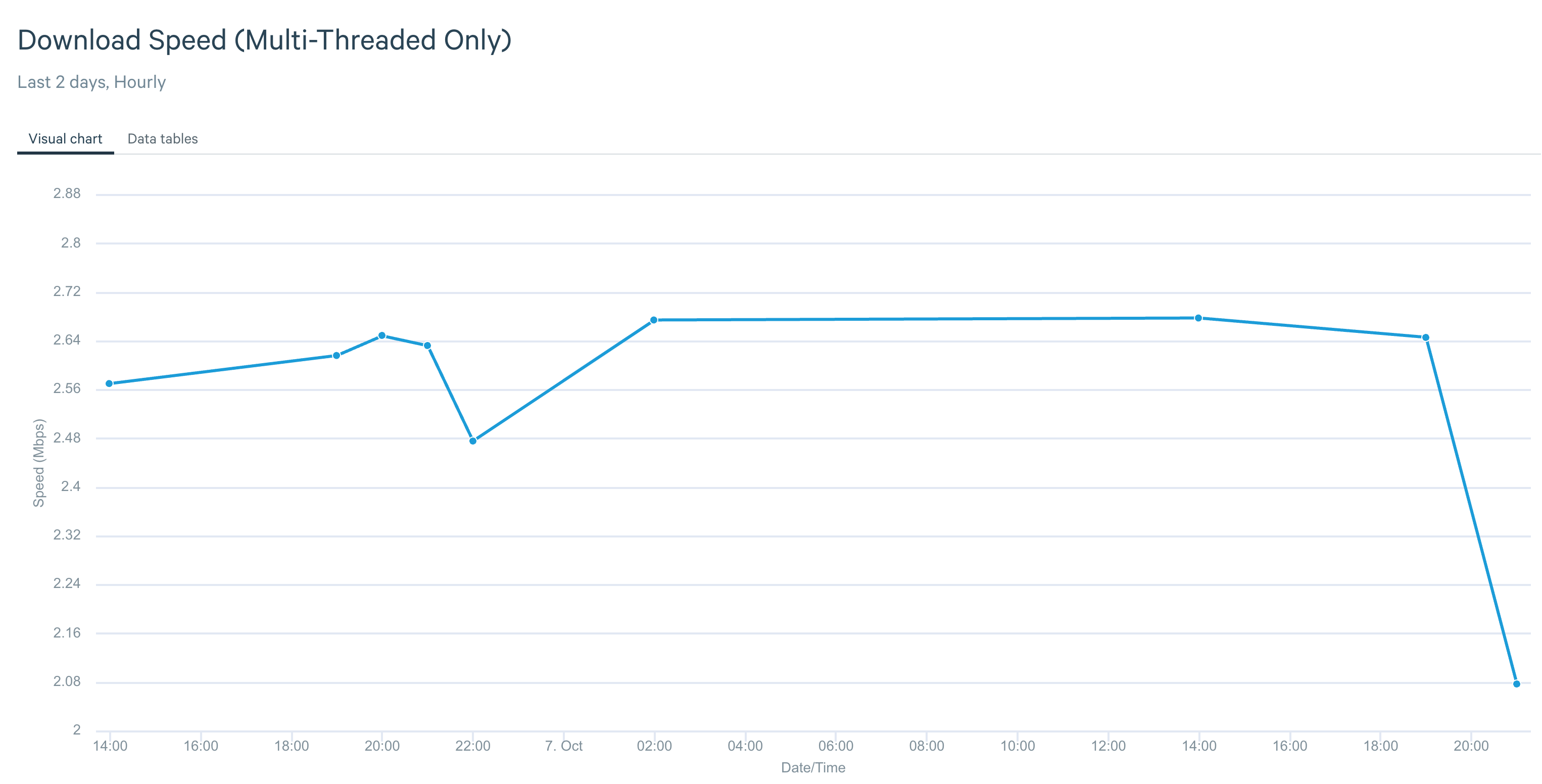
So, I'm getting very little in the way of download data - and it is reporting a max of only 1/2 the speed I actually get in real-world testing.
As you can see, it has only collected data on one day. So let's split out that day:
I can run a speed test right now and get up to 800 Mbps from multiple NZ-based servers. I have very little band-width in use for many hours over the day. So what gives?
Mikek: What ISP you with ?
2-Degrees.
SiliconAudio:Mikek: What ISP you with ?2-Degrees.
https://nick.mackechnie.co.nz | NZ ISP latency monitoring - https://smokeping.thenet.gen.nz
Have you reached out to samknows customer care? We have a heap of customers with probes on the network.
Nick
Yeah, I'll go ahead and do that and see what they come back with. I'm on 2 Degrees 900/400 plan, and generally see much better speeds than the very low speeds the box is reporting. Something is amiss here.
SiliconAudio:
Yeah, I'll go ahead and do that and see what they come back with. I'm on 2 Degrees 900/400 plan, and generally see much better speeds than the very low speeds the box is reporting. Something is amiss here.
Just something simple too - I changed a bit on my network and noticed my probe had stopped testing and had to reboot it. It may pay to do a quick "turn it off and on again" to see if this fixes it. Your speeds are looking incredibly low compared to the other 2degrees nodes so makes me think there is either something amiss on your network or you've got a faulty probe or a probe on the wrong testing profile.
Michael Murphy | https://murfy.nz
Referral Links: Quic Broadband (use R122101E7CV7Q for free setup)
Are you happy with what you get from Geekzone? Please consider supporting us by subscribing.
Opinions are my own and not the views of my employer.
|
|
|