Geekzone: technology news, blogs, forums
Guest
Welcome Guest.
You haven't logged in yet. If you don't have an account you can register now.


View this topic in a long page with up to 500 replies per page Create new topic
1 | ... | 126 | 127 | 128 | 129 | 130 | 131 | 132 | 133 | 134 | 135 | 136 | ... | 285
sidefx
3775 posts

Uber Geek
+1 received by user: 1295

Trusted

  #866667 26-Jul-2013 15:06
Send private message

smac:
mikenzb: that line attenuation is way to high. i am surprised chorus actually went ahead with the install. limit for vdsl install is 10.8dB


Can anyone clarify this please? Most of the comments in this thread refer to a figure in the low to mid teens being normal/acceptable. Or is this statement talking about something else?


My understanding is the attenuation they base the pre-qual on (and therefore use to draw a line at 10.8db) is measured at a specific frequency (or range) and that frequency is different to ADSL and\or VDSL.  In essence what you see as you ADSL or VDSL attenuation can't be used to say whether you're above or below the 10.8db threshold.

The only real way to know whether you can get VDSL is to get the pre-qual done and that will include the important attenuation measure (I think it actually gives a range)

I also *think* that I recall something about pre-qual attenuation being based on measurements chorus do\did manually at various locations at some time in the past, so they won't necessarily reflect what your attenuation is now, they exclude your internal wiring (and wiring from road to ETP.. and maybe some street wiring)


"I was born not knowing and have had only a little time to change that here and there."         | Octopus Energy | Sharesies
              - Richard Feynman


Dairusire
333 posts

Ultimate Geek
+1 received by user: 113


  #866675 26-Jul-2013 15:28
Send private message

sidefx:
smac:
mikenzb: that line attenuation is way to high. i am surprised chorus actually went ahead with the install. limit for vdsl install is 10.8dB


Can anyone clarify this please? Most of the comments in this thread refer to a figure in the low to mid teens being normal/acceptable. Or is this statement talking about something else?


My understanding is the attenuation they base the pre-qual on (and therefore use to draw a line at 10.8db) is measured at a specific frequency (or range) and that frequency is different to ADSL and\or VDSL.  In essence what you see as you ADSL or VDSL attenuation can't be used to say whether you're above or below the 10.8db threshold.

The only real way to know whether you can get VDSL is to get the pre-qual done and that will include the important attenuation measure (I think it actually gives a range)

I also *think* that I recall something about pre-qual attenuation being based on measurements chorus do\did manually at various locations at some time in the past, so they won't necessarily reflect what your attenuation is now, they exclude your internal wiring (and wiring from road to ETP.. and maybe some street wiring)


bang on the money

gabesmith
46 posts

Geek
+1 received by user: 6

Trusted

  #867256 27-Jul-2013 23:58
Send private message

Hey all, so here's the deal, I have been a pretty happy Snap VDSL customer for the last couple of months.

I am 200-300m away from my local exchange and I get on average a 47Mbits/s down and 10Mbits/s up.

Every once in a while (2-3 times a day on average these days) I get Signal-to-noise ratio loss, unrecoverable errors and then a re-sync usually. See a recent example of the stats images.

I want to a have a fast and stable line. I can see that DLM is cranking up the latency and INP to attempt to counteract these symptoms.

I am confident of my home wiring being in a 3 year-old house with CAT6 from my ETP to a single master RJ45 socket then a CAT6 patch lead to the FritzBox 7390.

Does anyone have any ideas what could be causing this and what process I need to go through to get this fixed?

Any help is appreciated.

(doh, images now hopefully fixed)


Phexx
420 posts

Ultimate Geek
+1 received by user: 6


  #867259 28-Jul-2013 00:09
Send private message

gabesmith: Hey all, so here's the deal, I have been a pretty happy Snap VDSL customer for the last couple of months.

I am 200-300m away from my local exchange and I get on average a 47Mbits/s down and 10Mbits/s up.

Every once in a while (2-3 times a day on average these days) I get Signal-to-noise ratio loss, unrecoverable errors and then a re-sync usually. See a recent example of the stats images.

I want to a have a fast and stable line. I can see that DLM is cranking up the latency and INP to attempt to counteract these symptoms.

I am confident of my home wiring being in a 3 year-old house with CAT6 from my ETP to a single master RJ45 socket then a CAT6 patch lead to the FritzBox 7390.

Does anyone have any ideas what could be causing this and what process I need to go through to get this fixed?

Any help is appreciated.


Those image links require a login. Try re hosting them with iForce or imgur. 

6297a1679f9
371 posts

Ultimate Geek
+1 received by user: 29
Inactive user


  #867273 28-Jul-2013 05:45

@gabesmith
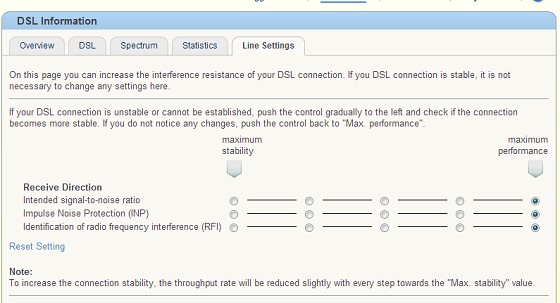
Try slowly dumbing down your settings

Move each dot slowly from the right to the left, and stop when you think your line is stable.

sidefx
3775 posts

Uber Geek
+1 received by user: 1295

Trusted

  #867284 28-Jul-2013 08:52
Send private message

With those issues I'm not sure changing the stability settings will be much help, though I guess it might be worth trying to see.

I would probably start by just confirming 100% that the wiring has been done right. Is there anything else running from the ETP to anywhere else? If it's definitely just incoming pair -> cat6 (and nothing else - remember even other sockets with nothing plugged into them = unterminated stubs which can have a big effect on VDSL) -> Master socket -> Fritzbox then I'd ring snap up and log a fault.


"I was born not knowing and have had only a little time to change that here and there."         | Octopus Energy | Sharesies
              - Richard Feynman


Want to support Geekzone and browse the site without the ads? Subscribe to Geekzone now (monthly, annual and lifetime options).
Jexlar
41 posts

Geek
+1 received by user: 5
Inactive user


  #867772 29-Jul-2013 12:18
Send private message

I have the same problem as gabe, our stats look extremely similar except my latency hasn't reached that far up yet, but I'm sure it will do in time.

gabesmith
46 posts

Geek
+1 received by user: 6

Trusted

  #867813 29-Jul-2013 13:18
Send private message

Jexlar: I have the same problem as gabe, our stats look extremely similar except my latency hasn't reached that far up yet, but I'm sure it will do in time.


Just a bit of an update from me. I have a CAT6 cable from my ETP to my master socket. My master socket is a small telephone patch panel housed inside a SIG TECH 2000 distribution panel. I was using an RJ45 socket on the patch panel to then run a CAT6 patch lead to my FritzBox 7390.

I thought I would try removing the telephone patch panel from the equation so I have now soldered an RJ11 lead on the end of my CAT6 master line cable from the ETP. So now it is ETP -> CAT6 -> RJ11 lead (soldered on) -> FritzBox 7390.

So far, so good. I have noticed some minor improvements to the spectrum, still the same Recv/Send SNRM 12/19 dB and attenuation 7 dB but no unrecoverable errors so far after 16 hours.

I will wait see how this new setup goes. I have had good line periods in the past so if this stays good for a number of days I will accept my telephone patch panel was introducing random noise onto the line.

Fingers crossed, treat me good DLM.

Jexlar
41 posts

Geek
+1 received by user: 5
Inactive user


  #867822 29-Jul-2013 13:29
Send private message

I have that exact same set up. I was hoping to avoid putting an rj45 on to it.

stevehodge
393 posts

Ultimate Geek
+1 received by user: 52


  #867840 29-Jul-2013 13:47
Send private message

gabesmith: if this stays good for a number of days I will accept my telephone patch panel was introducing random noise onto the line.


If the patch panel is designed for POTS then it wouldn't surprise me if it was an issue. A patch panel for data should be ok though. I'm using a cat6 patch panel and everything is good: right now with tweaking I'm getting 70000 kbit/s downstream sync with 0.05 CRC errors per minute.

Incidentally soldering those cables together is not recommended. The RJ11 lead will be flat so it'll be prone to picking up interference that a twisted cable would negate. I hope the RJ11 lead is short. If you have a cat 6 or cat 5e cable with an RJ45 on the end you could just plug that directly into the Fritz. The Fritz expects DSL on the centre pair (the blue/blue-white pair). It can also take POTS on next two pins out from the centre (pins 3 and 6 - colour depends on the cable's wiring standard).

Jexlar
41 posts

Geek
+1 received by user: 5
Inactive user


  #867847 29-Jul-2013 13:54
Send private message

In my case I believe I need to just put an rj45 on to my cat5e cable that comes into my house.


Shop now for Lego sets and other gifts (affiliate link).
gabesmith
46 posts

Geek
+1 received by user: 6

Trusted

  #867865 29-Jul-2013 14:34
Send private message

Jexlar: In my case I believe I need to just put an rj45 on to my cat5e cable that comes into my house.


I should have enough spare length on the my master cable to do the same. Time to track down a RJ45 crimping tool...

Jexlar
41 posts

Geek
+1 received by user: 5
Inactive user


  #867867 29-Jul-2013 14:37
Send private message

I think I may have to try pull some more through the wall. Can you get the tool on dx or something?

Jexlar
41 posts

Geek
+1 received by user: 5
Inactive user


  #868364 30-Jul-2013 10:24
Send private message

Tried to alter my settings to increase the stability of my connection and I wrecked my line. Failed to connect. Tried everything including a factory restore. Done nothing called snap, took 40mins to get someone, went through the basic stuff he done what he could on his end as did I. He could see it was syncing yet I wasn't getting anything he told me to check the modem at someone else's and call back, did so, dsl didn't connect like he said it should, called back an hour and 20mins waiting and he said that was weird and he would get chorus to do what they could remotely and if it wasn't working by the morning call back. Whatever they done worked, but now I am hesitant to try make the changes again... :-(

Dairusire
333 posts

Ultimate Geek
+1 received by user: 113


  #868367 30-Jul-2013 10:36
Send private message

Jexlar: Tried to alter my settings to increase the stability of my connection and I wrecked my line. Failed to connect. Tried everything including a factory restore. Done nothing called snap, took 40mins to get someone, went through the basic stuff he done what he could on his end as did I. He could see it was syncing yet I wasn't getting anything he told me to check the modem at someone else's and call back, did so, dsl didn't connect like he said it should, called back an hour and 20mins waiting and he said that was weird and he would get chorus to do what they could remotely and if it wasn't working by the morning call back. Whatever they done worked, but now I am hesitant to try make the changes again... :-(


What did you do?

1 | ... | 126 | 127 | 128 | 129 | 130 | 131 | 132 | 133 | 134 | 135 | 136 | ... | 285
View this topic in a long page with up to 500 replies per page Create new topic


Geekzone Live »

Try automatic live updates from Geekzone directly in your browser, without refreshing the page, with Geekzone Live now.


Are you subscribed to our RSS feed? You can download the latest headlines and summaries from our stories directly to your computer or smartphone by using a feed reader.