Geekzone: technology news, blogs, forums
Guest
Welcome Guest.
You haven't logged in yet. If you don't have an account you can register now.


View this topic in a long page with up to 500 replies per page Create new topic
1 | ... | 35 | 36 | 37 | 38 | 39 | 40 | 41 | 42 | 43 | 44 | 45 | ... | 67
jonnz
22 posts

Geek
+1 received by user: 5


  #2823903 3-Dec-2021 16:44
Send private message

What speed do you get going from Starlink power brick ethernet port straight into a PC  1Gbps ethernet port?


Apotheosis
37 posts

Geek
+1 received by user: 8

ID Verified

  #2824842 6-Dec-2021 07:46
Send private message

jonnz:


What speed do you get going from Starlink power brick ethernet port straight into a PC  1Gbps ethernet port?


Same 20Mbps..


Anyway I've fixed the problem!!! After rebuilding one of the affected computers the speed went upto to 200Mbps, I did some more trouble shooting (not wanting to rebuild all my computers..) and found that all of them had a VPN client on them (LogMein Hamachi), there is a known issue with this app, it amends your Netsh background configurations and doesn't revert them even after you uninstall the app.. 


Thanks for the feedback people it helped me get there.


Yank1w1
47 posts

Geek
+1 received by user: 29


  #2824851 6-Dec-2021 08:32
Send private message

Apotheosis:


Hi,


So i've been pulling my hair out trying to diagnose some weird speed test behavior. Starlink reports 190Mbps, my google Wifi mesh reports the same. but my wired (and some wireless) devices seem to think the speed is 25Mbps. So far i've tried the following: 


  • different speed test websites (no change)
  • connecting a wired device directly into the starlink router (no change)
  • changing the network cable (no change)
  • updating the NIC drivers (no change)

So far the only consistent thing I have noted is all the NIC's (wired and wireless) so far are Intel ones, they are all set to default settings. 


The other thing to note is if I download a big file from somewhere (i.e Google Drive) and manually calculate the speed I get around 60Mbps...


Any ideas wonderful people?


I had a very similar issue with a PC.  Issue resolved with an Administrator level CMD prompt. 


netsh int tcp set global autotuninglevel=normal


Apotheosis
37 posts

Geek
+1 received by user: 8

ID Verified

  #2824876 6-Dec-2021 09:40
Send private message

Where were you two days ago lol. Yep that's what i had to change


pih

pih
667 posts

Ultimate Geek
+1 received by user: 359

Lifetime subscriber

  #2829777 10-Dec-2021 08:46
Send private message

Been in touch with Starlink support about my AU IP address issues. As I've noted in earlier posts, we regularly get Australian ads, the Nest Hub sometimes shows Sydney time, we've had Netflix suddenly stop working part-way through a movie because it detected a country (and hence catalogue) change, I've also had Netflix decline to download a movie because it thought that I was using a VPN (I wasn't).


I did a bit of digging and realised what the problem is. We're regularly assigned an IPv6 address, and all 3 IPv6 addresses I've had in the last 24 hours fall in the range assigned to Sydney. In fact, they don't have any IPv6 address ranges associated with NZ in their published feed: https://geoip.starlinkisp.net/feed.csv.


They told me that power-cycling the Starlink (for 25 mins?!) has fixed geolocation issues with others, but it didn't help me. I'm surprised nobody else has mentioned these issues, but maybe I just got a unit destined for AU for some reason. Anyway, I'm hoping they slice out and publish an IPv6 range for us soon :)


andypen
51 posts

Master Geek
+1 received by user: 23


  #2829782 10-Dec-2021 09:00
Send private message

pih:


...They told me that power-cycling the Starlink (for 25 mins?!) has fixed geolocation issues with others, but it didn't help me. I'm surprised nobody else has mentioned these issues, but maybe I just got a unit destined for AU for some reason. Anyway, I'm hoping they slice out and publish an IPv6 range for us soon :)


Been lots of posts on the NZ Starlink FB page about geolocation issues. I've not had any, but then I don't think I've configured IPv6 on my WAN port so I only get a 100. address. Is that perhaps a solution in the short term. Disabling IPv6?


Support Geekzone with one-off or recurring donations Donate via PressPatron.

pih

pih
667 posts

Ultimate Geek
+1 received by user: 359

Lifetime subscriber

  #2829785 10-Dec-2021 09:11
Send private message

andypen:


Been lots of posts on the NZ Starlink FB page about geolocation issues. I've not had any, but then I don't think I've configured IPv6 on my WAN port so I only get a 100. address. Is that perhaps a solution in the short term. Disabling IPv6?


Ah, I'm not on FB and only occasionally on Reddit (didn't see anything there last time I checked, but maybe there's more noise now). Yeah, disabling IPv6 is probably a workaround, but it would be good to see them fix the problem.


pih

pih
667 posts

Ultimate Geek
+1 received by user: 359

Lifetime subscriber

  #2829828 10-Dec-2021 10:24
Send private message

Just got a reply from them:


It looks that you have a 3rd party router connected instead of our Starlink Router, that is configured to pull IPv6 addresses. At this time we don’t support the ability to allocate IPv6 range since it is something we don’t fully support. We ask that you attempt to connect the Starlink router and see if you are able to receive content for your region. Please let us know if after connecting the Starlink router you are still receiving content from Australia, hope to hear from your soon. Have a great day! 


So... They have IPv6 addresses, they allow my router to request IPv6 addresses, they assign those addresses (incorrectly) and they blame my router? :/


I guess disabling IPv6 is where it's at. Shame, given it's nearly working.


MikeAqua
8031 posts

Uber Geek
+1 received by user: 3820


  #2829830 10-Dec-2021 10:39
Send private message

Does anyone know of successful deployments of Starlink on boats?  I'm interested but I've found limited info.


Mike


pih

pih
667 posts

Ultimate Geek
+1 received by user: 359

Lifetime subscriber

  #2829840 10-Dec-2021 10:58
Send private message

Wow, I just got a phone call from Starlink that started like this:


"Hi, this is Elon from Starlink about your support request." 
"Not THE Elon, surely..."
"No, sadly, not THE Elon." 🤣


That had me grinning from ear to ear. He said rather than back and forth on chat he thought he'd just call and clarify: they are aware of some big gaps in the network layer including IPv6 assignments and functionality that they are looking to address "as we end 2021 and into 2022". He wouldn't be more specific than that.


I have to say I've had fantastic responsive support from Starlink, considering they're US-based and supporting global customers. Better than some local ISPs!


Linuxluver
5833 posts

Uber Geek
+1 received by user: 1639

Trusted
Subscriber

  #2829843 10-Dec-2021 11:17
Send private message

pih:

Just got a reply from them:


It looks that you have a 3rd party router connected instead of our Starlink Router, that is configured to pull IPv6 addresses. At this time we don’t support the ability to allocate IPv6 range since it is something we don’t fully support. We ask that you attempt to connect the Starlink router and see if you are able to receive content for your region. Please let us know if after connecting the Starlink router you are still receiving content from Australia, hope to hear from your soon. Have a great day! 


So... They have IPv6 addresses, they allow my router to request IPv6 addresses, they assign those addresses (incorrectly) and they blame my router? :/


I guess disabling IPv6 is where it's at. Shame, given it's nearly working.


The system is currently in beta and they do support their own router, but don't currently support IP v6. Maybe that's why I haven't had any problems. I use the Starlink router. I also have an ASUS router I might plug into the back of it to provide better local coverage


_____________________________________________________________________

I've been on Geekzone over 16 years..... Time flies.... 


Want to support Geekzone and browse the site without the ads? Subscribe to Geekzone now (monthly, annual and lifetime options).
tim0001
274 posts

Ultimate Geek
+1 received by user: 146


  #2829895 10-Dec-2021 12:40
Send private message

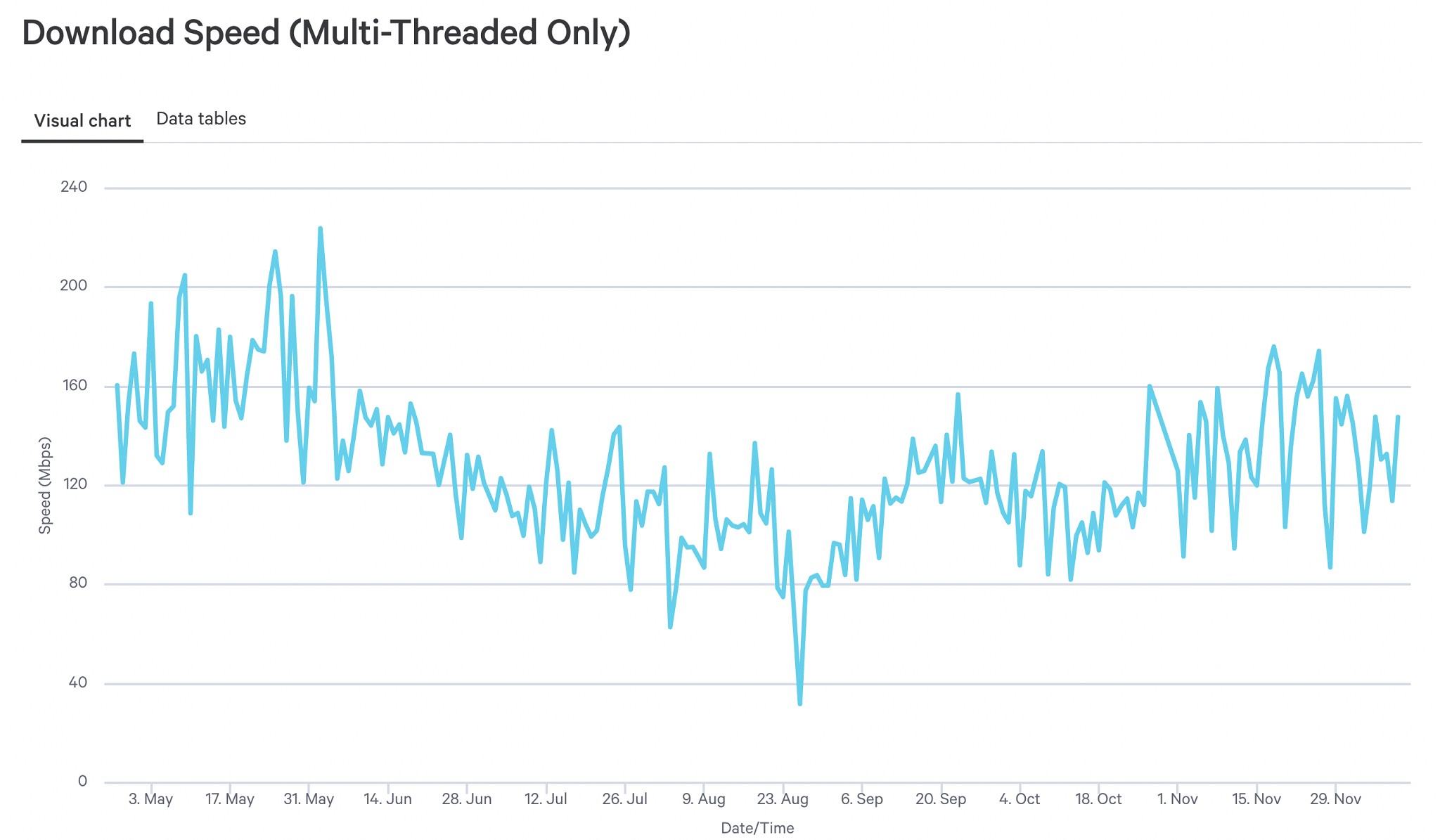
I was wondering how Starlink speeds have been trending this year.   


It would be great if someone could please post some Samknows graphs of their starlink connection. (preferably starting from when they received dishy)


@zenourn


BenT
8 posts

Wannabe Geek
+1 received by user: 12


  #2829905 10-Dec-2021 13:05
Send private message

tim0001:


I was wondering how Starlink speeds have been trending this year.   


It would be great if someone could please post some Samknows graphs of their starlink connection. (preferably starting from when they received dishy)


@zenourn


You can see user reported stats all over the world here:


https://starlinkstatus.space/stations


zenourn
281 posts

Ultimate Geek
+1 received by user: 168

ID Verified
Trusted
DR

  #2830080 10-Dec-2021 19:02
Send private message

Here is the average download speed each day over the past 7 months in North Canterbury, no obstructions, as measured by the SamKnows box:


gzt

gzt
18685 posts

Uber Geek
+1 received by user: 7826

Lifetime subscriber

  #2830372 11-Dec-2021 13:03
Send private message

Good to know. Does min and max ping time vary much over the period? (average might not tell the story)

1 | ... | 35 | 36 | 37 | 38 | 39 | 40 | 41 | 42 | 43 | 44 | 45 | ... | 67
View this topic in a long page with up to 500 replies per page Create new topic


Geekzone Live »

Try automatic live updates from Geekzone directly in your browser, without refreshing the page, with Geekzone Live now.


Are you subscribed to our RSS feed? You can download the latest headlines and summaries from our stories directly to your computer or smartphone by using a feed reader.