Geekzone: technology news, blogs, forums
Guest
Welcome Guest.
You haven't logged in yet. If you don't have an account you can register now.


Paul1977

5227 posts

Uber Geek
+1 received by user: 2221


#255983 9-Sep-2019 15:44
Send private message

A little over a year ago I put an Intel 760P SSD into my PC (which is running 24/7).


It has 9395 power on hours, and is saying it's estimated life remaining is only 229 days.


These drives have a 5 year warranty, so I'm a little confused as to why it looks like it will be dead before it hit the 2 year mark?




 Home:                                                           Work:
Home Work


View this topic in a long page with up to 500 replies per page Create new topic
 1 | 2 | 3

xpd

xpd
Geek of Coastguard
14193 posts

Uber Geek
+1 received by user: 4659

Retired Mod
ID Verified
Trusted
Lifetime subscriber

  #2313626 9-Sep-2019 15:46
Send private message

Youve answered it yourself. 


(which is running 24/7)


Consumer devices are not designed to be run 24/7. They expect maybe 8 hrs a day etc.


XPD / Gavin


LinkTree


Paul1977

5227 posts

Uber Geek
+1 received by user: 2221


  #2313629 9-Sep-2019 15:51
Send private message

xpd:


Youve answered it yourself. 


(which is running 24/7)


Consumer devices are not designed to be run 24/7. They expect maybe 8 hrs a day etc.


Sure, but most of that time it's doing very little as far as read/writes go.


Item
1750 posts

Uber Geek
+1 received by user: 727

Subscriber

  #2313630 9-Sep-2019 15:54
Send private message

Read/writes are more important for an SSD lifespan than just being "on" - it's not like it has any moving parts to wear down.


This should give you an idea:


https://www.compuram.de/blog/en/the-life-span-of-a-ssd-how-long-does-it-last-and-what-can-be-done-to-take-care/


What is the PC actually doing?


.


Paul1977

5227 posts

Uber Geek
+1 received by user: 2221


  #2313678 9-Sep-2019 16:02
Send private message

Item:


What is the PC actually doing?


Very little most of the time. I use it mainly as a media server, with all the media stored on spindle RAID arrays. The SSD houses the OS and apps.


Item
1750 posts

Uber Geek
+1 received by user: 727

Subscriber

  #2313682 9-Sep-2019 16:07
Send private message

S.M.A.R.T should be able to tell you the lifetime writes - this would be a better indicator than the total power on time...


.

Dynamic
4036 posts

Uber Geek
+1 received by user: 1862

ID Verified
Trusted
Lifetime subscriber

  #2313736 9-Sep-2019 16:55
Send private message

In the Intel SSD Toolbox, clock on the SMART Details button and look for the Host Writes figure.  Mine is 17226Gb on my 250Gb Intel 545s, which has 2041 power on hours and a Power Cycle Count of 15, which should tell you that my computer rarely gets turned off.  This computer is used for general office work and does not do anything special for me that would contribute to SSD wear and tear.


If I look here https://ark.intel.com/content/www/us/en/ark/products/125020/intel-ssd-545s-series-256gb-2-5in-sata-6gb-s-3d2-tlc.html I see the Endurance Rating for my SSD is 144 TBW (terabytes written).


17Tb divided by 144Tb = about 12%, which roughly matches with the 88% estimated life remaining in the Intel SSD Toolbox.  (I can't see an exact figure on the estimated life remaining bar.)  I set this computer up in March, so the drive has gone through 12% of its life in 6 months, and at the current rate I'll use the SSD's life up in 4 years, even through it has a 5 year warranty.  I've never looked seriously at these figures, and I'm actually quite surprised that I'm likely to wear the drive out.


So....  perhaps check your equivalent figures and see if the numbers line up.  It may well be that your machine is constantly writing to the drive and eating away at its life without you realising it.  Or there could be a fault.


Where are you getting your Estimated Life Remaining figure?  I can't see that in the Intel SSD Toolbox.


“Don't believe anything you read on the net. Except this. Well, including this, I suppose.” Douglas Adams


Shop now on AliExpress (affiliate link).
Jase2985
13772 posts

Uber Geek
+1 received by user: 6254

ID Verified
Lifetime subscriber

  #2313739 9-Sep-2019 16:58
Send private message

go read the PDS for your drive


but a 128GB model has an Endurance Rating (Lifetime Writes) 72 TBW (41gb per day every day for 5 years)


Mean Time Between Failures (MTBF) 1.6 million hours


where are you gathering your information from?


Paul1977

5227 posts

Uber Geek
+1 received by user: 2221


  #2313742 9-Sep-2019 17:03
Send private message

Dynamic:


In the Intel SSD Toolbox, clock on the SMART Details button and look for the Host Writes figure.  Mine is 17226Gb on my 250Gb Intel 545s, which has 2041 power on hours and a Power Cycle Count of 15, which should tell you that my computer rarely gets turned off.  This computer is used for general office work and does not do anything special for me that would contribute to SSD wear and tear.


If I look here https://ark.intel.com/content/www/us/en/ark/products/125020/intel-ssd-545s-series-256gb-2-5in-sata-6gb-s-3d2-tlc.html I see the Endurance Rating for my SSD is 144 TBW (terabytes written).


17Tb divided by 144Tb = about 12%, which roughly matches with the 88% estimated life remaining in the Intel SSD Toolbox.  (I can't see an exact figure on the estimated life remaining bar.)  I set this computer up in March, so the drive has gone through 12% of its life in 6 months, and at the current rate I'll use the SSD's life up in 4 years, even through it has a 5 year warranty.  I've never looked seriously at these figures, and I'm actually quite surprised that I'm likely to wear the drive out.


So....  perhaps check your equivalent figures and see if the numbers line up.  It may well be that your machine is constantly writing to the drive and eating away at its life without you realising it.  Or there could be a fault.


Where are you getting your Estimated Life Remaining figure?  I can't see that in the Intel SSD Toolbox.


Estimated life remaining is actually coming from HP Smart Storage Administrator which i have installed for my RAID card. For whatever reason SSA reports on the Intel SSD as well, even thoug it isn't connected to the HP RAID card.


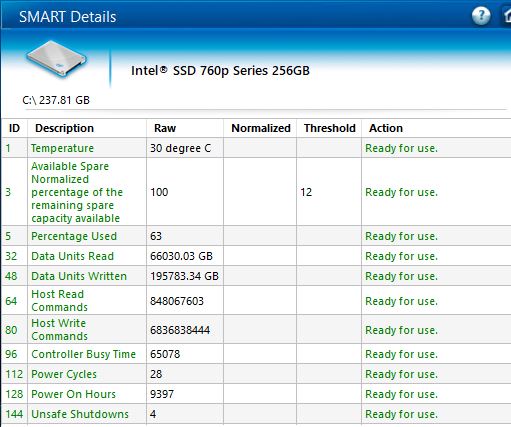
Here are the SMART details:


Almost 196,000GB written. Seems a lot.


Jase2985
13772 posts

Uber Geek
+1 received by user: 6254

ID Verified
Lifetime subscriber

  #2313747 9-Sep-2019 17:09
Send private message

FYI my intel 540 SSD has 54TBW on it


djtOtago
1190 posts

Uber Geek
+1 received by user: 613


  #2313756 9-Sep-2019 17:21
Send private message

I have a Crucial CT500MX In a Windows 10 machine that runs 24/7


Output from S.M.A.R.T


Power On Hours Count:  26945 Hours
Power Cycle Count:             40 Cycles
Percentage Lifetime Used:   11 % 


Dynamic
4036 posts

Uber Geek
+1 received by user: 1862

ID Verified
Trusted
Lifetime subscriber

  #2313757 9-Sep-2019 17:24
Send private message

Paul1977: Almost 196,000GB written. Seems a lot. 


Wow...  that does seem high.  In the absence of evidence to the contrary, that figure has to be taken at face value.  You might need to dive into what is constantly writing to that drive and wearing it out.


Or..... replace it with a spinner!  😂


“Don't believe anything you read on the net. Except this. Well, including this, I suppose.” Douglas Adams


Shop now for Lego sets and other gifts (affiliate link).
Lias
5673 posts

Uber Geek
+1 received by user: 3990

ID Verified
Trusted
Lifetime subscriber

  #2313764 9-Sep-2019 17:32
Send private message

Watch your PC for a bit with resmon and see what's active a lot on the SSD. Various things I've seen chew up SSD endurance:


  • Torrent clients (even when the incomplete & completed files are not on the SSD, other files can be stored in Appdata etc, e.g. Deluge state and fastresume files)
  • Blockchain clients storing the chain in Appdata
  • Debug/verbose logging for various things


I'm a geek, a gamer, a dad, a Quic user, and an IT Professional. I have a full rack home lab, size 15 feet, an epic beard and Asperger's. I'm a bit of a Cypherpunk, who believes information wants to be free and the Net interprets censorship as damage and routes around it. If you use my Quic signup you can also use the code R570394EKGIZ8 for free setup. Opinions are my own and not the views of my employer.


Beccara
1473 posts

Uber Geek
+1 received by user: 517

ID Verified

  #2313769 9-Sep-2019 17:44
Send private message

With that TBW i'd be looking to either replace or backup ASAP, It's at 135% of it's rated writes. I'm surprised it thinks it can go another 229 days to be honest.


Judging by the fact you said it's in a HP array I'd say you have something logging heavy to disk that's chewed up your writes, You have more writes than reads which would point to something being written then nuked without ever being used. To compare I have a 660p 2tb thats done 3.7tb write and 13.7tb reads


Most problems are the result of previous solutions...

All comment's I make are my own personal opinion and do not in any way, shape or form reflect the views of current or former employers unless specifically stated 

timmmay
20923 posts

Uber Geek
+1 received by user: 5395

Trusted
Lifetime subscriber

  #2313775 9-Sep-2019 18:06
Send private message
richms
29248 posts

Uber Geek
+1 received by user: 10354

Trusted
Lifetime subscriber

  #2313786 9-Sep-2019 18:41
Send private message

Friends kids killed their 250 gig in about 3 years in a gaming PC - its always got something downloading to it from steam that will be played for about 10 mins before something else becomes what they want to play. only 250 gig so always deleting and redownloading games. I think it was at about 350TB written to by the time it killed itself with a non booting PC.


Richard rich.ms

 1 | 2 | 3
View this topic in a long page with up to 500 replies per page Create new topic


Geekzone Live »

Try automatic live updates from Geekzone directly in your browser, without refreshing the page, with Geekzone Live now.


Are you subscribed to our RSS feed? You can download the latest headlines and summaries from our stories directly to your computer or smartphone by using a feed reader.