Geekzone: technology news, blogs, forums
Guest
Welcome Guest.
You haven't logged in yet. If you don't have an account you can register now.


View this topic in a long page with up to 500 replies per page Create new topic
1 | ... | 12 | 13 | 14 | 15 | 16 | 17 | 18 | 19 | 20 | 21 | 22 | ... | 57
normanc
58 posts

Master Geek
+1 received by user: 3


  #1960766 20-Feb-2018 09:51
Send private message

fe31nz:


What exactly do you mean by "Browse to my DDNS"?  How are you doing that?  From inside or outside your home network?


From outside. That's that problem. Inside I browse to the internal ip address in the 192.168 range.


Everything else seems to be working as expected...?


----


Self taught tech user. Newbie Samsung Galaxy S10+ user. Switched from iPhone


mentalinc
3384 posts

Uber Geek
+1 received by user: 1023

Trusted

  #1960768 20-Feb-2018 10:02
Send private message

mine is also running and accessible from the internet.


Super long password required!


CPU: AMD 5900x | RAM: GSKILL Trident Z Neo RGB F4-3600C16D-32GTZNC-32-GB | MB:  Asus X570-E | GFX: EVGA FTW3 Ultra RTX 3080Ti| Monitor: LG 27GL850-B 2560x1440


Quic: https://account.quic.nz/refer/473833 R473833EQKIBX 


michaelmurfy

meow
13581 posts

Uber Geek
+1 received by user: 10914

Moderator
ID Verified
Trusted
Lifetime subscriber

  #1960774 20-Feb-2018 10:11
Send private message

@normanc This means your firewall rules are not configured correctly. The default rules block this externally. Please check the interfaces on your firewall rules (especially the WAN_LOCAL rule) to ensure they're like the following:


Click to see full size


Michael Murphy | https://murfy.nz
Referral Links: Quic Broadband (use R122101E7CV7Q for free setup)

Are you happy with what you get from Geekzone? Please consider supporting us by subscribing.
Opinions are my own and not the views of my employer.


mdf

mdf
3566 posts

Uber Geek
+1 received by user: 1519

Trusted

  #1960776 20-Feb-2018 10:14
Send private message

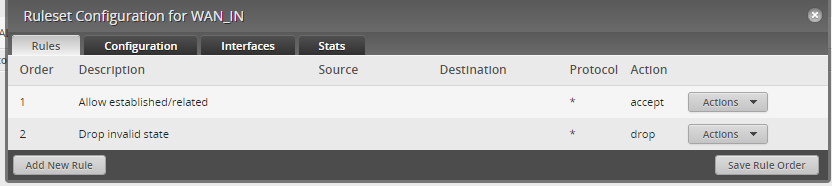
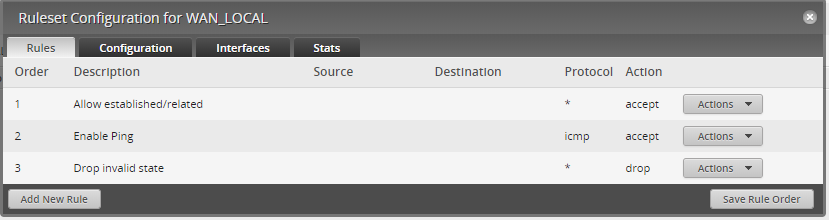
I'm pretty new to EdgeOS. But this is what my firewall policies look like:


WAN to internal:


WAN to router (note I've allowed pings):


I've just double checked and don't get anything when I browse to my (static) IP from an external network.


mentalinc
3384 posts

Uber Geek
+1 received by user: 1023

Trusted

  #1960806 20-Feb-2018 10:53
Send private message

Thanks mdf, found the rule that was allowing access (probably from when I setup letsencrypt a while back...) Forgot that i'd allowed it so it could access the file it creates (have now moved to dns based auth)


CPU: AMD 5900x | RAM: GSKILL Trident Z Neo RGB F4-3600C16D-32GTZNC-32-GB | MB:  Asus X570-E | GFX: EVGA FTW3 Ultra RTX 3080Ti| Monitor: LG 27GL850-B 2560x1440


Quic: https://account.quic.nz/refer/473833 R473833EQKIBX 


normanc
58 posts

Master Geek
+1 received by user: 3


  #1960814 20-Feb-2018 10:59
Send private message

Thanks all. I'll have a tweak. 


AFAIK, I didn't make any changes to the default firewall rules when I set up the router.


So not sure what's going on there, and why the default wouldn't have those rules...


I am new to DIY router configuration, so I really appreciate the help.


This router definitely behaves better than the Vodafone supplied one, but yeah, more configuration required.


Which I'm fine with. Just learning as I go...


Cheers


----


Self taught tech user. Newbie Samsung Galaxy S10+ user. Switched from iPhone


Want to support Geekzone and browse the site without the ads? Subscribe to Geekzone now (monthly, annual and lifetime options).
freakngeek
356 posts

Ultimate Geek
+1 received by user: 123


  #1972756 11-Mar-2018 18:11
Send private message

Should out on main site this coming week, but out on BETA site


EdgeMAX EdgeRouter software hotfix version v1.10.1 has been released!
Friday


New firmware release 1.10.1 is available here:


[Release Notes v1.10.1]


Changelog


Changes since v1.10.0


New features:


  • none

Enhancements and bug fixes:


  • Fix regression in 1.10.0 when BGP "keepalive" & "holdtime" timers caused commit failure if they were less than default value. Discussed here
  • Fix regression in 1.10.0 when OSPF "retransmit-interval" timer caused commit failure if it was less than 5 seconds. Discussed here
  • Fix regression in 1.10.0 when RIP "split-horizon" caused commit failure. Discussed here
  • Fix regression in 1.10.0 when failover LoadBalancing did not work after reconfiguration. Discussed here
  • Fix regression in 1.10.0 when weighted LoadBalancing did not work if 1st interface was inactive. Discussed here
  • Fix regression in 1.10.0 that caused periodic `ubnt-util` crash coredump messages in syslog. Discussed here
  • Fix bug when "ip arp base-reachable-time" caused commit failure if VLAN interface was configured. Discussed here
  • Fix regression in 1.10.0 that caused bad accounting data to be generated by netflow if VLAN interface was configured. Discussed here

Updated software components:


  • none

Known issues:


  • Bug with corrupted downloads via PPPoE interface is not fixed for ER-8-XG (it is fixed on all other ER models). Workaround - disable PPPoE offloading on ER-8-XG:configure set system offload ipv4 pppoe disable
    set system offload ipv6 pppoe disable commit save


BlackHand
135 posts

Master Geek
+1 received by user: 19


  #1974229 13-Mar-2018 21:15
Send private message

Anyone got IPv6 to work on 2degrees (ERL), tried the settings from the tutorial but no luck.
Is there anything special I need to do, e.g. call them to get it enabled?


fe31nz
1295 posts

Uber Geek
+1 received by user: 423


  #1974317 13-Mar-2018 23:07
Send private message

BlackHand:


Anyone got IPv6 to work on 2degrees (ERL), tried the settings from the tutorial but no luck.
Is there anything special I need to do, e.g. call them to get it enabled?


See my post here:


https://www.geekzone.co.nz/forums.asp?forumid=85&topicid=230720&page_no=1#1972180


michaelmurfy

meow
13581 posts

Uber Geek
+1 received by user: 10914

Moderator
ID Verified
Trusted
Lifetime subscriber

  #1974322 13-Mar-2018 23:47
Send private message

@BlackHand The settings are from my own Edgerouter which has IPv6 enabled on 2degrees successfully. I've noticed as of late it has been quite unreliable however so this may play a part in your inability to get an IPv6 address.


Michael Murphy | https://murfy.nz
Referral Links: Quic Broadband (use R122101E7CV7Q for free setup)

Are you happy with what you get from Geekzone? Please consider supporting us by subscribing.
Opinions are my own and not the views of my employer.


PANiCnz
999 posts

Ultimate Geek
+1 received by user: 161


  #1974342 14-Mar-2018 07:45
Send private message

Anyone tried Ubiquiti’s new NMS software? Not 100% sure it supports Edgerouters yet, some materials say the Edgemax range is supported other material says Egderouters not yet supported. I’m throughly confused.


Shop now on AliExpress (affiliate link).
Taubin
592 posts

Ultimate Geek
+1 received by user: 243

ID Verified
Subscriber

  #1974345 14-Mar-2018 08:04
Send private message

PANiCnz: Anyone tried Ubiquiti’s new NMS software? Not 100% sure it supports Edgerouters yet, some materials say the Edgemax range is supported other material says Egderouters not yet supported. I’m throughly confused.


I have it running on a spare server, it runs just fine on an ERL, you just need to follow the set up. It's not fully flushed out, and there are some things missing, but it's 'good enough' for now to have a run at if you have the spare server space. It allows you to configure your ERL through there instead of being local to the router which is nice.


ZL2TOY/ZL1DMP


michaelmurfy

meow
13581 posts

Uber Geek
+1 received by user: 10914

Moderator
ID Verified
Trusted
Lifetime subscriber

  #1978490 16-Mar-2018 10:45
Send private message

For those interested I've posted a review of the Edgerouter 4 here: https://www.geekzone.co.nz/content.asp?contentid=21773


I'm impressed. This is by-far the best router I've touched. If you're thinking about buying one then just do it.


Michael Murphy | https://murfy.nz
Referral Links: Quic Broadband (use R122101E7CV7Q for free setup)

Are you happy with what you get from Geekzone? Please consider supporting us by subscribing.
Opinions are my own and not the views of my employer.


mdf

mdf
3566 posts

Uber Geek
+1 received by user: 1519

Trusted

  #1978954 17-Mar-2018 09:34
Send private message

It seems to take a while (~10-15 seconds) for my ERL to assign a dhcp lease from clients first connecting. Is that normal or have I done something?

michaelmurfy

meow
13581 posts

Uber Geek
+1 received by user: 10914

Moderator
ID Verified
Trusted
Lifetime subscriber

  #1978958 17-Mar-2018 09:56
Send private message

mdf: It seems to take a while (~10-15 seconds) for my ERL to assign a dhcp lease from clients first connecting. Is that normal or have I done something?


Nope that isn't normal - but, it is easy to fix:


configure
set service dhcp-server shared-network-name LAN authoritative enable
commit

save

Where LAN is your DHCP pool name.


Michael Murphy | https://murfy.nz
Referral Links: Quic Broadband (use R122101E7CV7Q for free setup)

Are you happy with what you get from Geekzone? Please consider supporting us by subscribing.
Opinions are my own and not the views of my employer.


1 | ... | 12 | 13 | 14 | 15 | 16 | 17 | 18 | 19 | 20 | 21 | 22 | ... | 57
View this topic in a long page with up to 500 replies per page Create new topic


Geekzone Live »

Try automatic live updates from Geekzone directly in your browser, without refreshing the page, with Geekzone Live now.


Are you subscribed to our RSS feed? You can download the latest headlines and summaries from our stories directly to your computer or smartphone by using a feed reader.