|
|
|
I wouldn't recommend the Edgerouter series anymore (at all!) due to lack of updates over the last year.
Consider one of the Mikrotik's.
Michael Murphy | https://murfy.nz
Referral Links: Quic Broadband (use R122101E7CV7Q for free setup)
Are you happy with what you get from Geekzone? Please consider supporting us by subscribing.
Opinions are my own and not the views of my employer.
Agree I have the Edge router 4, the last update was in June last year!
Meanwhile my Mikrotek 10G switch has had far far more updates: https://mikrotik.com/download/changelogs
CPU: AMD 5900x | RAM: GSKILL Trident Z Neo RGB F4-3600C16D-32GTZNC-32-GB | MB: Asus X570-E | GFX: EVGA FTW3 Ultra RTX 3080Ti| Monitor: LG 27GL850-B 2560x1440
Quic: https://account.quic.nz/refer/473833 R473833EQKIBX
Friends and family should just use the ISP provided modem, they are much better these days.
Only need something else if you want to "play" or have lots and lots of devices..
CPU: AMD 5900x | RAM: GSKILL Trident Z Neo RGB F4-3600C16D-32GTZNC-32-GB | MB: Asus X570-E | GFX: EVGA FTW3 Ultra RTX 3080Ti| Monitor: LG 27GL850-B 2560x1440
Quic: https://account.quic.nz/refer/473833 R473833EQKIBX
Is there a logical replacement in the Mikrotik range for an Edgerouter X?
Also, a lack of updates doesn't seem an issue unless they are major security related? I'm a long time Edgerouter X user and it "just works" so I am wondering what I am missing.
phrozenpenguin:Is there a logical replacement in the Mikrotik range for an Edgerouter X?
phrozenpenguin:
Also, a lack of updates doesn't seem an issue unless they are major security related? I'm a long time Edgerouter X user and it "just works" so I am wondering what I am missing.
The problem also is Ubiquiti have not been too forthcoming about security - for example, I know they can be exploited by PwnKit but also they're running an old version of Debian and Ubiquiti is showing no interest in them anymore, despite being used by many ISP's. They've put all their eggs into the UniFi side of things and have basically exited the ISP space.
It is a shame as they were good routers.
Michael Murphy | https://murfy.nz
Referral Links: Quic Broadband (use R122101E7CV7Q for free setup)
Are you happy with what you get from Geekzone? Please consider supporting us by subscribing.
Opinions are my own and not the views of my employer.
A dedicated fanless 6W miniPC with 2NICs and pf- or OPNsense OSS does it all reliably since 2yrs now. A today’s Celeron class CPU is plenty of horsepower (I prefer not to virtualize a network key element). Never look back.
- NET: FTTH & VDSL, OPNsense, 10G backbone, GWN APs
- SRV: 12 RU HA server cluster, 0.1 PB storage on premise
- IoT: thread, zigbee, tasmota, BidCoS, LoRa, WX suite, IR
- 3D: two 3D printers, 3D scanner, CNC router, laser cutter
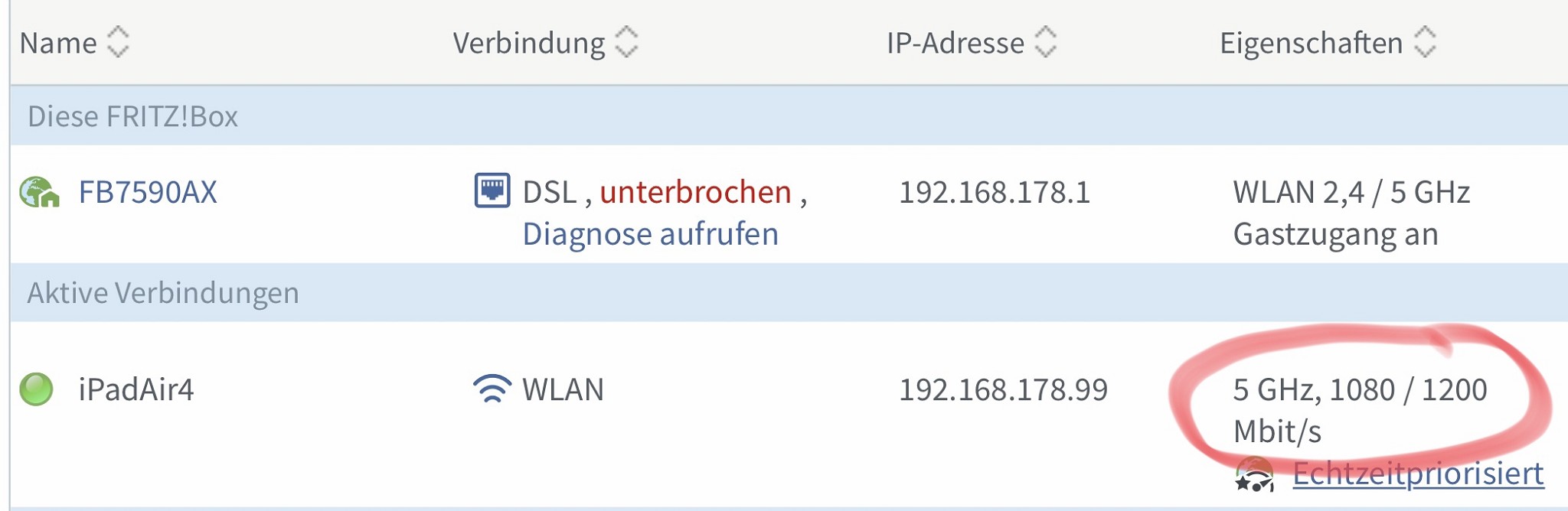
FB 7590AX v1 tests and setup in progress … (FB 7590 AX v2 is out since Friday, no ISDN So-Bus and ~20% more expensive).
Sometimes I could reach 1201 / 1200 Mbit/s.

- NET: FTTH & VDSL, OPNsense, 10G backbone, GWN APs
- SRV: 12 RU HA server cluster, 0.1 PB storage on premise
- IoT: thread, zigbee, tasmota, BidCoS, LoRa, WX suite, IR
- 3D: two 3D printers, 3D scanner, CNC router, laser cutter
Page one suggest two MikroTik routers that might be used for Hyperfibre
1) MikroTik CCR1036-8G-2S+
2) MikroTik RB5009 (via the SFP Port - 2.5Gbit Ethernet + 7x Gigabit Ports out)
I noticed that there are two other possibilities
MikroTik CCR2004-16G-2S+
MikroTik CCR2116-12G-4S+
Has anyone used either of these? I do not have Hyperfibre now but who knows what will be the norm in a few years.

Godfrey
Auckland/Coroglen, New Zealand
Quic Broadband - 4G Hyperfibre
Referral Link:
Quic (use R71004E9PVBJ on checkout for free setup)
On the subject of Mikrotik, has anyone here used the MikroTik RBD52G-5HacD2HnD-TC hAP as a UFB router and access point? Having been a supporter of the Deco M5 mesh system connected directly to the ONT, I've recently re-introduced the ISP-supplied NF18ACV into my system due to throughput limits and some annoying glitches with the Deco kit (which is now being used just for mesh WiFi). However the NF18ACV has the annoying habit of needing a reboot every few days, so I'd like to replace with something more solid. I also like the idea of something that is easier to tinker with and customise. The Mikrotik seems good value and well reviewed: https://www.pbtech.co.nz/product/NETMKT1264/MikroTik-RBD52G-5HacD2HnD-TC-hAP-ac2-Wireless-Acce
Tinkerisk:
A dedicated fanless 6W miniPC with 2NICs and pf- or OPNsense OSS does it all reliably since 2yrs now. A today’s Celeron class CPU is plenty of horsepower (I prefer not to virtualize a network key element). Never look back.
Can you tell me whether a Celeron CPU is actually fast enough to handle a full Gigabit UFB connection with say OPNsense with "everything turned on" ?
I've been thinking of going this route for a router (pun intended, yes!) for a while, and have periodically done searches for miniPCS (fanless, with heat-sink chassis, and multiple NICs), and reading about the featureset of pfsense, OPNsense and also Sophos UTM (free home variant).
From what I have read, while you can get by with "the basics" and an i3/i5 on a fibre gigabit plan, once you push the number of simultaneous connections higher (eg LOTS of devices at home, or even more extreme, a busy BT client) and THEN if you start to turn on ALL the useful features, like Suricata IDS/IPS, Sensei WAF etc, the CPU will choke, and the throughput die right off - fast.
I'll be very happy if you say: no siree, my Celeron CPU is just fine & dandy with ALL the Suricata IDS/IPS, Sensei WAF features fully enabled, I have around 100 devices at home and I'm seeding 500 torrents via VPN with combined total of 100Tb+, it doesn't break a sweat! 😜
But I suspect that's unrealistic and I should keep saving up for an i7 variant because otherwise it won't handle the jandal...
Cheers!
theUtmost: Can you tell me whether a Celeron CPU is actually fast enough to handle a full Gigabit UFB connection with say OPNsense with "everything turned on" ?
Nope, not with everything turned on on a single Celeron CPU (I assumed someone will point to DPI, etc.) but you should compare to what is handled here so far. It‘s hard to emulate all the offloading stuff with software only and to compare to real enterprise equipment.
I'll be very happy if you say: no siree, my Celeron CPU is just fine & dandy with ALL the Suricata IDS/IPS, Sensei WAF features fully enabled, I have around 100 devices at home and I'm seeding 500 torrents via VPN with combined total of 100Tb+, it doesn't break a sweat! 😜
But I suspect that's unrealistic and I should keep saving up for an i7 variant because otherwise it won't handle the jandal...
The IDS/IPS will always break the bank in terms of computing power. Maybe you should think about another security strategy i.e. letting a ‚screaming server data center’ proxy handle the safety stuff for you and only getting the sorted out safe traffic into the house … ;-)
It‘s like in aviation - with enough horsepower any piano is capable to fly. But I assume you already knew that before you asked. My goal is: quiet, power saving, safe AND efficient.
- NET: FTTH & VDSL, OPNsense, 10G backbone, GWN APs
- SRV: 12 RU HA server cluster, 0.1 PB storage on premise
- IoT: thread, zigbee, tasmota, BidCoS, LoRa, WX suite, IR
- 3D: two 3D printers, 3D scanner, CNC router, laser cutter
Next FritzOS 7.5 has WireGuard VPN modes and exFAT support. Not personally for me, but I was asked for tests.
- NET: FTTH & VDSL, OPNsense, 10G backbone, GWN APs
- SRV: 12 RU HA server cluster, 0.1 PB storage on premise
- IoT: thread, zigbee, tasmota, BidCoS, LoRa, WX suite, IR
- 3D: two 3D printers, 3D scanner, CNC router, laser cutter
|
|
|