|
|
|
Thanks for this awesome guide!
thanks for the tutorial!
I'v got Vodafone UFB with landline, by using the HG659 router provided by VDF I can connect the phone to the phone port on HG659, how can I set up the phone on ERL, so that I can connect the cordless phone to ERL?
Johnz:
thanks for the tutorial!
I'v got Vodafone UFB with landline, by using the HG659 router provided by VDF I can connect the phone to the phone port on HG659, how can I set up the phone on ERL, so that I can connect the cordless phone to ERL?
Hmm Vodafone UFB is pretty suboptimal since they force the use of their router. It may work behind the Edgerouter (you'll need to turn off VLAN 10 and set the Vodafone router to fetch via DHCP) however I am not 100% sure. Easiest option is to ditch the landline and go naked? Skinny Direct is cheap :)
Michael Murphy | https://murfy.nz
Referral Links: Quic Broadband (use R122101E7CV7Q for free setup)
Are you happy with what you get from Geekzone? Please consider supporting us by subscribing.
Opinions are my own and not the views of my employer.
michaelmurfy:
Hmm Vodafone UFB is pretty suboptimal since they force the use of their router.
How do they force it? surely just mac address?
CPU: AMD 5900x | RAM: GSKILL Trident Z Neo RGB F4-3600C16D-32GTZNC-32-GB | MB: Asus X570-E | GFX: EVGA FTW3 Ultra RTX 3080Ti| Monitor: LG 27GL850-B 2560x1440
Quic: https://account.quic.nz/refer/473833 R473833EQKIBX
mentalinc:
michaelmurfy:
Hmm Vodafone UFB is pretty suboptimal since they force the use of their router.
How do they force it? surely just mac address?
I mean if you need phone service you need to use their router instead of using the ONT with some other providers.
Michael Murphy | https://murfy.nz
Referral Links: Quic Broadband (use R122101E7CV7Q for free setup)
Are you happy with what you get from Geekzone? Please consider supporting us by subscribing.
Opinions are my own and not the views of my employer.
stubbed:
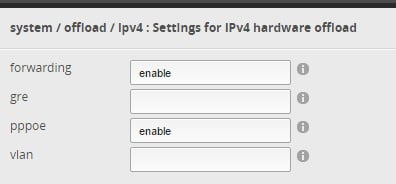
Unsure if this is a change in 1.9.1 but it appears as if the IPv4 hardware offload is either enabled by default, or enabled by the wizard:
So, important to note that vlan offload is still disabled with 1.9.1.
I got around to completing my network configuration over the weekend, which meant setting up several vlans. After I noticed my speeds had dropped down to ~120mbit. Was cursing the gods/ubnt/BigPipe when a mate pointed out this thread which reminded me about offloading. Back to normal once that option was enabled.
So if you're ever going to use vlans, you'll want to make sure you enable that option at the same time.
Silly/Noob question; if I run an iperf test to Spark's server from the edgerouter I seem to only ever get ~150mbit, if I run the same test from my laptop I get the speeds I was expecting, is this normal?
Another here who has used to this tutorial to set up an ER-Lite on Bigpipe.
Simple instructions to follow.
Thanks.
S.
BlackHand:
Silly/Noob question; if I run an iperf test to Spark's server from the edgerouter I seem to only ever get ~150mbit, if I run the same test from my laptop I get the speeds I was expecting, is this normal?
I have never tried that, but it is in line with my understanding of how the Edgerouters work. If you run iperf from the Edgerouter, the traffic is going to not be able to be handled by the offloading hardware and instead will have to be handled by the CPU. Offloading only works for packets received by the ER on one of its external interfaces, and transmitted again on one of its external interfaces. Offloading is not possible for packets generated on the ER itself or to be received by the ER itself. The CPU can not do packet processing as fast as the hardware can, and depending on your configuration, 150 Mbit/s is a not unlikely speed for what the CPU can do. With minimal configuration, an ERLite 3 is reported to be able to do CPU processed packets at up to somewhere around 300 Mbit/s, if my memory serves me correctly. But the max CPU processed speed drops off fairly quickly with a bit more configuration, and with QoS enabled and lots of config it will likely only do less than 100 Mbit/s.
Michael Murphy | https://murfy.nz
Referral Links: Quic Broadband (use R122101E7CV7Q for free setup)
Are you happy with what you get from Geekzone? Please consider supporting us by subscribing.
Opinions are my own and not the views of my employer.
michaelmurfy:Johnz:thanks for the tutorial!
I'v got Vodafone UFB with landline, by using the HG659 router provided by VDF I can connect the phone to the phone port on HG659, how can I set up the phone on ERL, so that I can connect the cordless phone to ERL?
Hmm Vodafone UFB is pretty suboptimal since they force the use of their router. It may work behind the Edgerouter (you'll need to turn off VLAN 10 and set the Vodafone router to fetch via DHCP) however I am not 100% sure. Easiest option is to ditch the landline and go naked? Skinny Direct is cheap :)
fe31nz:
BlackHand:
Silly/Noob question; if I run an iperf test to Spark's server from the edgerouter I seem to only ever get ~150mbit, if I run the same test from my laptop I get the speeds I was expecting, is this normal?
I have never tried that, but it is in line with my understanding of how the Edgerouters work. If you run iperf from the Edgerouter, the traffic is going to not be able to be handled by the offloading hardware and instead will have to be handled by the CPU. Offloading only works for packets received by the ER on one of its external interfaces, and transmitted again on one of its external interfaces. Offloading is not possible for packets generated on the ER itself or to be received by the ER itself. The CPU can not do packet processing as fast as the hardware can, and depending on your configuration, 150 Mbit/s is a not unlikely speed for what the CPU can do. With minimal configuration, an ERLite 3 is reported to be able to do CPU processed packets at up to somewhere around 300 Mbit/s, if my memory serves me correctly. But the max CPU processed speed drops off fairly quickly with a bit more configuration, and with QoS enabled and lots of config it will likely only do less than 100 Mbit/s.
Thank you!
So I'm getting great speeds, but just wondering why NZ fiber is limited to the 430mbit up, compared to others (in other countries) which seem to be able to get 940/940
http://beta.speedtest.net/result/5992685633
International gigabit examples

CPU: AMD 5900x | RAM: GSKILL Trident Z Neo RGB F4-3600C16D-32GTZNC-32-GB | MB: Asus X570-E | GFX: EVGA FTW3 Ultra RTX 3080Ti| Monitor: LG 27GL850-B 2560x1440
Quic: https://account.quic.nz/refer/473833 R473833EQKIBX
mentalinc:
So I'm getting great speeds, but just wondering why NZ fiber is limited to the 430mbit up, compared to others (in other countries) which seem to be able to get 940/940
http://beta.speedtest.net/result/5992685633
It's because you're paying for a 1000/500 product from your ISP. If you want to pay more you can buy a faster connection.
@mentalinc, that's the LFC limiting you. I assume you're Chorus? I see ~500mbit upload often with Enable, best upload result:

Best download result:
|
|
|