Geekzone: technology news, blogs, forums
Guest
Welcome Guest.
You haven't logged in yet. If you don't have an account you can register now.


View this topic in a long page with up to 500 replies per page Create new topic
1 | 2 | 3 | 4
webwat
2036 posts

Uber Geek
+1 received by user: 145

Trusted

  #2573129 23-Sep-2020 23:52
Send private message

If you find some accesspoint hardware you can run from one of your TV location outlets then maybe it doesn't look so bad mounted on the ceiling, depending on whether you have any furniture next to it to distract from the weird cable in the middle of the wall.


Wondering why you would be running an AppleTV over wireless when you have TV ethernet outlets on the wall that could give you Gigabit as well as offloading some traffic from the potentially congested wifi. Are some of your ethernet links faulty? Should be easy to fix.


Time to find a new industry!


kiwibob1
109 posts

Master Geek
+1 received by user: 34

ID Verified
Lifetime subscriber

  #2573167 24-Sep-2020 07:57
Send private message

webwat:


If you find some accesspoint hardware you can run from one of your TV location outlets then maybe it doesn't look so bad mounted on the ceiling, depending on whether you have any furniture next to it to distract from the weird cable in the middle of the wall.


Wondering why you would be running an AppleTV over wireless when you have TV ethernet outlets on the wall that could give you Gigabit as well as offloading some traffic from the potentially congested wifi. Are some of your ethernet links faulty? Should be easy to fix.


Just reread OP's post and noted the issue with the location of the ethernet ports.  Unifi do an 'in wall' unit which could replace the RJ45 socket which gives a couple of outlets


If the wall construction is plasterboard you can, with only a little repair work, get the wire through to emerge at a lower point (I did this with our wall mounted TV).


Mosbo

35 posts

Geek
+1 received by user: 15


  #2580315 6-Oct-2020 20:46
Send private message

webwat:


If you find some accesspoint hardware you can run from one of your TV location outlets then maybe it doesn't look so bad mounted on the ceiling, depending on whether you have any furniture next to it to distract from the weird cable in the middle of the wall.


Yeah, nah, visible cables are just not my bag sorry. Have successfully setup a unifi in-wall HD in one of the tv locations though so that's a great solution!


webwat:


Wondering why you would be running an AppleTV over wireless when you have TV ethernet outlets on the wall that could give you Gigabit as well as offloading some traffic from the potentially congested wifi. Are some of your ethernet links faulty? Should be easy to fix.


I think I will try and sort hard wiring the apple tv somehow but the issue at the moment is that particular wall outlet has a single power socket, which is powering the TV. There are other power sockets at floor level and HDMI cables routed behind the wall to there, but with no ethernet. Just poorly planned by sparky and I was having enough trouble convincing the wife that we even needed tv's on the wall without having to pay extra for more power/ethernet etc... To do it I would just need a double adapter but can't play with one to see what will fit without taking the tv off the wall again. Re: too hard basket right now.


Regardless, my current setup now has an AP in the lounge which is directly through the wall the TV is on so AppleTV now has excellent signal anyway.


Mosbo

35 posts

Geek
+1 received by user: 15


  #2580319 6-Oct-2020 20:53
Send private message

kiwibob1:


webwat:


If you find some accesspoint hardware you can run from one of your TV location outlets then maybe it doesn't look so bad mounted on the ceiling, depending on whether you have any furniture next to it to distract from the weird cable in the middle of the wall.


Wondering why you would be running an AppleTV over wireless when you have TV ethernet outlets on the wall that could give you Gigabit as well as offloading some traffic from the potentially congested wifi. Are some of your ethernet links faulty? Should be easy to fix.


Just reread OP's post and noted the issue with the location of the ethernet ports.  Unifi do an 'in wall' unit which could replace the RJ45 socket which gives a couple of outlets


If the wall construction is plasterboard you can, with only a little repair work, get the wire through to emerge at a lower point (I did this with our wall mounted TV).


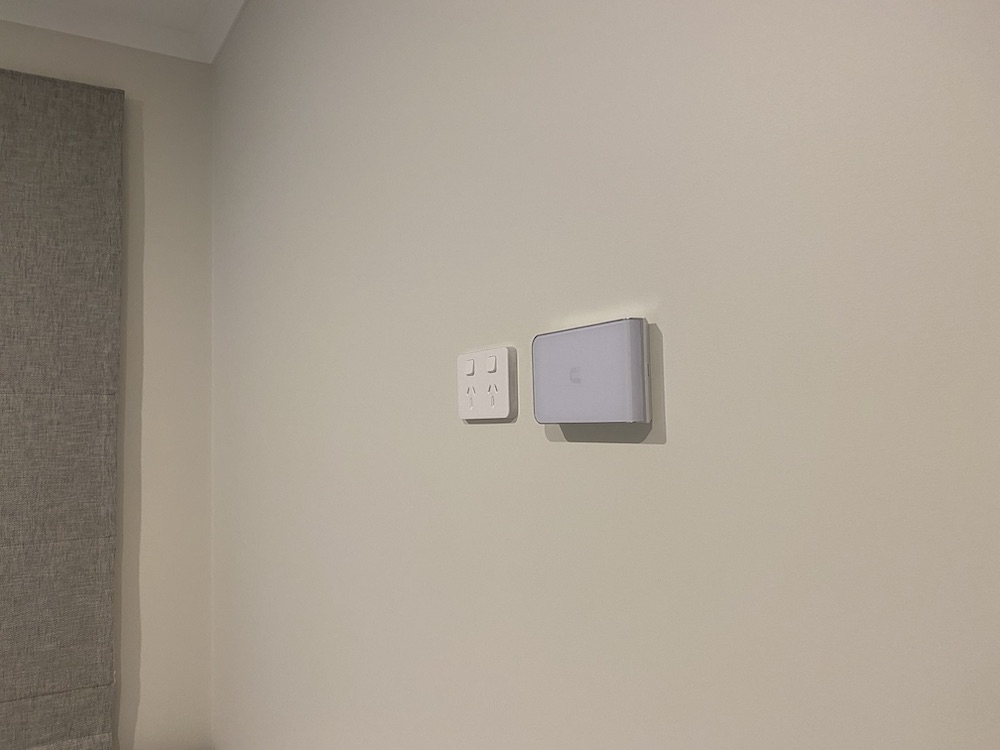
Got a UAP-IW-HD to go in the office / spare room wall socket which is perfect, so thanks for all that suggested that. 


Slightly gutted that it has to mount sideways but that's the only negative so far.


Mosbo

35 posts

Geek
+1 received by user: 15


  #2580326 6-Oct-2020 21:10
Send private message

So now I have a USG (3P) setup in wall unit under the stairs. That and the small switch I have take up far less room which is a good thing, it's a very small wall unit/cabinet. Plus i'm enjoying the 'tinkerability' of the whole unifi eco-system.


I'm still using the Smart Mesh in the lounge but I will replace this with a UAP of some kind soon hopefully. One day, when Ubiquiti launch their Wifi6 AP's i'll replace them both with those probably, and fingers crossed there's a newer, more capable USG-3 type device in the works (I've read their is but nobody knows what exactly).


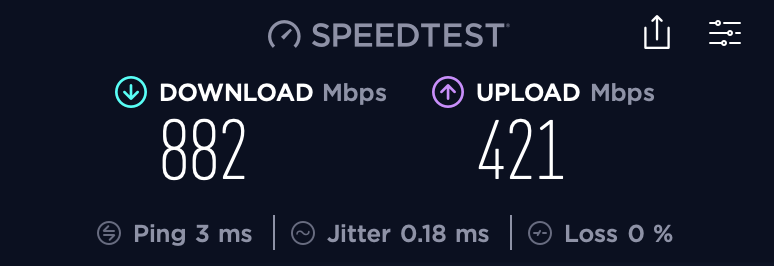
MacBook Pro is now easily getting 750+ regularly and every now and then i'll get a solid 800-something.


I realise this is all just for show really, but i'm stoked with the outcome just the same.


After further testing (and reading) I find the iPhone 11 Pro just won't push much past 650-700. It's 2x2 MIMO where as the MacBook Pro is 3x3 so that's the key difference there. I'll need a Wifi 6 AP to push it any higher. This Duckware link has been golden in terms of understanding what's going on and what to expect: https://www.duckware.com/tech/wifi-in-the-us.html


All in all I have to say that actually the Spark Smart Modem and Smart Mesh devices are still brilliant devices. With very little tweaking and able to get a solid 500Mbit out of the box, most people would never complain, and actually after a fair bit of channel swapping and positioning I did eventually get the Smart Modem up to low 700Mbit speeds (on MacBook Pro). I now realise too that running it 'meshed' I was never going to get great speeds out of the setup, that was my misunderstanding of what 'mesh' means. Plus I had the devices positioned totally wrong for the mesh setup anyway. 


I'm still yet to confirm this 100% but I actually think the biggest weakness these devices have, which for most people will be it's strength, is the fact that even when you run them both and setup the Smart Mesh hard-wired, the Smart Mesh becomes a 'dumb' unit and configures itself off of the Smart Modem. What this means is essentially 2 AP's running on the same channel and same power setting, which is not ideal. I always felt that even when the Smart Mesh was hard-wired, it was when I had them both running that my speeds decreased a fair bit. With just the Smart Modem and my Unifi AP, I could get much better speeds from the Smart Modem itself, and equally now the Smart Mesh + USG + UAP. This is because when the Smart Mesh runs stand-along you can configure it on a different 5Ghz channel. If there is a way to do this with the Smart Modem and Smart Mesh combined then they would be a killer setup for the money, but I don't think you can.


Anyway, i'm really just posting all of this so that anybody else in my situation may find it one day. It's been a fun exercise and i've learned a lot. Thanks to all that have helped out in here too. 


michaelmurfy
meow
13580 posts

Uber Geek
+1 received by user: 10911

Moderator
ID Verified
Trusted
Lifetime subscriber

  #2580378 6-Oct-2020 22:24
Send private message

That is a great result and you should be seriously proud of that. I get on average 650Mbit from my IW-HD on my MacBook Pro. As you’ve already found the UniFi ecosystem is a money trap as you always want more (switches etc also) to add to it.

But seriously good job.


Michael Murphy | https://murfy.nz
Referral Links: Quic Broadband (use R122101E7CV7Q for free setup)

Are you happy with what you get from Geekzone? Please consider supporting us by subscribing.
Opinions are my own and not the views of my employer.


HP


Shop now for HP laptops and other devices (affiliate link).
nztim
4013 posts

Uber Geek
+1 received by user: 2710

ID Verified
Trusted
TEAMnetwork
Subscriber

  #2580387 6-Oct-2020 22:48
Send private message

Mosbo:

Got a UAP-IW-HD to go in the office / spare room wall socket which is perfect, so thanks for all that suggested that. 


Slightly gutted that it has to mount sideways but that's the only negative so far.


Nice, I love how slick the Unifi IW looks on a wall

Don’t beat yourself up too much about it been mounted sideways, now you have 4 usable ports for hardwired devices in that location also


Any views expressed on these forums are my own and don't necessarily reflect those of my employer. 


PJ48
302 posts

Ultimate Geek
+1 received by user: 106

Lifetime subscriber

  #2580563 7-Oct-2020 11:19
Send private message

nztim:
Mosbo:

Got a UAP-IW-HD to go in the office / spare room wall socket which is perfect, so thanks for all that suggested that. 


Slightly gutted that it has to mount sideways but that's the only negative so far.


Nice, I love how slick the Unifi IW looks on a wall

Don’t beat yourself up too much about it been mounted sideways, now you have 4 usable ports for hardwired devices in that location also


Out of interest - can you use bare solid Ethernet cables to connect to these IW units? Or do you have to have preterminated cables running through the walls to plug into the back of them?

cyril7
9075 posts

Uber Geek
+1 received by user: 2499

ID Verified
Trusted
Subscriber

  #2580566 7-Oct-2020 11:25
Send private message

Hi, you could have solid cables with RJ45 plugs fitted, the rear connector of the IW is a standard RJ45 socket. If you dont like putting plugs on, you could terminate on an RJ45 socket, connect a short patch lead and leave all that inside the wall space.


Cyril


Mosbo

35 posts

Geek
+1 received by user: 15


  #2580571 7-Oct-2020 11:33
Send private message

PJ48:

Out of interest - can you use bare solid Ethernet cables to connect to these IW units? Or do you have to have preterminated cables running through the walls to plug into the back of them?


My cables in the wall were terminated with a socket as they were setup for TV's to be mounted. I just left the socket on there and ran a short patch cable to the back of the IW unit.


Jp576
19 posts

Geek
+1 received by user: 3


  #2609886 24-Nov-2020 15:53
Send private message

Mosbo:


Ok so quick update for anyone watching this thread.


On the advice of michaelmurfy I bought a Unifi HD In-wall and set this up as an AP, just initially connected to the Smart Modem I already have, so this effectively just replaced the Smart Mesh unit. This immediately saw an increase in Wifi speed upstairs in my office, and initial speed tests using the IW-HD just inside the modem cabinet in garage showed it had better coverage overall than the Smart Modem and I may not even need multiple AP's in the house.


Nice. My brothers just bought a house so wondering if this would be suitable for him. it's about 225m2, 2 storeys. Would a single unify ap mounted upstairs (hoping they would have have ethernet wired up as the house is only a few years old) be enough to cover most of the house. Also how difficult is the setup process. I assume you can connect directly to the ISP provided modem and turn off the wifi in the router.


He doesn't know a lot about networking and has been piggybacking off our wifi (standard vodafone router) in the minor unit he was staying in at the back of our place so his expectations won't be too high 😃.


Shop now for Lego sets and other gifts (affiliate link).
Lostja
240 posts

Master Geek
+1 received by user: 40


  #2609888 24-Nov-2020 15:56
Send private message

Jp576:


Mosbo:


Ok so quick update for anyone watching this thread.


On the advice of michaelmurfy I bought a Unifi HD In-wall and set this up as an AP, just initially connected to the Smart Modem I already have, so this effectively just replaced the Smart Mesh unit. This immediately saw an increase in Wifi speed upstairs in my office, and initial speed tests using the IW-HD just inside the modem cabinet in garage showed it had better coverage overall than the Smart Modem and I may not even need multiple AP's in the house.


Nice. My brothers just bought a house so wondering if this would be suitable for him. it's about 225m2, 2 storeys. Would a single unify ap mounted upstairs (hoping they would have have ethernet wired up as the house is only a few years old) be enough to cover most of the house. Also how difficult is the setup process. I assume you can connect directly to the ISP provided modem and turn off the wifi in the router.


He doesn't know a lot about networking and has been piggybacking off our wifi (standard vodafone router) in the minor unit he was staying in at the back of our place so his expectations won't be too high 😃.


I have a smaller 2 story house and went for one on each floor


evilonenz
/dev/urandom
291 posts

Ultimate Geek
+1 received by user: 152

ID Verified
Trusted
Lifetime subscriber

  #2609889 24-Nov-2020 15:57
Send private message

Lostja:


Jp576:


Nice. My brothers just bought a house so wondering if this would be suitable for him. it's about 225m2, 2 storeys. Would a single unify ap mounted upstairs (hoping they would have have ethernet wired up as the house is only a few years old) be enough to cover most of the house. Also how difficult is the setup process. I assume you can connect directly to the ISP provided modem and turn off the wifi in the router.


He doesn't know a lot about networking and has been piggybacking off our wifi (standard vodafone router) in the minor unit he was staying in at the back of our place so his expectations won't be too high 😃.


I have a smaller 2 story house and went for one on each floor


Similarly, I have a newly built 285sqm 2 story house, and I've gone with 3 UAP-IW-HDs. A little overkill, but I tell you what, the signal is impressive everywhere.


Smokeping


Referral Links:


Quic - Use code R536299EPGOCN at checkout for free setup
Contact Energy - Use code FRTQDXB for $100 credit


Jp576
19 posts

Geek
+1 received by user: 3


  #2610026 24-Nov-2020 21:05
Send private message

Just to add on to my last post, visited the house after my last post and notice it's got the ont in the garage with 1 blue wire connected to the ont and several other loose blue wires all leading into the house. I assume the blue cables all lead to the various Ethernet connection points in the house. Would i be able to stick the isp router in the garage with ont connected to the wan port then plug in the loose blue Ethernet cables into the lan ports with a unifi ap at a few different points in the house? Is it as simple as plugging the AP into one of the lan ports (along with the poe adapter) and turning off the wifi on the router?

From what I've read, you can install the controller software on pc and set up the aps from there and don't really need the software in everyday use unless you want to be regularly monitoring the network?

Jase2985
13732 posts

Uber Geek
+1 received by user: 6205

ID Verified
Lifetime subscriber

  #2610147 25-Nov-2020 07:43
Send private message

yes to both your questions


1 | 2 | 3 | 4
View this topic in a long page with up to 500 replies per page Create new topic


Geekzone Live »

Try automatic live updates from Geekzone directly in your browser, without refreshing the page, with Geekzone Live now.


Are you subscribed to our RSS feed? You can download the latest headlines and summaries from our stories directly to your computer or smartphone by using a feed reader.