
Geekzone: technology news, blogs, forums
Guest
Welcome Guest.
You haven't logged in yet. If you don't have an account you can register now.


Filter this topic showing only the reply marked as answer View this topic in a long page with up to 500 replies per page Create new topic
1 | 2 | 3 | 4 
iamsammajor

379 posts

Ultimate Geek
+1 received by user: 27

Lifetime subscriber

  #2100350 2-Oct-2018 21:15
Send private message

NickMack:


iamsammajor:


NickMack: Also see Michael Murphys guide on edge routers - https://www.geekzone.co.nz/forums.asp?forumid=66&topicid=205740

Nick


I followed Michael's guide to enable offloading, still working on ipv6 tho.


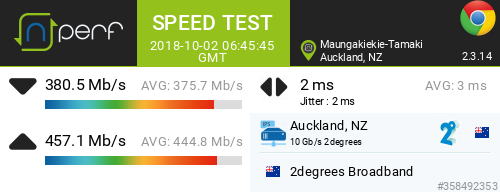
speed test result in the website you advised. 


tests with PC (z77 extrem 4 MB + e3 cpu, I test speed to NAS and it was able to get full gigabyte speed from NAS) and Macbook


all tests were with enthernet cable directly to router, results are similar.


@michaelmurfy - Do you have instructions/details on how to setup Ubuntu Live to assist - Maybe this would be a good reference document to pull together to help isolate whether it's the ISP or hardware/driver issues?


Nick


i will try google to see if i could load it to usb and test.


iamsammajor

379 posts

Ultimate Geek
+1 received by user: 27

Lifetime subscriber

  #2100355 2-Oct-2018 21:20
Send private message

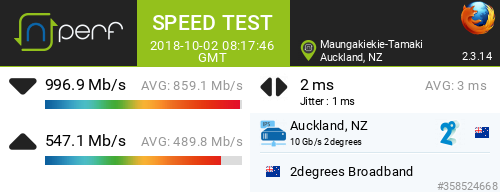
i guess this confirm it was my os issue?


run this with Ubuntu booted from usb.


NickMack
977 posts

Ultimate Geek
+1 received by user: 831

Trusted
In memoriam
Lifetime subscriber

  #2100357 2-Oct-2018 21:22
Send private message

iamsammajor:


i guess this confirm it was my os issue?


run this with Ubuntu booted from usb.


OS / Driver, combo of both.. who knows :-)


iamsammajor

379 posts

Ultimate Geek
+1 received by user: 27

Lifetime subscriber

  #2100361 2-Oct-2018 21:32
Send private message

NickMack:


iamsammajor:


i guess this confirm it was my os issue?


run this with Ubuntu booted from usb.


OS / Driver, combo of both.. who knows :-)


soo odd, same set up didnt even get half of the speed with pc and os,


thanks for your time Nick, i guess it is time to upgrade the pc lol


michaelmurfy
meow
13581 posts

Uber Geek
+1 received by user: 10914

Moderator
ID Verified
Trusted
Lifetime subscriber

  #2100362 2-Oct-2018 21:33
Send private message

Looking very impressive!


It also depends on the browser. I've found with Firefox I can get 900+Mbit down, 520Mbit up with nperf and yet, with Chrome I can only get around 500Mbit down.


Both same computer, both under Linux and both with IPv6 (just because).


@NickMack to create an Ubuntu USB stick:

1) Ensure you've got a USB drive handy with at-least 4gb of capacity. The process will format it and wipe everything.
2) Grab both Etcher (https://etcher.io/) and an Ubuntu ISO (https://www.ubuntu.com/download/desktop).
3) Install or open Etcher, Select image (where your Ubuntu ISO image is), Select drive and Flash!


Boot into Ubuntu when done by simply rebooting (most cases). Some PC's may require you to select a boot device (often pressing Escape or F1 brings up the screen for this). Select your flash drive, launch Firefox once it is booted and try a test.


Michael Murphy | https://murfy.nz
Referral Links: Quic Broadband (use R122101E7CV7Q for free setup)

Are you happy with what you get from Geekzone? Please consider supporting us by subscribing.
Opinions are my own and not the views of my employer.


NickMack
977 posts

Ultimate Geek
+1 received by user: 831

Trusted
In memoriam
Lifetime subscriber

  #2100363 2-Oct-2018 21:34
Send private message

iamsammajor:


NickMack:


iamsammajor:


i guess this confirm it was my os issue?


run this with Ubuntu booted from usb.


OS / Driver, combo of both.. who knows :-)


soo odd, same set up didnt even get half of the speed with pc and os,


thanks for your time Nick, i guess it is time to upgrade the pc lol


Hi Sam,


On the PC Side, Id look up the chipset of the NIC drivers and goto the manufactures website and download their drivers. It's not uncommon for them not to submit them to MSFT for Windows update for example. On the Mac side.... no idea what you can do there.


Nick.


Shop now for Lego sets and other gifts (affiliate link).
iamsammajor

379 posts

Ultimate Geek
+1 received by user: 27

Lifetime subscriber

  #2100367 2-Oct-2018 21:43
Send private message

NickMack:


iamsammajor:


NickMack:


iamsammajor:


i guess this confirm it was my os issue?


run this with Ubuntu booted from usb.


OS / Driver, combo of both.. who knows :-)


soo odd, same set up didnt even get half of the speed with pc and os,


thanks for your time Nick, i guess it is time to upgrade the pc lol


Hi Sam,


On the PC Side, Id look up the chipset of the NIC drivers and goto the manufactures website and download their drivers. It's not uncommon for them not to submit them to MSFT for Windows update for example. On the Mac side.... no idea what you can do there.


Nick.


thanks Nick, i was looking at downing the driver and update (even thinking of change os lol)


mac side is not critical, my mb is on wifi 99.99% of the time.


NickMack
977 posts

Ultimate Geek
+1 received by user: 831

Trusted
In memoriam
Lifetime subscriber

  #2100370 2-Oct-2018 21:59
Send private message

iamsammajor:


NickMack:


iamsammajor:


NickMack:


iamsammajor:


i guess this confirm it was my os issue?


run this with Ubuntu booted from usb.


OS / Driver, combo of both.. who knows :-)


soo odd, same set up didnt even get half of the speed with pc and os,


thanks for your time Nick, i guess it is time to upgrade the pc lol


Hi Sam,


On the PC Side, Id look up the chipset of the NIC drivers and goto the manufactures website and download their drivers. It's not uncommon for them not to submit them to MSFT for Windows update for example. On the Mac side.... no idea what you can do there.


Nick.


thanks Nick, i was looking at downing the driver and update (even thinking of change os lol)


mac side is not critical, my mb is on wifi 99.99% of the time.


Hi Sam, All;


I've updated https://www.geekzone.co.nz/forums.asp?forumid=85&topicid=239862 to include a section on Building a bootable USB stick to eliminate driver/OS issues (for the more tech savvy), Thanks @michaelmurfy


Nick


1 | 2 | 3 | 4 
Filter this topic showing only the reply marked as answer View this topic in a long page with up to 500 replies per page Create new topic


Geekzone Live »

Try automatic live updates from Geekzone directly in your browser, without refreshing the page, with Geekzone Live now.


Are you subscribed to our RSS feed? You can download the latest headlines and summaries from our stories directly to your computer or smartphone by using a feed reader.