Geekzone: technology news, blogs, forums
Guest
Welcome Guest.
You haven't logged in yet. If you don't have an account you can register now.


View this topic in a long page with up to 500 replies per page Create new topic
1 | 2 | 3 | 4 
Mosbo

35 posts

Geek
+1 received by user: 15


  #2610291 25-Nov-2020 10:33
Send private message

Just to pipe into the conversation - my house is just under 200sqm and 2 levels and while 1AP did cover the whole house (mounted centrally downstairs) it didn't give good 5Ghz coverage in the corner bedrooms. I've got 2 APs now and that's perfect - one downstairs on the North end and one upstairs on the South end. If you're running ethernet backhaul then you'll probably want them as far apart as possible like that.


I'm running my controller on a Mac Mini I have setup to run Plex and some other things which works great. You can just use the controller for setup and updates and then not have it running all the time but then I do think that you miss out on what's so great about Unifi in doing that. I'd much rather have it running all the time if possible.


If all you want is a couple of good Wifi devices for each corner of the house then the Spark Smart Modem + Smart Mesh is actually a really good choice and will cost much less. 2x equivalent Unifi APs will cost you $700 all up where as Spark will give you their modem for free and the Mesh unit for about $100ish I think. Once it's setup properly it's about as good as the Unifi APs, just not as configurable. Just thought i'd mention as you said he's not super nerdy about his networking.


And yes to your thoughts on setup. You'll need the ONT and Modem in the garage and then ethernet in the APs in whatever room makes sense to have them in. If you have power sockets next to where the APs will be you can use POE Injectors or do what I did and have a POE Switch in the cabinet with the ONT and Modem and then you don't need the injectors. Just much tidier, but more $$ of course. 


Be careful which APs you buy too as some come with injectors and some (like the In Walls) do not. They're cheap enough to buy though.


Jp576
19 posts

Geek
+1 received by user: 3


  #2610426 25-Nov-2020 12:30
Send private message

Mosbo:


If all you want is a couple of good Wifi devices for each corner of the house then the Spark Smart Modem + Smart Mesh is actually a really good choice and will cost much less. 2x equivalent Unifi APs will cost you $700 all up where as Spark will give you their modem for free and the Mesh unit for about $100ish I think. Once it's setup properly it's about as good as the Unifi APs, just not as configurable. Just thought i'd mention as you said he's not super nerdy about his networking.


Thanks a lot for the info starting to make sense to me now.
Btw which unifi ap's are you referencing? The ac pro is about $260 each atm. The ac ap lite is about $160 each. From everything I've read online about these APs i would assume the wifi range and performance is much better than isp provided routers/mesh units. Is there a big difference between Pro and lite?
The spark router and mesh unit does sound perfect for my brother's place. Any other isps offer similar? I read on here you can purchase a second fritzbox router from 2degrees to use as a mesh unit but couldn't find anything on their website.

Btw some of the questions I'm asking might not be related to my brother's house situation as I'm just trying to learn as much about APs etc for my own personal use in the future i.e. If i was to hook up a unifi ap to my own 2degrees router, would i be able to access the usb hard drive connected up the fritzbox router on the new wifi network?

Mosbo

35 posts

Geek
+1 received by user: 15


  #2610437 25-Nov-2020 12:41
Send private message

I'm talking about the 4x4MIMO (HD) APs, so FlexHD, IW-HD, NanoHD, AP-HD etc... The spark provided Smart Modem and Mesh units are 4x4MIMO as well so for ISP provided kit they're actually pretty amazing. All the 4x4 Unifi APs are around $350ea here.


Arguably 4x4 is too much for most people as there's probably not too many client devices that support it but I like to have a bit of headroom where possible. AC Pro is 3x3 and AC Lite only 2x2 I think.


Also be aware of the physical size of the units too. Personally I prefer all the HD devices because they're physically smaller and more inconspicuous for being in a home. AC Pro is 200mm across so think a medium sized dinner plate. Fine for offices but I wouldn't want that in my home.


I think Bigpipe and Skinny also offer the same smart modem device that Spark offers.


kiwibob1
109 posts

Master Geek
+1 received by user: 34

ID Verified
Lifetime subscriber

  #2610583 25-Nov-2020 15:04
Send private message

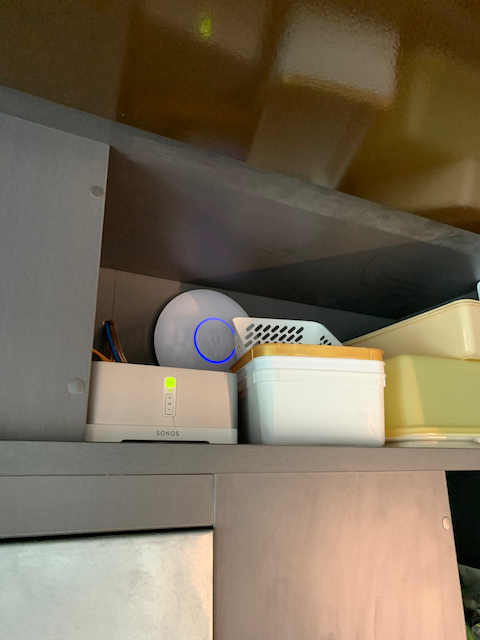
Mosbo:Also be aware of the physical size of the units too. Personally I prefer all the HD devices because they're physically smaller and more inconspicuous for being in a home. AC Pro is 200mm across so think a medium sized dinner plate. Fine for offices but I wouldn't want that in my home.


Mine are hidden in cupboards.


Click to see full size


1 | 2 | 3 | 4 
View this topic in a long page with up to 500 replies per page Create new topic


Geekzone Live »

Try automatic live updates from Geekzone directly in your browser, without refreshing the page, with Geekzone Live now.


Are you subscribed to our RSS feed? You can download the latest headlines and summaries from our stories directly to your computer or smartphone by using a feed reader.