|
|
|
dt:
could someone help me out with an IPV6 rule? I dont really need anything fancy just enough to operate IPV6 but not leave me in anyway 'exposed'
Currently having a play with an ER-4
TIA :)
Have a look at the first page "Firewall Rules (applies to all IPv6 configurations)"
ssamjh:
Just replaced the beloved ER-X with a new ER-4 after I got my fibre connection. Getting speeds of about 880Mb/s download with hardware offloading enabled, and about 800Mb/s with it disabled. ISP is Voyager.
Does this sound normal? As I see others here with screenshots of 900+ in their profiles. Don't get me wrong, this speed is great, just worried I may have configured something wrong.
The router is capable of it, your device may not be
dfnt:
ssamjh:
Just replaced the beloved ER-X with a new ER-4 after I got my fibre connection. Getting speeds of about 880Mb/s download with hardware offloading enabled, and about 800Mb/s with it disabled. ISP is Voyager.
Does this sound normal? As I see others here with screenshots of 900+ in their profiles. Don't get me wrong, this speed is great, just worried I may have configured something wrong.
The router is capable of it, your device may not be
Local iperf tests seem to indicate around 920-940Mb/s.

Whitianga, Coromandel
BlackHand:
Have a look at the first page "Firewall Rules (applies to all IPv6 configurations)"
Cheers, I did have a squiz over it but it mentions to not blindly copy and paste, when I look at it, it goes right over the top of my head
I failed to mention that i'm also on Orcon (ipoe) and MM's config states its for 2degrees PPPOE - not sure if that makes a difference but interested in learning nonetheless
I recently bought an edgerouter ER-X SFP
im trying to port forward so i can access the front-end of my home webserver and nzbget but it seems not to work at all

i still can't seem to know why it won't work at all.
Im with vodafone, and when i was using my old ultrahub, port forwarding was never a problem.
any help would be good
I think the WAN interface is not the right one. It needs to be the one named as the internet interface, which won't be eth0. Had the same issue with setting up Plex and once I discovered that, bing, everything worked.
rp1790:
I think the WAN interface is not the right one. It needs to be the one named as the internet interface, which won't be eth0. Had the same issue with setting up Plex and once I discovered that, bing, everything worked.
oh man it worked!!!! Thanks for that!
I'm thinking of installing an Edgerouter X into a system with Spark rural wireless broadband with currently a Huawei B618s-65d Spark stock modem / router / switch / WAP.
Several questions ... apologies if these are dumb newbie points:
1. What internet connection do I configure given the B618 will still be the LTE modem? DHCP or PPOE?
2. Do I connect the B618 WAN port to Eth0 once all set up, or can either WAN or LAN port do?
3. If I still want the B618 WAP to function, do I have to connect say Eth3 back to the B618 LAN?
4. Once all set up I'll be switching off thge B618 DHCP, firewall etc. etc leaving only the modem and WAP functional
Thanks & regards,
Rgds Andy T
Want to thank Michaelmurfy for this tutorial post. A combination of the steps here and a patient Slingshot tech support person has me up and running with this setup.
ONT-- > Edge Router X ---> Google Wifi
As a moderator I can see your IP address and have been checking with firewall related posts to ensure you're not exposing your Edgerouter directly to the internet - I've PM'd a couple of you who have your Edgerouter directly exposed to prevent you from getting pwned - Please check the following:
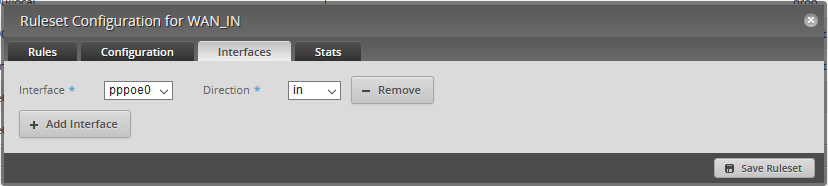
For your WAN_IN rule set this to your PPPoE, VLAN or Ethernet connection (depending on your ISP) - for example, with me:

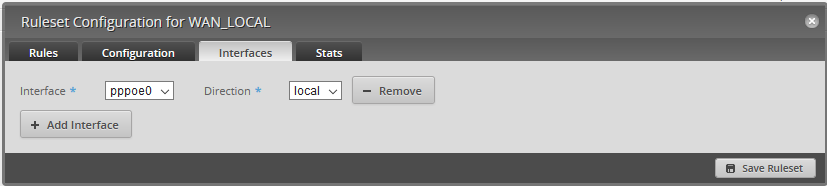
For your WAN_LOCAL rule this is your PPPoE, VLAN or Ethernet connection (depending on your ISP):

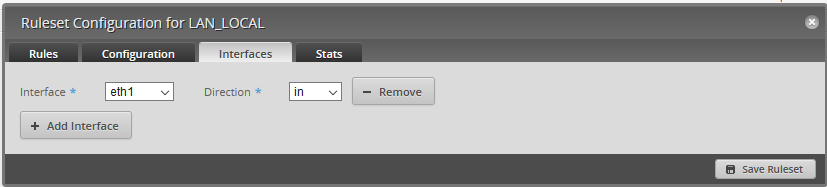
For your LAN_LOCAL rule (if exists) this should be your main LAN interface (for example, with me this is eth1):

Please double check this is correct on your router else having it incorrect exposes all services of your router to the internet.
Michael Murphy | https://murfy.nz
Referral Links: Quic Broadband (use R122101E7CV7Q for free setup) | Starlink
NZ Politics 2026 Tracking & Quiz: https://nzpol.nz
Are you happy with what you get from Geekzone? Please consider supporting us by subscribing.
Opinions are my own and not the views of my employer.
EdgeRouter 10X - Added Static Mapped IPs (Reserved IPs), not working.
I used the wizard to create a basic setup.
- Port 0 / WAN to modem
- DHCP for the LAN ports with range 192.168.0.38 to 192.168.0.254
- Configured the router with IP 192.168.0.1
Rebooted and connected the modem to Port 0 then my desktop PC to Port 1.
I then went into the DHCP server (for the LAN ports) that was created in the wizard. Then I went into -> Actions then Map Static IP.
I added 20 of my devices and saved. Then I rebooted the EdgeRouter. After that, nothing was connecting to the internet and I could not access the EdgeRouter with the IP I had assigned it (192.168.0.1). The rest of the devices including my desktop PC had reserved IPs ranging from 192.168.0.101 to 192.168.0.121.
just upgraded, cheers.
I enabled the IPV6 rule and prefix delgation and now have working ipv6 woohoo (orcon)
Could someone answer a question for me, for the hairpin+nat option, for the WAN interface do I select eth0 or eth0.10? I've tried both and nothing seems to break? just want to make sure I haven't left myself at risk or anything like that
ta
|
|
|