Geekzone: technology news, blogs, forums
Guest
Welcome Guest.
You haven't logged in yet. If you don't have an account you can register now.


jonathan18

7415 posts

Uber Geek
+1 received by user: 2850

ID Verified
Trusted

#288901 30-Jul-2021 16:15
Send private message

I’m looking to tidy up the very amateur cabling arrangements around our ONT, so would appreciate advice on if what I’m planning to do makes sense, or if there’s other stuff I need to buy or consider.

Currently, CAT6 cables from various places around the house all end up in this room, but are just terminated with R45 plugs, going straight into a switch or the back of the router; I now understand this is far from ideal.

My plans are to put in a very small wall-mounted cabinet with a 12-port patch panel; it only needs to have enough space for the patch panel, a router, and a small non-rack-mounted PoE switch.

Looking to get the following - any thoughts on whether stuff is adequate for the job, or if there’s anything I’m missing or should look to get:

https://www.pbtech.co.nz/product/CHSDNX1016/Dynamix-R10WM6-6RU-Mini-Cabinet-for-10-Panels-W280 (or maybe the deeper version?)

https://www.pbtech.co.nz/product/CHSDNX1014/Dynamix-PP10-C6-12-PP110-12-Port-Cat6-Patch-Panel

Also, is the norm in such a basic set-up to put the power supplies in or out of the cabinet? (Noting there’s no fan on such a tiny cabinet, I’m assuming they’re best left out of it?)

Thanks for any advice.

Create new topic
raytaylor
4076 posts

Uber Geek
+1 received by user: 1296

Trusted

  #2752622 30-Jul-2021 18:40
Send private message

I’m looking to tidy up the very amateur cabling arrangements around our ONT, so would appreciate advice on if what I’m planning to do makes sense, or if there’s other stuff I need to buy or consider.

Currently, CAT6 cables from various places around the house all end up in this room, but are just terminated with R45 plugs, going straight into a switch or the back of the router; I now understand this is far from ideal.


Personally I disagree. It doesnt look as nice as a patch panel, however it is more reliable from a technical perspective as you reduce the cable joints by one punch down connector and one plug connector, thus reducing the number of things that can go wrong. 

My plans are to put in a very small wall-mounted cabinet with a 12-port patch panel; it only needs to have enough space for the patch panel, a router, and a small non-rack-mounted PoE switch.

Looking to get the following - any thoughts on whether stuff is adequate for the job, or if there’s anything I’m missing or should look to get:

https://www.pbtech.co.nz/product/CHSDNX1016/Dynamix-R10WM6-6RU-Mini-Cabinet-for-10-Panels-W280 (or maybe the deeper version?)


We use those all the time - get the 9RU and deeper one, the 6RU shallow one is smaller than it looks.  

https://www.pbtech.co.nz/product/CHSDNX1014/Dynamix-PP10-C6-12-PP110-12-Port-Cat6-Patch-Panel


The way we do it:
Get one of these R10CS-137 to sit the switch upon

For the patch panel we use these PP10-UKS-12
And fill it with these A-RJ45-C6N
Then use 20cm patch leads down to the switch
Which means no punching required


Also, is the norm in such a basic set-up to put the power supplies in or out of the cabinet? (Noting there’s no fan on such a tiny cabinet, I’m assuming they’re best left out of it?)

Thanks for any advice.

 

Those cabinets have a fair amount of ventilation. We have one field tech that will take an angle grinder to the back of the cabinet and cut out a hole for the ont then mount the cabinet over the top of it. Me and my assistant will just carefully move the ONT into it - though we have the tools to repair the cable ourselves if we break something. 


Tip -  The wall bracket isnt very good for mounting it. Just send the screws straight through the back wall of the cabinet into a stud.
Tip  - They come flat packed and take about 10 mins to assemble. While assembling it, dont position the front rails too far forward  - make sure you leave space for your patch cables to fit between the front vertical rails / patch panel plate and the front door.  Its annoying to disassemble to move the rails back. 


Ray Taylor

There is no place like localhost

Spreadsheet for Comparing Electricity Plans Here


raytaylor
4076 posts

Uber Geek
+1 received by user: 1296

Trusted

  #2752624 30-Jul-2021 18:42
Send private message

Oh go with the R10WM6D  PBTech have 3x units in stock but the importer is out of stock of the larger models with no backorder date. 


Ray Taylor

There is no place like localhost

Spreadsheet for Comparing Electricity Plans Here


jonathan18

7415 posts

Uber Geek
+1 received by user: 2850

ID Verified
Trusted

  #2752734 31-Jul-2021 08:11
Send private message

Thanks, Ray, that’s really helpful advice, especially about the alternative to using a patch panel and those installation tips. 


But, yeah, it does look like the R10WM9D and R10WM9 models are out of stock everywhere, but I imagine the R10WM6D will do the job fine. Do I really need the shelf, or can the switch just sit on the base? It’s a tiny five port PoE+ number, but I would like the ability to take a larger one if needed later on. 


Power supplies - inside or out?


raytaylor
4076 posts

Uber Geek
+1 received by user: 1296

Trusted

  #2752738 31-Jul-2021 08:56
Send private message

The switch could sit on the bottom but we normally leave the power supplies to sit on the bottom (inside) 


Ray Taylor

There is no place like localhost

Spreadsheet for Comparing Electricity Plans Here


jonathan18

7415 posts

Uber Geek
+1 received by user: 2850

ID Verified
Trusted

  #2752749 31-Jul-2021 09:56
Send private message

Brilliant.

All parts but the keystone panel ordered from PB Tech; grabbed one of the 6RU deeper units, given no-one has the 9RU version in stock. Also got a shelf, noting your comment re putting power supplies on the bottom. Got the keystone panel from Cable Max as PB was out.

I don’t have plans to put the ONT within it, as the cabinet can sit directly above the ONT (plus would have to take the cut-out approach, as I don’t trust myself to move it!). I also think I’d have needed the 9RU version to have enough space, but can judge that when everything arrives.

Thanks again, Ray, for the useful and detailed advice - once again, GZ members FTW!


jonathan18

7415 posts

Uber Geek
+1 received by user: 2850

ID Verified
Trusted

  #2760572 16-Aug-2021 11:26
Send private message

So got the cabinet installed in the weekend - definitely easier to put together using a drill than a screwdriver, as a number of the holes weren’t drilled fully (or, in some cases, at all), but for under $100 that’s a forgivable sin. I’m glad I went with the deeper unit as that meant I was able to fit everything in (other than the ONT), and so there’s not a single thing left on the floor (should have done before and after photos, as it was a tangled mess!).

I have one remaining issue in that the PoE-powered cameras and APs weren’t working as they appeared to not be getting any/enough juice when connected in through the patch panel. But from what I’ve read there should be no issue, in that the patch panel shouldn’t make a difference and would carry through the power.

Here’s how I have it working now as a temporary fix:

PoE camera or AP > CAT6 cable > PoE+ switch > CAT6 patch lead > router

And here’s how I had it set up:

PoE camera or AP > CAT6 cable > patch panel > CAT6 patch lead > PoE+ switch > CAT6 patch lead > router

Can anyone please advise me what’s wrong with this arrangement and what I need to adjust?

Many thanks.


Stream your favourite shows now on Apple TV (affiliate link).
Yoban
453 posts

Ultimate Geek
+1 received by user: 86


  #2760603 16-Aug-2021 11:54
Send private message

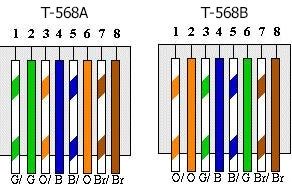
Have you maintained the same cabling standard of T568A or T568B across all points - patch leads, punch down on patch panel, run to POE Camera, etc. ?


T568A and T568B | Comms InfoZone


jonathan18

7415 posts

Uber Geek
+1 received by user: 2850

ID Verified
Trusted

  #2760610 16-Aug-2021 12:07
Send private message

Ah, I hadn’t thought of that! Thanks for the idea.

I went with using CAT6 joiners (as per the recommendation earlier in this thread) rather than punching down the wires; my assumption is that these themselves would be neutral as to standards as they’re just passing the signal of the cable through, yeah?

For the long runs to the devices, which I terminated myself, I used the B standard.

But as for the patch leads, I wouldn’t know… They’re commercial ones (30cm Dynamix ones); I’d need to look at them to check. But could that be the cause of the problem? So every cable along that line needs to be the same standard? (Or between the device and the PoE switch at least?)

jonathan18

7415 posts

Uber Geek
+1 received by user: 2850

ID Verified
Trusted

  #2760646 16-Aug-2021 12:47
Send private message

@Yoban: I think you’ve found the culprit.

Serves me right for not checking the listing correctly - the patch leads I bought were clearly sold as T568A -
https://www.trademe.co.nz/computers/cables-adaptors/networking/auction-3202332141.htm


It looks like nearly all short patch leads are T568A; the only one I can find in NZ that’s made to the T568B spec are StarTech, eg these. While I could buy these, I also could save the money and make some up myself, given I’ve got lots of RJ45 connectors and should have some spare stranded CAT6 cables around to chop up.


Can I please confirm - what spec cable should I have between the switch and the router, as per the following chain; does this also need to be T568B?


PoE camera or AP > CAT6 cable > patch panel > CAT6 patch lead > PoE+ switch > CAT6 patch lead > router


Many thanks.


froob
698 posts

Ultimate Geek
+1 received by user: 233

Lifetime subscriber

  #2760653 16-Aug-2021 13:01
Send private message

It won't shouldn't matter if you use T568B wiring in the wall with T568A patch cables. The key is that each length of cable in the chain needs to have matching standards at each end.

Would there be any single length of cable in the chain (either in the wall, or a patch cable), where you could have T568A at one end and T568B at the other (which is the configuration for a cross-over cable)?


Edit: The best way to check would be if you have a cable tester you can connect to the patch panel and camera ends of the cable. That would also check for any breaks in the cable, or other issues.


jonathan18

7415 posts

Uber Geek
+1 received by user: 2850

ID Verified
Trusted

  #2760693 16-Aug-2021 13:17
Send private message

froob: Would there be any single length of cable in the chain (either in the wall, or a patch cable), where you could have T568A at one end and T568B at the other (which is the configuration for a cross-over cable)?


Thanks for your help. I don’t believe so, as the long runs to the PoE devices all tested correctly (ie, every light in the tester lighted up in the same sequential order) after I’d terminated them, plus the devices are powered and working correctly when connected directly into the switch. Then the only other cables in the chain are the two T568A patch cables between the patch panel and switch then to the router.

froob: Edit: The best way to check would be if you have a cable tester you can connect to the patch panel and camera ends of the cable.


Great idea. I’ll try this tonight, but test it with the APs’ cables rather than the cameras’ ones (as it’s a dog to get to the plugs) - I assume it’s the same problem across all, given none of the PoE devices worked.


Edit: Just to close this issue off - I checked a couple of the cables with a cable tester and, as expected, it was all fine; I then hooked up that one through the patch panel using the 30cm patch cables and... the PoE+-powered AP also worked fine. So hooked up all devices via the patch panel and... all are working perfectly! So I don't have a clue what went wrong the first time, but all's well that ends well, and long may it remain like this. 


Thanks again for all the advice and guidance.


Create new topic


Geekzone Live »

Try automatic live updates from Geekzone directly in your browser, without refreshing the page, with Geekzone Live now.


Are you subscribed to our RSS feed? You can download the latest headlines and summaries from our stories directly to your computer or smartphone by using a feed reader.