Geekzone: technology news, blogs, forums
Guest
Welcome Guest.
You haven't logged in yet. If you don't have an account you can register now.


polki

24 posts

Geek


#77943 24-Feb-2011 18:32
Send private message

Currently our home network consists of a wireless ADSL router, 2 desktop PC's and 2 laptops connected by wired and wireless connections to the router.  I wish to build a central server machine as I have a spare older machine not being used.  The main purpose of the machine would be to control the bandwidth usage of my flatmates and I so no one uses an unfair amount of bandwidth and so no one can hog all the bandwidth slowing the rest of us down.

With our ISP we can buy monthly blocks of data and we typically buy around 75GB a month.  I was wondering if there was a way to limit this to around 15GB each and then either slow that users connection to the Internet to around 20KB/s for the remainder of the month (without slowing their local network access speed) or a way to track and record each users bandwidth usage throughout the monthly period so that we can work out our fair share of the bill to pay?

I think the setup would involve two ethernet connections on the server machine, one for the ADSL modem and one for a wireless router.  I would want to control the access to the internet being ethernet port 1 and not control ethernet port 2 being the home network.

Thanks for any input.

View this topic in a long page with up to 500 replies per page Create new topic
 1 | 2
Ragnor
8279 posts

Uber Geek
+1 received by user: 585

Trusted

  #443147 24-Feb-2011 18:40
Send private message

There are a number of linux or bsd distributions tailored to being a gateway that are quite easy to install and get running eg: pfsense, monowall, smoothwall, ipcop etc

One of those will have the features you want most likely, might be a bit of a learning curve to get it up and running 100% though.

You are going to need either a PCI ADSL card for the gateway pc or a standalone ADSL modem that can do pppoa half bridge (ip extension) because you want to put the wireless ap behind the gateway.

Modem> Gateway > Network Switch/Wireless AP > PC's/Devices

Yes if you are connecting to a separate modem you need two network cards/ports in the gateway pc/server.  If you can find a PCI ADSL card you only need one for the LAN side.

If mucking around with linux/bsd is not your cup of tea there are a number of pay options eg:
http://www.tomizone.com/hotspot_owners/residential
http://zenbu.net.nz/
http://www.webgauge.co.nz/


polki

24 posts

Geek


  #443155 24-Feb-2011 19:06
Send private message

I am interested in the linux options available though I will have a bit to learn.

I have access to a standalone ADSL modem though I am not sure of its advanced capabilities yet as I haven't used it before.  And I also have the current Dynalink ADSL/wireless combo.  Would it be possible to use these 2?  Using the ADSL/wireless combo as the wireless AP or must I use a standalone wireless AP without the ADSL modem incorporated?

I will investigate the options you have given and see if I can find something to suit my needs.

Decal
222 posts

Master Geek
+1 received by user: 26

ID Verified

  #443160 24-Feb-2011 19:45
Send private message

A basic adsl modem like the TPLINK TD-8840 in PPoA Ip Extension mode with router running Gargoyle has been great for me gives lots of quotas and graphs to manage data


Ragnor
8279 posts

Uber Geek
+1 received by user: 585

Trusted

  #443219 24-Feb-2011 23:12
Send private message

polki: I am interested in the linux options available though I will have a bit to learn.

I have access to a standalone ADSL modem though I am not sure of its advanced capabilities yet as I haven't used it before.  And I also have the current Dynalink ADSL/wireless combo.  Would it be possible to use these 2?  Using the ADSL/wireless combo as the wireless AP or must I use a standalone wireless AP without the ADSL modem incorporated?

I will investigate the options you have given and see if I can find something to suit my needs.


What is the make/model of those two devices you have already? 

Ragnor
8279 posts

Uber Geek
+1 received by user: 585

Trusted

  #443222 24-Feb-2011 23:14
Send private message

Decal: A basic adsl modem like the TPLINK TD-8840 in PPoA Ip Extension mode with router running Gargoyle has been great for me gives lots of quotas and graphs to manage data


Yeah this is a great solution, for less than $200

Modem that does half bridge/ip extension
http://www.computerlounge.co.nz/components/componentview.asp?partid=9314

Router (gigabit, wireless n)
http://www.computerlounge.co.nz/components/componentview.asp?partid=12378 

Gargoyle Firmware for the router
http://www.gargoyle-router.com/

Decal
222 posts

Master Geek
+1 received by user: 26

ID Verified

  #443265 25-Feb-2011 08:32
Send private message

Eaxctly what im running ragnor :)


Shop on-line at New World now for your groceries (affiliate link).
polki

24 posts

Geek


  #443608 26-Feb-2011 11:12
Send private message

We currently have a Dynalink RTA1025WE which we are using, we also have a Linksys WAG120N sitting around.
I am thinking about just buying those two TP-Link products and running Gargoyle, sounds like the simplest option to me.

freitasm
BDFL - Memuneh
80646 posts

Uber Geek
+1 received by user: 41030

Administrator
ID Verified
Trusted
Geekzone
Lifetime subscriber

  #444313 1-Mar-2011 07:56
Send private message

This was discussed just recently (using a roiuter for this specific task):

http://www.geekzone.co.nz/forums.asp?forumid=49&topicid=74837

http://www.geekzone.co.nz/tonyhughes/7524


Referral links: Quic Broadband (free setup code: R587125ERQ6VE) | Samsung | AliExpress | Wise | Sharesies 


Support Geekzone by subscribing (browse ads-free), or making a one-off or recurring donation through PressPatron.


Ragnor
8279 posts

Uber Geek
+1 received by user: 585

Trusted

  #444502 1-Mar-2011 17:11
Send private message

polki: We currently have a Dynalink RTA1025WE which we are using, we also have a Linksys WAG120N sitting around.
I am thinking about just buying those two TP-Link products and running Gargoyle, sounds like the simplest option to me.


The Dynalink RTA 1025WE supports half bridging (called ip extension), so you could save buying TP Link modem and just get the TP Link router.

You would need to disable the wireless on the dyanlink though so wireless clients can only connect through the TP Link router and thus go through Gargoyle's "management" and recording. 

polki

24 posts

Geek


  #445260 3-Mar-2011 19:18
Send private message

Thats good news that I can use the Dynalink as the modem.
With our provider (Slingshot) we get free off-peak between 2am and 8am.  Is there a way in Gargoyle to allow for this so it wont count usage throughout that period?

nick496
52 posts

Master Geek


  #445283 3-Mar-2011 20:21
Send private message

Yes, I've done it with my router running Gargoyle 1.2.4. Everyone has a separate quota, that is "All Times Except: 02:00-08:00". It's been working well for several months now. 


Main Box:  Antec P183, Intel i5 2500, Gigabyte GA-H67MA-UD2H-B3, 8GB RAM, HD4850, OCZ Vertex 2 120GB, 2xLG 24", Windows 7 Pro 64
NAS: Antec Three Hundred, Sempron 140, Asus M4A78LT-M LE, 4GB RAM, Only 5TB atm :(
Netbook: EEEPC 1000HA


Shop now for Lenovo laptops and other devices (affiliate link).
polki

24 posts

Geek


  #445290 3-Mar-2011 20:48
Send private message

Awesome.  Hope it does everything I want.  Just bought one tonight.
Thanks everyone.

polki

24 posts

Geek


  #445818 5-Mar-2011 17:03
Send private message

Hey everyone,
Having some issues, I've got Gargoyle installed ans set up and everything is working sort of.
The LAN/WLAN works fine transfering files and what not but the internet connection is being weird. Sometimes the internet works however it usually goes quite slow and often will timeout. Its especially bad when I try to open a page then another very soon after, its pretty much garaunteed to timeout.
The modem is in half brdige mode and thats about all I changed, I turned of NAT and QoS on the modem also.
The modem works fine if I unplug it from the TP-Link and use it directly, internet works fine and pages load quickly all the time. So both devices are working but appear to not be working together nicely.
Are there any settings I may have overlooked? Do I need to set the modems IP in the router? (I dont know what the modems IP is either, does it change due to DHCP from slingshot?)

Thanks
Van

nick496
52 posts

Master Geek


  #445821 5-Mar-2011 17:18
Send private message

The modem's local IP should not change due to slingshot, it should just pass its IP onto the gar
I have my modem's IP set to 10.0.0.1, and the gargoyle's lan IP set to 192.168.1.1. 
I've disabled the modem's DHCP, and have DHCP running on the router.
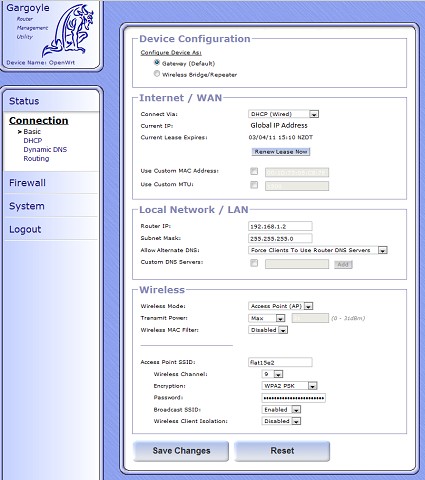
See below in the pic for my settings, they work for me. I'm on Slingshot also... but thinking about changing :P

Also, on the modem, set the client lease time to something small, like 5min, so if your IP with slingshot changes, the changes should reflect on the network within a short period.


Main Box:  Antec P183, Intel i5 2500, Gigabyte GA-H67MA-UD2H-B3, 8GB RAM, HD4850, OCZ Vertex 2 120GB, 2xLG 24", Windows 7 Pro 64
NAS: Antec Three Hundred, Sempron 140, Asus M4A78LT-M LE, 4GB RAM, Only 5TB atm :(
Netbook: EEEPC 1000HA

polki

24 posts

Geek


  #445831 5-Mar-2011 18:21
Send private message

Which version of Gargoyle are you running? Ive installed 1.3.11 and was thinking of reverting to 1.2. Are the 1.2 version image files generic as i cant see any specific for the TP-Link.

EDIT:
Just wondering why I should use half bridge mode, I've just hooked up my Linksys WAG120n wireless modem router to the TP-Link and it seems to be working fine in its standard configuration.  What are the advantages to half bridge?

 1 | 2
View this topic in a long page with up to 500 replies per page Create new topic


Geekzone Live »

Try automatic live updates from Geekzone directly in your browser, without refreshing the page, with Geekzone Live now.


Are you subscribed to our RSS feed? You can download the latest headlines and summaries from our stories directly to your computer or smartphone by using a feed reader.