Geekzone: technology news, blogs, forums
Guest
Welcome Guest.
You haven't logged in yet. If you don't have an account you can register now.


woodson

236 posts

Master Geek
+1 received by user: 14


#324991 23-Jun-2026 14:41
Send private message quote this post

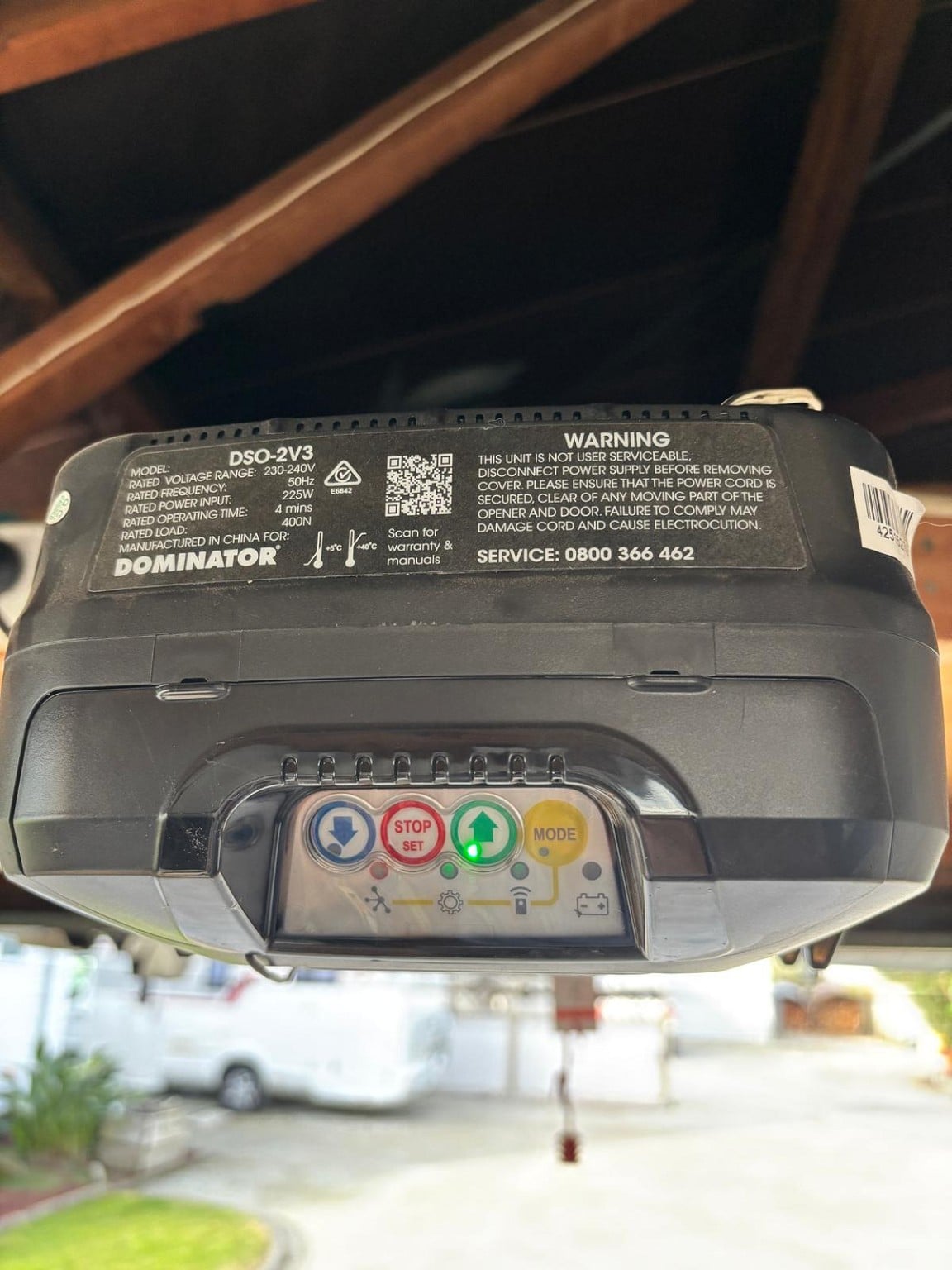
We've just moved to a new house, which has a newer model Dominator. I have a simple smart door opener module I'd like to hook up to it, but unlike our old house, which had a Dominator with the wires on the outside of the housing, where I just attached the red/black wires to the correct contacts, this one is all closed up. Is it possible to get inside it to get to those contacts and attach my opener? I opened one little housing door on top of the unit, but that didn't take me any closer to where the wires connect, and I wasn't sure where to go next.

Any advice much appreciated.

Create new topic
boosacnoodle
1421 posts

Uber Geek
+1 received by user: 952


  #3505479 23-Jun-2026 15:23
Send private message quote this post

The manual (page 15) says it has a terminal block - but it doesn't say where.


Mine has them on the same panel as you've pictured, but to the left. I can't see where you'd do it on yours, sorry.


Oblivian
7393 posts

Uber Geek
+1 received by user: 2150

ID Verified

  #3505518 23-Jun-2026 16:06
Send private message quote this post

If you have a (wired) button on the wall to open it already. Yes

Pop open the panel surrounding those buttons. (black finger tabs on the top edge both sides) Suspect the Black an white cable through the top is probably on the block currently.

Would need to bridge that. The remote units just short that which triggers open/close circuit to make it cycle through whatever current state is.


14.2 Terminal Block
Wired accessory items can be connected to the terminal block J4.
Terminal connections from top down are as follows:
a.+35V (Auxillary)
b. AUX (Auxillary)
c. SB (Safety Beam input, mandatory);
d.GND (Common ground for accessories and Safety Beam);
e. GND (Common ground)
f. OSC (Open/Stop/Close trigger)


woodson

236 posts

Master Geek
+1 received by user: 14


  #3505600 23-Jun-2026 17:22
Send private message quote this post

Amazing, thanks for that. I'll give it a shot. I did suspect those finger pull tabs were some sort of 'opening', but I didn't want to break anything, as we have only just moved in.


Create new topic


News and reviews »

Philips Hue Ultra-Bright LED Strip Flux Review
Posted 29-Jun-2026 10:46


ECOVACS Deebot T80s Review
Posted 22-Jun-2026 11:58


D-Link A/NZ Launches GaN Charger Range
Posted 12-Jun-2026 09:25


New Amazon Kindle Scribe Range Now Available in New Zealand
Posted 12-Jun-2026 09:19


OPPO Watch X3 Launches in New Zealand
Posted 5-Jun-2026 17:01


Blink Debuts Its First 2K Video Doorbell
Posted 4-Jun-2026 15:45


Geekzone Live »

Try automatic live updates from Geekzone directly in your browser, without refreshing the page, with Geekzone Live now.


Are you subscribed to our RSS feed? You can download the latest headlines and summaries from our stories directly to your computer or smartphone by using a feed reader.