
Geekzone: technology news, blogs, forums
Guest
Welcome Guest.
You haven't logged in yet. If you don't have an account you can register now.


View this topic in a long page with up to 500 replies per page Create new topic
1 | 2 | 3 | 4 | 5 | 6
michaelmurfy
meow
13579 posts

Uber Geek
+1 received by user: 10910

Moderator
ID Verified
Trusted
Lifetime subscriber

  #2195240 10-Mar-2019 20:27
Send private message

sylekta:


whats your deal mate? this is a legitimate nationwide issue affecting lots of people


I'm taking about the "speed issues" mostly and also the lack of information. Affecting lots of people maybe - but nobody has really provided any information on this fact or taking the time to provide traceroutes etc. It is important to provide as much details as you can if you'd like somebody to take it seriously. We get "issues with ping" and other things posted all the time on here which normally turn out to be issues outside of either the ISP or Blizzard. I'm not actually seeing anything really online of this matter so actually don't think it is a widespread issue as you think it is.


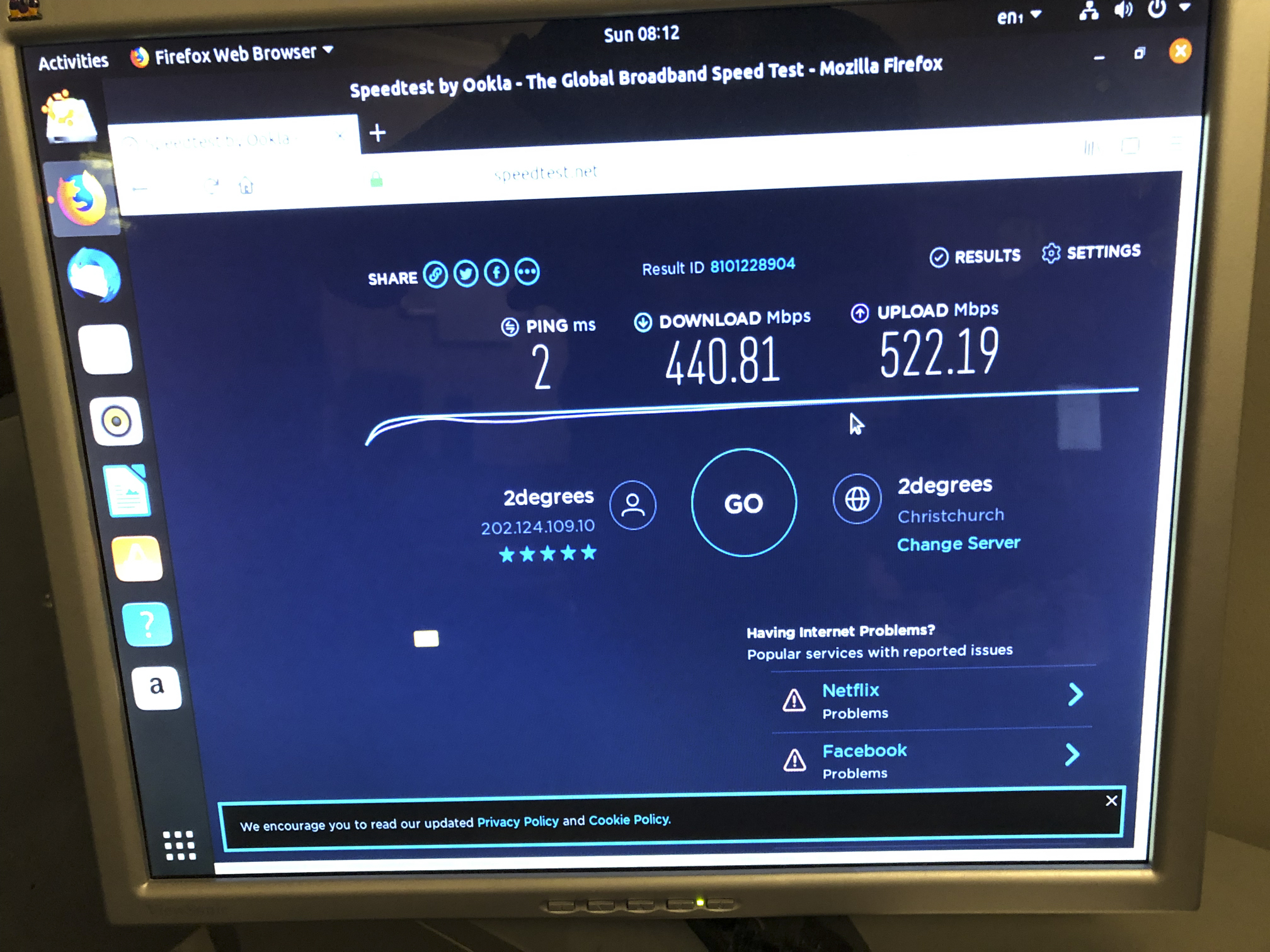
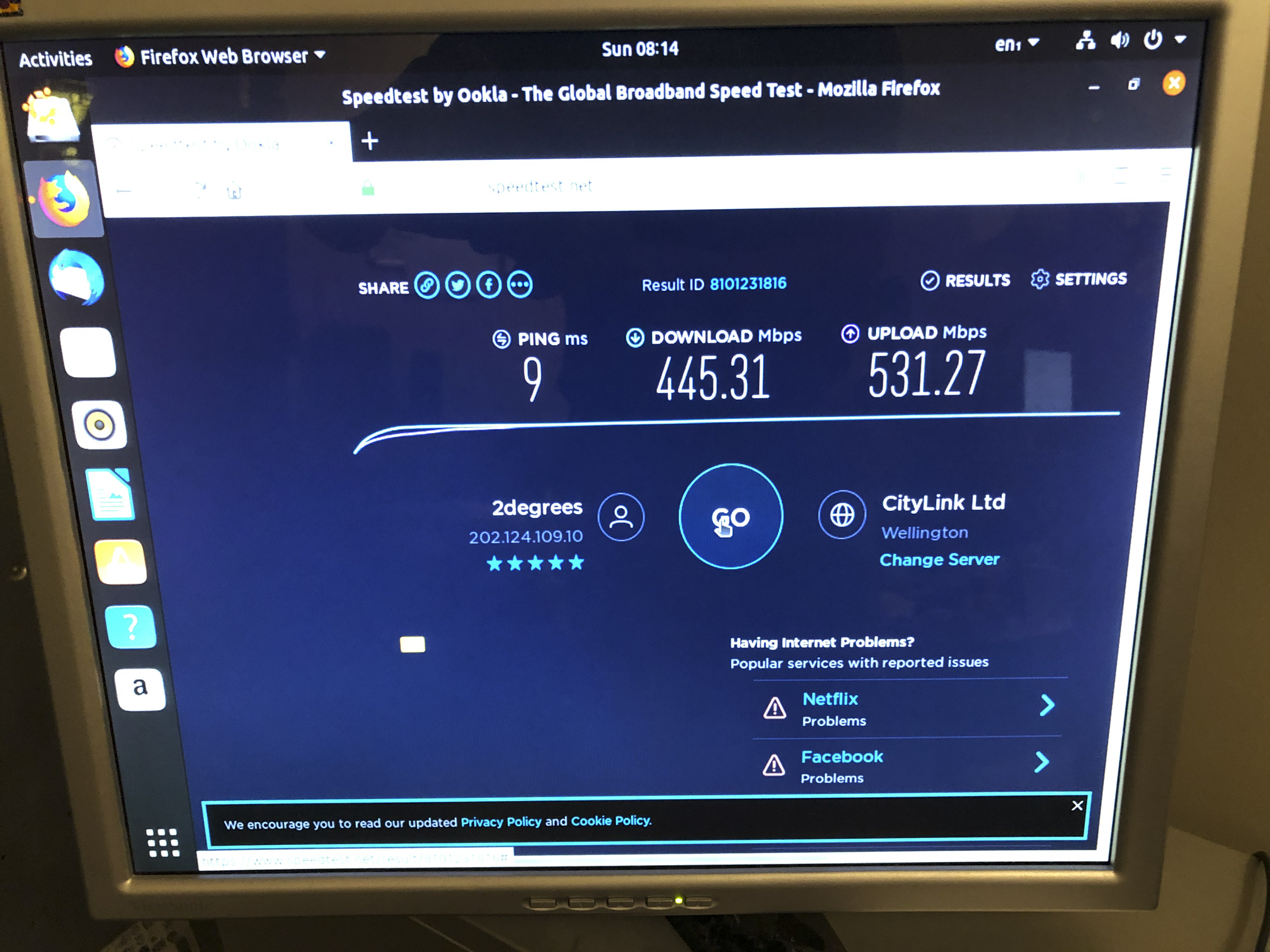
Michael Murphy | https://murfy.nz
Referral Links: Quic Broadband (use R122101E7CV7Q for free setup)

Are you happy with what you get from Geekzone? Please consider supporting us by subscribing.
Opinions are my own and not the views of my employer.


sylekta
11 posts

Geek


  #2195279 10-Mar-2019 20:43
Send private message

michaelmurfy:


sylekta:


whats your deal mate? this is a legitimate nationwide issue affecting lots of people


I'm taking about the "speed issues" mostly and also the lack of information. Affecting lots of people maybe - but nobody has really provided any information on this fact or taking the time to provide traceroutes etc. It is important to provide as much details as you can if you'd like somebody to take it seriously. We get "issues with ping" and other things posted all the time on here which normally turn out to be issues outside of either the ISP or Blizzard. I'm not actually seeing anything really online of this matter so actually don't think it is a widespread issue as you think it is.


https://us.forums.blizzard.com/en/wow/t/2degrees-nz-high-latency-oceanic-server/118103/14


https://www.pathofexile.com/forum/view-thread/2454286/page/1


Several people in just a couple hours reporting the same thing.


I connect to a MEL vpn server and my issue goes away


winmtr to my games servers https://pastebin.com/8MhBp74C


winmtr on vpn https://pastebin.com/a6gsu7ZG


michaelmurfy
meow
13579 posts

Uber Geek
+1 received by user: 10910

Moderator
ID Verified
Trusted
Lifetime subscriber

  #2195283 10-Mar-2019 20:55
Send private message

@sylekta yeah that is what I call a helpful post :)


It does indeed appear 2degrees are having an issue with Blizzard (or what we've seen before - Blizzard having an issue with the routes that 2degrees takes to its network). You'll just have to be patient while both parties resolve this.


Michael Murphy | https://murfy.nz
Referral Links: Quic Broadband (use R122101E7CV7Q for free setup)

Are you happy with what you get from Geekzone? Please consider supporting us by subscribing.
Opinions are my own and not the views of my employer.


D1NZ

194 posts

Master Geek
+1 received by user: 14


  #2195308 10-Mar-2019 21:43
Send private message

michaelmurfy:


@sylekta yeah that is what I call a helpful post :)


It does indeed appear 2degrees are having an issue with Blizzard (or what we've seen before - Blizzard having an issue with the routes that 2degrees takes to its network). You'll just have to be patient while both parties resolve this.


Sorry michael, at this point I am just pulling my hair out.


And I don't like to do thing twice.


CPU: Intel Xeon E3-1225 V2 @ 3.20Ghz
RAM: A-data ECC 4GB x 2 1600MHz
SSD: Samsung 840 Pro 120GB
Motherboard: Intel S1200KPR server board mini-ITX
NIC: Intel Ethernet Server Adapter I350-T2


Bluntj
584 posts

Ultimate Geek
+1 received by user: 284


  #2195316 10-Mar-2019 21:55
Send private message

sorceror:


fine in auckland


I am only getting the lag spikes when in a multi party intense fighting type situation when the game stops for a couple of seconds and then starts again. Several times my character has been dead after one of these spikes. They happen very frequently and I have had to withdraw from the raid because of it.


I will call 2 degrees tomorrow, but I have no idea what I am going to tell them. Seems to be some WinMTR statistics on the Blizzard forums that may help. The Blizzard thread is getting quite a bit of activity considering its just a kiwi ISP.


D1NZ

194 posts

Master Geek
+1 received by user: 14


  #2195352 10-Mar-2019 21:58
Send private message

Bluntj:


sorceror:


fine in auckland


I am only getting the lag spikes when in a multi party intense fighting type situation when the game stops for a couple of seconds and then starts again. Several times my character has been dead after one of these spikes. They happen very frequently and I have had to withdraw from the raid because of it.


I will call 2 degrees tomorrow, but I have no idea what I am going to tell them. Seems to be some WinMTR statistics on the Blizzard forums that may help. The Blizzard thread is getting quite a bit of activity considering its just a kiwi ISP.


They are aware the lag spike now, I have send through my trace to both wow servers IPs.


CPU: Intel Xeon E3-1225 V2 @ 3.20Ghz
RAM: A-data ECC 4GB x 2 1600MHz
SSD: Samsung 840 Pro 120GB
Motherboard: Intel S1200KPR server board mini-ITX
NIC: Intel Ethernet Server Adapter I350-T2


Move to New Zealand's best fibre broadband service (affiliate link). Free setup code: R587125ERQ6VE. Note that to use Quic Broadband you must be comfortable with configuring your own router.
michaelmurfy
meow
13579 posts

Uber Geek
+1 received by user: 10910

Moderator
ID Verified
Trusted
Lifetime subscriber

  #2195359 10-Mar-2019 22:18
Send private message

@D1NZ Thanks. Did you verify that offloading is enabled on your Edgerouter (commands I posted).


Michael Murphy | https://murfy.nz
Referral Links: Quic Broadband (use R122101E7CV7Q for free setup)

Are you happy with what you get from Geekzone? Please consider supporting us by subscribing.
Opinions are my own and not the views of my employer.


hio77
'That VDSL Cat'
13036 posts

Uber Geek
+1 received by user: 3896

ID Verified
Trusted
Lizard Networks
Subscriber

  #2195367 10-Mar-2019 22:44
Send private message

This really is two issues in one.


I'd stick to discussing your throughput issue here, since you are seeing that locally still.


The latency issue looks to be upstream, so it won't be a quick fix - Routing never is, i haven't checked but i would not be surprised if there is a fibre cut somewhere.


@NickMack will likely look into it monday morning, He's good like that.


#include <std_disclaimer>


Any comments made are personal opinion and do not reflect directly on the position my current or past employers may have. 


D1NZ

194 posts

Master Geek
+1 received by user: 14


  #2195411 10-Mar-2019 23:33
Send private message

hio77:


This really is two issues in one.


I'd stick to discussing your throughput issue here, since you are seeing that locally still.


The latency issue looks to be upstream, so it won't be a quick fix - Routing never is, i haven't checked but i would not be surprised if there is a fibre cut somewhere.


@NickMack will likely look into it monday morning, He's good like that.


Thanks @hio77 , come to think of it end of Jan I had my fibre cut in the cabinet a tech working on other line pulled my fibre out and didn't put it back in the ovel shape plastic prolly and when the clear cover went back on and snatch the fibre and cut it. 


michaelmurfy:


@D1NZ Thanks. Did you verify that offloading is enabled on your Edgerouter (commands I posted).


No, not yet, I'll wait til everyone went to bed and try it again.


CPU: Intel Xeon E3-1225 V2 @ 3.20Ghz
RAM: A-data ECC 4GB x 2 1600MHz
SSD: Samsung 840 Pro 120GB
Motherboard: Intel S1200KPR server board mini-ITX
NIC: Intel Ethernet Server Adapter I350-T2


D1NZ

194 posts

Master Geek
+1 received by user: 14


  #2195413 11-Mar-2019 00:21
Send private message

michaelmurfy:


@D1NZ Thanks. Did you verify that offloading is enabled on your Edgerouter (commands I posted).


ubnt@ubnt:~$ show ubnt offload && show version


IP offload module : loaded
IPv4
forwarding: enabled
vlan : disabled
pppoe : enabled
gre : disabled
IPv6
forwarding: disabled
vlan : disabled
pppoe : disabled


IPSec offload module: loaded


Traffic Analysis :
export : disabled
dpi : disabled
version : 1.480
Version: v1.10.9
Build ID: 5166937
Build on: 02/13/19 18:10
Copyright: 2012-2018 Ubiquiti Networks, Inc.
HW model: EdgeRouter 4
Uptime: 11:18:51 up 3 min, 1 user, load average: 0.85, 0.60, 0.26
ubnt@ubnt:~$


CPU: Intel Xeon E3-1225 V2 @ 3.20Ghz
RAM: A-data ECC 4GB x 2 1600MHz
SSD: Samsung 840 Pro 120GB
Motherboard: Intel S1200KPR server board mini-ITX
NIC: Intel Ethernet Server Adapter I350-T2


michaelmurfy
meow
13579 posts

Uber Geek
+1 received by user: 10910

Moderator
ID Verified
Trusted
Lifetime subscriber

  #2195414 11-Mar-2019 00:27
Send private message

@D1NZ Cheers, something I noticed is VLAN offloading isn't enabled.


configure
set system offload ipv4 vlan enable
commit
save


Other than that it looks fine but you're likely running a very basic Edgerouter configuration. The Edgerouter 4 is actually more capable than your PFSense box in terms of routing performance so may be best to use that going forward at-least until 2degrees / Enable have found the issue.


Something to note - have you actually spoken to the 2degrees customer service reps and got a ticket number? They'll check things like ONT performance etc.


Michael Murphy | https://murfy.nz
Referral Links: Quic Broadband (use R122101E7CV7Q for free setup)

Are you happy with what you get from Geekzone? Please consider supporting us by subscribing.
Opinions are my own and not the views of my employer.


Shop now for Dell laptops and other devices (affiliate link).
D1NZ

194 posts

Master Geek
+1 received by user: 14


  #2195417 11-Mar-2019 01:00
Send private message

michaelmurfy:


@D1NZ Cheers, something I noticed is VLAN offloading isn't enabled.


configure
set system offload ipv4 vlan enable
commit
save


Other than that it looks fine but you're likely running a very basic Edgerouter configuration. The Edgerouter 4 is actually more capable than your PFSense box in terms of routing performance so may be best to use that going forward at-least until 2degrees / Enable have found the issue.


Something to note - have you actually spoken to the 2degrees customer service reps and got a ticket number? They'll check things like ONT performance etc.


I did but no I haven't got a ticket number.


With offload setting enable speed still the same.


edgerouter 4 more capable? I am running Snort IDS/IPS also pfBlockerNG with tons of list. 


Had test the Suricata but it's not playing very nicely with PPPoE, and keep killing itself, end of the day I switched back to Snort and been rock solid.


USG just had IDS/IPS added not long ago and it's still in beta, also pfSense managing my 3kV UPS too.


To me pfSense has everything I need and more but sadly to say edgerouter not there yet.


CPU: Intel Xeon E3-1225 V2 @ 3.20Ghz
RAM: A-data ECC 4GB x 2 1600MHz
SSD: Samsung 840 Pro 120GB
Motherboard: Intel S1200KPR server board mini-ITX
NIC: Intel Ethernet Server Adapter I350-T2


Jase2985
13731 posts

Uber Geek
+1 received by user: 6202

ID Verified
Lifetime subscriber

  #2195425 11-Mar-2019 04:08
Send private message

michaelmurfy:


D1NZ:


With those said, still not explained my speed drop from 930 (had since 1Gbps made available on 2degrees) to 450Mbps now.


I have asked multiple times - refer to the above post. Next unhelpful post you provide, I'm simply locking this.


is there really any need for you a moderator of this forum to be acting like this "my word is law" kinda thing? if they don't provide the information just don't help them and move on. they will get the point when no one helps them.


sbiddle
30853 posts

Uber Geek
+1 received by user: 9996

Retired Mod
Trusted
Biddle Corp
Lifetime subscriber

  #2195471 11-Mar-2019 07:26
Send private message

D1NZ:


edgerouter 4 more capable? I am running Snort IDS/IPS also pfBlockerNG with tons of list. 


Had test the Suricata but it's not playing very nicely with PPPoE, and keep killing itself, end of the day I switched back to Snort and been rock solid.


USG just had IDS/IPS added not long ago and it's still in beta, also pfSense managing my 3kV UPS too.


To me pfSense has everything I need and more but sadly to say edgerouter not there yet.


Your consistent results with different sites across multiple times with no increase in latency look very like hardware limiting at your end. Routing 1Gbps *is* difficult, and there are plenty of devices out there that will not cope.


Since you've only added this all recently have you tried going back to a basic config? If these features kill the hardware offloading there is no way the router will ever get close to routing 1Gbps.


What happened to your original Fritz!box? I'd suggest going back to this for testing purposes.


The real world reality is that Gigabit throughput issues are very rarely ever Chorus/LFC or RSP related.


plas
456 posts

Ultimate Geek
+1 received by user: 59


  #2195475 11-Mar-2019 07:51
Send private message

I don't have any useful info on me (@ work now), but this started happening late Saturday evening. In Discord we could tell who was on 2Degrees due to voice breaking up and we would all get kicked from POE at the same time.


1 | 2 | 3 | 4 | 5 | 6
View this topic in a long page with up to 500 replies per page Create new topic


Geekzone Live »

Try automatic live updates from Geekzone directly in your browser, without refreshing the page, with Geekzone Live now.


Are you subscribed to our RSS feed? You can download the latest headlines and summaries from our stories directly to your computer or smartphone by using a feed reader.